
You are using an out of date browser. It may not display this or other websites correctly.
You should upgrade or use an alternative browser.
You should upgrade or use an alternative browser.
PS4 recover deleted save
- Thread starter mimi
- Start date
Charles_n_town
Senior Member
afaik, no. the only way would've been if you had psn plus and cloud saving, at least the only way I'm aware of. I've done this by accident before on the switch, and that was my only solution.
edit: oh, I just remembered. you can import the save if you backed it up and are activated. activation is possible without signing in through apollo. if you don't have a backup, I think you're sol.
edit: oh, I just remembered. you can import the save if you backed it up and are activated. activation is possible without signing in through apollo. if you don't have a backup, I think you're sol.

Berion
Developer
Copy two different saves from PS4 HDD (not via PS4DM export functionality) and upload so I can see what can be done. If these PFS containers have header (which I don't know, that's why I need compare two different files), I can make custom signature for eg. photorec.
Do NOT use this console. The more writes the less chance of recovery anything. Connect HDD on PC and read it there (but You need EAP HDD Key, I hope You already dump it in the past...).
If You not yet have it, before retrieving, make sector by sector disk image to keep it in current state as best material to future work of.
https://www.psx-place.com/threads/tutorial-hdd-mounting-and-decryption-on-linux.42314/
Do NOT use this console. The more writes the less chance of recovery anything. Connect HDD on PC and read it there (but You need EAP HDD Key, I hope You already dump it in the past...).
If You not yet have it, before retrieving, make sector by sector disk image to keep it in current state as best material to future work of.
https://www.psx-place.com/threads/tutorial-hdd-mounting-and-decryption-on-linux.42314/
Last edited:

mimi
Member
Copy two different saves from PS4 HDD (not via PS4DM export functionality) and upload so I can see what can be done. If these PFS containers have header (which I don't know, that's why I need compare two different files), I can make custom signature for eg. photorec.
Do NOT use this console. The more writes the less chance of recovery anything. Connect HDD on PC and read it there (but You need EAP HDD Key, I hope You already dump it in the past...).
If You not yet have it, before retrieving, make sector by sector disk image to keep it in current state as best material to future work of.
https://www.psx-place.com/threads/tutorial-hdd-mounting-and-decryption-on-linux.42314/
nevermind
Last edited:
Berion
Developer
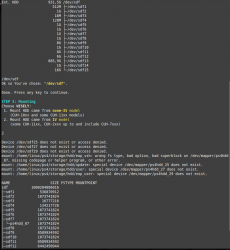
@mimi From what model this HDD came from?
This GPT looks different than mine and all I have access to (that's why script failed, expecting different partitions order). I will prepare for You tomorrow dedicated version.
edit:
Ok, I see that it is just list sorted for unknown to me reason. All is the same. Please, try script from attachment and tell me the results.
//attachment deleted
This GPT looks different than mine and all I have access to (that's why script failed, expecting different partitions order). I will prepare for You tomorrow dedicated version.
edit:
Ok, I see that it is just list sorted for unknown to me reason. All is the same. Please, try script from attachment and tell me the results.
//attachment deleted
Last edited:
Berion
Developer
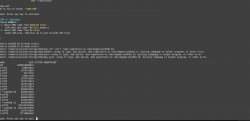
@mimi Thank You for Your time. Could You make another test?
Cloning method fine too.
//attachment deleted
- This time use script from yesterday, and run "dump.sh". It will dump few sectors from each created mappers. I can judge by that if partitions become decrypted or not. In home will be created some text files, pack them to eg. zip and after that delete *.txt.
- Another test is to use today script. I changed IV to match GPT order so in theory it should works now. If not, again, run dump script and make another archive. Please, attach both of them here (they will not contain any private data so don't worry).
So definitely IV model.cuh-2016b
That's normal. Only one model can be assigned at once to PS4.tried to insert cloned drive into ps4, and it requires to reinstall os. But with original drive i get same errors. Cloned with raw copy tool in windows.
Cloning method fine too.
//attachment deleted
Last edited:
mimi
Member
Unmounter doesn't work properly@mimi Thank You for Your time. Could You make another test?
PS: Remember to always running "Umounter" script before another attempt to use "Mounter" one. It will remove all mappers etc. etc. It is very important.
- This time use script from yesterday, and run "dump.sh". It will dump few sectors from each created mappers. I can judge by that if partitions become decrypted or not. In home will be created some text files, pack them to eg. zip and after that delete *.txt.
- Another test is to use today script. I changed IV to match GPT order so in theory it should works now. If not, again, run dump script and make another archive. Please, attach both of them here (they will not contain any private data so don't worry).
So definitely IV model.
That's normal. Only one model can be assigned at once to PS4.
Cloning method fine too.
Device ps4hdd_04 already exists.
Device ps4hdd_09 already exists.
Device ps4hdd_12 already exists.
Device ps4hdd_13 already exists.
Device ps4hdd_14 already exists.
After using unmounter.
can's see mounter partitions
Attachments
mimi
Member
desktop.zip is script from "v2 or todays".Unmounter doesn't work properly
Device ps4hdd_04 already exists.
Device ps4hdd_09 already exists.
Device ps4hdd_12 already exists.
Device ps4hdd_13 already exists.
Device ps4hdd_14 already exists.
After using unmounter.
can's see mounter partitions
script from yesterday - v1.zip
Attachments
Berion
Developer
In all three cases, none partition has been decrypted. That means that key is wrong (which I doubt, I believe You understand that EAP HDD Key is unique per console, so must be dumped on console from which disk came) or it is yet unknown case.
Mounter script from current PS4 HDD Decryption Helper for IV models using IV calculated from known to me GPT partition order. You have different, so I've made script which corrected partition names ("sorted GPT"). This test failed, so I've made another script which using IVs matching to that GPT order (sorted GPT v2"). Again, it failed too, so something is uncommon and unknown here.
Or... not all CUH-2xxx are IV models. Could You try chose option 1 instead 2? Using "sorted GPT v2" version. Thank You. ^^
If it will still fail to recognize and mount stuff, I will ask You to run in terminal:
And sending it to me with EAP HDD Key. Above command will create in home dir 4MiB mini image from first sectors (no private data contains). If You will get different listing this time, replace sdf13 by real one (lsblk will tell You, e.g could be sde13, sdg13, etc.).
I will look into it and try decrypt it on my own to not waste Your time.
Mounter script from current PS4 HDD Decryption Helper for IV models using IV calculated from known to me GPT partition order. You have different, so I've made script which corrected partition names ("sorted GPT"). This test failed, so I've made another script which using IVs matching to that GPT order (sorted GPT v2"). Again, it failed too, so something is uncommon and unknown here.
Or... not all CUH-2xxx are IV models. Could You try chose option 1 instead 2? Using "sorted GPT v2" version. Thank You. ^^
If it will still fail to recognize and mount stuff, I will ask You to run in terminal:
Code:
sudo dd if=/dev/sdf13 of=${HOME}/ps4hdd_p13.img bs=4M count=1 status=progressI will look into it and try decrypt it on my own to not waste Your time.
Last edited:
mimi
Member
https://nightkinghost.com/672new/index.htmlIn all three cases, none partition has been decrypted. That means that key is wrong (which I doubt, I believe You understand that EAP HDD Key is unique per console, so must be dumped on console from which disk came) or it is yet unknown case.
Mounter script from current PS4 HDD Decryption Helper for IV models using IV calculated from known to me GPT partition order. You have different, so I've made script which corrected partition names ("sorted GPT"). This test failed, so I've made another script which using IVs matching to that GPT order (sorted GPT v2"). Again, it failed too, so something is uncommon and unknown here.
Or... not all CUH-2xxx are IV models. Could You try chose option 1 instead 2? Using "sorted GPT v2" version. Thank You. ^^
If it will still fail to recognize and mount stuff, I will ask You to run in terminal:
And sending it to me with EAP HDD Key. Above command will create in home dir 4MiB mini image from first sectors (no private data contains). If You will get different listing this time, replace sdf13 by real one (lsblk will tell You, e.g could be sde13, sdg13, etc.).Code:sudo dd if=/dev/sdf13 of=${HOME}/ps4hdd_p13.img bs=4M count=1 status=progress
I will look into it and try decrypt it on my own to not waste Your time.
i use this host for JB and it has EAP key dumper.
mimi
Member
how to extract eap from sflash0?In all three cases, none partition has been decrypted. That means that key is wrong (which I doubt, I believe You understand that EAP HDD Key is unique per console, so must be dumped on console from which disk came) or it is yet unknown case.
Mounter script from current PS4 HDD Decryption Helper for IV models using IV calculated from known to me GPT partition order. You have different, so I've made script which corrected partition names ("sorted GPT"). This test failed, so I've made another script which using IVs matching to that GPT order (sorted GPT v2"). Again, it failed too, so something is uncommon and unknown here.
Or... not all CUH-2xxx are IV models. Could You try chose option 1 instead 2? Using "sorted GPT v2" version. Thank You. ^^
If it will still fail to recognize and mount stuff, I will ask You to run in terminal:
And sending it to me with EAP HDD Key. Above command will create in home dir 4MiB mini image from first sectors (no private data contains). If You will get different listing this time, replace sdf13 by real one (lsblk will tell You, e.g could be sde13, sdg13, etc.).Code:sudo dd if=/dev/sdf13 of=${HOME}/ps4hdd_p13.img bs=4M count=1 status=progress
I will look into it and try decrypt it on my own to not waste Your time.
Berion
Developer
It is safe to assume I think that this dumper payload doing his job.
Zecoxao has attached Python script for that which works on SFLASH image (which can be dump e.g just by "sending" that mount point via FTP client (i.e FileZilla)). However it doesn't work for all models and there is no list of supported (all CUH-1xxx are).
Please, dump for me this mini image + key (post no.13) and I will check decryption by various of ways.
Zecoxao has attached Python script for that which works on SFLASH image (which can be dump e.g just by "sending" that mount point via FTP client (i.e FileZilla)). However it doesn't work for all models and there is no list of supported (all CUH-1xxx are).
Please, dump for me this mini image + key (post no.13) and I will check decryption by various of ways.
Berion
Developer
I test it and PFS containers have no plain headers, so signature scan is impossible to prepare for them in any application. You need some advanced data recovery tool for UFS family system like R-Studio and of course in assumption that since then, nothing you written on drive. Sorry for bad news.

Similar threads
-
PS4 PS4 HDD deleted savegames restore - last step needed
- Started by John37
- Replies: 2
-
-
PS4 Data recovery from corrupted PS4 hard drive
- Started by elrey_76
- Replies: 1
-
