
Red death screen

If the clock isn't spinning on disc access, than your drive board is probably defect or not married. Without a drive board you can't start any applications. We need to be sure if you are really on 3.55 before we can enter FSM. For FSM you need an FSM dongle or a PSP.

Please send a photo of your system settings -> system information -> software version. If it is 9.99, then you are probably on 3.55.
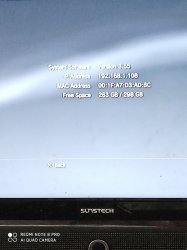
Its 3.55 rogero downgrade
 

Attachments

  • 1580040004646..jpg
    1580040004646..jpg
    987.2 KB · Views: 86
OK, now you need an FSM JIG or PSP to enter FSM. Then you can do the flash backup from FSM with Preloader Advance. I have preconfigured and attached it below. Just put the files to the root of a FAT32 usb drive and start the PS3.

And you still didn't tell your model number of the PS3.
 

Attachments

OK, now you need an FSM JIG or PSP to enter FSM. Then you can do the flash backup from FSM with Preloader Advance. I have preconfigured and attached it below. Just put the files to the root of a FAT32 usb drive and start the PS3.

And you still didn't tell your model number of the PS3.
It's CECHP
And I but the files in USB but nothing happened
 
Last edited:
I have attached the files for the PSP but I cant guarantee if it will work. Never tried the PSP method. I am using a Cobra USB dongle to enter FSM.
 

Attachments

First sorry for my bad English, but I try to help you. I have a same problem, RSOD. I downgrade successfully from 4.81 OFW my PS3 Slim with E3 flasher to 3.55 rogero downgrader and RSOD gone. Then update to rogero 3.55 v 3.7 and RSOD back again. Then I go directly to recovery mode and update to 4.85 CFW Ferox where the RSOD bypass is integrated and wolla system is start without RSOD.
 
Back
Top