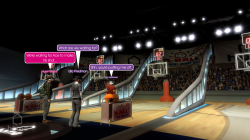
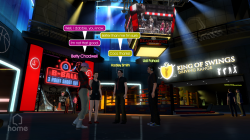
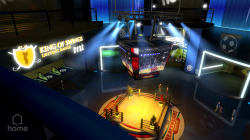
PS3 [RELEASE] Playstation Home 0.41 "GDC Demo 2007" Package for CFW/HEN/RPCS3

DeViL303

Developer
PSX-Place Supporter
upload_2022-10-9_11-48-52.png

Here is a pkg for Playstation Home 0.41 that will work on HEN and CFW, probably be fine on RPCS3 too.

I pieced this together from a few places, there was a mislabelled 1.00 pkg on NoPSN.org, which when I extracted it was fairly obvious it was 0.41 and that the version in PARAM.SFO was wrong. This would still not work though out of the box, but when combined with the SELF from Pongos 0.41 build, Pongos build would not work without TM, well anyway long story short, combined some bits and it now works fine.

This is a real piece of Playstation History IMO and it was a lot different to what they eventually released, with the avatar GFX taking a bit of a downgrade, PSP being removed and more stuff. I get the feeling Home was going to be aimed at an older audience at first.

Some notes::
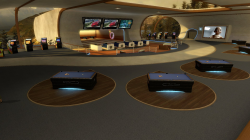
  • Fixed all screen links so all screens now work. Over 1 hour of video content included.
  • Added a main menu to start up screen with options for online and offline mode. Previously there was only the option to connect online. Now offline mode can be accessed without typing into command console with a USB keyboard. For casual play you do not need a keyboard anymore using this build.
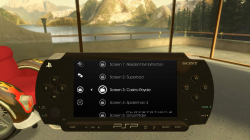
  • Fixed up PSP menu to allow jumping between all available scenes and some other little bits.
  • Added a few more backgrounds for the Virtual PSP from later versions.
  • Fixed a main menu stability issue by removing some NPCs from start up sequence, there were too many NPCs spawning and this made it a bit unstable where it could crash sometimes on PS3, and would crash on RPCS3 if you did not use a keyboard to quickly type "map apartment" (or some other scene)
  • Extracted and mapped NPBOOT.BAR, CHARACTERS.BAR and DYNFILES.BAR, so now that content runs directly from USRDIR, this makes it much easier to apply mods going forward.
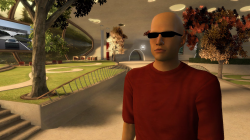
  • Enabled bald hair style for male and female, the textures were in there but they were not an option before. Added some colour variations to the accessories and hair styles.
  • Patch to EBOOT to prevent localisation string errors.
  • Patch to EBOOT to make all console commands lowercase, before it was case sensitive but commands were a weird mix of upper and lowercase.
  • Created some missing scene links, like from Cinema back to Lobby, also tweaked the position of some others. Now you can go everywhere without using the PSP or the command console.
  • Spoofed this as FIFA16 in case $ony start banning people who are playing discontinued beta content IDs
  • Fixed and tweaked a few other small things, too many to remember, if you don't like that, you can get the original base I started with on NoPSN.org, and take the EBOOT from this pkg.
Download Playstation Home 0.4.1 GDC Demo Build 303.050

This still needs more work really, but hopefully this gets the ball rolling. It looks like there was an official LAN mode too based on some svml files that seem to show menus for setting up LAN parties, It would be great if we could get that working too someday. Maybe Pongo would help us with that in the name of preservation if he ever sees this?

The package is approx 2GB, a lot of this is due to all the screen content being BIK format, Maybe someone who knows more about Bink encoding could optimize those videos more for PS3. Or maybe someone with more knowledge of these old beta versions would know if other formats can work here. AFAIK there is not much documentation for these old builds. There can be a bit of a screen tearing effect on the ingame screens sometimes too, normally loading the scene again fixes it.

Quick look:

Original 2007 GDC video:
Code:
https://youtu.be/DOyQD3wprlM

List of console commands for 0.41, press L3 at the main menu or anywhere in game for the developer console. Usage on all these is not documented anywhere afaik. If you type in just what is written below it will tell you what arguments to put after it if there are any required. Mostly they are toggled on and off with true, false, 0, 1, on, off, but some require more than that.

Some interesting ones:
  • debugmenu
  • wireframeenable 1
  • showskeletons 1
  • enabledemonpcs 1
  • walkspeed 5.0 (normal is 2.3)
  • map scenename

upload_2022-10-8_10-59-10.png


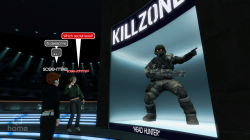
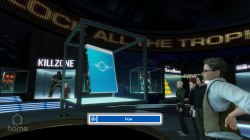
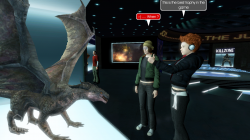
upload_2022-10-9_11-50-48.png upload_2022-10-9_11-51-14.png upload_2022-10-9_11-51-43.png


NOTE: This is not the GDC demo build exactly, afaik Pongos 0.41 build is not it either, some of the menus look slightly different if you compare this and the GDC 2007 video, even the character GFX look better in this version IMO. Seems there are a few builds of 0.41 going around, anyway afaik this is the most complete version and the only one that does not require DEX &TM or RPCS3.
 
Last edited:
Some basic info for modders.

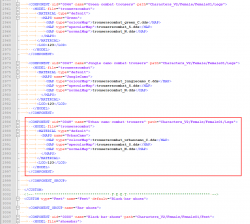
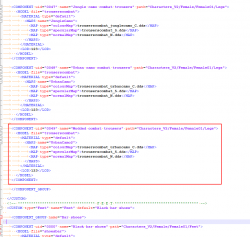
If you want to add a modded item of clothing for example. You need to edit the USRDIR\DATA\AVATARS\HUMANFEMALE\HUMANFEMALE_COMPONENTS.XML or the USRDIR\DATA\AVATARS\HUMANMALE\HUMANMALE_COMPONENTS.XML first, depending if its for men or women.

So as a quick example. Say you wanted to add a new pair of trousers for the female avatar. Starting off it's easiest to add stuff to the end of the list as each item has a unique UID number going up from 0001, so to add a new item I find the end of the legs section which in this case is 0048, copy that COMPONENT section underneath.

Then edit:
  • the uid to 0049.
  • Edit the name to something else.
  • Also edit the "MAPS name" to something else, this can be anything, but must be different to the previous item due to the way the menu works.
Before and after:

upload_2022-10-9_1-14-24.pngupload_2022-10-9_1-19-15.png


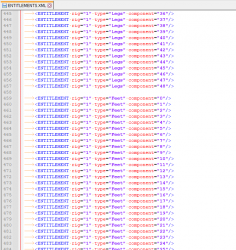
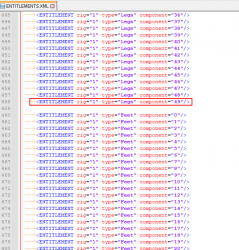
Then there is an USRDIR/ENTITLEMENTS.XML. You must add the uid to the list in there too.

Before and after:

upload_2022-10-9_1-21-23.png upload_2022-10-9_1-22-27.png


Then inside the USRDIR/CHARACTERS_V2/ folder you will find the textures and models, the easiest thing to start off with is to make copies of existing textures and mod those, then link those copies in the HUMANFEMALE_COMPONENTS.XML. For messing around you can make some of the mens stuff like hair styles work for the women and that kind of thing. The skull size is different, so only some of the hair styles look ok when used on the gender they were not made for.
 
Last edited:
If anyone wants to add their own video to the screens, for example if you have some (legally backed up) movies you could add full movies to the cinema easily enough. I think it will work fine.

You need to use BNK format for now, I think there is some basic MPG and MP4 support but not sure really. You can get a video converter for BNK here: http://www.radgametools.com/bnkdown.htm

Here are the settings that worked for me, the file size is a bit big for some at about 25MB per minute, but I don't really care about that. I think the original content was at 720x405 (not sure as I have no examples), but I pushed that up to 854x480 and it works just as well. Even 960x544 can work in some places. Different scene types have different RAM allocations (scene type is set in USRDIR/ENVIRONMENTS/SCENELIST.XML).

unknown.png

upload_2025-9-13_8-28-23.png


I do have 1080p copies of all the videos backed up too, if anyone wants to try make optimized versions or if anyone gets another format like mp4 working.

The actual videos and the xmls with the links to the videos are in the USRDIR/SCREENS/ folder, it works fairly simply, not much explanation of those needed really.
 
Last edited:
Can you please upload the savedate for RPCS3, everytime I try to launch it says "error - save data cannot be found"

Full error:
E SYS: 'cellKbClearBuf' failed with 0x80121007 : CELL_KB_ERROR_NO_DEVICE [1]
E SYS: 'cellKbClearBuf' failed with 0x80121007 : CELL_KB_ERROR_NO_DEVICE [2]
E SYS: 'cellKbClearBuf' failed with 0x80121007 : CELL_KB_ERROR_NO_DEVICE [3]
E SYS: 'cellAudioInit' failed with 0x80310701 : CELL_AUDIO_ERROR_ALREADY_INIT [1]
U cellAudio TODO: cellAudioPortOpen(): CELL_AUDIO_PORTATTR_OUT_SECONDARY
E SYS: '_sys_lwmutex_lock' failed with 0x80010005 : CELL_ESRCH [1]
E SYS: '_sys_lwmutex_lock' failed with 0x80010005 : CELL_ESRCH [2]
E SYS: '_sys_lwmutex_lock' failed with 0x80010005 : CELL_ESRCH [3]
E SYS: 'cellMicOpen' failed with 0x8014010e : CELL_MICIN_ERROR_DEVICE_NOT_FOUND [1]
 
Last edited:
Started on HEN, received blackscreen. Ty bro XD
Strange, I ONLY used HEN when working on this as it has better debug logs. Also it has had 500+ downloads now and no other complaints about it not working on HEN, so I recommend trying it again. Maybe redownload and reinstall it.
 
Updated Build:
  • All scenes now fully mapped and running from USRDIR
  • Lots of extra furniture enabled
  • Sony Bravia TV Appliances Enabled
  • Now the posters used in the cinema can be used in picture frames too.
  • Comes with some default furniture set up
  • Sitting enabled for 1 couch
  • Loads of new picture hooks added
  • Virtual PSP bug that could cause a freeze has been fixed
Download Playstation Home 0.4.1 Build 303.050

Note: There is a bug with the Bravia TVs where it wont play the video the second time you use it, if you remove the TV in furniture placement settings and place it again then it will be fixed for that session.

Currently the radios are not working, no audio comes out when you choose a track, but I have left them enabled as they still look cool. Put some MP3 files into USRDIR/MEDIA if you want to try get them working, maybe it needs a specific MP3 configuration?


Launch Home_1.jpg


Launch Home_4.jpg


Launch Home_5.jpg
 
Last edited:
Updated Build:
  • All scenes now fully mapped and running from USRDIR
  • Lots of extra furniture enabled
  • Sony Bravia TV Appliances Enabled
  • Now the posters used in the cinema can be used in picture frames too.
  • Comes with some default furniture set up
  • Sitting enabled for 1 couch
  • Loads of new picture hooks added
  • Virtual PSP bug that could cause a freeze has been fixed
Download Playstation Home 0.4.1 Build 303.050

Note: There is a bug with the Bravia TVs where it wont play video the second time you use it, if you remove it in furniture settings and place it again then it will be fixed for that session.


View attachment 40207

View attachment 40208

View attachment 40209
Fantastic thanks very much, Now we just need the trophy room and that sports room they showed off in GDC 07.
 
Back
Top