[RELEASE][PS3 VSH Plugin] PS3Lock v0.4

Sry, I forgot the source for the sys-font thing...

ps3_vsh_menu_sys_font

Thank you very very very much :dancepine:
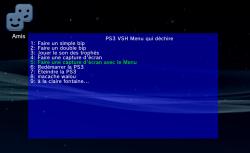

KoHor38.png
 
Nice. Maybe you should increase the line distance regarding the accents, 2 pixel or more:
Code:
print_text(8, 8 + ((FONT_H [COLOR="#FF0000"]+ 2)[/COLOR] * (i + 1)), entry_str[selected + i]);
 
[MENTION=48]littlebalup[/MENTION]

here is a fix for your headline, a simple "center":
Code:
void print_text(int32_t x, int32_t y, const char *str)
{
  int32_t i, k, [COLOR="#FF0000"]len = 0[/COLOR];
  uint32_t code = 0;                                             // char unicode
  ...
  memset(&glyph, 0, sizeof(BitmapCharGlyph));
	
  [COLOR="#FF0000"]// center text(only 1 line)
  if(x == -1)
  {
    while(1)                                  // get render length in pxl
    {
      utf8 += utf8_to_ucs4(utf8, &code);
		
      if(code == 0)
      break;
		
      glyph = get_glyph(code);
      len += glyph->metrics.Horizontal.advance + FONT_D;
    }
    
    o_x = t_x = (CANVAS_W - len - FONT_D) / 2;
    utf8 = (uint8_t*)str;
  }[/COLOR]
	
  // render text
  while(1)
  {
    utf8 += utf8_to_ucs4(utf8, &code);
...
Code:
  // print headline string, center(x = -1)
  print_text([COLOR="#FF0000"]-1[/COLOR], 8, "PS3 VSH Menu");
 
[MENTION=48]littlebalup[/MENTION]

here is a fix for your headline, a simple "center":
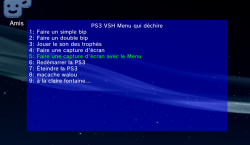
Personnaly, I didn't planned to make an advanced menu. That was just a quick try for fun.
Anyway, thanks for that. I'm sure it will help a lot other devs ;)


Edit : I couldn't help myself...
Works like a charm:
EQAqYw1.png
With 4 pixel distance.
Nice idea the "-1" for a centered text. ;)
 
Last edited:
[MENTION=6103]MixeryMaxe[/MENTION] I just tried this or and is just what I needed. I thought xmblock was going to have this feature when I first tried it out. Would be great if the two were combined together.
I have a suggestion also, would be a good idea to have a confirm password when setting it up. I was nervous that I would hit a wrong button accidentally.
Thanks for this though.
 
[MENTION=6103]MixeryMaxe[/MENTION] I just tried this or and is just what I needed. I thought xmblock was going to have this feature when I first tried it out. Would be great if the two were combined together.
I have a suggestion also, would be a good idea to have a confirm password when setting it up. I was nervous that I would hit a wrong button accidentally.
Thanks for this though.

he's got a few that he listed on resetting password if forgot (he's listed them somewhere on the forum) as for the XMBLock functions they're on the way he just has implemented them yet :)
 
the 360 uses a similar mechanic to lock certain specifications in from kernel to kernel, so it's likely part of the kv or the ps3 equivalent of the xregistry. it's something that doesn't change between firmware installation. anyway, it has a way to back out or remove the password if forgotten. it's probably based on the idea that anyone who intended to do "damage" wouldn't know the password or whatever. what I do is have my system base itself on wired only controls to prevent anyone from updating wirelessly. then, I use a mac filter to whitelist mac addresses. though, my ps3 has been added. I rely on the wireless. the first thing the ps3 checks when it comes to updates, though, is the disc game. it'd be best if new cfw changes the name for the update folder. the 360 does this. it's normal location is named $SystemUpdate, but they've changed it to $$ystemUpdate, so changing as so will allow an update while still retaining the patch.
 
the first thing the ps3 checks when it comes to updates, though, is the disc game. it'd be best if new cfw changes the name for the update folder. the 360 does this. it's normal location is named $SystemUpdate, but they've changed it to $$ystemUpdate, so changing as so will allow an update while still retaining the patch.
I think [MENTION=29]Joonie[/MENTION] was working on this for the new REBUG but not sure if it was implemented into HABIB 4.75
 
I think [MENTION=29]Joonie[/MENTION] was working on this for the new REBUG but not sure if it was implemented into HABIB 4.75

that will be awesome. I found the update search location coding a while back. it has several update locations listed in descending order with the bd rom being the first place it searches. sadly, not ejecting a disc is what's resulted in a lot of people mistakingly installing ofw. however, there's a way to avoid that. whenever u install a fw, it'll read the fw version from the version.txt of the pup file. several cfw devs like rebug and rogero do this, but instead of having say 4.70 for the fw version, it might have 4.46-rog or 4.46 rebug re. it looks like Habib started doing that with 4.50.1, 'cause 4.50 is the same way as ofw. I decrypted both when hex comparing waves along with the others. anyway, that's how u'll know ur installing ofw rather than cfw. it'll only say 4.50 for example. even hishamage has his name in the version.txt which I decrypted to out him for stealing [MENTION=20]habib[/MENTION] work. that version.txt will be displayed before confirming installation, so always watch for that everyone. :)
 
I had reversed emer_init long ago but then i lost the ida db, i did enough reverse engineering on it that i knew where, when and how bd is searched for .pup
I could have easily patched that check out if i wanted to, but i thought leaving original would be the best.
It would take me not more than 5 minutes to patch the check out though ;)
 
my suggestion is to make an app to patch out bd rom since it's the first in the list of the locations searched for update pup files as well as the network. neither would be for cfw installation. leave the rest the same. 360 updates r similar. normally, they don't remove the $SystemUpdate, but u can patch in dashlaunch while creating it. it's not recommended though. anyway, u have a choice with that. it's up to the user. :)
 
Back
Top