Ultimate Toolbox

PS3 [RELEASE] ★ Ultimate Toolbox v2.03 - It Only Does Everything! v2.03 (FW 4.84 - 4.91)

I'm on Rebug v4.84.
Should be working fine, I've been mainly testing it on Rebug 4.84. I would say you must have installed something that replaced your category_game.xml. The 2 category game xmls included in Rebug have support for Ultimate Toolbox.
 
@anyone Is there any simple Windows PC app that can view coldboot.raf files?


I tried Easy Static RAF Converter v1.0a but it just shows me an out of memory error any time I try to open any raf file, I guess it can only convert images to raf, not view rafs.

It would be really handy if I had a small app that could view these or convert to png, I want to redo the coldboot icons in Ultimate Toolbox as it's almost impossible to see what they are in the current icons.
 
I don't know about coldboot.raf files, but a lot of people show a png or something of the coldboot, taken from the creator I think. I've never used the app though, so I'm assuming that's what's being shown.
 
The app has a "Show Preview" button.
upload_2021-2-14_12-31-25.png


It shows a preview like this:
upload_2021-2-14_12-32-1.png


I attached the coldboot generated.

EDIT:
I included another cooldboot.raf with the image centered.
 

Attachments

Last edited:
I think it can only show a preview of a png, It does not seem to be able to open an existing raf. I think Managunz can extract rafs on the console, So I will try that.
 
Ok, Managunz has the option for Extract RAF, but it fails on every one with 8055007 error. :( Really it's too many clicks anyway even if it worked, you need to press square to select it, then triangle to open the menu, then scroll all the way down to select Extract raf, then it errors :) Be great if you could just click them and it said "extract to filename folder?" and it worked.
 
I think it can only show a preview of a png, It does not seem to be able to open an existing raf. I think Managunz can extract rafs on the console, So I will try that.

The Easy Static RAF Converter is quite easy to use. I think it's easier to create the coldboot again. It generates the raf and the preview.

I've updated the rar with 4 coldboots (2 for PS4 logo + 2 for PS5 logo: centered and right). I think you could include them in the package.
 

Attachments

The Easy Static RAF Converter is quite easy to use. I think it's easier to create the coldboot again. It generates the raf and the preview.

I've updated the rar with 4 coldboots (2 for PS4 logo + 2 for PS5 logo: centered and right). I think you could include them in the package.
I will include those, thanks.

I really wouldn't know how to recreate every coldboot included, I'm not great at image editing and it would be a lot of work.

For now I will just redo the icons for the greyscale logos the old fashioned way.
 
Last edited:
iirc, you can still use the p3textractor on rafs, but they must first have the first eight bytes removed and be uncompressed. you won't have to hex them out if that's what you mean. however, you'll have to use gtf2dds after that. still a lot of work really.
 
So, there was a couple things that I was trying to sort out before I went to bed last night, but only made progress on one of them

Apps that have been integrated to built-in apps, that have a full-sized .PNG of 320x176 are overlapped by the text of the app's name

1st is easy, but the 2nd problem is what I couldn't wrap my head around... No matter how hard I try to move the base installer for webMAN mod, or "re-installer" because I have to reset my webMAN ALOT, whichever you wanna call it. Whatever the case, it will not move.

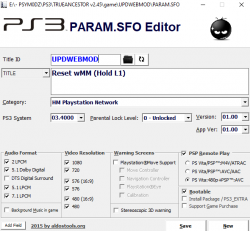
So I take the PARAM.SFO for webMAN 1.47.34's base and edit it on the PC, I change the true controller buttons to text based L1 and X, remove the tab-sized gap between 1st line of text and 2nd, then set the .SFO to category HM

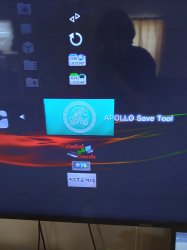
After replacing the original .SFO in dev_hdd0~game~UPDWEBMOD with new it does not respectively change the title of the webMAN installer on my XMB, nor does it move to the built-in apps like it should... Apollo, Artemis, SEN Enabler, CCAPI, mmCM, RetroARCH and RBGTOOLBX2 all moved into the toolbox just fine... base installer for webMAN is the only issue here

Plus, after replacing the original .SFO with renamed version, webMAN mod does not actually install anything when ran from XMB... So I unpack the UPDWEBMOD which is recognized by TrueAncestor as "debug" package, change the .SFO from there, and then fast pack the .PKG since there is no choice inside of TA PKG MNGR that is listed as just "debug".

Either way, whether I replace the .SFO manually on PS3... or unpack, edit and repack on PC, webMAN Mod will not integrate.

Still, is great to have an actual place to put all of the tool-type programs instead of creating an album on the main XMB called TOOLBOX
 

Attachments

  • 20210215_114415.jpg
    20210215_114415.jpg
    897.6 KB · Views: 57
So, there was a couple things that I was trying to sort out before I went to bed last night, but only made progress on one of them

Apps that have been integrated to built-in apps, that have a full-sized .PNG of 320x176 are overlapped by the text of the app's name

1st is easy, but the 2nd problem is what I couldn't wrap my head around... No matter how hard I try to move the base installer for webMAN mod, or "re-installer" because I have to reset my webMAN ALOT, whichever you wanna call it. Whatever the case, it will not move.

So I take the PARAM.SFO for webMAN 1.47.34's base and edit it on the PC, I change the true controller buttons to text based L1 and X, remove the tab-sized gap between 1st line of text and 2nd, then set the .SFO to category HM

After replacing the original .SFO in dev_hdd0~game~UPDWEBMOD with new it does not respectively change the title of the webMAN installer on my XMB, nor does it move to the built-in apps like it should... Apollo, Artemis, SEN Enabler, CCAPI, mmCM, RetroARCH and RBGTOOLBX2 all moved into the toolbox just fine... base installer for webMAN is the only issue here

Plus, after replacing the original .SFO with renamed version, webMAN mod does not actually install anything when ran from XMB... So I unpack the UPDWEBMOD which is recognized by TrueAncestor as "debug" package, change the .SFO from there, and then fast pack the .PKG since there is no choice inside of TA PKG MNGR that is listed as just "debug".

Either way, whether I replace the .SFO manually on PS3... or unpack, edit and repack on PC, webMAN Mod will not integrate.

Still, is great to have an actual place to put all of the tool-type programs instead of creating an album on the main XMB called TOOLBOX
The ICON0 is placed slightly differently for HM apps, if it bothers you, the easiest solution is to Modify the icon to have a slightly bigger transparent border.

With the SFO. when you install an app, the data gets added to the PS3s database, then the SFO is not used anymore. This is why simply changing the SFO file on the HDD is not enough to make it change on the XMB. There are a few ways around this, normally running the app once and then exiting it is enough to update the database. This is probably how you got the other apps to move.

With the webMAN installer, you can not exit it really, as it just runs and then reboots the console, so this might be the issue.

Another way to get SFO info in the database updated is to rebuild the database from the recovery menu after replacing the file, or using the "reboot into a database rebuild" option inside Ultimate Toolbox >Power Options >Advanced.

Another way to get the SFO info updated into the database is create a new pkg with your modified SFO included, then when you install this it should add its info the database.

Not sure why repacking the pkg is not working for you tbh.

Here is a test pkg where I ONLY edited the category to HM. It works for me.

https://www.dropbox.com/s/enys7rldxaktpna/webMAN_MOD_1.47.34_Installer_HM.pkg?dl=1
 
Not sure why repacking the pkg is not working for you tbh.

Here is a test pkg where I ONLY edited the category to HM. It works for me.

https://www.dropbox.com/s/enys7rldxaktpna/webMAN_MOD_1.47.34_Installer_HM.pkg?dl=1

Yes, I was getting most of the apps to move simply by launching and exiting them.

Your package worked perfectly for getting the webMAN installer where I wanted it to go :)

So I unpacked the test .pkg and try to give it this name change, but still the name change does not take effect whatsoever

I was thinking that the special characters inside of the .SFO (actual buttons for L1 and X) are interfering somehow... and honestly, this has always baffled me because I can only ever get special characters to work in .xml directory names. Like the star next to Package Manager or the REBUG CFW Tools in the network category.

I can never get special characters into an .SFO using PARAM.SFO editor, it will just turn them into "?" or nothing... so I am assuming that the .SFO for webMAN's installer was written with something other than the aldostools editor. Or, that mine does not work like it should.

and yes, after simple name change, all i do is fastpack and try to re-install on PS3 again, but no dice, it won't accept it

Stays as "webMAN Mod 1.47.34 [Hold down for Full Edition, for Lite Edition]"
 

Attachments

  • Capture.PNG
    Capture.PNG
    39.3 KB · Views: 43
you may need to change it in other areas by the drop box for its name or even hex editing. some games are not in the English field despite being English. the final fantasy xiii saga is one such game.
 
Yes, I was getting most of the apps to move simply by launching and exiting them.

Your package worked perfectly for getting the webMAN installer where I wanted it to go :)

So I unpacked the test .pkg and try to give it this name change, but still the name change does not take effect whatsoever

I was thinking that the special characters inside of the .SFO (actual buttons for L1 and X) are interfering somehow... and honestly, this has always baffled me because I can only ever get special characters to work in .xml directory names. Like the star next to Package Manager or the REBUG CFW Tools in the network category.

I can never get special characters into an .SFO using PARAM.SFO editor, it will just turn them into "?" or nothing... so I am assuming that the .SFO for webMAN's installer was written with something other than the aldostools editor. Or, that mine does not work like it should.

and yes, after simple name change, all i do is fastpack and try to re-install on PS3 again, but no dice, it won't accept it

Stays as "webMAN Mod 1.47.34 [Hold down for Full Edition, for Lite Edition]"
For special characters you need to HEX edit them in. The param.sfo editor does not support them.

Also an issue is that the webMAN installer actually has the title in about 20 languages, I do not know if you can edit the rest via the SFO editor, again a HEX editor will work here.. TBH it had the button entries as text "L1" and "X" for years, it was upgrade to add the icons. :)

EDIT: Oh yeah, you can edit the titles for other languages by using the dropbox at the side for the title.

upload_2021-2-15_18-59-40.png
 
you may need to change it in other areas by the drop box for its name or even hex editing. some games are not in the English field despite being English. the final fantasy xiii saga is one such game.

There it is! It was in TITLE_00 and TITLE_01, just below TITLE, lol, never had that before.
 
yes, final fantasy xiii games have the English in the drop box, but there's two or three English ones. it's not the default one from what I remember, because I changed their names to alphabetize everything in the xmb. all three final fantasy xiii games were this way.
 
am really loving the toolbox thanks for your efforts.

just a quick report when using the custom power off options to add soft reboot the in game xmb displays infinite loading icon for it and the original shutdown.
will test the other options, if it is too much of a hassle don't bother as the other poweroff menu is still available (holding ps button)
anyway thanks again
 
Is it normal if Rebug Toolbox not showing up on Evilnat 4.87 CFW? I installed the pkg inside built-in option and it never showed on XMB. Also with the Toggle QA Flag pkg as well?
 
Is it normal if Rebug Toolbox not showing up on Evilnat 4.87 CFW? I installed the pkg inside built-in option and it never showed on XMB. Also with the Toggle QA Flag pkg as well?
They should have shown up inside the Toolbox > built in apps, check there not in the game category like normal apps.
 
Last edited:
Small steps towards v1.04:

I fixed all the greyscale coldboot icons and added a few more new coldboots (thanks @aldostools). The old icons were very bad and made it almost impossible to see what you were installing. These are much better.


Added over 50 waves (thanks @SKEPTiCK ) , and also added the ability to force 24 official background colors, plus 15 custom background colors.

 
Last edited:

Similar threads

Back
Top