PS4 [Research]PS2 emulator configuration on PS4

kozarovv

Developer
Ps2 emulation on PS4 is handled in very different way comparing to PS3. Emulator seems to be more open for configurations. We can basically change anything we want. Here comes kudos to developers, as many of this options are here to bring you 1:1 emulation. They implemented settings that can change almost everything in way how game is recompiled. Thread, and first post are constantly updated with knowledge that I'm gaining right now.

1. Custom config repository
2. Configuration Files used in emulator
3. Using PCSX2 settings on PS4
4. Known emulation settings/toggles [W.I.P.]
5. Patching ps2 emulated memory
6. Creating Advanced Hook


1. Custom config repository

You can find ready commands for games here: https://github.com/kozarovv/PS2-Configs
To use them, just add them to config-emu-ps4.txt or in lua case to XXXX-YYYYY_config.lua . Remember to remove old upscaler settings from config if you are adding new one.

2. Configuration Files used in emulator

Let start with small explanation about configuration files. There are 4 of them that we already found (there is minimum one more as far as I know).

config-emu-ps4.txt keep most basic settings related to emulator. Mostly paths, info about trophies support, title ID, Screen settings (aspect ratio, screen size, but games still require 16:9 patches to look like they should). This file also handle upscaling, and uprendering settings. So everything not strictly related to plain game code

XXXX-YYYYY_cli.conf store per game config with toggles, and not conditional hooks. So settings like enabling-disabling clamping, gs-precision settings, basically all that can be changed in emulation at PS4 side. Also this file store hooks that are no conditional and can be applied all the time.

Hook structure is:
Code:
--<procesor type>-hook=0x<memory adrdress (uint_32)>,<function name>

example =  --ee-hook=0x0025b3b0,FastForwardClock

XXXX-YYYYY_config.lua used for more advanced patches like changing in-game opcodes at ee/iop code, conditional hooks, maybe more. More examples of this file is needed to get more commands.

File structure

require( "ee-gpr-alias" ) - we need to include it if we want to access EE GPR, the same apply to ee-hwaddr, and ee-cpr0-alias. So if our hook require access to any of registers related stuff (list here http://www.psdevwiki.com/ps3/PS2_Emulation#PS2_Memory_and_Hardware_Mapped_Registers_Layout) then we need to include mentioned options in our config.

apiRequest(X.X) - Required to make config work. Probably similar to config revision on ps3. Probably used as check for minimum version of api that work with this config. Which mean that emu is still upgraded. :) For now only known by me api version is 0.4

3. Using PCSX2 clamping settings on PS4

PCSX2 is very good place to find correct settings for our games. But there are slightly different named compared to emulator used in PS4.

Settings list: https://raw.githubusercontent.com/PCSX2/pcsx2/master/bin/GameIndex.dbf

Example from list:

Code:
Serial = SCES-51719
Name   = Gran Turismo 4
Region = PAL-M5
Compat = 5
//eeClampMode = 3 // Text in races works
vuClampMode = 2 // Text in GT mode works

So looking at top of list we can find that eeClampMode = 3 is Full Clamping for FPU, and vuClampMode = 2 is Clamp Extra for vu0, vu1, and cop2

But how to apply settings like this to config files?


Code:
--fpu-no-clamping=0
--fpu-clamp-operands=1
--fpu-clamp-results=1
--vu0-no-clamping=0
--vu1-no-clamping=0
--vu0-clamp-operands=1
--vu0-clamp-results=1
--vu1-clamp-operands=1
--vu1-clamp-results=1
--cop2-no-clamping=0
--cop2-clamp-operands=1
--cop2-clamp-results=1

Will do the same. First thing we need to do when we want to use ANY clamping is to add xxx-no-clamping=0 to allow clamp mode. Other modes are described below:

  • --fpu-no-clamping=1 //or nothing
  • --fpu-no-clamping=0
    --fpu-clamp-results=1

  • //Unknown, closest known setting:
    --fpu-no-clamping=0
    --fpu-clamp-operands=1
    --fpu-clamp-results=1

  • --fpu-no-clamping=0
    --fpu-clamp-operands=1
    --fpu-clamp-results=1
  • --vu0-no-clamping=1
    --vu1-no-clamping=1
    --cop2-no-clamping=1

  • --vu0-no-clamping=0
    --vu0-clamp-results=1
    --vu1-no-clamping=0
    --vu1-clamp-results=1
    --cop2-no-clamping=0
    --cop2-clamp-results=1

  • --vu0-no-clamping=0
    --vu0-clamp-operands=1
    --vu0-clamp-results=1
    --vu1-no-clamping=0
    --vu1-clamp-operands=1
    --vu1-clamp-results=1
    --cop2-no-clamping=0
    --cop2-clamp-operands=1
    --cop2-clamp-results=1

  • //Unknown, closest known setting:
    --vu0-no-clamping=0
    --vu0-clamp-operands=1
    --vu0-clamp-results=1
    --vu1-no-clamping=0
    --vu1-clamp-operands=1
    --vu1-clamp-results=1
    --cop2-no-clamping=0
    --cop2-clamp-operands=1
    --cop2-clamp-results=1


Like you can see, we are able to use almost all clamping options that are used in PCSX2.

4. Best default config to use.

"Default Config" is universal CLI configuration that should be used when game have any issues. This file try to reproduce default PCSX2 settings. Can fix many minor to major issues. Speed issues, graphical issues, physics issues. Is first thing to try, when emu without config have game issues. Config is 100% safe for 99% games, and can only improve game compatibility, there should be absolutely no cons of using it.

Code:
--fpu-no-clamping=0
--fpu-clamp-results=1
--vu0-no-clamping=0
--vu0-clamp-results=1
--vu1-no-clamping=0
--vu1-clamp-results=1
--cop2-no-clamping=0
--cop2-clamp-results=1
--vu0-opt-flags=1
--vu1-opt-flags=1
--cop2-opt-flags=1
--vu0-const-prop=0
--vu1-const-prop=0
--vu1-jr-cache-policy=newprog
--vu1-jalr-cache-policy=newprog
--vu0-jr-cache-policy=newprog
--vu0-jalr-cache-policy=newprog

5. Known emulation settings/toggles

https://www.psdevwiki.com/ps4/PS2_Emulation#Emulator_Configuration

6. Patching ps2 emulated memory (work in progress)

Sony used here the same structure like in 0xA in ps2_netemu from PS3. Emotion Engine Instant Replace.
So command looks like this: eeInsnReplace(memory address, original opcode, replaced opcode)

Here is example:
Code:
eeInsnReplace(0x13d7f0, 0x1000ffff, 0x0804f45d)    -- retry FREAD() for fix #9025,

This code replace opcode 1000ffff to 0804f45d at 0x13d7f0 address. Like you can see above we can use comments. to add comment use "-- " without quote.
Keep in mind that address and opcode is Big Endian this time, so any ports from PS3 need reversed endianess.


7. Creating Advanced Hook (work in progress)


Code:
local eeObj = getEEObject()

-- Track#
-- The Grand Reefs : 6
-- Ruins of Carnuss Gorgull : 9

eeObj.AddHook(0x187330,    0x3c010001, function()
local track = eeObj.GetGpr(gpr.a1)
print(string.format("Track : %d", track))
if track == 6 or track == 9 then
eeObj.Vu1MpgCycles(1000)    -- makes it be 30fps.
else
eeObj.Vu1MpgCycles(100)    -- default value.
end
end)

187330 = memory address
3c0100001 = Original opcode in big endian
function() = kind of conditional replace opcode in this example

Sony this time abandoned all that crypto stuff, and we have even hook names, very promising for research in ps3 netemu.[/tab][/tabs]
 
Last edited:
Function names and command names too, right ?, nice find :)

Edit:
While reading again the names... this one called my attention

--gs-vert-precision=8
Compare here ---> http://www.psdevwiki.com/ps3/Talk:PS2_Emulation#PS2_Emulators_Config_Commands

It can be PS3 netemu command 0x07... if is not that one.... then maybe is 0x04
Are the only ones where was used the value 8... this doesnt means that other commands could use the value 8... but is probable is this one :)
 
Last edited:
Little bit more info, for now in chaotic form :)

Possible values for gs-upscale:


  • Disabled
  • Bilinear
  • MotionVector
  • EdgeSmooth

Possible values for gs-uprender:

  • 2x2
  • 2x4

apiRequest() is required for every XXXXX-config.lua
Emulator support (somehow) LoadConfig, and SaveConfig
iopInsnReplace have the same usage like eeInsnReplace, but obviously patch IOP memory (no longer need for 0xB used in ps3)

fcr0
fcr31
vi00
vi01
vi02
vi03
vi04
vi05
vi06
vi07
vi08
vi09
vi10
vi11
vi12
vi13
vi14
vi15
vi16
vi17
vi18
vi19
vi20
vi21
vi22
vi23
vi24
vi25
vi26
vi27
vi28
vi29
vi30
vi31
rsvd17
rsvd18
rsvd19
rsvd20
rsvd21
rsvd22
rsvd26
rsvd27
vf00
vf01
vf02
vf03
vf04
vf05
vf06
vf07
vf08
vf09
vf10
vf11
vf12
vf13
vf14
vf15
vf16
vf17
vf18
vf19
vf20
vf21
vf22
vf23
vf24
vf25
vf26
vf27
vf28
vf29
vf30
vf31
NOP
ADD rd,rs,rt
ADDI rt,rs,simm
ADDIU rt,rs,simm
ADDU rd,rs,rt
AND rd,rs,rt
ANDI rt,rs,imm
BEQ rs,rt,off
BEQL rs,rt,off
BGEZ rs,off
BGEZAL rs,off
BGEZALL rs,off
BGEZL rs,off
BGTZ rs,off
BGTZL rs,off
BLEZ rs,off
BLEZL rs,off
BLTZ rs,off
BLTZAL rs,off
BLTZALL rs,off
BLTZL rs,off
BNE rs,rt,off
BNEL rs,rt,off
BREAK code
DADD rd,rs,rt
DADDI rt,rs,simm
DADDIU rt,rs,simm
DADDU rd,rs,rt
DIV rs,rt
DIVU rs,rt
DSLL rd,rt,shamt
DSLL32 rd,rt,shamt
DSLLV rd,rt,rs
DSRA rd,rt,shamt
DSRA32 rd,rt,shamt
DSRAV rd,rt,rs
DSRL rd,rt,shamt
DSRL32 rd,rt,shamt
DSRLV rd,rt,rs
DSUB rd,rs,rt
DSUBU rd,rs,rt
J target
JAL target
JALR rd,rs
JR rs
LB rt,simm(rs)
LBU rt,simm(rs)
LD rt,simm(rs)
LDL rt,simm(rs)
LDR rt,simm(rs)
LH rt,simm(rs)
LHU rt,simm(rs)
LUI rt,imm
LW rt,simm(rs)
LWL rt,simm(rs)
LWR rt,simm(rs)
LWU rt,simm(rs)
MFHI rd
MFLO rd
MOVN rd,rs,rt
MOVZ rd,rs,rt
MTHI rs
MTLO rs
MULT rs,rt
MULTU rs,rt
NOR rd,rs,rt
OR rd,rs,rt
ORI rt,rs,imm
PREF hint,simm(rs)
SB rt,simm(rs)
SD rt,simm(rs)
SDL rt,simm(rs)
SDR rt,simm(rs)
SH rt,simm(rs)
SLL rd,rt,shamt
SLLV rd,rt,rs
SLT rd,rs,rt
SLTI rt,rs,simm
SLTIU rt,rs,simm
SLTU rd,rs,rt
SRA rd,rt,shamt
SRAV rd,rt,rs
SRL rd,rt,shamt
SRLV rd,rt,rs
SUB rd,rs,rt
SUBU rd,rs,rt
SW rt,simm(rs)
SWL rt,simm(rs)
SWR rt,simm(rs)
SYNC
SYNC.L
SYNC.P
SYSCALL code
TEQ rs,rt
TEQI rs,simm
TGE rs,rt
TGEI rs,simm
TGEIU rs,simm
TGEU rs,rt
TLT rs,rt
TLTI rs,simm
TLTIU rs,simm
TLTU rs,rt
TNE rs,rt
TNEI rs,simm
XOR rd,rs,rt
XORI rt,rs,imm
DIV1 rs,rt
DIVU1 rs,rt
LQ rt,simm(rs)
MADD rd,rs,rt
MADD1 rd,rs,rt
MADDU rd,rs,rt
MADDU1 rd,rs,rt
MFHI1 rd
MFLO1 rd
MFSA rd
MTHI1 rs
MTLO1 rs
MTSA rs
MTSAB rs,simm
MTSAH rs,simm
MULT rd,rs,rt
MULT1 rd,rs,rt
MULTU rd,rs,rt
MULTU1 rd,rs,rt
PABSH rd,rt
PABSW rd,rt
PADDB rd,rs,rt
PADDH rd,rs,rt
PADDSB rd,rs,rt
PADDSH rd,rs,rt
PADDSW rd,rs,rt
PADDUB rd,rs,rt
PADDUH rd,rs,rt
PADDUW rd,rs,rt
PADDW rd,rs,rt
PADSBH rd,rs,rt
PAND rd,rs,rt
PCEQB rd,rs,rt
PCEQH rd,rs,rt
PCEQW rd,rs,rt
PCGTB rd,rs,rt
PCGTH rd,rs,rt
PCGTW rd,rs,rt
PCPYH rd,rt
PCPYLD rd,rs,rt
PCPYUD rd,rs,rt
PDIVBW rs,rt
PDIVUW rs,rt
PDIVW rs,rt
PEXCH rd,rt
PEXCW rd,rt
PEXEH rd,rt
PEXEW rd,rt
PEXT5 rd,rt
PEXTLB rd,rs,rt
PEXTLH rd,rs,rt
PEXTLW rd,rs,rt
PEXTUB rd,rs,rt
PEXTUH rd,rs,rt
PEXTUW rd,rs,rt
PHMADH rd,rs,rt
PHMSBH rd,rs,rt
PINTH rd,rs,rt
PINTEH rd,rs,rt
PLZCW rd,rs
PMADDH rd,rs,rt
PMADDUW rd,rs,rt
PMADDW rd,rs,rt
PMAXH rd,rs,rt
PMAXW rd,rs,rt
PMFHI rd
PMFLO rd
PMFHL.LW rd
PMFHL.UW rd
PMFHL.SLW rd
PMFHL.LH rd
PMFHL.SH rd
PMINH rd,rs,rt
PMINW rd,rs,rt
PMSUBH rd,rs,rt
PMSUBW rd,rs,rt
PMTHI rs
PMTHL.LW rs
PMTLO rs
PMULTH rd,rs,rt
PMULTUW rd,rs,rt
PMULTW rd,rs,rt
PNOR rd,rs,rt
POR rd,rs,rt
PPAC5 rd,rt
PPACB rd,rs,rt
PPACH rd,rs,rt
PPACW rd,rs,rt
PREVH rd,rt
PROT3W rd,rt
PSLLH rd,rt,shamt
PSLLVW rd,rt,rs
PSLLW rd,rt,shamt
PSRAH rd,rt,shamt
PSRAVW rd,rt,rs
PSRAW rd,rt,shamt
PSRLH rd,rt,shamt
PSRLVW rd,rt,rs
PSRLW rd,rt,shamt
PSUBB rd,rs,rt
PSUBH rd,rs,rt
PSUBSB rd,rs,rt
PSUBSH rd,rs,rt
PSUBSW rd,rs,rt
PSUBUB rd,rs,rt
PSUBUH rd,rs,rt
PSUBUW rd,rs,rt
PSUBW rd,rs,rt
PXOR rd,rs,rt
QFSRV rd,rs,rt
SQ rt,simm(rs)
BC0F off
BC1F off
BC2F off
BC3F off
BC0T off
BC1T off
BC2T off
BC3T off
BC0FL off
BC1FL off
BC2FL off
BC3FL off
BC0TL off
BC1TL off
BC2TL off
BC3TL off
CACHE op,simm(rs)
DI
EI
ERET
MFBPC rt
MFDAB rt
MFDABM rt
MFDVB rt
MFDVBM rt
MFIAB rt
MFIABM rt
MFPC rt,reg
MFPS rt,reg
MTBPC rt
MTDAB rt
MTDABM rt
MTDVB rt
MTDVBM rt
MTIAB rt
MTIABM rt
MTPC rt,reg
MTPS rt,reg
TLBP
TLBR
TLBWI
TLBWR
ABS.S fd,fs
ADD.S fd,fs,ft
ADDA.S fs,ft
C.F.S fs,ft
C.EQ.S fs,ft
C.LT.S fs,ft
C.LE.S fs,ft
CVT.S.W fd,fs
CVT.W.S fd,fs
DIV.S fd,fs,ft
MADD.S fd,fs,ft
MADDA.S fs,ft
MAX.S fd,fs,ft
MIN.S fd,fs,ft
MOV.S fd,fs
MSUB.S fd,fs,ft
MSUBA.S fs,ft
MUL.S fd,fs,ft
MULA.S fs,ft
NEG.S fd,fs
RSQRT.S fd,fs,ft
SQRT.S fd,ft
SUB.S fd,fs,ft
SUBA.S fs,ft
CFC2 rt,vis
CFC2.I rt,vis
CTC2 rt,vis
CTC2.I rt,vis
LQC2 vft,simm(rs)
QMFC2 rt,vfs
QMFC2.I rt,vfs
QMTC2 rt,vfs
QMTC2.I rt,vfs
SQC2 vft,simm(rs)
VABS&dest vft,vfs
VADD&dest vfd,vfs,vft
VADDI&dest vfd,vfs,I
VADDQ&dest vfd,vfs,Q
VADD*&dest vfd,vfs,vft
VADDA&dest ACC,vft,vfs
VADDAI&dest ACC,vfs,I
VADDAQ&dest ACC,vfs,Q
VADDA*&dest ACC,vfs,vft
VCALLMS callms
VCALLMSR vis
VCLIP*&dest vfs,vft
VDIV Q,vfs&fsf,vft&ftf
VFTOI0&dest vft,vfs
VFTOI4&dest vft,vfs
VFTOI12&dest vft,vfs
VFTOI15&dest vft,vfs
VIADD vid,vis,vit
VIADDI vit,vis,iaddi
VIAND vid,vis,vit
VILWR&dest vit,(vis)
VIOR vid,vis,vit
VISUB vid,vis,vit
VISWR&dest vit,(vis)
VITOF0&dest vft,vfs
VITOF4&dest vft,vfs
VITOF12&dest vft,vfs
VITOF15&dest vft,vfs
VLQD&dest vft,(--vis)
VLQI&dest vft,(vis++)
VMADD&dest vfd,vfs,vft
VMADDI&dest vfd,vfs,I
VMADDQ&dest vfd,vfs,Q
VMADD*&dest vfd,vfs,vft
VMADDA&dest ACC,vfs,vft
VMADDAI&dest ACC,vfs,I
VMADDAQ&dest ACC,vfs,Q
VMADDA*&dest ACC,vfs,vft
VMAX&dest vfd,vfs,vft
VMAXI&dest vfd,vfs,I
VMAX*&dest vfd,vfs,vft
VMFIR&dest vft,vis
VMINI&dest vfd,vfs,vft
VMINII&dest vfd,vfs,I
VMINI*&dest vfd,vfs,vft
VMOVE&dest vft,vfs
VMR32&dest vft,vfs
VMSUB&dest vfd,vfs,vft
VMSUBI&dest vfd,vfs,I
VMSUBQ&dest vfd,vfs,Q
VMSUB*&dest vfd,vfs,vft
VMSUBA&dest ACC,vft,vfs
VMSUBAI&dest ACC,vfs,I
VMSUBAQ&dest ACC,vfs,Q
VMSUBA*&dest ACC,vfs,vft
VMTIR vit,vfs&fsf
VMUL&dest vfd,vfs,vft
VMULI&dest vfd,vfs,I
VMULQ&dest vfd,vfs,Q
VMUL*&dest vfd,vfs,vft
VMULA&dest ACC,vfs,vft
VMULAI&dest ACC,vfs,I
VMULAQ&dest ACC,vfs,Q
VMULA*&dest ACC,vfs,vft
VNOP
VOPMSUB&dest vfd,vfs,vft
VOPMULA&dest ACC,vfs,vft
VRGET&dest vft,R
VRINIT R,vfs&fsf
VRNEXT&dest vft,R
VRSQRT Q,vfs&fsf,vft&ftf
VRXOR R,vfs&fsf
VSQD&dest vfs,(--vit)
VSQI&dest vfs,(vit++)
VSQRT Q,vft&ftf
VSUB&dest vfd,vfs,vft
VSUBI&dest vfd,vfs,I
VSUBQ&dest vfd,vfs,Q
VSUB*&dest vfd,vfs,vft
VSUBA&dest ACC,vfs,vft
VSUBAI&dest ACC,vfs,I
VSUBAQ&dest ACC,vfs,Q
VSUBA*&dest ACC,vfs,vft
VWAITQ
RFE
CFC0 rt,cd
CFC1 rt,cd
CFC2 rt,cd
CFC3 rt,cd
CTC0 rt,cd
CTC1 rt,cd
CTC2 rt,cd
CTC3 rt,cd
MFC0 rt,zd
MFC1 rt,zd
MFC2 rt,zd
MFC3 rt,zd
MTC0 rt,zd
MTC1 rt,zd
MTC2 rt,zd
MTC3 rt,zd
LWC0 zt,simm(rs)
LWC1 zt,simm(rs)
LWC2 zt,simm(rs)
LWC3 zt,simm(rs)
SWC0 zt,simm(rs)
SWC1 zt,simm(rs)
SWC2 zt,simm(rs)
SWC3 zt,simm(rs)
COP0 cofun
COP1 cofun
COP2 cofun
COP3 cofun
zr
at
v0
v1
a0
a1
a2
a3
t0
t1
t2
t3
t4
t5
t6
t7
s0
s1
s2
s3
s4
s5
s6
s7
t8
t9
k0
k1
gp
sp
fp
ra
lo
hi
sa
ZR
AT
V0
V1
A0
A1
A2
A3
T0
T1
T2
T3
T4
T5
T6
T7
S0
S1
S2
S3
S4
S5
S6
S7
T8
T9
K0
K1
GP
SP
FP
RA
LO
HI
SA
entrylo0
entrylo1
context
pagemask
wired
rsvd7
badvaddr
entryhi
compare
cause
epc
prid
IAB
IABM
DAB
DABM
DVM
DVBM
badpaddr
bpc
perf
PCR0
PCR1
taglo
taghi
errorepc
rsvd31
fpr0
fpr1
fpr2
fpr3
fpr4
fpr5
fpr6
fpr7
fpr8
fpr9
fpr10
fpr11
fpr12
fpr13
fpr14
fpr15
fpr16
fpr17
fpr18
fpr19
fpr20
fpr21
fpr22
fpr23
fpr24
fpr25
fpr26
fpr27
fpr28
fpr29
fpr30
fpr31
facc

Multi disc games are handled by file disc-swap-cli.conf and command --max-disc-num=1 in basic config. Emu support max 5 discs in one pkg.

Emulator command, some with possible values if variable exist:


This emu looks like someone compiled debug version, and then released it as retail. :D

Additional emulation settings:

Code:
--ee-hook=0x0025b3b0,FastForwardClock
--ee-hook=0x0025b188,FastForwardClock
--ee-hook=0x00243214,FastForwardClock
--ee-hook=0x00243224,FastForwardClock
--gs-vert-precision=8
--idec-cycles-per-qwc=768
--gs-optimize-30fps=1
--fpu-no-clamping=1
--cop2-no-clamping=1
--vu1-di-bits=0
--gs-override-small-tri-area=1
--assert-path1-ad=0
--ee-ignore-segfault=Read

Basic emulation settings:

Code:
--path-snaps="/tmp/snapshots"
--path-recordings="/tmp/recordings"
--path-vmc="/tmp/vmc"
--path-emulog="/tmp/recordings"
--config-local-lua=""
--load-tooling-lua=0
#--path-patches="/app0/patches"
#--path-trophydata="/app0/trophy_data"
#--path-featuredata="/app0/patches"
#--path-toolingscript="/app0/patches"
--ps2-title-id=SLES-52755
--max-disc-num=1
--trophy-support=0
--gs-uprender=2x2
--gs-upscale=EdgeSmooth
--host-audio=1
--rom="PS20220WD20050620.crack"
--verbose-cdvd-reads=0
--host-osd=0

hw addresses example:

Code:
gif_hw  = {}
vif0_hw = {}
vif1_hw = {}

gif_hw.CHCR            = 0x1000A000
gif_hw.MADR            = 0x1000A010
gif_hw.QWC            = 0x1000A020
gif_hw.TADR            = 0x1000A030
gif_hw.ASR0            = 0x1000A040
gif_hw.ASR1            = 0x1000A050
gif_hw.SADR            = 0x1000A080

vif0_hw.CHCR        = 0x10008000
vif0_hw.MADR        = 0x10008010
vif0_hw.QWC            = 0x10008020
vif0_hw.TADR        = 0x10008030
vif0_hw.ASR0        = 0x10008040
vif0_hw.ASR1        = 0x10008050
vif0_hw.SADR        = 0x10008080

vif1_hw.CHCR        = 0x10009000
vif1_hw.MADR        = 0x10009010
vif1_hw.QWC            = 0x10009020
vif1_hw.TADR        = 0x10009030
vif1_hw.ASR0        = 0x10009040
vif1_hw.ASR1        = 0x10009050
vif1_hw.SADR        = 0x10009080

gpr settings example:

Code:
gpr = {}

gpr.zero = 0
gpr.at   = 1
gpr.v0   = 2
gpr.v1   = 3
gpr.a0   = 4
gpr.a1   = 5
gpr.a2   = 6
gpr.a3   = 7
gpr.t0   = 8
gpr.t1   = 9
gpr.t2   = 10
gpr.t3   = 11
gpr.t4   = 12
gpr.t5   = 13
gpr.t6   = 14
gpr.t7   = 15
gpr.s0   = 16
gpr.s1   = 17
gpr.s2   = 18
gpr.s3   = 19
gpr.s4   = 20
gpr.s5   = 21
gpr.s6   = 22
gpr.s7   = 23
gpr.t8   = 24
gpr.t9   = 25
gpr.k0   = 26
gpr.k1   = 27
gpr.gp   = 28
gpr.sp   = 29
gpr.fp   = 30
gpr.ra   = 31

cpr0 related:

Code:
cpr = {}

cpr.index        = 0
cpr.random        = 1
cpr.entrylo0    = 2
cpr.entrylo1    = 3
cpr.context        = 4
cpr.pagemask    = 5
cpr.wired        = 6
cpr.badvaddr    = 8
cpr.count        = 9
cpr.entryhi        = 10
cpr.compare        = 11
cpr.status        = 12
cpr.cause        = 13
cpr.epc            = 14
cpr.prid        = 15
cpr.config        = 16
cpr.badpaddr    = 23
cpr.hwbk        = 24
cpr.pccr        = 25
cpr.taglo        = 28
cpr.taghi        = 29
cpr.errorepc    = 30
 
Last edited:
He-Ho guys whats up ?
Awsome Thread !
I am wrtting on a PS2 PKG Gen which let's you also edit all that stuff talked here. But still we need to collect as much infos as possible so i already found a string for the config file which was not present in flatz write up config.
Keep it up !
 

Attachments

  • image1.png
    image1.png
    100.7 KB · Views: 1,419
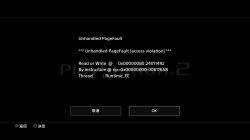
hello ,anyone know how to solve this problem ?

View attachment 10537

Valkyrie Profile 2
I know why problem exist, I even have knowledge how to fix it, but i miss function/hook name that I need to call to fix it. If anyone have star ocean ps2 classic for PS4 then we can fix all tri ace games, as all of them have the same protection.

Ding ding ding. :D

Here is line that need to be added to XXXX-YYYYY_cli.conf for TriAce games (Valkiria Profile 2, Radiata stories, Star ocean)
Code:
--vu-hack-triace
This should make them boot, but not sure that emulation will be perfect.
 
Last edited:
I added some explanation to commands, mostly to VU's where I'm mostly sure most of them. Still a lot to do..


Cool. If you need any help with file/command usage, post problem here. :)
thank you ,but try add --vu-hack-triace in option still can't into game.
stop on my setting pic1.png screen.

--path-snaps="/tmp/snapshots"
--path-recordings="/tmp/recordings"
--path-vmc="/tmp/vmc"
--path-emulog="/tmp/recordings"
--config-local-lua=""
--load-tooling-lua=0
#--path-patches="/app0/patches"
#--path-trophydata="/app0/trophy_data"
#--path-featuredata="/app0/patches"
#--path-toolingscript="/app0/patches"
--ps2-title-id=SLES-52755
--max-disc-num=1
--trophy-support=0
--gs-uprender=2x2
--gs-upscale=EdgeSmooth
--host-audio=1
--rom="PS20220WD20050620.crack"
--verbose-cdvd-reads=0
--host-osd=0
--host-display-mode=full
--vu-hack-triace
config-emu-ps4.txt
 
thank you ,but try add --vu-hack-triace in option still can't into game.
stop on my setting pic1.png screen.

--path-snaps="/tmp/snapshots"
--path-recordings="/tmp/recordings"
--path-vmc="/tmp/vmc"
--path-emulog="/tmp/recordings"
--config-local-lua=""
--load-tooling-lua=0
#--path-patches="/app0/patches"
#--path-trophydata="/app0/trophy_data"
#--path-featuredata="/app0/patches"
#--path-toolingscript="/app0/patches"
--ps2-title-id=SLES-52755
--max-disc-num=1
--trophy-support=0
--gs-uprender=2x2
--gs-upscale=EdgeSmooth
--host-audio=1
--rom="PS20220WD20050620.crack"
--verbose-cdvd-reads=0
--host-osd=0
--host-display-mode=full
--vu-hack-triace
config-emu-ps4.txt
You need to create additional file called XXXX-YYYYY_cli.conf where xy is id of your game. for US version of game it will be SLUS-21452_cli.conf

Inside that file create line --vu-hack-triace
Also possible that you need change game ID in other files (like --ps2-title-id= in ps4-emu-config) to your game ID to make it work.

Edit: cli conf file need to be in folder called "patches".
 
Last edited:
God of War (SCES-53133) runs but is very very jerky with basic settings:
Code:
--path-snaps="/tmp/snapshots"
--path-recordings="/tmp/recordings"
--path-vmc="/tmp/vmc"
--path-emulog="/tmp/recordings"
--config-local-lua=""
--load-tooling-lua=0
#--path-patches="/app0/patches"
#--path-trophydata="/app0/trophy_data"
#--path-featuredata="/app0/patches"
#--path-toolingscript="/app0/patches"
--ps2-title-id=SCES-53133
--max-disc-num=1
--trophy-support=0
--gs-uprender=2x2
--gs-upscale=EdgeSmooth
--host-audio=1
--rom="PS20220WD20050620.crack"
--verbose-cdvd-reads=0
--host-osd=0
--host-display-mode=full

Any advices?
All those config stuff are like martian language for me for the time being... I'll have to spend more time on it.

Edit: in add for this game, on PS2 or on PCSX2, game language depends of the system language (there is no language selection via the gamme options). Doesnt work on PS4 with default config.
 
Last edited:
*PS2 Fake PKG Generator for PS4*

https://picload.org/view/ddiwaaww/image1.png.html
https://picload.org/view/ddiwaogr/image2.png.html
https://picload.org/view/ddiwaoga/image3.png.html

https://github.com/cfwprpht/free-ps2-pub-gen
https://github.com/cfwprpht/free-ps2-pub-gen/releases/tag/v1.2

You need to provide decrypted eboot.elf, ps2-compiler.elf, libc.prx and LibSceFios.prx for the template by your self since i only got allready fake signed one and no time to play with my ps4.
Wayne,...uhh..you can edit the emulator config and the script too. Even define your fav editor to use for the script. The tool will automaticly patch all files and rename files depending the PS4 and PS2 TitleID you want to use. The both IDs alone can not be edited within the text box. They are readed from the Content ID textBox.
Under 'Options > Paths >' you can check the defined paths for the apps and the db. Only for the default text/code viewer you can select a new one via this button. Others can be dropped onto the GUI or simple placed into the same directory.
The template project file will also be patched on fly regarding your settings. Like if you choosed to use a trophy script and file and checked the box, then the .gp4 is patched douring the creation.
Defining your ISO and the output folder can also done by dropping or by using the buttons. If you double click the Output / Input textBox it will swapp between ISO input and Folder output.
Passcode is outoset to only 00s. Should be leaved so in case of compatibility for all of us. But if you need or want to change it, you can do that.

If there is some bug or some needed feature i forgot, call me and i'll fix or add it immediately. Unless i am not sleeping. :D

I've also throwed a new Fake PKG Tools collection together with my tool and a hacked version of the orbis-pub-cmd.exe. By the way hacked .exe. Here are the patches for the above called executeable: https://ybin.me/p/a99239d411eefd25#ef4wf/XzFqDD3A6AsE2SZ9Jmelo15aFeeH5ibQ+u1e4=

Fake PKG Tools v1.2: https://anonfile.com/E0j223deb9/Fake_PKG_Tools_v1.2.rar
I'll added some more SDK Tools which we might could use for our fake pkgs.

-have fun- cfwprpht
 
Last edited:
God of War (SCES-53133) runs but is very very jerky with basic settings:
Code:
--path-snaps="/tmp/snapshots"
--path-recordings="/tmp/recordings"
--path-vmc="/tmp/vmc"
--path-emulog="/tmp/recordings"
--config-local-lua=""
--load-tooling-lua=0
#--path-patches="/app0/patches"
#--path-trophydata="/app0/trophy_data"
#--path-featuredata="/app0/patches"
#--path-toolingscript="/app0/patches"
--ps2-title-id=SCES-53133
--max-disc-num=1
--trophy-support=0
--gs-uprender=2x2
--gs-upscale=EdgeSmooth
--host-audio=1
--rom="PS20220WD20050620.crack"
--verbose-cdvd-reads=0
--host-osd=0
--host-display-mode=full

Any advices?
All those config stuff are like martian language for me for the time being... I'll have to spend more time on it.

Edit: in add for this game, on PS2 or on PCSX2, game language depends of the system language (there is no language selection via the gamme options). Doesnt work on PS4 with default config.

Try with:
--gs-uprender=None
--gs-upscale=None
 
Thanks, a lot to do last days/weeks. :)
The Error "Base is not OK" means that the needed apps and elfs are not found or that the elfs/prxs are not decrypted.
Place files as follow:

\app0\eboot.elf
\app0\ps2-emu-compiler.elf
\app0\sce_module\libc.prx
\app0\sce_module\libSceFios2.prx
 
I have tried several ps2 pskg games for ps4 with other tutorials and everything is fine but when I launch the game it starts but nothing is seen. I will try with this guide that looks interesting this thread, thanks for sharing. As I will share my experiences
 

Similar threads

Back
Top