PS4 [Research]PS2 emulator configuration on PS4

Banned for publishing game download links
Last edited by a moderator:
Sony speed/gfx-hacks found in ps3 official classic. Works on PCSX2, and PS3. Should work also here.

Raw Danger! / Zettai Zetsumei Toshi 2 - Itetsuita Kiokutachi

Code:
apiRequest(0.1)

-- SLPS-25606

eeInsnReplace(0x11e094, 0x0c066804, 0x00000000)
eeInsnReplace(0x11e09c, 0x0c08a654, 0x00000000)

Code:
apiRequest(0.1)

-- SLES-54587

eeInsnReplace(0x11e0f4, 0x0c066a40, 0x00000000)
eeInsnReplace(0x11e0fc, 0x0c08a8d0, 0x00000000)

Code:
apiRequest(0.1)

-- SLUS-21501

eeInsnReplace(0x11e104, 0x0c066a5c, 0x00000000)
eeInsnReplace(0x11e10c, 0x0c08a8ec, 0x00000000)

What sony did here is actually terrible way of fixing stuff, but kinda work.
 
@kozarovv -----really dumb question but what and how to do take the following and use/convert so that it could be used in the ps4.pkg making process and add that into a ps4 pkg?
Code:
apiRequest(0.1)
-- SLUS-21501
eeInsnReplace(0x11e104, 0x0c066a5c, 0x00000000)
eeInsnReplace(0x11e10c, 0x0c08a8ec, 0x00000000)

Does that convert into a config file somehow? or is it a pnatch thing on the actual .iso? or does it somehow get converted and added to config-emu-ps4.txt? (sorry just trying to learn this part....is this an example of a ps3 config maybe)

I've seen the odd reply to some games with an example similar to the above but no idea how to use that/convert that into a ps4.pkg Just want to try to make more PS2onPS4 games for peeps :)

I should add I've been making/remaking games the manual way.......if that matters?
 
@kozarovv -----really dumb question but what and how to do take the following and use/convert so that it could be used in the ps4.pkg making process and add that into a ps4 pkg?
Code:
apiRequest(0.1)
-- SLUS-21501
eeInsnReplace(0x11e104, 0x0c066a5c, 0x00000000)
eeInsnReplace(0x11e10c, 0x0c08a8ec, 0x00000000)

Does that convert into a config file somehow? or is it a pnatch thing on the actual .iso? or does it somehow get converted and added to config-emu-ps4.txt? (sorry just trying to learn this part....is this an example of a ps3 config maybe)

I've seen the odd reply to some games with an example similar to the above but no idea how to use that/convert that into a ps4.pkg Just want to try to make more PS2onPS4 games for peeps :)

I should add I've been making/remaking games the manual way.......if that matters?
One posted above is LUA config, i belive there are some tutorials available for it.
Anyway you can patch iso directly using ps2 patch engine, and those codes:

Code:
patch=1,EE,0011e104,word,00000000
patch=1,EE,0011e10c,word,00000000

is there a pnatch version for the NTSC??
I don't think it is, maybe someone can port it.
 
Hi, I Have God of War 2005 (USA) ISO and I converted to pkg then i installed it and it runs so slow so i check the https://www.psdevwiki.com/ps4/PS2_Classics_Emulator_Compatibility_List and i figured out I should do some configured to work perfect but I don't know where to do this changes and how?:sorrow:
can I just convert the iso to pkg and installed it then I make a patch to do this configuration? and this configuration work for USA version? becuse I see at the beginning of LUA file wrote -- God Of War EU
but in the site said playable for US/EU
Please Help Me I Don't Know Anything about All of This
 
Hi, I Have God of War 2005 (USA) ISO and I converted to pkg then i installed it and it runs so slow so i check the https://www.psdevwiki.com/ps4/PS2_Classics_Emulator_Compatibility_List and i figured out I should do some configured to work perfect but I don't know where to do this changes and how?:sorrow:
can I just convert the iso to pkg and installed it then I make a patch to do this configuration? and this configuration work for USA version? becuse I see at the beginning of LUA file wrote -- God Of War EU
but in the site said playable for US/EU
Please Help Me I Don't Know Anything about All of This
p.m me
 
Thanks for testing.

is it possible to look at the config of second sight SLES-52670?
This is one of games that have similar issue to THPS4+ , etc. All games that have issue with MTVU on pcsx2 are currently not working also on ps4. And for now i have no idea how to fix it.
 
Crash Bandicoot: The Wrath of Cortex

LUA
Code:
apiRequest(0.1)
-- Eliminate color scan lines
local emuObj = getEmuObject()

emuObj.SetGsTitleFix( "forceSimpleFetch", "reserved", { texMode=1 } )
 
Last edited:
Some fun staff for Ace Combat 5 SCES_524.24, lets call it AC5 Remastered :D . This is patch that make game think that far objects on ground, are close to camera. That make game to select best quality texture for whole terrain. Here are some screens from PCSX2 as i don't own PS4 to make compare on it. Like you can see this is not great improvement, but on 40' TV can be a big deal. Specially that with those patches we don't need to use mipmap kernel, so we can use proper 2x2 Uprender with EdgeSmooth. That make graphic even better.
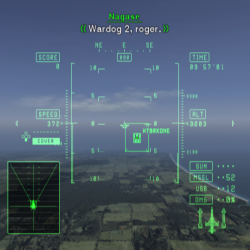
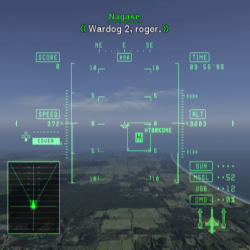

Original vs. Patched - Open full images to see effect

mipmapping.png vs. no_mipmap.png
mipmapp.jpg vs. no_mip.jpg

Usually mipmaping is used to minimize transition/aliasing effect of far textures, but here there seems to be no reason to keep it. As game still look stunning. :)

IMPORTANT. DO NOT USE THIS WHEN USING THAT CONFIG!

Code:
--gs-kernel-cl="mipmap"
--gs-kernel-cl-up="mipmap2x2"
--gs-use-mipmap=1

DO NOT USE THAT!

Ok, straight to the point. Here is config, patches for collision detection come from PCSX2, fix for clouds was found by @Vitt0xLar_YT , patch for improved textures is my work.

AC5 Remastered

Code:
apiRequest(0.1)

local emuObj = getEmuObject()

-- Collision detection fix based on PCSX2 Patch (Rearranging COP2 instructions that use old results)

eeInsnReplace(0x1A3154, 0x4B00682C, 0x48498800)
eeInsnReplace(0x1A3158, 0x4B0C682C, 0x4B00682C)
eeInsnReplace(0x1A3164, 0x48498800, 0x484A8800)
eeInsnReplace(0x1A3168, 0x484A8800, 0x4B0C682C)

-- Always select best quality texture (no MipMap)

emuMediaPatch(0x16E, 12 + 0x414, { 0x10400096 }, { 0x00000000 })
emuMediaPatch(0x16E, 12 + 0x424, { 0x1443003A }, { 0x00000000 })
emuMediaPatch(0x16E, 12 + 0x430, { 0x4502000C }, { 0x00000000 })

-- Foece simple fetch for selected textures (i'm 100% sure that we don't need both, but i can't test by myself which one is correct)

emuObj.SetGsTitleFix( "forceSimpleFetch", "reserved", { texMode=1 } )
emuObj.SetGsTitleFix( "forceSimpleFetch", "reserved", { texMode=2 } )

Edit: Fixed pad patch.
 
Last edited:
I believe besides that there is a certain confusion in the patches ace combat on psdevwiki. game codes do not match titles. I don't know how to edit them properly.

edit: this is just SCES50410 who is ace combat 4 and not 5.
Oh, i wasn't aware. I will fix it here in few minutes. So "remastered patch should be fine soon.
 
Ace Combat Zero: The Belkan War

SLPS-25629
LUA

Code:
apiRequest(0.1) -- request version 0.1 API. Calling apiRequest() is mandatory.
-- Collision detection fix.
eeInsnReplace(0x131E84, 0x4B00682C, 0x48498800)
eeInsnReplace(0x131E88, 0x4B0C682C, 0x4B00682C)
eeInsnReplace(0x131E94, 0x48498800, 0x484A8800)
eeInsnReplace(0x131E98, 0x484A8800, 0x4B0C682C)

Ace Combat 5

SLPS-25418
LUA

Code:
apiRequest(0.1) -- request version 0.1 API. Calling apiRequest() is mandatory.
-- Collision detection fix for Stage 3 onwards // Rearranging COP2 instructions that use old results
eeInsnReplace(0x1A3B6C, 0x4B00682C, 0x48498800)
eeInsnReplace(0x1A3B70, 0x4B0C682C, 0x4B00682C)
eeInsnReplace(0x1A3B7C, 0x48498800, 0x484A8800)
eeInsnReplace(0x1A3B80, 0x484A8800, 0x4B0C682C)
 
Last edited:
Prince of Persia: The Sands of Time
Prince of Persia: The Two Thrones
Prince of Persia: The Warrior Within

All versions
Text

Code:
--vu0-no-clamping=0
--vu0-clamp-operands=1
--vu0-clamp-results=1
--vu1-no-clamping=0
--vu1-clamp-operands=1
--vu1-clamp-results=1
--cop2-no-clamping=0
--cop2-clamp-operands=1
--cop2-clamp-results=1
#fix for graphical glitches
 
Last edited:

Similar threads

Back
Top