
You are using an out of date browser. It may not display this or other websites correctly.
You should upgrade or use an alternative browser.
You should upgrade or use an alternative browser.
PS4 [Research]PS2 emulator configuration on PS4
- Thread starter kozarovv
- Start date

Vika23
Senior Member
what mean how add, u need create files or edit lua or cli files with wordpad for example!Sorry for being annoying but could someone teach me how to add these commands?
OK so I've made some progress I got Star Ocean to work with the commands in a txt. But Grandia III still gives me an error. Is there some different commands it needs? How do I find the commands?
I see the Custom config repository but Grandia III doesn't have one or I missed it.
Currently I only added
--max-disc-num=2
to config-emu-ps4.txt but the game does not work. Tried both Jak and Rogue.
I see the Custom config repository but Grandia III doesn't have one or I missed it.
Currently I only added
--max-disc-num=2
to config-emu-ps4.txt but the game does not work. Tried both Jak and Rogue.
Last edited:

Manu Mx
Member
from my testing these games are very sensitive to the ee/iop scalars. .01 or .1 in the wrong direction will re-enable the loading freeze.
The others will probably work with EXTRA fine tuning on the scalars. Or, maybe something completely different due to this emu/emus
BTW, do you know what this is doing?
cli
Code:--vu1-mpg-cycles=2250 --vu1-mpg-cycles=1850,$037,$7b3 --vu1-mpg-cycles=1150,$2b4,$7c4
This is from Okage PSN.
When it comes to these ee/iop cycle commands....can we expect to see the same results on PS4 / PS4 Pro? After all it's some form of overclocking (I guess) to get a performance boost on certain games. With the PS4 Pro being the higher clocked system do we have to distinguish between both systems when using "cycle" commands. At least when boost mode is enabled?
feedtalesix
Forum Noob
Thanks for the clarification.I added some explanation to commands, mostly to VU's where I'm mostly sure most of them. Still a lot to do..
Cool. If you need any help with file/command usage, post problem here.
Vika23
Senior Member
Some games need build manuallyHow do I use emulators other than Jakv2 or Roguev1? It's the only two I see available in PS2-FPKG 0.6.
Some games need build manually
How?
Vika23
Senior Member
i use Fake PKG ToolsHow?

nifengyuexia
Member
Crash Bandicoot Twinsanity(2.00) SLUS_209.09
TXT
Fix the loading freeze after PS2LOGO
LUA
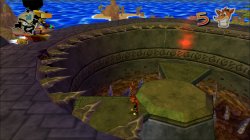
The white line on the wall is the only problem, I think this should be fixed if we can find the code to disable the blurring.
Most emulations should work except for all jak emulators.
TXT
Code:
--ee-cycle-scalar=1.8
--iop-cycle-scalar=1.5
Fix the loading freeze after PS2LOGO
LUA
Code:
apiRequest(0.1)    -- request version 0.1 API. Calling apiRequest() is mandatory.

-- Fix random crashes
eeInsnReplace(0x191C58,0x5440FFFB,0x00000000)
eeInsnReplace(0x191C5C,0x0071182F,0x00000000)
eeInsnReplace(0x191C60,0x0223102F,0x00000000)
The white line on the wall is the only problem, I think this should be fixed if we can find the code to disable the blurring.
Most emulations should work except for all jak emulators.
Last edited:
Vika23
Senior Member
you mean Jak v.1 or all jak emus?Crash Bandicoot Twinsanity(2.00) SLUS_209.09
TXT
Code:--ee-cycle-scalar=1.8 --iop-cycle-scalar=1.5
Fix the loading freeze after PS2LOGO
LUA
Code:apiRequest(0.1) -- request version 0.1 API. Calling apiRequest() is mandatory. -- Fix random crashes eeInsnReplace(0x191C58,0x5440FFFB,0x00000000) eeInsnReplace(0x191C5C,0x0071182F,0x00000000) eeInsnReplace(0x191C60,0x0223102F,0x00000000)
View attachment 32024
The white line on the wall is the only problem, I think this should be fixed if we can find the code to disable the blurring.
All emulators should work well except for Jak emulator.
nifengyuexia
Member
Allyou mean Jak v.1 or all jak emus?

Stayhye
Senior Member
When it comes to these ee/iop cycle commands....can we expect to see the same results on PS4 / PS4 Pro? After all it's some form of overclocking (I guess) to get a performance boost on certain games. With the PS4 Pro being the higher clocked system do we have to distinguish between both systems when using "cycle" commands. At least when boost mode is enabled?
I'm on default ps4. So, maybe if you have a Pro with boost mode on, you may have a slight improvement on some of these fixes.
Vika23
Senior Member
Was test just now via BULLY v2 emu!Crash Bandicoot Twinsanity(2.00) SLUS_209.09
TXT
Code:--ee-cycle-scalar=1.8 --iop-cycle-scalar=1.5
Fix the loading freeze after PS2LOGO
LUA
Code:apiRequest(0.1) -- request version 0.1 API. Calling apiRequest() is mandatory. -- Fix random crashes eeInsnReplace(0x191C58,0x5440FFFB,0x00000000) eeInsnReplace(0x191C5C,0x0071182F,0x00000000) eeInsnReplace(0x191C60,0x0223102F,0x00000000)
View attachment 32024
The white line on the wall is the only problem, I think this should be fixed if we can find the code to disable the blurring.
Most emulations should work except for all jak emulators.
Looks playble, some sounds lags and white line, but still looks fine!
Video of test here
spellforce7
Member
Did someone test The Suffering? All have that small bug?
i am also having this issue. also there is some black tar coal effect on characters and the camera drifting on it own.
Vika23
Senior Member
Did u finish the game?i am also having this issue. also there is some black tar coal effect on characters and the camera drifting on it own.
spellforce7
Member
Did u finish the game?
No. i requested for a fix and am waiting.
nifengyuexia
Member
Please don't wait, why don't you try to fix it yourself? Most of the commands are on the wiki. If you love that game, I think you will put in hard work and enthusiasm.No. i requested for a fix and am waiting.
nifengyuexia
Member
I tested it on PRO and there is no audio lag, it seems to need further fixes and needs to be done with increase mode turned offWas test just now via BULLY v2 emu!
Looks playble, some sounds lags and white line, but still looks fine!
Video of test here
Similar threads
-
-
-
PS4 How to play multiplayer (3-4 players) using PSX-FPKG?
- Started by PSXP_Kira
- Replies: 2
-
 PS3 [PS2] Gundam Warriors 2 FPU rounding fix
- Started by Low_Plankton_3329
- Replies: 0