
mrjaredbeta
Developer
I also have a freeze fix now for Spartan Total Warrior if issue is same as PCSX2. Freeze issue seems different on PS3.

I also have a freeze fix now for Spartan Total Warrior if issue is same as PCSX2. Freeze issue seems different on PS3.


Very great share! Graphic looks amazing now! but i want ask if you have same lines on some stages?Tekken 5
SCES532.02
lua
Code:apiRequest(1.0) local eeObj = getEEObject() local emuObj = getEmuObject() local patcher = function() local code_check1 = eeObj.ReadMem16(0x1FFEF20) if code_check1 == 0xB0F0 then eeObj.WriteMem32(0x4039F0,0x00000001) eeObj.WriteMem32(0x10213C,0x3C050000) eeObj.WriteMem32(0x102144,0x3C060050) eeObj.WriteMem32(0x10214C,0x3C070001) eeObj.WriteMem32(0x1DF1F0,0x00009400) eeObj.WriteMem32(0x1DF1FC,0x001BF9FF) eeObj.WriteMem32(0x1DF218,0x00009400) eeObj.WriteMem32(0x1DF224,0x001BF9FF) end local code_check2 = eeObj.ReadMem16(0x1FFEF20) if code_check2 == 0x3B70 then eeObj.WriteMem32(0x261C84,0x34029400) eeObj.WriteMem32(0x2619F4,0x3C050000) eeObj.WriteMem32(0x2619FC,0x3C060050) eeObj.WriteMem32(0x261A04,0x3C070001) eeObj.WriteMem32(0x36725C,0x001BF9FF) eeObj.WriteMem32(0x367284,0x001BF9FF) end local code_check3 = eeObj.ReadMem16(0x1FFEF20) if code_check3 == 0xBDF0 then eeObj.WriteMem32(0x14CBB4,0x3c050000) eeObj.WriteMem32(0x14CBBC,0x3C060050) eeObj.WriteMem32(0x14CBC4,0x3c070001) end local code_check4 = eeObj.ReadMem16(0x1FFEF20) if code_check4 == 0x3B70 then eeObj.WriteMem32(0x15CD74,0x3c050000) eeObj.WriteMem32(0x15CD7C,0x3C060050) eeObj.WriteMem32(0x15CD84,0x3c070001) end local code_check5 = eeObj.ReadMem16(0x1FFEF20) if code_check5 == 0x30F0 then eeObj.WriteMem32(0x1E24F4,0x3c050000) eeObj.WriteMem32(0x1E24FC,0x3C060050) eeObj.WriteMem32(0x1E2504,0x3c070001) end end emuObj.AddVsyncHook(patcher) --Fix lines appearing in some areas emuObj.SetGsTitleFix( "forceSimpleFetch", "reserved", { texMode=2 } )
Added PAL480p 60 frame code and Sharp framebuffer code, now the definition is the same as when NTSC turns on 480P mode. The arcade mode Tekken 123 still has image errors, and there will be an area box in the upper left corner of some areas of Tekken 5.
JakV2 emus
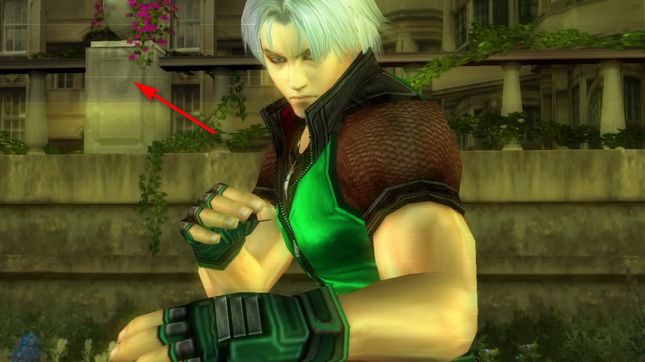
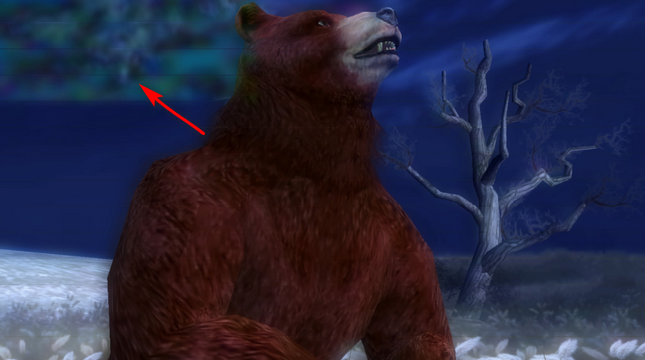

It should be said that the location of your screenshot is the problem that will occur in these two areas. Enabling the clamping mode in PCSX2 will fix such a frame, but it is useless on PS4. Maybe someone can fix it.Very great share! Graphic looks amazing now! but i want ask if you have same lines on some stages?
Also you can wacth video of some gameplay here
Just wonder if just me have these lines but thanks anyway! I like how game looks now!
Some comparisonTekken 5
SCES532.02
lua
Code:apiRequest(1.0) local eeObj = getEEObject() local emuObj = getEmuObject() local patcher = function() local code_check1 = eeObj.ReadMem16(0x1FFEF20) if code_check1 == 0xB0F0 then eeObj.WriteMem32(0x4039F0,0x00000001) eeObj.WriteMem32(0x10213C,0x3C050000) eeObj.WriteMem32(0x102144,0x3C060050) eeObj.WriteMem32(0x10214C,0x3C070001) eeObj.WriteMem32(0x1DF1F0,0x00009400) eeObj.WriteMem32(0x1DF1FC,0x001BF9FF) eeObj.WriteMem32(0x1DF218,0x00009400) eeObj.WriteMem32(0x1DF224,0x001BF9FF) end local code_check2 = eeObj.ReadMem16(0x1FFEF20) if code_check2 == 0x3B70 then eeObj.WriteMem32(0x261C84,0x34029400) eeObj.WriteMem32(0x2619F4,0x3C050000) eeObj.WriteMem32(0x2619FC,0x3C060050) eeObj.WriteMem32(0x261A04,0x3C070001) eeObj.WriteMem32(0x36725C,0x001BF9FF) eeObj.WriteMem32(0x367284,0x001BF9FF) end local code_check3 = eeObj.ReadMem16(0x1FFEF20) if code_check3 == 0xBDF0 then eeObj.WriteMem32(0x14CBB4,0x3c050000) eeObj.WriteMem32(0x14CBBC,0x3C060050) eeObj.WriteMem32(0x14CBC4,0x3c070001) end local code_check4 = eeObj.ReadMem16(0x1FFEF20) if code_check4 == 0x3B70 then eeObj.WriteMem32(0x15CD74,0x3c050000) eeObj.WriteMem32(0x15CD7C,0x3C060050) eeObj.WriteMem32(0x15CD84,0x3c070001) end local code_check5 = eeObj.ReadMem16(0x1FFEF20) if code_check5 == 0x30F0 then eeObj.WriteMem32(0x1E24F4,0x3c050000) eeObj.WriteMem32(0x1E24FC,0x3C060050) eeObj.WriteMem32(0x1E2504,0x3c070001) end end emuObj.AddVsyncHook(patcher) --Fix lines appearing in some areas emuObj.SetGsTitleFix( "forceSimpleFetch", "reserved", { texMode=2 } )
Added PAL480p 60 frame code and Sharp framebuffer code, now the definition is the same as when NTSC turns on 480P mode. The arcade mode Tekken 123 still has image errors, and there will be an area box in the upper left corner of some areas of Tekken 5.
JakV2 emus

No, the configuration above already includes the progressive scan configuration of the arcade version. In my test, NTSC-J cannot play the three arcade versions, and the screen will be black. I want to ask, which emulator are you using? Are you testing NTSC-U? Because there is no need to configure in the NTSC version, you can directly turn on the progressive scan mode in the game options, but the PAL version does not. This is after comparing the NTSC version, the code is modified to the PAL version, and the progressive scan mode is implemented And clear frame buffer, so there will be that high definition!Some comparison
Also Tekken Trilogy in "Arcade History" works good on NTSC, no image errors!
Video here
Probably you have some configs for NTSC? Becouse i think PAL version looks much better!
never test NTSC-J! Only NTSC - U and PAL! Jak X v2 emuNo, the configuration above already includes the progressive scan configuration of the arcade version. In my test, NTSC-J cannot play the three arcade versions, and the screen will be black. I want to ask, which emulator are you using? Are you testing NTSC-U? Because there is no need to configure in the NTSC version, you can directly turn on the progressive scan mode in the game options, but the PAL version does not. This is after comparing the NTSC version, the code is modified to the PAL version, and the progressive scan mode is implemented And clear frame buffer, so there will be that high definition!
Okay, when I'm free, I'm looking at the NTSC-U versionnever test NTSC-J! Only NTSC - U and PAL! Jak X v2 emu
apiRequest(1.0)
local eeObj = getEEObject()
local emuObj = getEmuObject()
local patcher = function()

--Fix game frame rate
eeObj.WriteMem32(0x3816e0,0x10000025)
end

emuObj.AddVsyncHook(patcher)apiRequest(1.0)
local eeObj = getEEObject()
local emuObj = getEmuObject()
local patcher = function()
--Fix game frame rate
eeObj.WriteMem32(0x37c688,0x10000025)
end
emuObj.AddVsyncHook(patcher)apiRequest(1.0)
local eeObj = getEEObject()
local emuObj = getEmuObject()
local patcher = function()
--Fix game frame rate
eeObj.WriteMem32(0x37e6e0,0x10000025)
end
emuObj.AddVsyncHook(patcher)I tried the NTSC-U version with the jakxv2 emulator. In the arcade mode, there are still random black screens and graphics problems. The NTSC version does not apply enhancement patches. In addition, I have tested many games and the enhancement patches do not work.It seems that it will be very difficult to open some game enhancement patches on PS4.never test NTSC-J! Only NTSC - U and PAL! Jak X v2 emu
You tell about Tekken Trilogy inside Tekken 5? In my version no graphics problems, i was post video above!I tried the NTSC-U version with the jakxv2 emulator. In the arcade mode, there are still random black screens and graphics problems. The NTSC version does not apply enhancement patches. In addition, I have tested many games and the enhancement patches do not work.It seems that it will be very difficult to open some game enhancement patches on PS4.
The version number is SLUS21059, can you enter the arcade mode every time? And there are no graphical errors? In many of my tests, there is either a black screen or graphic errors. I don't want to waste too much time on this game.You tell about Tekken Trilogy inside Tekken 5? In my version no graphics problems, i was post video above!
yes SLUS21059! Im test it long time ago and load all tekkens 1,2,3 but i load just 1 time each of game! It was no image errors! Few days ago i install Tekken 5 NTSC again becouse in ur pal config u say tekkens 1,2,3 have image errors, so i load tekken 3 again and no image error!The version number is SLUS21059, can you enter the arcade mode every time? And there are no graphical errors? In many of my tests, there is either a black screen or graphic errors. I don't want to waste too much time on this game.

apiRequest(1.0)
local eeObj = getEEObject()
local emuObj = getEmuObject()
local patcher = function()
eeObj.WriteMem32(0x003B0D4C,0x00000000)
end
emuObj.AddVsyncHook(patcher)apiRequest(1.0)
local eeObj = getEEObject()
local emuObj = getEmuObject()
local patcher = function()
eeObj.WriteMem32(0x003B0D4C,0x00000000)
end
emuObj.AddVsyncHook(patcher)Gauntlet: Seven Sorrows (SLUS-21077)
LUA
Code:apiRequest(1.0) local eeObj = getEEObject() local emuObj = getEmuObject() local patcher = function() eeObj.WriteMem32(0x003B0D4C,0x00000000) end emuObj.AddVsyncHook(patcher)
Gauntlet: Seven Sorrows (SLES-53667)
LUA
Fixes slow frame rate.Code:apiRequest(1.0) local eeObj = getEEObject() local emuObj = getEmuObject() local patcher = function() eeObj.WriteMem32(0x003B0D4C,0x00000000) end emuObj.AddVsyncHook(patcher)
--gs-kernel-cl="mipmap"
--gs-kernel-cl-up="mipmap2x2"
--gs-use-mipmap=1apiRequest(1.0)
local eeObj = getEEObject()
local emuObj = getEmuObject()
local patcher = function()
eeObj.WriteMem32(0x3b0d4c,0x00000000)--Fix frame rate
eeObj.WriteMem32(0x446200,0x24020002)--Widescreen
eeObj.WriteMem32(0x107244,0x3c050000)--480P progressive mode
eeObj.WriteMem32(0x10724c,0x3c060050)
eeObj.WriteMem32(0x107254,0x3c070001)
eeObj.WriteMem32(0x107514,0x3c090010)
end
emuObj.AddVsyncHook(patcher)apiRequest(1.0)
local eeObj = getEEObject()
local emuObj = getEmuObject()
local patcher = function()
eeObj.WriteMem32(0x3b0d4c,0x00000000)--Fix frame rate
eeObj.WriteMem32(0x446620,0x24020002)--Widescreen
eeObj.WriteMem32(0x107244,0x3c050000)--480P progressive mode
eeObj.WriteMem32(0x10724c,0x3c060050)
eeObj.WriteMem32(0x107254,0x3c070001)
eeObj.WriteMem32(0x107514,0x3c090010)
end
emuObj.AddVsyncHook(patcher)In the Prince of Persia trilogy, this is the only one without 480P progressive scan mode. I saw your screenshot, it seems to have the same effect as God of War 1 at the beginning, maybe@kozarovv can fix it, but it's not necessarily!The same color texture is also available on PCSX2 1.50Maybe someone know....i read that Prince of Persia games have config
--vu0-no-clamping=0
--vu0-clamp-operands=1
--vu0-clamp-results=1
--vu1-no-clamping=0
--vu1-clamp-operands=1
--vu1-clamp-results=1
--cop2-no-clamping=0
--cop2-clamp-operands=1
--cop2-clamp-results=1
#fix for graphical glitches
but i think it still have minor issue
is that normal or will be fixed too?
By the way i was fixed rope in game with attached lua config! Now it display normal! But boat still flickering! And i think with config its looks around progressive scan mode but maybe i wrong!In the Prince of Persia trilogy, this is the only one without 480P progressive scan mode. I saw your screenshot, it seems to have the same effect as God of War 1 at the beginning, maybe@kozarovv can fix it, but it's not necessarily!
I guess you will also use this configuration, I have tried not to use this configuration now, because it is a kind of blur effect, which will slightly reduce the quality of the game!By the way i was fixed rope in game with attached lua config! Now it display normal! But boat still flickering! And i think with config its looks around progressive scan mode but maybe i wrong!
