Hello Stayhye, can you share your emu collection to me? Sorry for my English and thank you so much!https://www.psx-place.com/threads/r...onfiguration-on-ps4.16131/page-64#post-281939
Work in progress, not perfect but better than nothing. Maybe someone can help with better fix

You are using an out of date browser. It may not display this or other websites correctly.
You should upgrade or use an alternative browser.
You should upgrade or use an alternative browser.
PS4 [Research]PS2 emulator configuration on PS4
- Thread starter kozarovv
- Start date

Vika23
Senior Member
Digimon World 4 PS2toPS4 GamePlay
FiXed black screen at start! Added Disable Fog, No Body Shadow of the Digimons on the Ground, Enhance Digimons and World real Light and disable their additional Lights! Some slowdowns on parts of stages! EU version.
Attachments
Vika23
Senior Member
Was record God of War. PS2toPS4 GamePlay! Thanks again @Kugozx for recommendations and configs!
Music sound problem still here - music restarts every time there are many sounds to play! Good solution for now its turn off music in game options! Also annoy problem is some cutscenes have syncing issues and FPS drops! But before these configs game was very bad for me and now i think is playble! Also use some pretty cheats as - Widescreen patch and forced 480p at while start game! Removes Title screen flames also!

mrjaredbeta
Developer
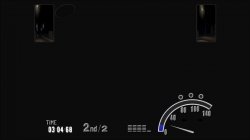
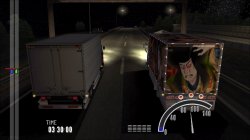
Does anyone know if the graphics are broken during a race in Bakusou Dekotora Densetsu: Otoko Hanamichi Yume Roman (SLPM-65234)? The rear view mirror graphics should work, but not the rest. If broken, I have a fix. 

nifengyuexia
Member
Does anyone know if the graphics are broken during a race in Bakusou Dekotora Densetsu: Otoko Hanamichi Yume Roman (SLPM-65234)? The rear view mirror graphics should work, but not the rest. If broken, I have a fix.
Yes, the same problem as you described. This should be related to Skipdraw.
mrjaredbeta
Developer
@nifengyuexia Thank you! This should fix it:
This is essentially what Skipdraw at 2 does for this game, but it disables it from the EE side before it can be sent to GS.
Code:
apiRequest(1.0)

local eeObj = getEEObject()
local emuObj = getEmuObject()
local patcher = function()
eeObj.WriteMem32(0x01A15A10,0x10000008)
end

emuObj.AddVsyncHook(patcher)nifengyuexia
Member
@nifengyuexia Thank you! This should fix it:
This is essentially what Skipdraw at 2 does for this game, but it disables it from the EE side before it can be sent to GS.Code:apiRequest(1.0) local eeObj = getEEObject() local emuObj = getEmuObject() local patcher = function() eeObj.WriteMem32(0x01A15A10,0x10000008) end emuObj.AddVsyncHook(patcher)
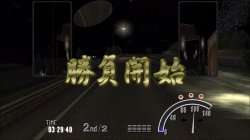
After testing, it has been completely repaired!


tehrzky
Member
thnx. hope you fix more JRPG.
Updated fix for Tales of the Abyss NTSC
CLI
LUACode:--gs-uprender=2x2 --gs-upscale=EdgeSmooth --fpu-accurate-range=0x27FFFC,0x27FFFF --fpu-accurate-range=0x2921F4,0x2921F8 --vu0-no-clamping=0 --vu1-no-clamping=0 --cop2-no-clamping=0 --host-display-mode=16:9 #--lopnor-config=1
Code:--Tales Of The Abyss (NTSC-U) (SLUS-21386) -- emu used=psychonauts v2 local gpr = require("ee-gpr-alias") apiRequest(0.1) local eeObj = getEEObject() local emuObj = getEmuObject() local patcher = function() --ISO patched due to crashing when code put here end emuObj.AddVsyncHook(patcher) emuObj.SetGsTitleFix( "forceSimpleFetch", "reserved", { texMode=1 } )
Game now allows for 2x2 upscale. Only issue is the game seems to not uprender? Works perfectly otherwise......
Fix for Summoner 2 NTSC
More testing needed but seems to work fine.
CLI
LUACode:--gs-uprender=2x2 --gs-upscale=EdgeSmooth --host-display-mode=16:9 --framelimiter=1 --framelimit-fps=60.0 --framelimit-scalar=1 --ee-cycle-scalar=1.5
Code:-- Summoner 2 NTSC (SLUS-20448) -- 60 FPS -- emu used=primal local gpr = require("ee-gpr-alias") apiRequest(0.1) local eeObj = getEEObject() local emuObj = getEmuObject() local patcher = function() --60 fps eeObj.WriteMem32(0x2017BC34,0x24040001) end emuObj.AddVsyncHook(patcher)

Bergolino Gamer
Member
Avatar The Legend of Aang
Avatar 2 - The Legend of Aang - The Burning Earth
Avatar 3 - The Last Airbender - Into the Inferno
TXT
--vif1-instant-xfer=0
#Fixes loading screen
Emu: roguev1
Status: playable + Subtitle failures
Avatar 2 - The Legend of Aang - The Burning Earth
Avatar 3 - The Last Airbender - Into the Inferno
TXT
--vif1-instant-xfer=0
#Fixes loading screen
Emu: roguev1
Status: playable + Subtitle failures
Bergolino Gamer
Member
Guitar Hero 1 - SLUS21224
TXT
--gs-uprender=2x2
--gs-upscale=edgesmooth
--vif-ignore-invalid-cmd=0
--vif1-ignore-cmd-ints=1
--vif1-instant-xfer=0
--vu1=jit-sync
--vu1-mpg-cycles=8000
--ee-jit-pagefault-threshold=30
Guitar Hero 2 - SLES54442
TXT
--gs-uprender=2x2
--gs-upscale=edgesmooth
--gs-kernel-cl="h2lpool"
--gs-kernel-cl-up="h2lpool2x2"
--gs-adaptive-frameskip=1
--vu1-mpg-cycles=7750
--vu1=jit-sync
--vif-ignore-invalid-cmd=0
--vif1-ignore-cmd-ints=1
--vif1-instant-xfer=0
Guitar Hero Encore - Rocks the 80s - SLES54859
TXT
--gs-uprender=2x2
--gs-upscale=edgesmooth
--gs-kernel-cl="h2lpool"
--gs-kernel-cl-up="h2lpool2x2"
--gs-adaptive-frameskip=1
--vu1-mpg-cycles=7750
--vu1=jit-sync
--vif-ignore-invalid-cmd=0
--vif1-ignore-cmd-ints=1
--vif1-instant-xfer=0
Emu: JakXv2
Satatus: Playable... in easy and medium difficulties.
Gameplays: https://www.youtube.com/channel/UCJqtVlcUxM6931mtxmN9W8w/videos
TXT
--gs-uprender=2x2
--gs-upscale=edgesmooth
--vif-ignore-invalid-cmd=0
--vif1-ignore-cmd-ints=1
--vif1-instant-xfer=0
--vu1=jit-sync
--vu1-mpg-cycles=8000
--ee-jit-pagefault-threshold=30
Guitar Hero 2 - SLES54442
TXT
--gs-uprender=2x2
--gs-upscale=edgesmooth
--gs-kernel-cl="h2lpool"
--gs-kernel-cl-up="h2lpool2x2"
--gs-adaptive-frameskip=1
--vu1-mpg-cycles=7750
--vu1=jit-sync
--vif-ignore-invalid-cmd=0
--vif1-ignore-cmd-ints=1
--vif1-instant-xfer=0
Guitar Hero Encore - Rocks the 80s - SLES54859
TXT
--gs-uprender=2x2
--gs-upscale=edgesmooth
--gs-kernel-cl="h2lpool"
--gs-kernel-cl-up="h2lpool2x2"
--gs-adaptive-frameskip=1
--vu1-mpg-cycles=7750
--vu1=jit-sync
--vif-ignore-invalid-cmd=0
--vif1-ignore-cmd-ints=1
--vif1-instant-xfer=0
Emu: JakXv2
Satatus: Playable... in easy and medium difficulties.
Gameplays: https://www.youtube.com/channel/UCJqtVlcUxM6931mtxmN9W8w/videos
mrjaredbeta
Developer
I don't understand...does the X button not work for the last orange button for hard/expert modes? I played through Guitar Hero on expert using only the DualShock 2 a while back and had no issues.Satatus: Playable... in easy and medium difficulties.
Bergolino Gamer
Member
All buttons work.
The problem is the lag.
The problem is the lag.
Bergolino Gamer
Member
Grand Theft Auto Liberty City Stories :SLES-54135. / SLUS-21423.
OPTION 1
LUA
apiRequest(2.2)
local gpr = require("ee-gpr-alias")
local cpr = require("ee-cpr0-alias")
local hwaddr = require("ee-hwaddr")
local emuObj = getEmuObject()
local eeObj = getEEObject()
local gsObj = getGsObject()
local eeOverlay = eeObj.getOverlayObject()
local iopObj = getIOPObject()
local thresholdArea = 700
local ApplyVifCycleSettings = function()
eeObj.Vu1MpgCycles(150) -- important for speed gain
eeObj.SetVifDataCycleScalar(1, 1.6)
end
ApplyVifCycleSettings()
local patcher = function()
end
emuObj.AddVsyncHook(patcher)
TXT
--gs-uprender=2x2
--gs-upscale=edgesmooth
--gs-kernel-cl="h2lpool"
--gs-kernel-cl-up="h2lpool2x2"
--gs-h2l-list-opt=1
--gs-h2l-accurate-hash=1
--gs-frontend-opt-mode=2
--gs-motion-factor=60
--gs-render-tile-threshold=300000
--gs-adaptive-frameskip=1 # Optional
--vu-custom-min-max=0
--vu1-opt-flags=2
--vu1-di-bits=0
--vu1-injection=1
--vu1-opt-vf00=2
--vu1-jr-cache-policy=newprog
--vu1-jalr-cache-policy=newprog
OPTION 2
Only TXT
--gs-uprender=2x2
--gs-upscale=edgesmooth
--gs-kernel-cl="h2lpool"
--gs-kernel-cl-up="h2lpool2x2"
--gs-h2l-list-opt=1
--gs-h2l-accurate-hash=1
--gs-frontend-opt-mode=2
--gs-motion-factor=60
--gs-render-tile-threshold=300000
--gs-adaptive-frameskip=1 #Optional
--vu1-mpg-cycles=150
--vu-custom-min-max=0
--vu1-opt-flags=2
--vu1-di-bits=0
--vu1-injection=1
--vu1-opt-vf00=2
--vu1-jr-cache-policy=newprog
--vu1-jalr-cache-policy=newprog
emu JAKXv2
I need more emu. If anyone can help me... Thanks!
Last edited:

Stayhye
Senior Member
All buttons work.
The problem is the lag.
have you tried "--iop-cycle-scalar"? This sometimes help with controller lag
Bergolino Gamer
Member
[QUOTE = "Stayhye, post: 315114, member: 33996"] você tentou "--iop-cycle-scalar"? Isso às vezes ajuda com o atraso do controlador [/ QUOTE]
On guitar heroes.
Lag is random.
It exists in the easy and medium difficulties... but, it doesn't influence the gameplay.
Now, in hard/expert modes difficulties... the game needs to be perfect.
In some tests, I changed the value.... --iop-cycle-scalar.
I didn't notice a difference in lag.
But its alright...
the game is playable.
On guitar heroes.
Lag is random.
It exists in the easy and medium difficulties... but, it doesn't influence the gameplay.
Now, in hard/expert modes difficulties... the game needs to be perfect.
In some tests, I changed the value.... --iop-cycle-scalar.
I didn't notice a difference in lag.
But its alright...
the game is playable.

Bortoloti
Member
A curious fact is that a few days ago I was working on a setup for this game, and it got ready this morning, I tested it with the SLUS version of guitar hero 1, 2 and encore '80s, but it should work on SLES too.Guitar Hero 1 - SLUS21224
TXT
--gs-uprender=2x2
--gs-upscale=edgesmooth
--vif-ignore-invalid-cmd=0
--vif1-ignore-cmd-ints=1
--vif1-instant-xfer=0
--vu1=jit-sync
--vu1-mpg-cycles=8000
--ee-jit-pagefault-threshold=30
Guitar Hero 2 - SLES54442
TXT
--gs-uprender=2x2
--gs-upscale=edgesmooth
--gs-kernel-cl="h2lpool"
--gs-kernel-cl-up="h2lpool2x2"
--gs-adaptive-frameskip=1
--vu1-mpg-cycles=7750
--vu1=jit-sync
--vif-ignore-invalid-cmd=0
--vif1-ignore-cmd-ints=1
--vif1-instant-xfer=0
Guitar Hero Encore - Rocks the 80s - SLES54859
TXT
--gs-uprender=2x2
--gs-upscale=edgesmooth
--gs-kernel-cl="h2lpool"
--gs-kernel-cl-up="h2lpool2x2"
--gs-adaptive-frameskip=1
--vu1-mpg-cycles=7750
--vu1=jit-sync
--vif-ignore-invalid-cmd=0
--vif1-ignore-cmd-ints=1
--vif1-instant-xfer=0
Emu: JakXv2
Satatus: Playable... in easy and medium difficulties.
Gameplays: https://www.youtube.com/channel/UCJqtVlcUxM6931mtxmN9W8w/videos
I tested it in all difficulties and both had 0.01% lag, which happens due to strong lighting in some scenarios.
The setting works on guitar hero 1, 2 and encore '80s.
Guitar Hero II (SLUS-21447)
TXT:
--gs-kernel-cl="h2lpool"
--gs-kernel-cl-up="h2lpool2x2"
--vif-ignore-invalid-cmd=0
--vif1-ignore-cmd-ints=1
--vif1-instant-xfer=0
--vu1-mpg-cycles=1001
--vu0-mpg-cycles=1001
--ee-cycle-scalar=0.72
--iop-cycle-scalar=2.5
--ee-jit-pagefault-threshold=25
emu JAKXv2
Here is the performance of the other guitar hero
https://www.youtube.com/channel/UCkIiozIRuA_tEW2xRL2nt5w
Last edited:
Stayhye
Senior Member
Updated fix + widescreen for Suikoden III
emu used=psychonauts v2
Works perfectly so far
CLI
LUA
Code:
--gs-uprender=2x2
--gs-upscale=EdgeSmooth

--host-display-mode=16:9

--vu1-no-clamping=0

--vu0-const-prop=0
--vu1-const-prop=0
#emu used=psychonauts v2
LUA
Code:
-- Suikoden III (SLUS-20387)
-- Widescreen hack by nemesis2000 (pnach by nemesis2000)
-- emu used=psychonauts v2

local gpr = require("ee-gpr-alias")

apiRequest(0.1)

local eeObj = getEEObject()
local emuObj = getEmuObject()

local patcher = function()
--16:9
eeObj.WriteMem32(0x016c21c0,0x460d6502)
eeObj.WriteMem32(0x016c21bc,0x460d6d42)

end

emuObj.AddVsyncHook(patcher)
emu used=psychonauts v2
Works perfectly so far
Last edited:
Similar threads
-
-
-
PS4 How to play multiplayer (3-4 players) using PSX-FPKG?
- Started by PSXP_Kira
- Replies: 2
-
 PS3 [PS2] Gundam Warriors 2 FPU rounding fix
- Started by Low_Plankton_3329
- Replies: 0