
You are using an out of date browser. It may not display this or other websites correctly.
You should upgrade or use an alternative browser.
You should upgrade or use an alternative browser.
PS4 [Research]PS2 emulator configuration on PS4
- Thread starter kozarovv
- Start date
Thank you txt is understandable,but what about lua?Select the config and txt file in the program. (PS2-FPKG v0.6)

Stayhye
Senior Member
So you created a save on PCSX2 first? Or is this a freshly formatted Mcd001.ps2?
created on PCSX2 first..just settings auto-save. Seems the game had an issue with an unformatted card

@ANGO @Eaglehook
Sharing copyrighted files is against the site rules.
this the third time i have had to say this to someone in this thread in the last two days.
EVERYONE STOP ASKING!
Sharing copyrighted files is against the site rules.
this the third time i have had to say this to someone in this thread in the last two days.
EVERYONE STOP ASKING!
Stayhye
Senior Member
Resident Evil Code Veronica X.(SLES50306) emuRECVX. Just got it done. Runs well
Code:--path-vmc="/tmp/vmc" --config-local-lua="" --ps2-title-id=SLES-50306 --max-disc-num=1 --gs-uprender=2x2 --gs-upscale=edgesmooth --host-audio=1 --rom="PS20220WD20050620.crack" --verbose-cdvd-reads=0 --host-display-mode=full
The game will crash at some point using that config.....
Official config from PSN classic
https://www.psdevwiki.com/ps4/Talk:...atibility_List#Resident_Evil_Code:_Veronica_X
you can also add
Code:
-- Resident Evil Code Veronica X.(SLES50306) ONLY!!
local WS = function()

-- 16:9
eeObj.WriteMem32(0x21140300,0x3f400000) -- 3f800000 hor fov
eeObj.WriteMem32(0x21E394C0,0x01aa0280) -- 01400280 fmv fix
eeObj.WriteMem32(0x21E394C4,0x000c0000) -- 00400000 fmv fix

end

emuObj.AddVsyncHook(WS)
to the end of official LUA for true widescreen
Last edited:

Vika23
Senior Member
which emu is better?The game will crash at some point using that config.....
Official config from PSN classic
https://www.psdevwiki.com/ps4/Talk:...atibility_List#Resident_Evil_Code:_Veronica_X
you can also add
Code:-- Resident Evil Code Veronica X.(SLES50306) ONLY!! local WS = function() -- 16:9 eeObj.WriteMem32(0x21140300,0x3f400000) -- 3f800000 hor fov eeObj.WriteMem32(0x21E394C0,0x01aa0280) -- 01400280 fmv fix eeObj.WriteMem32(0x21E394C4,0x000c0000) -- 00400000 fmv fix end emuObj.AddVsyncHook(WS)
to the end of official LUA for true widescreen
Stayhye
Senior Member
which emu is better?
For RECVX? I would say the emu that came with it.
Stayhye
Senior Member
Is this something that can still help today for speeding up games?
https://gamehacking.org/library/82
Or is adjusting vu/ee cycles the better approach?
Is there any chance we can get debug/verbose logs of PS2emu to get a better understanding when games won't boot up, won't render correctly or even crash? I'm pretty sure the overall compatibility of the PS2 Classics emulator(s) could be so much better and comparable to the PS3 with some insights, what the emulator is actually doing.
I know you can get console logs with UART, but this still requires soldering I guess...
Perhaps we can use something like this:
https://github.com/m0rph3us1987/ps4gdb_desktop
@kozarovv enabled emulog a few years back.... I never got it to work though. A modern tutorial would be helpful
https://www.psx-place.com/threads/r...onfiguration-on-ps4.16131/page-18#post-129703
Vika23
Senior Member
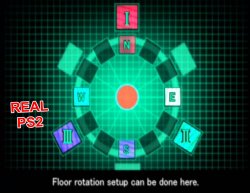
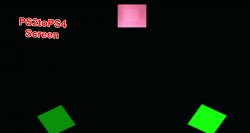
Fix for Galerians Ash NTSC
CLI
LUACode:--gs-uprender=2x2 --gs-upscale=EdgeSmooth --gs-adaptive-frameskip=1 --vif-ignore-invalid-cmd=0 --vif1-ignore-cmd-ints=1 --vif1-instant-xfer=0 --ee-jit-pagefault-threshold=30 --lopnor-config=1 --ee-cycle-scalar=2.0
Code:-- Galarians Ash NTSC -- emu used=jakx v2 local gpr = require("ee-gpr-alias") apiRequest(2.2) local eeObj = getEEObject() local emuObj = getEmuObject() local patcher = function() eeObj.WriteMem32(0x001e0100,0x3c013f40) -- 16:9 emuObj.ThrottleMax() -- Drastically reduces loading screens duration on most games end emuObj.AddVsyncHook(patcher)
emu used=jakx v2
Works Perfectly! More testing needed.
Attachments
Stayhye
Senior Member
Not so Perfectly as wish, but with GSDX Hardware Render looks really cool, but still some broken text, screen errors and graphical bugs In PAL version test! @mrjaredbeta was fix in game screens in ps3 version, probably it possible on ps4?
Do those glitches happen on NTSC? I didn't notice any on my tests.
Does anyone know how to extract codes from PS3 config to plain text to be converted to PS4 CLI/LUA?
Last edited:

mrjaredbeta
Developer
@Vika23 The config fixes the screens on PS3 and PCSX2. It looks like @Stayhye's fix uses the PS3 config through lopnor on NTSC, so the PAL version would work fine in theory. Also, @kozarovv fixed it, not me.
@Stayhye It's easy to do. You will need to switch endianness. For example, the Galerians: Ash NTSC config:
The 0x0A command on the first line (used for patching EE memory) uses 5 codes:
The first one is located on the second line and is a collection of 12 bytes in 4 byte segments:
First word (4 byte segment) is A8 12 1E 00. Switching the endianness will give you 001E12A8, which is the EE memory address where the instruction is being changed. The next word, 00 00 00 00, is the current instruction at that location (nop). The last word, 50 71 01 3C, is the instruction to replace the current instruction. Switching the endianness of that gives you 3C017150.
You can create a pnach code like so:
That's the PCSX2 pnach equivalent. You can easily move that to a PS4 WriteMem32 command. There is no need to use the current/original instruction at that address in these patches as it ignores it, but it would be required for an eeInsnReplace command.
The PS4 codes would be:
Maybe I messed up the endianness as I am doing this from memory, but it should be understandable at least. 
@Stayhye It's easy to do. You will need to switch endianness. For example, the Galerians: Ash NTSC config:
Code:
3D 00 00 00 11 11 00 00 0A 00 00 00 05 00 00 00
A8 12 1E 00 00 00 00 00 50 71 01 3C B0 12 1E 00
43 01 05 46 00 28 81 44 C8 12 1E 00 83 01 06 46
00 30 81 44 D8 12 1E 00 C3 01 07 46 00 38 81 44
E8 12 1E 00 03 00 01 46 00 00 81 44 00 00 00 00
The 0x0A command on the first line (used for patching EE memory) uses 5 codes:
Code:
0A 00 00 00 05 00 00 00The first one is located on the second line and is a collection of 12 bytes in 4 byte segments:
Code:
A8 12 1E 00 00 00 00 00 50 71 01 3CYou can create a pnach code like so:
Code:
patch=1,EE,001e12a8,word,3c017150The PS4 codes would be:
Code:
eeObj.WriteMem32(0x1e12a8,0x3c017150)

or

eeInsnReplace(0x1e12a8, 0x0, 0x3c017150)
Last edited:
Vika23
Senior Member
yes i test NTSC and it no have text and broken screens tooDo those glitches happen on NTSC? I didn't notice any on my tests.
Does anyone know how to extract codes from PS3 config to plain text to be converted to PS4 CLI/LUA?
Stayhye
Senior Member
I would have to check(play further). but you can try to add:
Code:
--gs-use-clut-merge=1
--gs-kernel-cl="clutmerge"
--gs-kernel-cl-up="clutmerge2x2"
Code:
--gs-kernel-cl="mipmap"
--gs-kernel-cl-up="mipmap2x2"
--gs-use-mipmap=1
in CLI. Let me know if it worked
Vika23
Senior Member
not worked, even stay more badI would have to check(play further). but you can try to add:
orCode:--gs-use-clut-merge=1 --gs-kernel-cl="clutmerge" --gs-kernel-cl-up="clutmerge2x2"
Code:--gs-kernel-cl="mipmap" --gs-kernel-cl-up="mipmap2x2" --gs-use-mipmap=1
in CLI. Let me know if it worked
Attachments

Vika23
Senior Member
The Truth is Out There (c) X-Files
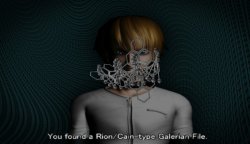
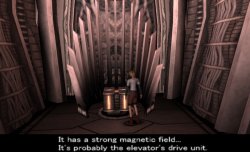
test alot, tired and....found @kozarovv old lua for PAL version of Galerians Ash and it fix all - animation, text, and screens
apiRequest(0.1)
-- Floating points hack
eeInsnReplace(0x1e7130, 0x00000000, 0x3c017140)
eeInsnReplace(0x1e7138, 0x46050143, 0x44812800)
eeInsnReplace(0x1e7150, 0x46060183, 0x44813000)
eeInsnReplace(0x1e7160, 0x460701C3, 0x44813800)
eeInsnReplace(0x1e7170, 0x46010003, 0x44810000)
test alot, tired and....found @kozarovv old lua for PAL version of Galerians Ash and it fix all - animation, text, and screens
apiRequest(0.1)
-- Floating points hack
eeInsnReplace(0x1e7130, 0x00000000, 0x3c017140)
eeInsnReplace(0x1e7138, 0x46050143, 0x44812800)
eeInsnReplace(0x1e7150, 0x46060183, 0x44813000)
eeInsnReplace(0x1e7160, 0x460701C3, 0x44813800)
eeInsnReplace(0x1e7170, 0x46010003, 0x44810000)
Attachments
Last edited:

Yuria
Forum Noob
hiya im about 99% in Batman vengeance rev 1 with the jack v2 emu. i just get a minor drop with slowdown in music any help how to fix would be apricated.also dont know if i need to say im running ps4 pro 9.00 genb2
--fpu-no-clamping=1
--fpu-clamp-results=1
--vu0-no-clamping=0
--vu0-clamp-results=1
--vu1-no-clamping=0
--vu1-clamp-results=1
--cop2-no-clamping=0
--cop2-clamp-results=1
--vu0-opt-flags=1
--vu1-opt-flags=1
--cop2-opt-flags=1
--vu0-const-prop=0
--vu1-const-prop=0
--vu1-jr-cache-policy=newprog
--vu1-jalr-cache-policy=newprog
--vu0-jr-cache-policy=newprog
--vu0-jalr-cache-policy=newprog
--gs-use-clut-merge=1
--gs-kernel-cl="clutmerge"
--gs-kernel-cl-up="clutmerge2x2"
--gs-use-clut-merge=1
--gs-optimize-30fps=1
--fpu-no-clamping=1
--fpu-clamp-results=1
--vu0-no-clamping=0
--vu0-clamp-results=1
--vu1-no-clamping=0
--vu1-clamp-results=1
--cop2-no-clamping=0
--cop2-clamp-results=1
--vu0-opt-flags=1
--vu1-opt-flags=1
--cop2-opt-flags=1
--vu0-const-prop=0
--vu1-const-prop=0
--vu1-jr-cache-policy=newprog
--vu1-jalr-cache-policy=newprog
--vu0-jr-cache-policy=newprog
--vu0-jalr-cache-policy=newprog
--gs-use-clut-merge=1
--gs-kernel-cl="clutmerge"
--gs-kernel-cl-up="clutmerge2x2"
--gs-use-clut-merge=1
--gs-optimize-30fps=1
Vika23
Senior Member
KOF 2000 emu help with music sometimehiya im about 99% in Batman vengeance rev 1 with the jack v2 emu. i just get a minor drop with slowdown in music any help how to fix would be apricated.also dont know if i need to say im running ps4 pro 9.00 genb2
--fpu-no-clamping=1
--fpu-clamp-results=1
--vu0-no-clamping=0
--vu0-clamp-results=1
--vu1-no-clamping=0
--vu1-clamp-results=1
--cop2-no-clamping=0
--cop2-clamp-results=1
--vu0-opt-flags=1
--vu1-opt-flags=1
--cop2-opt-flags=1
--vu0-const-prop=0
--vu1-const-prop=0
--vu1-jr-cache-policy=newprog
--vu1-jalr-cache-policy=newprog
--vu0-jr-cache-policy=newprog
--vu0-jalr-cache-policy=newprog
--gs-use-clut-merge=1
--gs-kernel-cl="clutmerge"
--gs-kernel-cl-up="clutmerge2x2"
--gs-use-clut-merge=1
--gs-optimize-30fps=1

ANGO
Member
Solved! Used "Rogue Galaxy 1.01" emuSome games are only running with ROGUE v2 emu.
But every game I start with ROGUE v2 emu I got this Video Recording error:

How do I get rid of this message?
Similar threads
-
-
-
PS4 How to play multiplayer (3-4 players) using PSX-FPKG?
- Started by PSXP_Kira
- Replies: 2
-
 PS3 [PS2] Gundam Warriors 2 FPU rounding fix
- Started by Low_Plankton_3329
- Replies: 0