Stayhye
Senior Member
not yetany fix for budokai 3 collectors edition for freezing in world tournament and few other stages

not yetany fix for budokai 3 collectors edition for freezing in world tournament and few other stages


yes work very good! thanks for configs!Final Fix for The Simpsons Hit and Run NTSC
CLI
LUACode:--gs-uprender=2x2 --gs-upscale=edgesmooth --gs-kernel-cl="h2lpool" --gs-kernel-cl-up="h2lpool2x2" --gs-progressive=1 --ee-cycle-scalar=2.89
Code:-- The Simpsons - Hit & Run (NTSC-U) -- Widescreen hack by ElHecht -- ported to PS4 -- emu used=eternal ring v2 local gpr = require("ee-gpr-alias") apiRequest(1.5) local eeObj = getEEObject() local emuObj = getEmuObject() emuObj.ForceRefreshRate(60) emuObj.SetDisplayAspectWide() local patcher = function() -- 16:9 ver eeObj.WriteMem32(0x00138a88,0x00000000) -- 10400005 eeObj.WriteMem32(0x0014b360,0x00000000) -- 10400004 eeObj.WriteMem32(0x0014b364,0x00000000) -- 10400004 eeObj.WriteMem32(0x002a0b38,0x00000000) -- 10400004 eeObj.WriteMem32(0x0031c888,0x00000000) -- 10400004 eeObj.WriteMem32(0x0031d674,0x00000000) -- 10400004 ---------CHEATS------------------------- --Have All Levels Complete by Code Master eeObj.WriteMem32(0x005E6CF0,0x00000006) eeObj.WriteMem32(0x005E6CF4,0x00000006) --Have Movie by Code Master eeObj.WriteMem32(0x005E5E0C,0x00000001) --Have All Wasp Cameras by Code Master eeObj.WriteMem32(0x005E5E18,0x00000014) --Have All Gags by Code Master eeObj.WriteMem32(0x005E5E2C,0x0000000F) emuObj.ThrottleMax() end emuObj.AddVsyncHook(patcher) -- Apply light maps texMode=2 (bilinear) psm= SCE_GS_PSMCT32 (0) emuObj.SetGsTitleFix( "forceSimpleFetch", "reserved", {tw=8, th=8, psm=0, ztst=1, texMode=2 } )
emu used=eternal ring v2
Works Perfectly! Better framerate and faster load times than original fix!
any chance this new fix can help with X-men legends 2 since its also suffer of performance issue??Updated fix for Urban Chaos Riot Response. Much, much better framerate by porting @mrjaredbeta fixes from ps3
https://www.psx-place.com/threads/r...nfiguration-on-ps4.16131/page-123#post-319739
any chance this new fix can help with X-men legends 2 since its also suffer of performance issue??
Thank you,but am still trying to figure out how to make config.selfdoubtful. But you are welcome to try some of those commands with X-men
Sorry i ment cli.confconfig.self?
can i also add the lua file normaly like i do with the cli(using ps2 fpkg by jabu) i didn't try this one yet, too spooky for me looolCLI commands work in both *.conf and config-emu-ps4.txt
I have never used that tool, so I couldn't saycan i also add the lua file normaly like i do with the cli(using ps2 fpkg by jabu) i didn't try this one yet, too spooky for me loool

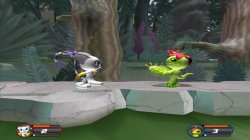
Yeah, I don't think this can be fixed. And it's not that bad. At least the game is not freezing on PS4.is there a fix to fix the shaders in digimon rumble arena 2
i did the fpu fix for menu .
but some of the models look a bit off like gatomons jaw is a dark whitish
Scarface boots fine here using Jak X v2. But of course the disappearing textures are still present.
@nifengyuexia thank you! That is literally one of my favorite series Great work! What emu did you use?
ThanxI have never used that tool, so I couldn't say
SetUprenderMode
SetUpscaleMode--gs-progressive=1does the 480p code work on the unsupported games?Not through CLI, but through LUA(api 2.2 or higher?Lower?) we have:
Code:SetUprenderMode SetUpscaleMode
gsObj.SetUprenderMode( ) --- I can't figure out the syntax though. I think this is the only way to get higher than 2x2
In CLI you can force 480p with:
Code:--gs-progressive=1