PS4 [Research]PS2 emulator configuration on PS4

Sorry, I do not use that program. I wouldn't know the first thing about it. But, the Armored Core 3 files are not emulator files, they are config files for said game to use WITH psychonauts emu.
I see, looks like I my first mistake was the program to use. What program do you use?
 
Improvement/Fix+Godmode toggle for Without Warning (NTSC)

CLI
Code:
--gs-uprender=2x2
--gs-upscale=EdgeSmooth

--host-display-mode=16:9
--cdvd-sector-read-cycles=2000

#emu used=aofa
LUA
Code:
-- Without Warning (SLUS)
-- Widescreen hack by nemesis2000 @PCSX2 forums
-- 60 fps by asasega @PCSX2 forums
-- emu used=aofa

local gpr = require("ee-gpr-alias")

apiRequest(0.4)

local eeObj = getEEObject()
local emuObj = getEmuObject()

--16:9 (crashes emu if used as WriteMem32)
eeInsnReplace(0x001486fc, 0x00000000, 0x3c013f40)
eeInsnReplace(0x00148700, 0x3c013f40, 0x44810800)
eeInsnReplace(0x00148704, 0x44810000, 0x27bdffe0)
eeInsnReplace(0x00148708, 0x27bdffe0, 0x3c04004b)
eeInsnReplace(0x0014870c, 0x3c04004b, 0x8c848318)
eeInsnReplace(0x00148710, 0x8c848318, 0x03a0282d)
eeInsnReplace(0x00148714, 0x03a0282d, 0x46016002)
eeInsnReplace(0x00148718, 0x46006002, 0x46016303)

eeInsnReplace(0x00148368, 0x0c0521c0, 0x0c0521bf)
eeInsnReplace(0x00197ddc, 0x0c0521c0, 0x0c0521bf)
eeInsnReplace(0x00197df8, 0x0c0521c0, 0x0c0521bf)

--black borders fix
eeInsnReplace(0x0017f75c, 0x3c014260, 0x3c013f80)

local patcher = function()
--God Mode by Code Master, Lajos Szalay

-- God Mode Toggle
local pad_bits    = emuObj.GetPad()

local UP  = pad_bits &  0x0010
local DOWN  = pad_bits &  0x0040
local LEFT  = pad_bits &  0x0080
local RIGHT  = pad_bits &  0x0020
local Triangle = pad_bits &  0x1000
local Cross  = pad_bits &  0x4000
local Square  = pad_bits &  0x8000
local Circle  = pad_bits &  0x2000
local L1  = pad_bits &  0x0400
local L2  = pad_bits &  0x0100
local L3  = pad_bits &  0x0002
local R1  = pad_bits &  0x0800
local R2  = pad_bits &  0x0200
local R3  = pad_bits &  0x0004
local Select  = pad_bits &  0x0001
local Start  = pad_bits &  0x0008

if (L1 ~= 0 and Select ~= 0) then -- normal
  eeObj.WriteMem32(0x004A5A8B,0x00000000) -- normal man
end

if (R1 ~= 0 and Select ~= 0) then -- god
   eeObj.WriteMem32(0x004A5A8B,0x00000001) -- god-like entity
end
--- 60FPS enable
--60 fps -- Notes: activate ingame, title menu freezes for whatever reason, probably because of the fmv played in the background
if (R3 ~= 0 and Select ~= 0) then
   eeObj.WriteMem32(0x004A749C,0x00000001) -- 60fps
end

emuObj.ThrottleMax()
end

emuObj.AddVsyncHook(patcher)

Testers needed.


Can anyone help me ? I'm trying to fix Rayman 3: Hoodlum Havoc. Game Starts but After the First cutscene ends a Loading screen starts and after The loading screen Ends The Game Gets Black screen with nothing happening. First sequence Won't start. Tried many emus. Tried many configs. Jakv2 was most stable for me But nothing fixes the black screen

No luck with that one(yet) I'm afraid.

I see, looks like I my first mistake was the program to use. What program do you use?

I use the old fake-pkg-tools set. Google "fake pkg tools" There is nothing wrong with what you are using, most people here probably use Jabu's app as well.
 
Last edited:
@Stayhye

In your configuration Eragon NTSC

  • Widescreen patch makes the game crash... that's on the second mission.
  • The game already has widescreen, fullscreen and letterbox options.
  • In the second mission... it has graphical errors.


Fixed up

Cli NTSC
Code:
--gs-uprender=2x2
--gs-upscale=EdgeSmooth
--ee-cycle-scalar=1.65
--iop-cycle-scalar=0.8
--cdvd-sector-read-cycles=4000
--vu1-di-bits=0
--vu0-no-clamping=0                     # fix graphic in the second mission

Cli PAL
Code:
--gs-kernel-cl-up="up2x2simple"      # fix horizontal lines
--gs-uprender=2x2
--gs-upscale=EdgeSmooth
--ee-cycle-scalar=1.65
--iop-cycle-scalar=0.8
--cdvd-sector-read-cycles=4000
--vu1-di-bits=0
--vu0-no-clamping=0                     # fix graphic in the second mission

LUA
Code:
local gpr = require("ee-gpr-alias")

apiRequest(2.0)

local eeObj    = getEEObject()
local emuObj    = getEmuObject()

local patcher = function()

eeObj.SchedulerDelayEvent("vif1.dma", 0x1500)

emuObj.ThrottleMax()
end

emuObj.AddVsyncHook(patcher)


EMU aofa
 
Last edited:
Improvement/Fix+Cheats for Battlestar Galactica (NTSC-U)

CLI
Code:
--gs-uprender=2x2
--gs-upscale=edgesmooth

--gs-progressive=1
--cdvd-sector-read-cycles=6000

#emu used=rotk v1
LUA
Code:
-- Battlestar Galactica (NTSC-U)
-- Widescreen Hack
-- emu used=rotk v1

local gpr = require("ee-gpr-alias")

apiRequest(0.1)

local eeObj = getEEObject()
local emuObj = getEmuObject()

emuObj.SetDisplayAspectWide()

--16:9 A
eeInsnReplace(0x00102354, 0x3c013f99, 0x3c013f66)  --gameplay hor
eeInsnReplace(0x00102358, 0x3421999a, 0x34216666)

local patcher = function()
--16:9 B
eeObj.WriteMem32(0x001cb3a0,0x3c013f66) --menu
eeObj.WriteMem32(0x001cb3a4,0x34216666)
--60 fps
eeObj.WriteMem32(0x20342CE0,0x00000001)
--Unlock: Renders by MadCatz
eeObj.WriteMem32(0x0031B6FD,0x0000001A)
--Unlock: Concepts by MadCatz
eeObj.WriteMem32(0x0031B6FE,0x0000001D)
--Unlock: Model Viewer by MadCatz
eeObj.WriteMem32(0x0031B6FC,0x00000014)
--Unlock: Series Links by MadCatz
eeObj.WriteMem32(0x0031B6FF,0x0000000A)
--Unlock: Outtakes by MadCatz
eeObj.WriteMem32(0x0031B700,0x00000003)
--Unlock: Movies by MadCatz
eeObj.WriteMem32(0x0031B445,0x0000000F)
--Unlock: Characters by MadCatz
eeObj.WriteMem32(0x0031B701,0x00000010)

emuObj.ThrottleMax()
end

emuObj.AddVsyncHook(patcher)

Works better than PAL version! 60fps + cheats added. Feedback welcome.
 
Last edited:
Also maybe you ever before test - Knight Rider The Game (SLES51011) ?
It always was have same kind bugs as in terminator, car not show up and invisible!

I tested it with Rise of the Kasai v1, no glitches. Also, no widescreen patch used. Widescreen patch for Knight Rider crashes emus for me.
 
WIP Fix+Improvements for Knight Rider (SLES-51011)

CLI
Code:
--gs-uprender=2x2
--gs-upscale=EdgeSmooth

--host-display-mode=16:9
--cdvd-sector-read-cycles=2000

#emu used=rotk v1
LUA
Code:
-- Knight Rider (PAL-M4)(SLES-51011)
-- Widescreen Fix by ThirteenAG
-- ported to PS4
-- emu used=rotk v1

apiRequest(0.1)

local gpr       = require("ee-gpr-alias")

local emuObj      = getEmuObject()
local eeObj       = getEEObject()

--math.random() + math.random(1, 99)

local patch = function()

-- Widescreen Selector
local pad_bits    = emuObj.GetPad()

local UP  = pad_bits &  0x0010
local DOWN  = pad_bits &  0x0040
local LEFT  = pad_bits &  0x0080
local RIGHT  = pad_bits &  0x0020
local Triangle = pad_bits &  0x1000
local Cross  = pad_bits &  0x4000
local Square  = pad_bits &  0x8000
local Circle  = pad_bits &  0x2000
local L1  = pad_bits &  0x0400
local L2  = pad_bits &  0x0100
local L3  = pad_bits &  0x0002
local R1  = pad_bits &  0x0800
local R2  = pad_bits &  0x0200
local R3  = pad_bits &  0x0004
local Select  = pad_bits &  0x0001
local Start  = pad_bits &  0x0008

if (L1 ~= 0 and R3 ~= 0) then --Normal Screen
--4:3
eeObj.WriteMem32(0x003E3600, 0x3c023faa)
eeObj.WriteMem32(0x003E3604, 0x3443aaab)
eeObj.WriteMem32(0x003EB864, 0x3c023faa)
eeObj.WriteMem32(0x003EB868, 0x3442aaab)
eeObj.WriteMem32(0x00444108, 0x3faaaaab)
eeObj.WriteMem32(0x003EB910, 0x3c023c0e)
eeObj.WriteMem32(0x003EB914, 0x3442fa36)
emuObj.SetDisplayAspectNormal()
end

if (L2 ~= 0 and R3 ~= 0) then --Widescreen Screen
--16:9
eeObj.WriteMem16(0x003E3600, 0x3FE3)
eeObj.WriteMem16(0x003E3604, 0x8E39)
eeObj.WriteMem16(0x003EB864, 0x3FE3)
eeObj.WriteMem16(0x003EB868, 0x8E39)
eeObj.WriteMem16(0x003EB910, 0x3C2C)
eeObj.WriteMem16(0x003EB914, 0x52D4)
eeObj.WriteMem32(0x00444108, 0x3FE38E39)
emuObj.SetDisplayAspectWide()
end

emuObj.ThrottleMax()
end

emuObj.AddVsyncHook(patch)

Works great. Tested a little. Widescreen works. 14:9 and 4:3 switch added

*Edit - apparently some missing graphics still exist on some stages. Looking for a solution.
 
Last edited:
WIP Fix for Knight Rider 2 PAL

CLI
Code:
--gs-uprender=2x2
--gs-upscale=EdgeSmooth

--host-display-mode=16:9
--cdvd-sector-read-cycles=2000

#emu used=rotk v1
LUA
Code:
-- Knight Rider 2
-- Widescreen Fix by ThirteenAG
-- ported to PS4
-- emu used=rotk v1

apiRequest(0.1)

local gpr       = require("ee-gpr-alias")

local emuObj      = getEmuObject()
local eeObj       = getEEObject()

local patch = function()
eeObj.WriteMem16(0x0017F1EC,0x3FE3)
eeObj.WriteMem16(0x0017F204,0x8E39)

eeObj.WriteMem16(0x001B8E08,0x3FE3)
eeObj.WriteMem16(0x001B8E20,0x8E39)

eeObj.WriteMem16(0x00457740,0x3FE3)
eeObj.WriteMem16(0x00457744,0x8E39)

eeObj.WriteMem16(0x004606F4,0x3FE3)
eeObj.WriteMem16(0x00460704,0x8E39)

eeObj.WriteMem16(0x004F18AC,0x3FE3)
eeObj.WriteMem16(0x004F18C4,0x8E39)

eeObj.WriteMem16(0x004F196C,0x3FE3)
eeObj.WriteMem16(0x004F1984,0x8E39)

eeObj.WriteMem16(0x004F471C,0x3FE3)
eeObj.WriteMem16(0x004F4724,0x8E39)

eeObj.WriteMem16(0x004F5BD0,0x3FE3)
eeObj.WriteMem16(0x004F5BD8,0x8E39)

eeObj.WriteMem16(0x004F6F78,0x3FE3)
eeObj.WriteMem16(0x004F6F7C,0x8E39)

eeObj.WriteMem16(0x00505CEC,0x3FE3)
eeObj.WriteMem16(0x00505D04,0x8E39)

eeObj.WriteMem16(0x00506220,0x3FE3)
eeObj.WriteMem16(0x00506238,0x8E39)

eeObj.WriteMem16(0x004607B0,0x3C2C)
eeObj.WriteMem16(0x004607B8,0x52D4)

--PAL2NTSC by lee4
eeObj.WriteMem32(0x20250EA0,0x34050002)
eeObj.WriteMem32(0x20250EA4,0x24030002)
eeObj.WriteMem32(0x20250EA8,0x0000000C)
eeObj.WriteMem32(0x20250EAC,0x03E00008)

--Open Everything by Datel
eeObj.WriteMem32(0x005B478D,0x00000001)

emuObj.ThrottleMax()
end

emuObj.AddVsyncHook(patch)

*Edit - apparently some missing graphics still exist on some stages. Looking for a solution.

How to play urban reign 4 players
Unknown at the moment. Multitap command when enabled does not work(and disables player 2) for this game
 
Last edited:
Fix+Improvements for Knight Rider (SLES-51011)

CLI
Code:
--gs-uprender=2x2
--gs-upscale=EdgeSmooth

--host-display-mode=16:9
--cdvd-sector-read-cycles=2000

#emu used=rotk v1
LUA
Code:
-- Knight Rider (PAL-M4)(SLES-51011)
-- Widescreen Fix by ThirteenAG
-- ported to PS4
-- emu used=rotk v1

apiRequest(0.1)

local gpr       = require("ee-gpr-alias")

local emuObj      = getEmuObject()
local eeObj       = getEEObject()

--math.random() + math.random(1, 99)

local patch = function()

-- Widescreen Selector
local pad_bits    = emuObj.GetPad()

local UP  = pad_bits &  0x0010
local DOWN  = pad_bits &  0x0040
local LEFT  = pad_bits &  0x0080
local RIGHT  = pad_bits &  0x0020
local Triangle = pad_bits &  0x1000
local Cross  = pad_bits &  0x4000
local Square  = pad_bits &  0x8000
local Circle  = pad_bits &  0x2000
local L1  = pad_bits &  0x0400
local L2  = pad_bits &  0x0100
local L3  = pad_bits &  0x0002
local R1  = pad_bits &  0x0800
local R2  = pad_bits &  0x0200
local R3  = pad_bits &  0x0004
local Select  = pad_bits &  0x0001
local Start  = pad_bits &  0x0008

if (L1 ~= 0 and R3 ~= 0) then --Normal Screen
--4:3
eeObj.WriteMem32(0x003E3600, 0x3c023faa)
eeObj.WriteMem32(0x003E3604, 0x3443aaab)
eeObj.WriteMem32(0x003EB864, 0x3c023faa)
eeObj.WriteMem32(0x003EB868, 0x3442aaab)
eeObj.WriteMem32(0x00444108, 0x3faaaaab)
eeObj.WriteMem32(0x003EB910, 0x3c023c0e)
eeObj.WriteMem32(0x003EB914, 0x3442fa36)
emuObj.SetDisplayAspectNormal()
end

if (L2 ~= 0 and R3 ~= 0) then --Widescreen Screen
--16:9
eeObj.WriteMem16(0x003E3600, 0x3FE3)
eeObj.WriteMem16(0x003E3604, 0x8E39)
eeObj.WriteMem16(0x003EB864, 0x3FE3)
eeObj.WriteMem16(0x003EB868, 0x8E39)
eeObj.WriteMem16(0x003EB910, 0x3C2C)
eeObj.WriteMem16(0x003EB914, 0x52D4)
eeObj.WriteMem32(0x00444108, 0x3FE38E39)
emuObj.SetDisplayAspectWide()
end

emuObj.ThrottleMax()
end

emuObj.AddVsyncHook(patch)

Works great. Tested a little. Widescreen works. 14:9 and 4:3 switch added
thanks i try test later
 
Improvement/Fix for Dragon's Lair 3D - Special Edition (SLES-51696)

CLI
Code:
--gs-uprender=2x2
--gs-upscale=motionvector

--cdvd-sector-read-cycles=4000

--iop-cycle-scalar=0.4
--ee-cycle-scalar=0.35

--vu1-jr-cache-policy=auto
--vu1-mpg-cycles=50

#emu used=aofa
LUA
Code:
-- Dragon's Lair 3D - Special Edition (E)(SLES-51696)
-- Widescreen hack by Arapapa
--PAL2NTSC by jay-jay
-- emu used=aofa

apiRequest(1.0)

local gpr = require("ee-gpr-alias")

local eeObj = getEEObject()
local emuObj = getEmuObject()

--Y-Fix
eeInsnReplace(0x00154ca4, 0x24420032, 0x00000010)
eeInsnReplace(0x00154d14, 0x24630019, 0x00000010)
eeInsnReplace(0x00154d58, 0x24420048, 0x00000010)
eeInsnReplace(0x00154de4, 0x24630024, 0x00000010)

local patcher = function()
--16:9
eeObj.WriteMem32(0x00243000,0x3c023fe3) --3c023faa
eeObj.WriteMem32(0x00243004,0x34428e39) --3442aaab
--PAL2NTSC
eeObj.WriteMem32(0x201548E0,0x24120002)

emuObj.ThrottleMax()
end

emuObj.AddVsyncHook(patcher)

Feedback welcome.
 
Last edited:
Improvement/Fix for Dragon's Lair 3D - Special Edition (SLES-51696)

CLI
Code:
--gs-uprender=2x2
--gs-upscale=edgesmooth

--host-display-mode=16:9
--cdvd-sector-read-cycles=2000

#emu used=ADK
LUA
Code:
-- Dragon's Lair 3D - Special Edition (E)(SLES-51696)
-- Widescreen hack by Arapapa
-- PAL2NTSC/Y-Fix by Jay-Jay
-- emu used=ADK

apiRequest(1.0)

local gpr = require("ee-gpr-alias")

local eeObj = getEEObject()
local emuObj = getEmuObject()

local patcher = function()
--16:9
eeObj.WriteMem32(0x00243000,0x3c023fe3) --3c023faa
eeObj.WriteMem32(0x00243004,0x34428e39) --3442aaab
--PAL2NTSC
eeObj.WriteMem32(0x201548E0,0x24120002)
--Y-Fix
eeObj.WriteMem32(0x00154ca4,0x00000010)
eeObj.WriteMem32(0x00154d14,0x00000010)
eeObj.WriteMem32(0x00154d58,0x00000010)
eeObj.WriteMem32(0x00154de4,0x00000010)

emuObj.ThrottleMax()
end

emuObj.AddVsyncHook(patcher)
Feedback welcome.
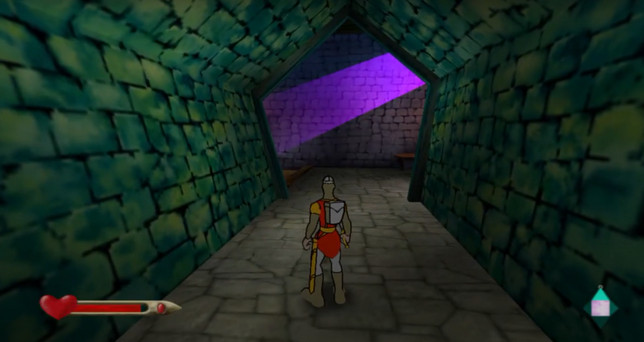
widescreen have also in options but thanks anyway, did u test notice slow framerate on some stages?
 
Improvement/Fix for Dragon's Lair 3D - Special Edition (SLES-51696)

CLI
Code:
--gs-uprender=2x2
--gs-upscale=edgesmooth

--host-display-mode=16:9
--cdvd-sector-read-cycles=2000

#emu used=ADK
LUA
Code:
-- Dragon's Lair 3D - Special Edition (E)(SLES-51696)
-- Widescreen hack by Arapapa
-- PAL2NTSC/Y-Fix by Jay-Jay
-- emu used=ADK

apiRequest(1.0)

local gpr = require("ee-gpr-alias")

local eeObj = getEEObject()
local emuObj = getEmuObject()

local patcher = function()
--16:9
eeObj.WriteMem32(0x00243000,0x3c023fe3) --3c023faa
eeObj.WriteMem32(0x00243004,0x34428e39) --3442aaab
--PAL2NTSC
eeObj.WriteMem32(0x201548E0,0x24120002)
--Y-Fix
eeObj.WriteMem32(0x00154ca4,0x00000010)
eeObj.WriteMem32(0x00154d14,0x00000010)
eeObj.WriteMem32(0x00154d58,0x00000010)
eeObj.WriteMem32(0x00154de4,0x00000010)

emuObj.ThrottleMax()
end

emuObj.AddVsyncHook(patcher)
Feedback welcome.
Freeze at ps2 logo with attached files
PIC.jpg


Then decide just add
Code:
--host-display-mode=16:9
--cdvd-sector-read-cycles=2000

Still nothing new from my tests before
Still slow framerate on this area!
PIC2.jpg
 
Hello, I'm new here, I want to share this fix here:


The Sims 2+cheats [SLES-53718]
emu=Jakxv2
Code:
--gs-uprender=2x2
--gs-upscale=edgesmooth
--host-display-mode=full
--safe-area-min=0.9
--vu0-no-clamping=0 -->flickering fix
--vu1-no-clamping=0 -->flickering fix
--gs-force-bilinear=1
--force-pal-60hz=1
Lua:
Code:
apiRequest(1.0)

local eeObj    = getEEObject()
local emuObj   = getEmuObject()
local patcher = function()
eeObj.WriteMem32(0x2052026c,0x000000d7)
end
emuObj.ThrottleFast()
emuObj.AddVsyncHook(patcher)


The Sims 2: Castaway [SLES-54903]
emu=Jak v2
Code:
--gs-uprender=2x2
--gs-upscale=edgesmooth
--host-display-mode=full
--safe-area-min=0.9
--vu0-no-clamping=0
--vu1-no-clamping=0
--gs-force-bilinear=1
Lua:
Code:
apiRequest(1.0)

local eeObj    = getEEObject()
local emuObj   = getEmuObject()
local patcher = function()
end
emuObj.ThrottleFast()
emuObj.AddVsyncHook(patcher)

The Sims 2: Pets [SLES-54347]
emu=Jakxv2
Code:
--gs-uprender=2x2
--gs-upscale=edgesmooth
--host-display-mode=full
--safe-area-min=0.9
--vu0-no-clamping=0
--vu1-no-clamping=0
--gs-force-bilinear=1
Lua:
Code:
apiRequest(1.0)

local eeObj    = getEEObject()
local emuObj   = getEmuObject()
local patcher = function()
end
emuObj.ThrottleFast()
emuObj.AddVsyncHook(patcher)

#The only problem are some black lines (can be fixed using bilinear in lua, but loses quality).
 
Last edited:
Hello, I'm new here, I want to share this fix here:


The Sims 2+cheats [SLES-53718]
Emu=Jakxv2

--gs-uprender=2x2
--gs-upscale=edgesmooth
--host-display-mode=full
--vu0-no-clamping=0 -->flickering fix
--vu1-no-clamping=0 -->flickering fix
--force-pal-60hz=1


Lua:
apiRequest(1.0)

local eeObj = getEEObject()
local emuObj = getEmuObject()
local patcher = function()
eeObj.WriteMem32(0x2052026c,0x000000d7)
end
emuObj.ThrottleFast()
emuObj.AddVsyncHook(patcher)


The Sims 2: Castaway [SLES-54903]
Emu=Jak v2

--gs-uprender=2x2
--gs-upscale=edgesmooth
--host-display-mode=full
--vu0-no-clamping=0
--vu1-no-clamping=0

Lua:
apiRequest(1.0)

local eeObj = getEEObject()
local emuObj = getEmuObject()
local patcher = function()
end
emuObj.ThrottleFast()
emuObj.AddVsyncHook(patcher)


The Sims 2: Pets [SLES-54347]
Emu=Jakxv2

--gs-uprender=2x2
--gs-upscale=edgesmooth
--host-display-mode=full
--vu0-no-clamping=0
--vu1-no-clamping=0


Lua:

apiRequest(1.0)

local eeObj = getEEObject()
local emuObj = getEmuObject()
local patcher = function()
end
emuObj.ThrottleFast()
emuObj.AddVsyncHook(patcher)


#The only problem are some black lines (can be fixed using bilinear in lua, but loses quality).
Very nice, i will try later!
 
Hello, I'm new here, I want to share this fix here:


The Sims 2+cheats [SLES-53718]
Emu=Jakxv2

--gs-uprender=2x2
--gs-upscale=edgesmooth
--host-display-mode=full
--vu0-no-clamping=0 -->flickering fix
--vu1-no-clamping=0 -->flickering fix
--force-pal-60hz=1


Lua:
apiRequest(1.0)

local eeObj = getEEObject()
local emuObj = getEmuObject()
local patcher = function()
eeObj.WriteMem32(0x2052026c,0x000000d7)
end
emuObj.ThrottleFast()
emuObj.AddVsyncHook(patcher)


The Sims 2: Castaway [SLES-54903]
Emu=Jak v2

--gs-uprender=2x2
--gs-upscale=edgesmooth
--host-display-mode=full
--vu0-no-clamping=0
--vu1-no-clamping=0

Lua:
apiRequest(1.0)

local eeObj = getEEObject()
local emuObj = getEmuObject()
local patcher = function()
end
emuObj.ThrottleFast()
emuObj.AddVsyncHook(patcher)


The Sims 2: Pets [SLES-54347]
Emu=Jakxv2

--gs-uprender=2x2
--gs-upscale=edgesmooth
--host-display-mode=full
--vu0-no-clamping=0
--vu1-no-clamping=0


Lua:

apiRequest(1.0)

local eeObj = getEEObject()
local emuObj = getEmuObject()
local patcher = function()
end
emuObj.ThrottleFast()
emuObj.AddVsyncHook(patcher)


#The only problem are some black lines (can be fixed using bilinear in lua, but loses quality).
What mean some black lines (can be fixed using bilinear in lua, but loses quality). what command is?
 

Similar threads

Back
Top