PS4 [Research]PS2 emulator configuration on PS4

Fix for Scarface - The World is Yours (NTSC)

CLI
Code:
--gs-uprender=2x2
--gs-upscale=edgesmooth
--gs-kernel-cl-up="up2x2skipinterp" #gfx fix A
--gs-motion-factor=30 #fps smoothing
--gs-optimize-30fps=1 #fps smoothing

--cdvd-sector-read-cycles=2000 # loading speedup

--vu1-di-bits=0 # micro freezing fix

--ee-cycle-scalar=0.75
--iop-cycle-scalar=0.75 # input response increase

--vu1-jr-cache-policy=newprog  # stutter fix
--vu1-jalr-cache-policy=newprog  # stutter fix

#emu used=star ocean v2

LUA

Code:
-- Scarface - The World is Yours (NTSC)
-- speed fix by Agrippa & Kozarovv
-- graphical issues fix by kozarovv
-- ported to PS4 lua by Stayhye
-- emu used=star ocean v2

apiRequest(0.1)

local cpr       = require("ee-cpr0-alias")

local emuObj      = getEmuObject()
local eeObj       = getEEObject()

emuObj.SetFormattedCard("scarface.card")
emuObj.SetDisplayAspectWide()

--PS3 config(speed up)
eeInsnReplace(0x00643790, 0xc4810020, 0x03e00008) -- pop ins might be more distracting.
eeInsnReplace(0x00643794, 0x3c033f80, 0x00000000)
eeInsnReplace(0x0064292c, 0x45010012, 0x10000012) -- This patch would affect the smaller objects also (e.g. stillages).
eeInsnReplace(0x0050ffa0, 0x3c034320, 0x3c034220)
eeInsnReplace(0x0050ff50, 0x3c033f80, 0x3c033f00)

local gfx_fix = function()
--[[ Kozarovv's Notes:
after some reversing i noticed that Scarface don't use VU1 to draw road terrain. This patch in theory force rendering to be done.
--]]
--graphics fix C
eeObj.WriteMem32(0x004F4D8C,0x10000003)
eeObj.WriteMem32(0x004F4F34,0x00000000)
eeObj.WriteMem32(0x004F4F58,0x10000007)
--60 fps by asasega
--eeObj.WriteMem32(0x20DAFABC,0x00000000) -- breaks uprender and FPS

   if eeObj.ReadMem16(0x1B99E0, 0xE614) then
     eeObj.WriteMem32(0x001B90DC,0x00000000) -- bloom backbuffer
     eeObj.WriteMem32(0x001B8B88,0x00000000) -- MotionBlurEnable
     eeObj.WriteMem32(0x001B9318,0x00000000) -- MipMapLevel
 
   end
 
eeObj.Vu1MpgCycles(375) -- Helps FPS and removes stutter
--emuObj.ThrottleMax() -- not supported by Star Ocean 3 emu
end

emuObj.AddVsyncHook(gfx_fix)

-- Uprender/Upscale fix
emuObj.SetGsTitleFix( "globalSet",  "reserved", { waveThreshold = 90000} ) -- removes even more stutter
emuObj.SetGsTitleFix( "ignoreAreaUpdate", 0, { } )
emuObj.SetGsTitleFix( "forceSimpleFetch",  "reserved", {psm=0} )
emuObj.SetGsTitleFix( "fetchFromCurrBuff", "reserved", {psm=0} )


Total fix! Almost perfect! Probably can still be tweaked to remove remaining stutter. Big Thanks to @kozarovv for final graphics fix.
 
Last edited:
Fix for Scarface - The World is Yours (NTSC)

CLI
Code:
--gs-uprender=2x2
--gs-upscale=edgesmooth
--gs-kernel-cl-up="up2x2skipinterp" #gfx fix A
--gs-motion-factor=30 #fps smoothing
--gs-optimize-30fps=1 #fps smoothing

--cdvd-sector-read-cycles=2000 # loading speedup

--vu1-di-bits=0 # micro freezing fix

--ee-cycle-scalar=0.8
--iop-cycle-scalar=0.7 # input response increase

--vif-thread-chunk-size=512

--vu1-jr-cache-policy=newprog  # stutter fix
--vu1-jalr-cache-policy=newprog  # stutter fix

#emu used=star ocean v2

LUA

Code:
-- Scarface - The World is Yours (NTSC)
-- speed fix by Agrippa & Kozarovv
-- graphical issues fix by kozarovv
-- ported to PS4 lua by Stayhye
-- emu used=star ocean v2

apiRequest(0.1)

local cpr       = require("ee-cpr0-alias")

local emuObj      = getEmuObject()
local eeObj       = getEEObject()

emuObj.SetFormattedCard("scarface.card")
emuObj.SetDisplayAspectWide()

--PS3 config(speed up)
eeInsnReplace(0x00643790, 0xc4810020, 0x03e00008) -- pop ins might be more distracting.
eeInsnReplace(0x00643794, 0x3c033f80, 0x00000000)
eeInsnReplace(0x0064292c, 0x45010012, 0x10000012) -- This patch would affect the smaller objects also (e.g. stillages).
eeInsnReplace(0x0050ffa0, 0x3c034320, 0x3c034220)
eeInsnReplace(0x0050ff50, 0x3c033f80, 0x3c033f00)

local gfx_fix = function()
--[[ Notes:
after some reversing i noticed that Scarface don't use VU1 to draw road terrain. This patch in theory force rendering to be done.
--]]
--graphics fix C
eeObj.WriteMem32(0x004F4D8C,0x10000003)
eeObj.WriteMem32(0x004F4F34,0x00000000)
eeObj.WriteMem32(0x004F4F58,0x10000007)
--60 fps by asasega
--eeObj.WriteMem32(0x20DAFABC,0x00000000) -- breaks uprender and FPS

   if eeObj.ReadMem16(0x1B99E0, 0xE614) then
     eeObj.AdvanceClock(500)
     eeObj.WriteMem32(0x001B90DC,0x00000000) -- bloom backbuffer
     eeObj.WriteMem32(0x001B8B88,0x00000000) -- MotionBlurEnable
     eeObj.WriteMem32(0x001B9318,0x00000000) -- MipMapLevel
 
   end
 
eeObj.Vu1MpgCycles(360) -- Helps FPS and removes stutter
--emuObj.ThrottleMax() -- not supported by Star Ocean 3 emu
end

emuObj.AddVsyncHook(gfx_fix)

-- Uprender/Upscale fix
emuObj.SetGsTitleFix( "ignoreAreaUpdate", 0, { } )
emuObj.SetGsTitleFix( "forceSimpleFetch",  "reserved", {psm=0} )
emuObj.SetGsTitleFix( "fetchFromCurrBuff", "reserved", {psm=0} )


--[[
FogStart
001B8920
 
FogEnd
001B894C
 
FogColor_Red
001B8978
 
FogColor_Green
001B89A4
 
FogColor_Blue
001B89D0
 
FogColor_Alpha
001B89FC
 
FogEnabled
001B8A28
 
FogClamp
001B8A54
 
DOFFocusDist
001B8A80
 
DOFPercentBlur
001B8AAC
 
DOFColor_Red
001B8AD8
 
DOFColor_Green
001B8B04
 
DOFColor_Blue
001B8B30
 
DOFEnabled
001B8B5C
 
MotionBlurEnable
001B8B88
 
MotionBlurDebugEnable
001B8BB4
 
MotionBlurRadialSubdivide
001B8BE0
 
MotionBlurDepthSubdivide
001B8C0C
 
MotionBlurAlphaCenter
001B8C38
 
MotionBlurAlphaInner
001B8C64
 
MotionBlurAlphaOuter
001B8C90
 
MotionBlurRadiusInner
001B8CBC
 
MotionBlurRadiusOuter
001B8CE8
 
MotionBlurZoomInner
001B8D14
 
MotionBlurZoomOuter
001B8D40
 
MotionBlurBrightnessCenter
001B8D6C
 
MotionBlurBrightnessInner
001B8D98
 
MotionBlurBrightnessOuter
001B8DC4
 
ColourFX_Enable
001B8DF0
 
ColourFX_Saturation
001B8E1C
 
ColourFX_Brightness
001B8E48
 
ColourFX_Contrast
001B8E74
 
ColourFX_MidPoint
001B8EA0
 
ColourFX_Tint_R
001B8ECC
 
ColourFX_Tint_G
001B8EF8
 
ColourFX_Tint_B
001B8F24
 
Bloom_Enable
001B8F50
 
Bloom_Weights_R
001B8F7C
 
Bloom_Weights_G
001B8FA8
 
Bloom_Weights_B
001B8FD4
 
Bloom_Brightness
001B9000
 
Bloom_Contrast
001B902C
 
Bloom_MidPoint
001B9058
 
Bloom_Radius
001B9084
 
Bloom_Value
001B90B0
 
Bloom_BackBuffer
001B90DC
 
Bloom_Tint_R
001B9108
 
Bloom_Tint_G
001B9134
 
Bloom_Tint_B
001B9160
 
ShadowColor_R
001B918C
 
ShadowColor_G
001B91B8
 
ShadowColor_B
001B91E4
 
ShadowColor_A
001B9210
 
RoadSepcularIntensity_R
001B923C
 
RoadSepcularIntensity_G
001B9268
 
RoadSepcularIntensity_B
001B9294
 
RoadSepcularPower
001B92C0
 
RoadSepcularIntensity
001B92EC
 
MipMapLevel
001B9318
 
LensFlareFadeLevel
001B9344
 
CbvLitBlendValue
001B9370
 
WindowReflectionIntensityR
001B939C
 
WindowReflectionIntensityG
001B93C8
 
WindowReflectionIntensityB
001B93F4
 
WindowSpecularIntensityR
001B9420
 
WindowSpecularIntensityG
001B944C
 
WindowSpecularIntensityB
001B9478
 
WindowSpecularPower
001B94A4
 
WindowTilingScaler
001B94D0
 
Window_EnableDebugMode
001B94FC
 
PrelitLuminance_R
001B9528
 
PrelitLuminance_G
001B9554
 
PrelitLuminance_B
001B9580
 
SFX_PrelitLuminance_R
001B95AC
 
SFX_PrelitLuminance_G
001B95D8
 
SFX_PrelitLuminance_B
001B9604
 
WindDirectionAngle
001B9630
 
WindStrength
001B965C
 
LODRedScaler
001B9688
 
LODGreenScaler
001B96B4
 
LODBlueScaler
001B96E00

--]]


Total fix! Almost perfect! Probably can still be tweaked to remove remaining stutter. Big Thanks to @kozarovv for final graphics fix.

Are You Maker Hitman Contracts fix crashes while loading.

Pnach Code!

Hitman - Contracts - SLUS_20882

Widescreen hack by ElHecht
60FPS by asasega

=========================

// Widescreen 16:9
patch=1,EE,002659d8,word,3c013f10 // 3c013f40 ver fov
patch=1,EE,001c8300,word,3c1b3f40 // 1060006e zoom
patch=1,EE,001c8304,word,1060006d // ae220044
patch=1,EE,001c8308,word,ae220044 // c6200038
patch=1,EE,001c830c,word,c6200038 // 3c013f80
patch=1,EE,001c8310,word,3c013f80 // 4481a000
patch=1,EE,001c8314,word,4481a000 // 46140032
patch=1,EE,001c8318,word,46140032 // 00000000
patch=1,EE,001c84bc,word,3c013f00 // 3c013f80
patch=1,EE,001c84c0,word,4481a800 // 4481a000
patch=1,EE,001c84c4,word,4615ad00 // 3c013f00
patch=1,EE,001c84c8,word,449bf000 // 4481a800
patch=1,EE,001c8504,word,461e0002 // 46150002
patch=1,EE,001c8508,word,46150002 // 4600a583
patch=1,EE,001c850c,word,4600a583 // e6200054
patch=1,EE,001c8510,word,e6200054 // 3c01bf00
patch=1,EE,001c8514,word,4600a807 // 44810000

=========================

60 fps
2053A70C 00000001

Disable FMV
20455C28 24020001
 
Are You Maker Hitman Contracts fix crashes while loading.

Pnach Code!

Hitman - Contracts - SLUS_20882

Widescreen hack by ElHecht
60FPS by asasega

=========================

// Widescreen 16:9
patch=1,EE,002659d8,word,3c013f10 // 3c013f40 ver fov
patch=1,EE,001c8300,word,3c1b3f40 // 1060006e zoom
patch=1,EE,001c8304,word,1060006d // ae220044
patch=1,EE,001c8308,word,ae220044 // c6200038
patch=1,EE,001c830c,word,c6200038 // 3c013f80
patch=1,EE,001c8310,word,3c013f80 // 4481a000
patch=1,EE,001c8314,word,4481a000 // 46140032
patch=1,EE,001c8318,word,46140032 // 00000000
patch=1,EE,001c84bc,word,3c013f00 // 3c013f80
patch=1,EE,001c84c0,word,4481a800 // 4481a000
patch=1,EE,001c84c4,word,4615ad00 // 3c013f00
patch=1,EE,001c84c8,word,449bf000 // 4481a800
patch=1,EE,001c8504,word,461e0002 // 46150002
patch=1,EE,001c8508,word,46150002 // 4600a583
patch=1,EE,001c850c,word,4600a583 // e6200054
patch=1,EE,001c8510,word,e6200054 // 3c01bf00
patch=1,EE,001c8514,word,4600a807 // 44810000

=========================

60 fps
2053A70C 00000001

Disable FMV
20455C28 24020001

Code:
-- Widescreen 16:9
eeObj.WriteMem32(0x002659d8,0x3c013f10) -- 3c013f40 ver fov
eeObj.WriteMem32(0x001c8300,0x3c1b3f40) -- 1060006e zoom
eeObj.WriteMem32(0x001c8304,0x1060006d) -- ae220044
eeObj.WriteMem32(0x001c8308,0xae220044) -- c6200038
eeObj.WriteMem32(0x001c830c,0xc6200038) -- 3c013f80
eeObj.WriteMem32(0x001c8310,0x3c013f80) -- 4481a000
eeObj.WriteMem32(0x001c8314,0x4481a000) -- 46140032
eeObj.WriteMem32(0x001c8318,0x46140032) -- 00000000
eeObj.WriteMem32(0x001c84bc,0x3c013f00) -- 3c013f80
eeObj.WriteMem32(0x001c84c0,0x4481a800) -- 4481a000
eeObj.WriteMem32(0x001c84c4,0x4615ad00) -- 3c013f00
eeObj.WriteMem32(0x001c84c8,0x449bf000) -- 4481a800
eeObj.WriteMem32(0x001c8504,0x461e0002) -- 46150002
eeObj.WriteMem32(0x001c8508,0x46150002) -- 4600a583
eeObj.WriteMem32(0x001c850c,0x4600a583) -- e6200054
eeObj.WriteMem32(0x001c8510,0xe6200054) -- 3c01bf00
eeObj.WriteMem32(0x001c8514,0x4600a807) -- 44810000

--60 fps
eeObj.WriteMem32(0x2053A70C,0x00000001)

--Disable FMV
eeObj.WriteMem32(0x20455C28,0x24020001)
 
Are You Maker Hitman Contracts fix crashes while loading.

Pnach Code!

Hitman - Contracts - SLUS_20882

Widescreen hack by ElHecht
60FPS by asasega

=========================

// Widescreen 16:9
patch=1,EE,002659d8,word,3c013f10 // 3c013f40 ver fov
patch=1,EE,001c8300,word,3c1b3f40 // 1060006e zoom
patch=1,EE,001c8304,word,1060006d // ae220044
patch=1,EE,001c8308,word,ae220044 // c6200038
patch=1,EE,001c830c,word,c6200038 // 3c013f80
patch=1,EE,001c8310,word,3c013f80 // 4481a000
patch=1,EE,001c8314,word,4481a000 // 46140032
patch=1,EE,001c8318,word,46140032 // 00000000
patch=1,EE,001c84bc,word,3c013f00 // 3c013f80
patch=1,EE,001c84c0,word,4481a800 // 4481a000
patch=1,EE,001c84c4,word,4615ad00 // 3c013f00
patch=1,EE,001c84c8,word,449bf000 // 4481a800
patch=1,EE,001c8504,word,461e0002 // 46150002
patch=1,EE,001c8508,word,46150002 // 4600a583
patch=1,EE,001c850c,word,4600a583 // e6200054
patch=1,EE,001c8510,word,e6200054 // 3c01bf00
patch=1,EE,001c8514,word,4600a807 // 44810000

=========================

60 fps
2053A70C 00000001

Disable FMV
20455C28 24020001
60 FPS ? as if that game needs anymore performance issues...
 
Hello
Anybody can help me with Star Wars Battlefront 2 PAL?
This game has slowdowns on many maps like Hoth, Mygeeto, ect. I don't know how I can fix it.
Disabeling the Uprender causes some minimal speed up of the game but the slowdowns are the same.
The most speed up I get is disabeling MTVU but it causes the black sky issue and some other graphical issues.
PCSX2 has the same issue with disabeling MTVU but the solution there was setting the hardwarerenderer to opengl.
Increasing ee-cycle-scalar and vu1-mpg-cycle doesn't eliminate the slowdowns, it's only affect that the FMVs doesn't play correctly and the movements are not smooth.

Any ideas how I can fix it on PS4?

Here's a video what I mean

Here's my cli.conf with some notices
Code:
#Emu used=JakXv2

#Speedhacks
--ee-cycle-scalar=2.75
--vu1-mpg-cycles=1700

#no effect on the game?
--vu0-mpg-cycles=3000
--vu1-injection=1
--vu0-di-bits=0
--vu1-di-bits=0
--cop2-di-bits=0
--vu0-const-prop=1
--vu1-const-prop=1
--cop2-const-prop=1
--vu0-opt-subroutine=1
--vu1-opt-subroutine=1
--vu1-jr-cache-policy=newprog
--vu1-jalr-cache-policy=newprog
--vu0-jr-cache-policy=newprog
--vu0-jalr-cache-policy=newprog
--threaded-gs=1
--gs-optimize-30fps=1
--gs-adaptive-frameskip=1
--fpu-rsqrt-fast-estimate=1

#Fix the freeze in Campaign
--gs-use-deferred-l2h=0

#most speed up but with graphical issues (black sky)
--vu1=jit-sync

#fixes the black sky but game runs very slow and crashes after short time
#--vif1-instant-xfer=0

#seems to speed up the game a little when uprender is enabled
--gs-use-mipmap=1
--gs-kernel-cl="mipmap"
--gs-kernel-cl-up="mipmap2x2"

#Speedhacks?
--gs-frontend-opt-mode=1
--gs-render-tile-threshold=3000000
--vu1-opt-flags=1
--vu0-opt-flags=1
--vu1-opt-vf00=1
--vu0-opt-vf00=1
--cop2-opt-flags=1
--cop2-opt-vf00=1

#optional
--gs-progressive=1
--host-vsync=1
--force-pal-60hz=1


I also create a lua.file for widescreen and 60fps
Code:
--Star Wars - Battlefront 2 PAL SLES-53503
--emu used=JakXv2
--Widescreen Hack by nemesis2000 and Arapapa
--Ported to PS4

apiRequest(0.1)

local gpr = require("ee-gpr-alias")

local eeObj = getEEObject()
local emuObj = getEmuObject()

-- Fix the vertikal lines on Background (only works when uprender is enabled)
emuObj.SetGsTitleFix( "forceSimpleFetch", "reserved", {texMode=2} )

local patcher = function()
--60FPS
eeObj.WriteMem32(0x20600B64,0x00000001)
--Widescreen
eeObj.WriteMem32(0x00582814,0x3c013f40)
eeObj.WriteMem32(0x00582818,0x44810000)
eeObj.WriteMem32(0x00582820,0x46000003)
--Render fix
eeObj.WriteMem32(0x00573f6c,0x3c013f2b)
eeObj.WriteMem32(0x005b074c,0x3c013f2b)

emuObj.ThrottleMax()
end

emuObj.AddVsyncHook(patcher)

Please, any help is welcome!
 
Hello
Anybody can help me with Star Wars Battlefront 2 PAL?
This game has slowdowns on many maps like Hoth, Mygeeto, ect. I don't know how I can fix it.
Disabeling the Uprender causes some minimal speed up of the game but the slowdowns are the same.
The most speed up I get is disabeling MTVU but it causes the black sky issue and some other graphical issues.
PCSX2 has the same issue with disabeling MTVU but the solution there was setting the hardwarerenderer to opengl.
Increasing ee-cycle-scalar and vu1-mpg-cycle doesn't eliminate the slowdowns, it's only affect that the FMVs doesn't play correctly and the movements are not smooth.

Any ideas how I can fix it on PS4?

Here's a video what I mean

Here's my cli.conf with some notices
Code:
#Emu used=JakXv2

#Speedhacks
--ee-cycle-scalar=2.75
--vu1-mpg-cycles=1700

#no effect on the game?
--vu0-mpg-cycles=3000
--vu1-injection=1
--vu0-di-bits=0
--vu1-di-bits=0
--cop2-di-bits=0
--vu0-const-prop=1
--vu1-const-prop=1
--cop2-const-prop=1
--vu0-opt-subroutine=1
--vu1-opt-subroutine=1
--vu1-jr-cache-policy=newprog
--vu1-jalr-cache-policy=newprog
--vu0-jr-cache-policy=newprog
--vu0-jalr-cache-policy=newprog
--threaded-gs=1
--gs-optimize-30fps=1
--gs-adaptive-frameskip=1
--fpu-rsqrt-fast-estimate=1

#Fix the freeze in Campaign
--gs-use-deferred-l2h=0

#most speed up but with graphical issues (black sky)
--vu1=jit-sync

#fixes the black sky but game runs very slow and crashes after short time
#--vif1-instant-xfer=0

#seems to speed up the game a little when uprender is enabled
--gs-use-mipmap=1
--gs-kernel-cl="mipmap"
--gs-kernel-cl-up="mipmap2x2"

#Speedhacks?
--gs-frontend-opt-mode=1
--gs-render-tile-threshold=3000000
--vu1-opt-flags=1
--vu0-opt-flags=1
--vu1-opt-vf00=1
--vu0-opt-vf00=1
--cop2-opt-flags=1
--cop2-opt-vf00=1

#optional
--gs-progressive=1
--host-vsync=1
--force-pal-60hz=1


I also create a lua.file for widescreen and 60fps
Code:
--Star Wars - Battlefront 2 PAL SLES-53503
--emu used=JakXv2
--Widescreen Hack by nemesis2000 and Arapapa
--Ported to PS4

apiRequest(0.1)

local gpr = require("ee-gpr-alias")

local eeObj = getEEObject()
local emuObj = getEmuObject()

-- Fix the vertikal lines on Background (only works when uprender is enabled)
emuObj.SetGsTitleFix( "forceSimpleFetch", "reserved", {texMode=2} )

local patcher = function()
--60FPS
eeObj.WriteMem32(0x20600B64,0x00000001)
--Widescreen
eeObj.WriteMem32(0x00582814,0x3c013f40)
eeObj.WriteMem32(0x00582818,0x44810000)
eeObj.WriteMem32(0x00582820,0x46000003)
--Render fix
eeObj.WriteMem32(0x00573f6c,0x3c013f2b)
eeObj.WriteMem32(0x005b074c,0x3c013f2b)

emuObj.ThrottleMax()
end

emuObj.AddVsyncHook(patcher)

Please, any help is welcome!
The 60fps patch is the problem. remove it.
as for the graphical problems. use roguev1 with clamping for the vu0 and vu1 set to 0

Code:
--vu1-di-bits=0
--vu1-const-prop=1
--vu1-mpg-cycles=750
--ee-cycle-scalar=1.3
--vu1-no-clamping=0
--vu0-no-clamping=0
--gs-use-deferred-l2h=0
--gs-kernel-cl-up="up2x2simple"
 
Last edited:
Thank you for your answer but your config didn't work for me.
vu1-no-clamping=0 causes a crash after I select a character
I get this message:

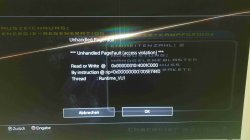
Unhandled PageFault (acces violation)

Read or Write @ 0x00000010:4001C000
By instruction @ rip=0x00000000:005E7440
Thread : Runtime_VU1

I tried it without this command but the game runs only at half speed
Which version do you have of this game?
 

Attachments

  • 20230115_004823(2).jpg
    20230115_004823(2).jpg
    261.8 KB · Views: 48
Thank you for your answer but your config didn't work for me.
vu1-no-clamping=0 causes a crash after I select a character
I get this message:

Unhandled PageFault (acces violation)

Read or Write @ 0x00000010:4001C000
By instruction @ rip=0x00000000:005E7440
Thread : Runtime_VU1

I tried it without this command but the game runs only at half speed
Which version do you have of this game?
You can always try adding this to my earlier made config. though it might crash for you cause idk the limit for this command if 400 doesn't work, change it to 30 or 60
Code:
--ee-jit-pagefault-threshold=400
 
Ok i found out that --ee-jit-pagefault-threshold command is not accepted by the roguev1 emu. I tried it on the Jak emu and the game will freeze at character selection, on kof2000 it crashes with an CE error at the same spot, when vu1-no-clamping=0 is enabled.
That means this game doesn't like vu1 clamping
 
Ok i found out that --ee-jit-pagefault-threshold command is not accepted by the roguev1 emu. I tried it on the Jak emu and the game will freeze at character selection, on kof2000 it crashes with an CE error at the same spot, when vu1-no-clamping=0 is enabled.
That means this game doesn't like vu1 clamping
Yeah, sly cooper 2 i believe had the same issue. try these with mtvu off

Code:
#Star war games seem to like these commands
--gs-check-trans-rejection68=1
--gs-dirty-page-policy=1
--gs-kernel-cl-up="OptRightTri"
#MTVU Disabled
--vu1=jit-sync
#Misc command idk
--assert-path1-ad=1
#Potential speedhacks for the game.
--vu1-mpg-cycles=1000
--vu1-di-bits=0
--ee-cycle-scalar=1.2
 
Last edited:
Thanks, but with this config the game runs at half speed and i have alot of graphical corruptions (tested with Jak, Kof2000, eternalringv2 emu).
On Jak, RECVX or Redfaction emus has vu1=jit-sync the most speed up but with the "Black Sky" issue. On some other emus like GTA3, Eternalringv2 or Kof2000 it has no effect. No graphic issues but also no speed up for the game.
I also found out that this game doesn't like it, when i'm increasing vu1-mpg-cycles.
When i'm increasing vu1-mpg-cycles over 400 i get graphic issues. I can fix these issues when ee-cycle-scalar is increased to 2.7, then i have no graphic issues but i still have slowdowns on many maps.

Maybe a lua config with speed optimation can fix the slowdowns. I saw on this forum some lua scripts with speed improvement.
For example:
Need for Speed Underground 2 (PAL) has this command
eeObj.WriteMem32(0x001D78A8,0x100000B4) --speed fix

Can somebody make an speed improvement for the PAL version of Star Wars Battlefront 2?
Or anyone can tell me how you find out the ee offsets? I know, with PCSX2 debugger but how? Anyone has an tutorial or something else?
 
Thanks, but with this config the game runs at half speed and i have alot of graphical corruptions (tested with Jak, Kof2000, eternalringv2 emu).
On Jak, RECVX or Redfaction emus has vu1=jit-sync the most speed up but with the "Black Sky" issue. On some other emus like GTA3, Eternalringv2 or Kof2000 it has no effect. No graphic issues but also no speed up for the game.
I also found out that this game doesn't like it, when i'm increasing vu1-mpg-cycles.
When i'm increasing vu1-mpg-cycles over 400 i get graphic issues. I can fix these issues when ee-cycle-scalar is increased to 2.7, then i have no graphic issues but i still have slowdowns on many maps.

Maybe a lua config with speed optimation can fix the slowdowns. I saw on this forum some lua scripts with speed improvement.
For example:
Need for Speed Underground 2 (PAL) has this command
eeObj.WriteMem32(0x001D78A8,0x100000B4) --speed fix

Can somebody make an speed improvement for the PAL version of Star Wars Battlefront 2?
Or anyone can tell me how you find out the ee offsets? I know, with PCSX2 debugger but how? Anyone has an tutorial or something else?
Set ee to interpreter and keep hitting break until you find offsets that keep repeating / debugger stops at, and make sure they're coloured. not white! you will find the offsets on the right side. make sure you're on R5900 [EE] not R3000 [IOP]

or even better, you can follow my guide to find them on ps4
https://www.psdevwiki.com/ps4/PS2_Emulation#Debugging_through_PS4CHEATER
 
Last edited:
Shadow of the colossus

CLI
All versions

Code:
#Speedhacks for performance
--ee-cycle-scalar=1.2
--vu1-di-bits=0
--vu1-mpg-cycles=600
#Game hates mtvu, It also hates jit-sync as it causes graphical problems
#Therefore jit is good enough to improve performance and keep graphics stable
--vu1=jit
 
Last edited:
Shadow of the colossus

CLI
All versions

Code:
#Speedhacks for performance
--ee-cycle-scalar=1.2
--vu1-di-bits=0
--vu1-mpg-cycles=600
#Game hates mtvu, It also hates jit-sync as it causes graphical problems
#Therefore jit is good enough to improve performance and keep graphics stable
--vu1=jit

SCUS-97472_config.lua
Code:
-- Shadow of the Colossus (SCUS-97472)
-- Widescreen by Ultrawide Hack
-- PCSX2 forums by ErikDestler666

apiRequest(0.1)

local gpr = require("ee-gpr-alias")

local eeObj = getEEObject()
local emuObj = getEmuObject()

local patcher = function()

-- Widescreen 21:9
eeObj.WriteMem32(0x2128A1E4,0x3fa80000)

emuObj.ThrottleMax()
end

emuObj.AddVsyncHook(patcher)
 

Similar threads

Back
Top