PS4 [Research]PS2 emulator configuration on PS4

Someone could transform these wrc rally evolved PAL codes into lua | SCES-53247, I just need to fix the drawing distance.

patch=1,EE,004B56C8,word,a020b6e0

//Set the draw distance to the static mode (lower than the default one)
patch=1,EE,004CAC34,word,24080000

//Set the draw distance to the dynamic mode (it's the similar mode like in the WRC 4, the engine adjust the settings on the fly)
patch=1,EE,004CAC34,word,24080001

//Enable the debug menu, press the L3+R3 buttons to activate
patch=1,EE,00241174,word,24020001
 
Code:
--WRC Rally Evolved (SCES-53247)

apiRequest(0.1)

local eeObj = getEEObject()
local emuObj = getEmuObject()

local patcher = function()

eeObj.WriteMem32(0x004B56C8,0xa020b6e0)
--Set the draw distance to the static mode (lower than the default one)
eeObj.WriteMem32(0x004CAC34,0x24080000)
--Set the draw distance to the dynamic mode (it's the similar mode like in the WRC 4, the engine adjust the settings on the fly)
eeObj.WriteMem32(0x004CAC34,0x24080001)
--Enable the debug menu, press the L3+R3 buttons to activate
eeObj.WriteMem32(0x00241174,0x24020001)

end
emuObj.AddVsyncHook(patcher)

SCES-53247_config.lua
 
NEO CONTRA (SLPM-65752)

CONFIG TXT

--gs-uprender=2x2
--gs-upscale=edgesmooth
--host-display-mode=16:9
--host-gamepads=2 #Fix two players mode

LUA

-- Neo Contra NTSC-J
-- Widescreen Hack (16:9) by Israpps
-- emu used=rogue v2

local gpr = require("ee-gpr-alias")

apiRequest(0.1)

local eeObj = getEEObject()
local emuObj = getEmuObject()

local patcher = function()

-- 16:9
eeObj.WriteMem32(0x20359ED4,0x3C013F40)
eeObj.WriteMem32(0x20359ED8,0x44810000)
eeObj.WriteMem32(0x20359EE0,0x4600C602)

end

emuObj.AddVsyncHook(patcher)
 
Coraline - SLUS-21854 (credits to Stayhye for finding the softlock freeze with the read cycles command)

CLI:
--gs-uprender=2x2
--gs-upscale=EdgeSmooth
--gs-use-mipmap=1
--gs-kernel-cl-up="mipmap2x2"
--gs-scanout-offsetx=27
--gs-scanout-offsety=27
--safe-area-min=0.9
--cdvd-sector-read-cycles=2000

Kof98 used. This gets rid of some minor white seams while ingame and it fixes the yellow line at the buttom of the screen. Should work fine for PAL too. Played until you reach the "other world" and did most of the minigames including the cards, no freezes detected. I think it's perfect now. The subtitles appear a bit desynced at first but that's how it was on real hardware too.

You can also use the mipmap and kernel mipmap2x2 commands for pretty much any game that has white seams flickering during gameplay. It fixed it for games like Fatal Frame 3, Silent Hill 2, 3, 4, etc. Steambot Chronicles also has it but unfortunately the mipmap command has graphical issues so for some games it has to be disabled.
 
Last edited:
Coraline - SLUS-21854 (credits to Stayhye for finding the softlock freeze with the read cycles command)

CLI:
--gs-uprender=2x2
--gs-upscale=EdgeSmooth
--gs-use-mipmap=1
--gs-kernel-cl-up="mipmap2x2"
--gs-scanout-offsetx=27
--gs-scanout-offsety=27
--safe-area-min=0.9
--cdvd-sector-read-cycles=2000

Kof98 used. This gets rid of some minor white seams while ingame and it fixes the yellow line at the buttom of the screen. Should work fine for PAL too. Played until you reach the "other world" and did most of the minigames including the cards, no freezes detected. I think it's perfect now. The subtitles appear a bit desynced at first but that's how it was on real hardware too.

You can also use the mipmap and kernel mipmap2x2 commands for pretty much any game that has white seams flickering during gameplay. It fixed it for games like Fatal Frame 3, Silent Hill 2, 3, 4, etc. Steambot Chronicles also has it but unfortunately the mipmap command has graphical issues so for some games it has to be disabled.
with pal version no softlock freezes or u mean random freeze on loading screens while levels?
 
Hi I've tried to emulate beatmania IIDX games on both Jak v2 and Rogue v1, they get into menu perfectly fine with jitter / interlacing issues, but once I go in-game it halts to a creep of about 1 frame every few seconds, would anyone know a way to fix this?
 
XIII PS2toPS4 vs. REmake BIG GamePlay Comparison!

FiX (SLES51244)

Code:
--gs-adaptive-frameskip=1
--gs-progressive=1
--gs-kernel-cl-up="up2x2skipinterp"
   
--host-display-mode=16:9
--host-vsync=1

in txt.

Code:
-- XIII
-- emu used=JakX v2

apiRequest(1.0)

local gpr = require("ee-gpr-alias")

local eeObj = getEEObject()
local emuObj = getEmuObject()

local gsObj  = getGsObject()

local CheckInputs = function()

local pad_bits = emuObj.GetPad()

local UP    = pad_bits &  0x0010
local DOWN    = pad_bits &  0x0040
local LEFT    = pad_bits &  0x0080
local RIGHT    = pad_bits &  0x0020
local Triangle  = pad_bits &  0x1000
local Cross    = pad_bits &  0x4000
local Square    = pad_bits &  0x8000
local Circle  = pad_bits &  0x2000
local L1    = pad_bits &  0x0400
local L2    = pad_bits &  0x0100
local L3    = pad_bits &  0x0002
local R1    = pad_bits &  0x0800
local R2    = pad_bits &  0x0200
local R3    = pad_bits &  0x0004
local Select  = pad_bits &  0x0001
local Start    = pad_bits &  0x0008

if (R1 ~= 0 and LEFT ~= 0) then --R1+LEFT disable2x2
   gsObj.SetUprenderMode(0) -- 0=none <> 1=2x2
   gsObj.SetUpscaleMode(0)
end

if (R1 ~= 0 and RIGHT ~= 0) then --R1+RIGHT enable2x2
   gsObj.SetUprenderMode(1) -- 0=none <> 1=2x2
   gsObj.SetUpscaleMode(0)
end

end

emuObj.AddVsyncHook(CheckInputs)

local patcher = function()

--Widescreen hack 16:9
eeObj.WriteMem32(0x001d7758,0x3c013f40) -- 00000000
eeObj.WriteMem32(0x001d77b0,0xae4100a8) -- ae4300a8

--60FPS
eeObj.WriteMem32(0x20191C64,0x28420001)

emuObj.ThrottleMax()
end

emuObj.AddVsyncHook(patcher)

in lua.

In some dark areas of stages still will bad graphics! For fix that - use Render Switcher (R1+ D-Pad Left for turn off and R1+ D-Pad Right for on!)
I think this will help in dark areas(instead of buttons combos):
Code:
emuObj.SetGsTitleFix( "forceSimpleFetch", "reserved", { texMode=2  } )
emuObj.SetGsTitleFix( "forceSimpleFetch", "reserved", { texMode=1  } )
and this so that it looks more cleaner:
Code:
--gs-kernel-cl="up2x2"
--gs-kernel-cl-up="up2x2skipinterp"
 
I think this will help in dark areas(instead of buttons combos):
Code:
emuObj.SetGsTitleFix( "forceSimpleFetch", "reserved", { texMode=2  } )
emuObj.SetGsTitleFix( "forceSimpleFetch", "reserved", { texMode=1  } )
and this so that it looks more cleaner:
Code:
--gs-kernel-cl="up2x2"
--gs-kernel-cl-up="up2x2skipinterp"
yes but these commands will low game resolution and quality! Thats why i prefer Render Switcher
 
Hi guys. The Simpsons The Game has been a huge problem for the Playstation 2 emulation on PS4. It would be very good if we worked so that this title could work without problems. So far there is only one thread where this is discussed but no solution has been found. So far I tried converting to PS2-FPKG and the game doesn't even start, then I tried deade PS2-Classic-Gui getting it to work but with serious performance and graphics problems
 
Just want share some find!

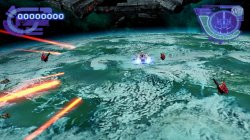
Silpheed Lost Planet. First Test!
VIDEO

I tested this game with much emus! Almost all have black screen after PS2 logo or crash before start of stage issues!

Only Siren v2 emu let us get to gameplay! But....we have freeze at start of gameplay (you can see it on video above!)

Probably someone else will figure with this!

Also it have some problems with font of text in briefing!
 

Attachments

  • 01.jpg
    01.jpg
    618.8 KB · Views: 48
  • 02.jpg
    02.jpg
    1.1 MB · Views: 44
Ibara (SLPM66301)

TXT.
Code:
--cdvd-sector-read-cycles=2000
--force-frame-blend=1
--host-gamepads=2

LUA.
Code:
-- Ibara (NTSC-J)
-- emu used=ADK

apiRequest(1.0)   

local gpr = require("ee-gpr-alias")

local eeObj = getEEObject()
local emuObj = getEmuObject()

local patcher = function()


emuObj.ThrottleMax()
end

emuObj.AddVsyncHook(patcher)

Ibara. Short GamePlay!
VIDEO

One more Good Vertical Scrolling Shooter!
 
Updating old codes for Batman Begins (Europe), looks this game not run with emu kof2000 as advised in wiki and other emu needs some commands also crash when video ends, initial logos and videos first time cannot be skipped so crash, stuck in black screen,:sco hmmthink: cleaning and fixing codes enable disable video skip lock, pass fps unlock to 50fps and fix movie play when use it, autoenable widescreen, subtitles and other QoL fixes, also find compactible EMU "war of monsters v1" but this emu not work with lua script ....:sco hmmthink:so create a pach ISO file with the fixes for bypass incompactibility with lua, download patch (500kb) patch you ISO dump and use next commands and emu
CLI
Code:
--gs-kernel-cl-up="up2x2skipinterp"
--ps2-lang=system
--host-gamepads=0
--vu0-opt-flags=1
--vu1-opt-flags=1
--vu0-const-prop=1
--vu1-const-prop=1
--gs-motion-factor=50
--ee-cycle-scalar=2.5

#use EMU WarM v1
#EMU not compactible with lua

some codes enable to bypass the movie crash, !! still you need to skip movie play with any button before end play or skip it, not let finish or game will stuck black screen. !!

Verify your dump and rename to:
Batman Begins (Europe) (En,Fr,De,Es,It,Nl,Sv)
sha1: 3380b57d641f3dd6669b7f3944b11f8fe930c330
use atach file a readme for pach your game dump (backup your dump before patch)

Game has graphic bugs in PS4 and looking PCSX2 console requires:
autoFlush to [mode=1] --*tested similar command from wiki = crash emu not compatible
halfPixelOffset to [mode=2]
and is heavy in microvu0, microvu1; for people can debug better this ps2 - ps4 emu compactibility

i have a 60fps NTSC progressive scan 60hz patch too but is a big file pach because need movie reemplacement.
 

Attachments

Last edited:
Updating old codes for Batman Begins (Europe), looks this game not run with emu kof2000 as advised in wiki and other emu needs some commands also crash when video ends, initial logos and videos first time cannot be skipped so crash, stuck in black screen,:sco hmmthink: cleaning and fixing codes enable disable video skip lock, pass fps unlock to 50fps and fix movie play when use it, autoenable widescreen, subtitles and other QoL fixes, also find compactible EMU "war of monsters v1" but this emu not work with lua script ....:sco hmmthink:so create a pach ISO file with the fixes for bypass incompactibility with lua, download patch (500kb) patch you ISO dump and use next commands and emu
CLI
Code:
--gs-kernel-cl-up="up2x2skipinterp"
--ps2-lang=system
--host-gamepads=0
--vu0-opt-flags=1
--vu1-opt-flags=1
--vu0-const-prop=1
--vu1-const-prop=1
--gs-motion-factor=50
--ee-cycle-scalar=2.5

#use EMU WarM v1
#EMU not compactible with lua

some codes enable to bypass the movie crash, !! still you need to skip movie play with any button before end play or skip it, not let finish or game will stuck black screen. !!

Verify your dump and rename to:
Batman Begins (Europe) (En,Fr,De,Es,It,Nl,Sv)
sha1: 3380b57d641f3dd6669b7f3944b11f8fe930c330
use atach file a readme for pach your game dump (backup your dump before patch)

Game has graphic bugs in PS4 and looking PCSX2 console requires:
autoFlush to [mode=1] --*tested similar command from wiki = crash emu not compatible
halfPixelOffset to [mode=2]
and is heavy in microvu0, microvu1; for people can debug better this ps2 - ps4 emu compactibility

i have a 60fps NTSC progressive scan 60hz patch too but is a big file pach because need movie reemplacement.

As i remember game never works with other emus! Works only with Rogue v1!

also we have that switcher in lua!
Code:
--60fps switch by @kugozx
local Speed_Switch = eeObj.ReadMem16(0x00448642)

--title screen freeze fix?? but breaks FMVs
if (Speed_Switch == 0xFBFD) then --Press L1+L3 Enabled 60 Fps
   eeObj.WriteMem32(0x00409BF8,0x0000003C)
end

if (Speed_Switch == 0xFBFB) then --Press L1+R3 Disabled 60 Fps
   eeObj.WriteMem32(0x00409BF8,0x0000001E)
end

60fps code is Fix for black screen in game!

But your codes is new reason to test that game! i test year ago!
 
@felixthecat1970 do you think you can create a code that only fixes the broken aspect ratio to its original aspect ratio (not fullscreen) for SLUS-21361, your progressive mode 256p code fixes that issue but creates a rainbow effect in the right edge of the screen in some levels
DMC3-Bug.png
 

Similar threads

Back
Top