PS4 [Research]PS2 emulator configuration on PS4

Haunting Ground (SLUS-21075/SLES-52877) fixes for shadows, buggy meshes on cutscenes, slightly misplaced post processing effects, broken blur effects and black screen in panic mode:

CLI:
--gs-use-mipmap=1
--gs-kernel-cl-up="mipmap2x2"
--gs-flush-ad-xyz=safeZwrite

LUA:
apiRequest(2.3)

local gpr = require("ee-gpr-alias")
local emuObj = getEmuObject()
local eeObj = getEEObject()

-- Fix shadow
emuObj.SetGsTitleFix( "ignoreUpShiftTri", "reserved", { fbmask = 0x00FFFFFF } )

Apply this to your ISO:
NTSC:
// Disable Blur-Effect
patch=1,EE,002bbba4,word,34020000
// Disable briefly emerging Blur-Effects and constant effects on some foreground objects
patch=1,EE,002c6650,word,03e00008
patch=1,EE,002c6654,word,34020000

PAL:
// Disable Blur-Effect
patch=1,EE,0028c684,word,34020000
// Disable briefly emerging Blur-Effects and constant effects on some foreground objects
patch=1,EE,002935c0,word,03e00008
patch=1,EE,002935c4,word,34020000

Note: The 1st blur code is only half of the "disable blur effect" code from Maori-Jigglypuff. If you only apply half of the code, you can preserve the gradient effect while Fiona is in panic mode along with text that might appear during those moments. The 2nd blur code is to avoid upscalled lines/ghosting in some cutscenes.

Note 2: Using ignoreUpShiftTri to fix the shadows doesn't degrade the visual quality of the graphics. Also, mipmap uprender fixes the white seams and SafeZWrite fixes some minor post processing effects.
VIDEO

Emu used and required: JakX v2.

Final fix for Haunting Ground. It's no longer required to use the low render 2x2simple nor is it required to disable all of the graphical effects/shadows anymore either. The game is now perfect at normal 2x2. I only had to disable most of the blur to avoid the black screen in panic mode and some lines/ghosting in a few cutscenes. Those who want to add a widescreen hack feel free but I think it already exists.
 
Last edited:
¿Dónde agrego exactamente los archivos de configuración cli y lua? Estoy usando Star Ocean V2 y cambiar el juego no es suerte. Estoy usando PS2-FPKG v0.7 y cada vez que hago el paquete de PS2 nunca pasa del logotipo de inicio de PS2. Siento que he invertido tanto tiempo en este juego que no puedo rendirme ahora. Cualquier ayuda sería muy apreciada.
Hello brother, I also had the same problem and I was able to solve it. The problem is in the Star Ocean V2 emu , it has some error that I could not discover. I solved it by unpacking the pkg of the game "Star Ocean Till The End of Time" and its update, with that I got the clean Star Ocean V2 emu without any errors, and that helped Scarface to be emulated correctly. I hope it helps you brother
 
Last edited by a moderator:
Hello brother, I also had the same problem and I was able to solve it. The problem is in the Star Ocean V2 emu , it has some error that I could not discover. I solved it by unpacking the pkg of the game "Star Ocean Till The End of Time" and its update, with that I got the clean Star Ocean V2 emu without any errors, and that helped Scarface to be emulated correctly. I hope it helps you brother
thanks! i really appreciate it
 
Last edited by a moderator:
Marvel vs. Capcom 2 - New Age of Heroes (USA) SLUS_204.86;1) Game CRC = 0x4D228733

Marvel vs. Capcom 2 - New Age of Heroes (USA) Updated v2 -Change game engine to full frame mode 640x448 with progressive scan mode (default is 640x224 field rendered mode) -Unlocked all characters, for vs modes -PS4build include arcade joystick compatibility (not fully tested), more clean pixel mode, scanlines, smooth mode.

emu kof98
Code:
--
--lua test by felixthecat1970
--update fix thanks to stayhye

local gpr = require("ee-gpr-alias")

apiRequest(0.1)

local eeObj = getEEObject()
local emuObj = getEmuObject()

--local patcher = function() --leave disabled because some conflict bug with full frame code patch (need more testing)
--16:9
--eeObj.WriteMem32(0x00414284,0x3C023FAA)
--eeObj.WriteMem32(0x003DDB10,0xAC83003C)
--eeObj.WriteMem32(0x003DDB14,0x3C033F40)
--eeObj.WriteMem32(0x003DDB18,0x03E00008)
--eeObj.WriteMem32(0x003DDB1C,0xAC830000)
--eeObj.WriteMem32(0x003DD480,0x3C023FE3)
--end
--
--emuObj.AddVsyncHook(patcher)

local HD = function()
eeObj.WriteMem32(0x203EC218,0x24020002)
eeObj.WriteMem32(0x203EC21C,0xAC22BC00)
eeObj.WriteMem32(0x203EC22C,0xAC20BC1C)
eeObj.WriteMem32(0x203EC754,0x0000282D)
eeObj.WriteMem32(0x203EC758,0x24060050)
eeObj.WriteMem32(0x203EC760,0x24070001)
eeObj.WriteMem32(0x201008A8,0x24840033)
eeObj.WriteMem32(0x203ECB7C,0x1040FFF6)
eeObj.WriteMem32(0x203ECB80,0xAC20BC38)
eeObj.WriteMem32(0x203D6C4C,0x3C03F8FF)
eeObj.WriteMem32(0x203D6C50,0x3C0207FF)
eeObj.WriteMem32(0x203D6C54,0x3464FFFF)
eeObj.WriteMem32(0x203D6C58,0x3443FFFF)
eeObj.WriteMem32(0x2012F740,0x241B0006)
eeObj.WriteMem32(0x2012F770,0xA23B0000)
end

emuObj.AddEntryPointHook(HD)

Also lua test config for features other things
Code:
--Lua configs by felixthecat1970

apiRequest(2.0)

local emuObj = getEmuObject()
local gsObj    = getGsObject()
local eeObj = getEEObject()
local sprite0 = getSpriteObject(0)
local sprite1 = getSpriteObject(1)

--emuObj.SetVolumes(0.3162, 1.0, 1.0) --advised by PS4 docs in official configs

HIDPad_Enable() --unknow but called for code execution? (need test with arcade sticks)

--scanlines call gpu resource
Global_InitGpuResources = function()
    -- # Fragment Shader 0 is fixed as the default no-thrills as-is renderer.
    emuObj.LoadFsShader(1, "./shader_SL480_p.sb")        -- (1) = 480P ScanLine Sim

end

--disable ps2 smoothing -generic commands
emuObj.SetGsTitleFix( "forcePoint", "reserved", {texMode=1, mmin=0, prim=6} )
emuObj.SetGsTitleFix( "forceSimpleFetch", "reserved", {texMode=1, mmin=0, prim=6} )

--pad ligths per controller R,G,B
local lightDef0 = {153, 0, 0}
local lightDef1 = {0, 153, 0}
emuObj.PadSetLightBar(0, lightDef0, 1, lightDef1)

--scanlines-params
local scanlineParams = {
    240.0,        -- float scanlineCount
       0.7,        -- float scanlineHeight;
    1.5,        -- float scanlineBrightScale;
    0.5,        -- float scanlineAlpha;
    0.5         -- float vignetteStrength;
}
--scanlines L3 + R3
local scanlines = function()
    sprite0.BindTexture(0)
    sprite0.SetPosXY((1920-1440)/2,0)
    sprite0.SetSizeXY(1440,1080)
    sprite0.BindFragmentShader(1)
    sprite0.SetShaderParams(scanlineParams)
    sprite0.SetBlendColor(1.0,1.0,1.0,1.0)
    sprite0.Enable()

end
--no scanlines touch pad left (select)
local original = function()
    sprite0.BindTexture(0)
    sprite0.BindFragmentShader(0)
    sprite0.SetPosXY((1920-1440)/2,0)
    sprite0.SetSizeXY(1440,1080)
    sprite0.SetBlendColor(1.0,1.0,1.0,1.0)
    sprite0.Enable()

end
--execute scanlines
local sl = function()

local pad_bits = emuObj.GetPad()
local L3        = pad_bits &  0x0002
local R3        = pad_bits &  0x0004
local Select    = pad_bits &  0x0001

if (L3 ~= 0 and R3 ~= 0) then
    scanlines()
    end
if (Select ~= 0) then
    original()
    end
end
emuObj.AddVsyncHook(sl)

--soft filter L3=OFF R3=ON
local sf = function()

local pad_bits = emuObj.GetPad()
local L3        = pad_bits &  0x0002
local R3        = pad_bits &  0x0004

if (L3 ~= 0) then
    gsObj.SetUprenderMode(0)
    gsObj.SetUpscaleMode("point")
    end
if (R3 ~= 0) then
    gsObj.SetUprenderMode(1)
    gsObj.SetUpscaleMode("smooth")
    end
end
emuObj.AddVsyncHook(sf)
 
Last edited:
Hello brother, I also had the same problem and I was able to solve it. The problem is in the Star Ocean V2 emu, it has some error that I could not discover. I solved it by unpacking the pkg of the game "Star Ocean Till The End of Time" and its update, with that I got the clean Star Ocean V2 emu without any errors, and that helped Scarface to be emulated correctly. I hope it helps you brother
I know this is a different subject but is there a post or tutorial on how to make PS2 cheats for PS4 GoldHen
 
Last edited by a moderator:
Battlefield II - Modern combat [SLES-53729]
emu used=primal

config-emu-ps4.txt:
Code:
--path-patches="/app0/patches"
--host-display-mode=full
--gs-uprender=1
--gs-upscale=edgesmooth
--ps2-lang=system
--vu1-jr-cache-policy=newprog
--vu1-jalr-cache-policy=newprog
--vu0-jalr-cache-policy=newprog
--vu0-jr-cache-policy=newprog
--gs-kernel-cl="h2lpool"
--gs-kernel-cl-up="h2lpool2x2"
--vu1-mpg-cycles=1310
--vu1-const-prop=1
--vu0-const-prop=1
--vu1-di-bits=0
--vu0-di-bits=0
--force-pal-60hz=1
--cdvd-sector-read-cycles=1310
#emu used=primal

Lua:
  • filename: SLES-53729_config.lua
Code:
apiRequest(0.1)
local eeObj   = getEEObject()
local emuObj  = getEmuObject()

local patcher = function()
--Unlock 50fps by PeterDelta
eeObj.WriteMem32(0x0022D9DC,0x24630001)
emuObj.ThrottleMax()
end
emuObj.AddVsyncHook(patcher)
emuObj.SetGsTitleFix( "forceSimpleFetch", "reserved", {texMode=2} )
emuObj.SetGsTitleFix( "ignoreUpRender", thresholdArea , {  texType=1} )

-Still need optimization.
-I don't know if these commands are discovered, but they work:
Code:
--image="/app0/image/name-of-the-game.iso" --instead of disc01.iso
--path-patches="/app0/patches/SXXS-XXXXX_config.lua"
 
Dreamworks - Bee movie game
emu used=primal

Code:
--ee-cycle-scalar=4.0 #fix pass fmv 
--vu0-di-bits=0
--vu1-di-bits=0
--vu1-jr-cache-policy=newprog #fix random crash?
--gs-uprender=1
--gs-upscale=edgesmooth
--host-display-mode=full

-it has audio problem(fmv) and slowdowns.
 
Devil May Cry 3 - Dante's Awakening (Europe) (En,Fr,De,Es,It) (Special Edition) SLES_541.86;1
Patch test v3 -No hud (press start when start gameplay to hide hud, press start againg to see health, orbs, style ranking) -widescreen (still missing text aspect correction) -unlock japanese and korean languages check video how to enable (not use CONFIG OPTIONS is a remanant other versions) -change framemode for no interlacing (shaky screen) -filter out some postprocess (some screen blur) keep others.

updated old code + no hud version other codes, tested in ps4 but still missing a parameter in ps4 for not shaky screen (using blend frame parameters make game looks ugly,) still i leave code here people want to test with a required fix i read some post ported to PAL and code fix botton black screen reported here.

Emu tested Jakv2 (tested with iso patched, code here in theory should work same)

Code:
--lua test by felixthecat1970
apiRequest(2.0)

local gpr = require("ee-gpr-alias")

local emuObj         = getEmuObject()
local eeObj            = getEEObject()


-- ported to PAL from kozarov USA fix

eeObj.AddHook(0x20AD40, 0xF8400030, function()
    local sp  = eeObj.GetGpr(29)
    local val = eeObj.ReadMemFloat(sp + 0x84)
    eeObj.WriteMemFloat(sp + 0x84, val - 0.1)
end)


local patch = function()

eeObj.WriteMem32(0x201EE060,0x0000202D)
eeObj.WriteMem32(0x20513830,0x24420004)
eeObj.WriteMem32(0x2051368C,0xAE210048)
eeObj.WriteMem32(0x20102C84,0x3C0700E0)
eeObj.WriteMem32(0x205B8338,0x00000006)
eeObj.WriteMem32(0x205B833C,0x00000000)
eeObj.WriteMem32(0x203EF124,0x28410006)
eeObj.WriteMem32(0x201AC7A4,0x3C1B3F40)
eeObj.WriteMem32(0x201AC7A8,0xAC7B0060)
eeObj.WriteMem32(0x201AC814,0x3C1B3F40)
eeObj.WriteMem32(0x201AC818,0xAC9B0060)
eeObj.WriteMem32(0x201AC844,0x3C0345BF)
eeObj.WriteMem32(0x201AC96C,0x3C0345BF)
eeObj.WriteMem32(0x201AC55C,0x3C033F40)
eeObj.WriteMem32(0x2021527C,0x0000102D)
eeObj.WriteMem32(0x2023EC54,0xA0209A0D)
eeObj.WriteMem32(0x20232DCC,0x240301C0)
eeObj.WriteMem32(0x202E5A8C,0x240801C0)
eeObj.WriteMem32(0x202847FC,0x0C1580AC)
eeObj.WriteMem32(0x20284800,0x00000000)
eeObj.WriteMem32(0x205602B0,0x341B0003)
eeObj.WriteMem32(0x205602B4,0x145B0002)
eeObj.WriteMem32(0x205602B8,0x00000000)
eeObj.WriteMem32(0x205602BC,0x34020000)
eeObj.WriteMem32(0x205602C0,0x00000000)
eeObj.WriteMem32(0x205602C4,0x341B0001)
eeObj.WriteMem32(0x205602C8,0x145B0002)
eeObj.WriteMem32(0x205602CC,0x00000000)
eeObj.WriteMem32(0x205602D0,0x34020000)
eeObj.WriteMem32(0x205602D4,0x00000000)
eeObj.WriteMem32(0x205602D8,0x341B000F)
eeObj.WriteMem32(0x205602DC,0x145B0002)
eeObj.WriteMem32(0x205602E0,0x00000000)
eeObj.WriteMem32(0x205602E4,0x34020000)
eeObj.WriteMem32(0x205602E8,0x00000000)
eeObj.WriteMem32(0x205602EC,0x0013343C)
eeObj.WriteMem32(0x205602F0,0x03E00008)
eeObj.WriteMem32(0x205602F4,0x0040B02D)
eeObj.WriteMem32(0x201AE8E0,0x0000182D)
eeObj.WriteMem32(0x20340F84,0x241B3FAA)
eeObj.WriteMem32(0x20340FAC,0xAE1B2E52)
eeObj.WriteMem32(0x20332364,0x24030016)
eeObj.WriteMem32(0x201EE264,0x0000182D)
eeObj.WriteMem32(0x201EE3D4,0x2A020001)
eeObj.WriteMem32(0x2023BF9C,0xA0620009)
eeObj.WriteMem32(0x2023BD30,0xA0400009)
eeObj.WriteMem32(0x2023CA18,0xA0620009)
eeObj.WriteMem32(0x2023EF00,0x00000000)
eeObj.WriteMem32(0x202407C0,0x00000000)
eeObj.WriteMem32(0x2023A090,0x00000000)

end
emuObj.AddVsyncHook(patch)
 
Dreamworks - Bee movie game
emu used=primal

Code:
--ee-cycle-scalar=4.0 #fix pass fmv
--vu0-di-bits=0
--vu1-di-bits=0
--vu1-jr-cache-policy=newprog #fix random crash?
--gs-uprender=1
--gs-upscale=edgesmooth
--host-display-mode=full

-it has audio problem(fmv) and slowdowns.
Oh wow! I've been trying to fix that one for ages! Well done!
 
Devil May Cry 3 - Dante's Awakening (Europe) (En,Fr,De,Es,It) (Special Edition) SLES_541.86;1
Patch test v3 -No hud (press start when start gameplay to hide hud, press start againg to see health, orbs, style ranking) -widescreen (still missing text aspect correction) -unlock japanese and korean languages check video how to enable (not use CONFIG OPTIONS is a remanant other versions) -change framemode for no interlacing (shaky screen) -filter out some postprocess (some screen blur) keep others.

updated old code + no hud version other codes, tested in ps4 but still missing a parameter in ps4 for not shaky screen (using blend frame parameters make game looks ugly,) still i leave code here people want to test with a required fix i read some post ported to PAL and code fix botton black screen reported here.

Emu tested Jakv2 (tested with iso patched, code here in theory should work same)

Code:
--lua test by felixthecat1970
apiRequest(2.0)

local gpr = require("ee-gpr-alias")

local emuObj         = getEmuObject()
local eeObj            = getEEObject()


-- ported to PAL from kozarov USA fix

eeObj.AddHook(0x20AD40, 0xF8400030, function()
    local sp  = eeObj.GetGpr(29)
    local val = eeObj.ReadMemFloat(sp + 0x84)
    eeObj.WriteMemFloat(sp + 0x84, val - 0.1)
end)


local patch = function()

eeObj.WriteMem32(0x201EE060,0x0000202D)
eeObj.WriteMem32(0x20513830,0x24420004)
eeObj.WriteMem32(0x2051368C,0xAE210048)
eeObj.WriteMem32(0x20102C84,0x3C0700E0)
eeObj.WriteMem32(0x205B8338,0x00000006)
eeObj.WriteMem32(0x205B833C,0x00000000)
eeObj.WriteMem32(0x203EF124,0x28410006)
eeObj.WriteMem32(0x201AC7A4,0x3C1B3F40)
eeObj.WriteMem32(0x201AC7A8,0xAC7B0060)
eeObj.WriteMem32(0x201AC814,0x3C1B3F40)
eeObj.WriteMem32(0x201AC818,0xAC9B0060)
eeObj.WriteMem32(0x201AC844,0x3C0345BF)
eeObj.WriteMem32(0x201AC96C,0x3C0345BF)
eeObj.WriteMem32(0x201AC55C,0x3C033F40)
eeObj.WriteMem32(0x2021527C,0x0000102D)
eeObj.WriteMem32(0x2023EC54,0xA0209A0D)
eeObj.WriteMem32(0x20232DCC,0x240301C0)
eeObj.WriteMem32(0x202E5A8C,0x240801C0)
eeObj.WriteMem32(0x202847FC,0x0C1580AC)
eeObj.WriteMem32(0x20284800,0x00000000)
eeObj.WriteMem32(0x205602B0,0x341B0003)
eeObj.WriteMem32(0x205602B4,0x145B0002)
eeObj.WriteMem32(0x205602B8,0x00000000)
eeObj.WriteMem32(0x205602BC,0x34020000)
eeObj.WriteMem32(0x205602C0,0x00000000)
eeObj.WriteMem32(0x205602C4,0x341B0001)
eeObj.WriteMem32(0x205602C8,0x145B0002)
eeObj.WriteMem32(0x205602CC,0x00000000)
eeObj.WriteMem32(0x205602D0,0x34020000)
eeObj.WriteMem32(0x205602D4,0x00000000)
eeObj.WriteMem32(0x205602D8,0x341B000F)
eeObj.WriteMem32(0x205602DC,0x145B0002)
eeObj.WriteMem32(0x205602E0,0x00000000)
eeObj.WriteMem32(0x205602E4,0x34020000)
eeObj.WriteMem32(0x205602E8,0x00000000)
eeObj.WriteMem32(0x205602EC,0x0013343C)
eeObj.WriteMem32(0x205602F0,0x03E00008)
eeObj.WriteMem32(0x205602F4,0x0040B02D)
eeObj.WriteMem32(0x201AE8E0,0x0000182D)
eeObj.WriteMem32(0x20340F84,0x241B3FAA)
eeObj.WriteMem32(0x20340FAC,0xAE1B2E52)
eeObj.WriteMem32(0x20332364,0x24030016)
eeObj.WriteMem32(0x201EE264,0x0000182D)
eeObj.WriteMem32(0x201EE3D4,0x2A020001)
eeObj.WriteMem32(0x2023BF9C,0xA0620009)
eeObj.WriteMem32(0x2023BD30,0xA0400009)
eeObj.WriteMem32(0x2023CA18,0xA0620009)
eeObj.WriteMem32(0x2023EF00,0x00000000)
eeObj.WriteMem32(0x202407C0,0x00000000)
eeObj.WriteMem32(0x2023A090,0x00000000)

end
emuObj.AddVsyncHook(patch)
good stuff!
 
Marvel vs. Capcom 2 - New Age of Heroes (USA) SLUS_204.86;1) Game CRC = 0x4D228733

Marvel vs. Capcom 2 - New Age of Heroes (USA) Updated v2 -Change game engine to full frame mode 640x448 with progressive scan mode (default is 640x224 field rendered mode) -Unlocked all characters, for vs modes -PS4build include arcade joystick compatibility (not fully tested), more clean pixel mode, scanlines, smooth mode.

emu kof98
Code:
--lua test by felixthecat1970
apiRequest(2.0)

local gpr = require("ee-gpr-alias")

local emuObj         = getEmuObject()
local eeObj            = getEEObject()

local patch = function()

eeObj.WriteMem32(0x203EC218,0x24020002)
eeObj.WriteMem32(0x203EC21C,0xAC22BC00)
eeObj.WriteMem32(0x203EC22C,0xAC20BC1C)
eeObj.WriteMem32(0x203EC754,0x0000282D)
eeObj.WriteMem32(0x203EC758,0x24060050)
eeObj.WriteMem32(0x203EC760,0x24070001)
eeObj.WriteMem32(0x201008A8,0x24840033)
eeObj.WriteMem32(0x203ECB7C,0x1040FFF6)
eeObj.WriteMem32(0x203ECB80,0xAC20BC38)
eeObj.WriteMem32(0x203D6C4C,0x3C03F8FF)
eeObj.WriteMem32(0x203D6C50,0x3C0207FF)
eeObj.WriteMem32(0x203D6C54,0x3464FFFF)
eeObj.WriteMem32(0x203D6C58,0x3443FFFF)
eeObj.WriteMem32(0x2012F740,0x241B0006)
eeObj.WriteMem32(0x2012F770,0xA23B0000)

end
emuObj.AddVsyncHook(patch)

Also lua test config for features other things
Code:
--Lua configs by felixthecat1970

apiRequest(2.0)

local emuObj = getEmuObject()
local gsObj    = getGsObject()
local eeObj = getEEObject()
local sprite0 = getSpriteObject(0)
local sprite1 = getSpriteObject(1)

--emuObj.SetVolumes(0.3162, 1.0, 1.0) --advised by PS4 docs in official configs

HIDPad_Enable() --unknow but called for code execution? (need test with arcade sticks)

--scanlines call gpu resource
Global_InitGpuResources = function()
    -- # Fragment Shader 0 is fixed as the default no-thrills as-is renderer.
    emuObj.LoadFsShader(1, "./shader_SL480_p.sb")        -- (1) = 480P ScanLine Sim

end

--disable ps2 smoothing -generic commands
emuObj.SetGsTitleFix( "forcePoint", "reserved", {texMode=1, mmin=0, prim=6} )
emuObj.SetGsTitleFix( "forceSimpleFetch", "reserved", {texMode=1, mmin=0, prim=6} )

--pad ligths per controller R,G,B
local lightDef0 = {153, 0, 0}
local lightDef1 = {0, 153, 0}
emuObj.PadSetLightBar(0, lightDef0, 1, lightDef1)

--scanlines-params
local scanlineParams = {
    240.0,        -- float scanlineCount
       0.7,        -- float scanlineHeight;
    1.5,        -- float scanlineBrightScale;
    0.5,        -- float scanlineAlpha;
    0.5         -- float vignetteStrength;
}
--scanlines L3 + R3
local scanlines = function()
    sprite0.BindTexture(0)
    sprite0.SetPosXY((1920-1440)/2,0)
    sprite0.SetSizeXY(1440,1080)
    sprite0.BindFragmentShader(1)
    sprite0.SetShaderParams(scanlineParams)
    sprite0.SetBlendColor(1.0,1.0,1.0,1.0)
    sprite0.Enable()

end
--no scanlines touch pad left (select)
local original = function()
    sprite0.BindTexture(0)
    sprite0.BindFragmentShader(0)
    sprite0.SetPosXY((1920-1440)/2,0)
    sprite0.SetSizeXY(1440,1080)
    sprite0.SetBlendColor(1.0,1.0,1.0,1.0)
    sprite0.Enable()

end
--execute scanlines
local sl = function()

local pad_bits = emuObj.GetPad()
local L3        = pad_bits &  0x0002
local R3        = pad_bits &  0x0004
local Select    = pad_bits &  0x0001

if (L3 ~= 0 and R3 ~= 0) then
    scanlines()
    end
if (Select ~= 0) then
    original()
    end
end
emuObj.AddVsyncHook(sl)

--soft filter L3=OFF R3=ON
local sf = function()

local pad_bits = emuObj.GetPad()
local L3        = pad_bits &  0x0002
local R3        = pad_bits &  0x0004

if (L3 ~= 0) then
    gsObj.SetUprenderMode(0)
    gsObj.SetUpscaleMode("point")
    end
if (R3 ~= 0) then
    gsObj.SetUprenderMode(1)
    gsObj.SetUpscaleMode("smooth")
    end
end
emuObj.AddVsyncHook(sf)
Thanks for the LUA, I love this game!

* The 640x448 patch makes the game freeze right at the PS2 logo animation (is there something in the config.txt that I should or should not use maybe?)

* HIDPad_Enable() crashes the emu before boot for some unknown reason

* scanlines call gpu resource crashes the emu before boot for some unknown reason

* L3 (point) and R3 (smooth) and those works nicely, really cool!

* disable ps2 smoothing is amazing too!


I've tested using the combination below and the game looks crazy crisp on R2 and not too soft on L2:

Code:
if (L3 ~= 0) then
    gsObj.SetUprenderMode(1) // almost completely removes the image jitter
    gsObj.SetUpscaleMode("smooth")
    end
if (R3 ~= 0) then
    gsObj.SetUprenderMode(1)
    gsObj.SetUpscaleMode("point")
    end

I'd love to test more if you have any updates on this.
 
Last edited:
Thanks for the LUA, I love this game!

* The 640x448 patch makes the game freeze right at the PS2 logo animation (is there something in the config.txt that I should or should not use maybe?)

* HIDPad_Enable() crashes the emu before boot for some unknown reason

* scanlines call gpu resource crashes the emu before boot for some unknown reason

* L3 (point) and R3 (smooth) and those works nicely, really cool!

* disable ps2 smoothing is amazing too!


I've tested using the combination below and the game looks crazy crisp on R2 and not too soft on L2:

Code:
if (L3 ~= 0) then
    gsObj.SetUprenderMode(1) // almost completely removes the image jitter
    gsObj.SetUpscaleMode("smooth")
    end
if (R3 ~= 0) then
    gsObj.SetUprenderMode(1)
    gsObj.SetUpscaleMode("point")
    end

I'd love to test more if you have any updates on this.

should work ok use default structure adviced in ps4-ps2 docs

features\SLUS-20486_features.lua (features) and shader_SL480_p.sb from emu kof
patches\SLUS-20486_cli.conf and SLUS-20486_config.lua (memory patches only)

check your dump .bin for usa is sha1:3445ddf09b57bf5b2d493e75e21ff0cd9caa2759 then convert to .iso with WinBin2Iso_x64 you will find tool here in psxplace > resources
 
should work ok use default structure adviced in ps4-ps2 docs

features\SLUS-20486_features.lua (features) and shader_SL480_p.sb from emu kof
patches\SLUS-20486_cli.conf and SLUS-20486_config.lua (memory patches only)

check your dump .bin for usa is sha1:3445ddf09b57bf5b2d493e75e21ff0cd9caa2759 then convert to .iso with WinBin2Iso_x64 you will find tool here in psxplace > resources
I read your blog about the work and reverse engineering you put into these games, amazing stuff!
Unfortunately, I have to wait till tonight to test it :)

Keep up the good work man!

EDIT: Tested it now and It looks and plays marvelously!
 
Last edited:
The Simpsons - Road Rage (U)(SLUS-20305)

txt
Code:
--gs-uprender=2x2
--gs-upscale=edgesmooth
--host-display-mode=16:9
--ee-cycle-scalar=1.35     
--vu0-mpg-cycles=250
--vu1-mpg-cycles=250
--iop-cycle-scalar=1.9
--framelimit-mode=normal

lua
Code:
--The Simpsons - Road Rage (U)(SLUS-20305)
--Widescreen Hack by Arapapa
--CHEATS (All characters) by Codejunkies and InterAct
--Star Ocean v2 emu (fix graphic)
--Port to ps4 by Bergolino gamer

apiRequest(0.1)

local emuObj         = getEmuObject()
local eeObj            = getEEObject()

local fix = function()
--Widescreen hack 16:9
--X-Fov
eeObj.WriteMem32(0x0027ae14,0x080a6494)
eeObj.WriteMem32(0x00299250,0x46040002)
eeObj.WriteMem32(0x00299254,0x3c013f40)
eeObj.WriteMem32(0x00299258,0x4481f000)
eeObj.WriteMem32(0x0029925c,0x461e0002)
eeObj.WriteMem32(0x00299260,0x0809eb86)
--Render fix
eeObj.WriteMem32(0x002197dc,0x3c013f2b)

--CHEATS (All characters)
--1 Apu by Codejunkies
eeObj.WriteMem32(0x20320988,0x00000001)
--2 Barney by Codejunkies
eeObj.WriteMem32(0x2032098C,0x00000001)
--3 Chief Wiggum by Codejunkies
eeObj.WriteMem32(0x20320998,0x00000001)
--4 Flanders by InterAct
eeObj.WriteMem32(0x2032099C,0x00000001)
--5 Krusty by InterAct
eeObj.WriteMem32(0x20320984,0x00000001)
--6 Moe by InterAct
eeObj.WriteMem32(0x20320990,0x00000001)
--7 Mr Plow by InterAct
eeObj.WriteMem32(0x203209A0,0x00000001)
--8 Otto by InterAct
eeObj.WriteMem32(0x20320994,0x00000001)
--9 Prof. Frink by InterAct
eeObj.WriteMem32(0x203209AC,0x00000001)
--10 Reverend Lovejoy by InterAct
eeObj.WriteMem32(0x203209A4,0x00000001)
--11 Snake by InterAct
eeObj.WriteMem32(0x203209A8,0x00000001)
--12 Willie by InterAct
eeObj.WriteMem32(0x20320980,0x00000001)

emuObj.ThrottleMax()
end
emuObj.AddVsyncHook(fix)

Notes
--Star Ocean v2 emu (fix graphic)
--txt ... to fix audio: audio loop in menu and audio distortion in gameplay.
--Tested on base PS4 (FAT)
 
Last edited:
For

The Legend of Spyro: The Eternal Night NTSC

LUA:

Code:
apiRequest(0.4)

-- The Legend of Spyro: The Eternal Night NTSC (SLUS-21607)

local eeObj    = getEEObject()
local emuObj    = getEmuObject()

eeInsnReplace(0x00173CB8, 0x44840800, 0x00000000) -- Fixes HUD and menu display.

-- Graphic improvement: removes corrupted lines on screen with uprender enabled, for PAL version

emuObj.SetGsTitleFix( "forceSimpleFetch", "reserved", { texMode=1 } ) --texMode=1 ?
emuObj.SetGsTitleFix( "forceSimpleFetch", "reserved", { texMode=2 } ) --texMode=2 is BILINEAR

Try this code.

Spyro A New Beginning has the same problem (HUD and menu display) on the NTSC version. The code only exists for the PAL version:
eeInsnReplace(0x1849b8, 0x44840800, 0x00000000) -- Fixes HUD and menu display.
Would it be possible to convert this one too?
 
@sargentfart

Search for 44840800 in the ELF of the PAL version.
Use the ps2dis program.
Edit / find pattern / check the Hex String.
Enter 00088444 in the box.
Can it work? Sometimes yes and sometimes no.

Compare the top and bottom row of opcodes in ps2dis.
It is important to have 2 ps2 dis open at the same time.
1 with original opcode and 1 for the port.
 
@sargentfart

Search for 44840800 in the ELF of the PAL version.
Use the ps2dis program.
Edit / find pattern / check the Hex String.
Enter 00088444 in the box.
Can it work? Sometimes yes and sometimes no.

Compare the top and bottom row of opcodes in ps2dis.
It is important to have 2 ps2 dis open at the same time.
1 with original opcode and 1 for the port.

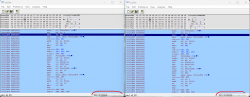
I can't find 44840800 unless I'm doing something wrong. But I did find 00088444 on both PAL (left) and NTSC (right)

Edit: Ok I figured it out. I had to jump to address first before finding pattern.
PAL version: 001849b8 (opcode line: 00101f04 44840800)
The NTSC doesn't find 00088444 after I jump to address.
 

Attachments

  • 1.png
    1.png
    79.7 KB · Views: 93
Last edited:
I leave patch for this games still i have not tested in ps4 yet :sco hmmthink:let me know if work

Deus Ex (Germany)-patchv2
Deus Ex - The Conspiracy (USA)-patch


-widescreen, 60fps, NTSC 60fps, FOV=90

This games has dynamic elf load write (yes this game is starved of ram, debug info show game only use max 25mb) porting require E or D codes and sometimes address changes for widescreen, time consuming port it to lua, also the FOV code is in game files not in the executables, so best options is a direct patch, i trace files, update the codes for widescreen and leave offset if you want to change the FOV value with a hex editor

Code:
Deus Ex (Germany) offset 211DB28C byte XX
Deus Ex - The Conspiracy (USA) offset 51E2C63E byte XX

Bonus:
Debug area options for test or fun
German version starting 006ED34C > 006ED3B0? ps2 ram area (in gameplay) 4 bytes bolean values 0 - 1
Usa version starting 006EAE7C > 006EAEE0? ps2 ram area (in gameplay) 4 bytes bolean values 0 - 1
example: 006EAE7C put 1 enables FPS other info for usa version

Updated patches, seems ported widescreen causes outbounds menus, so using only FOV 90 seems ok, also fixed for german version movie play return, and add some less blur patch
 

Attachments

Last edited:

Similar threads

Back
Top