PS4 [Research]PS2 emulator configuration on PS4

Hudson selection volume 2
emu=jakxv2
txt
Code:
--vu1=jit-sync
--gs-optimize=60fps

Jak and daxter - The lost frontier - PAL
emu=
red dead
txt
Code:
--vu1-di-bits=0
--vu0-di-bits=1
--gs-optimize=60fps
lua
Code:
apiRequest(0.6)
 
local eeObj       = getEEObject()
local emuObj    = getEmuObject()

emuObj.ThrottleMax()
emuObj.SetGsTitleFix( "forceSimpleFetch",  "reserved", {texMode=1} )
 
Hudson selection volume 2
emu=jakxv2
txt
Code:
--vu1=jit-sync
--gs-optimize=60fps

Jak and daxter - The lost frontier - PAL
emu=
red dead
txt
Code:
--vu1-di-bits=0
--vu0-di-bits=1
--gs-optimize=60fps
lua
Code:
apiRequest(0.6)
 
local eeObj       = getEEObject()
local emuObj    = getEmuObject()

emuObj.ThrottleMax()
emuObj.SetGsTitleFix( "forceSimpleFetch",  "reserved", {texMode=1} )

do you have graphical fixes config for Jak and daxter - The lost frontier (SCES55510)?
@Jvn9207

Jak and Daxter_The Lost Frontier.png
 
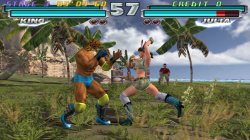
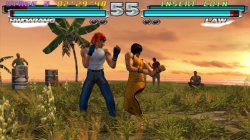
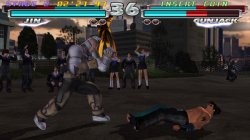
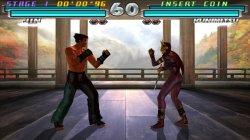
Tekken Tag Tournament (SLUS20001)

FIX

TXT.

Code:
--host-display-mode=16:9
--gs-progressive=1

--ee-cycle-scalar=2.00

--iop-cycle-scalar=0.1

--vu1-mpg-cycles=100

--vu0-const-prop=1

--vu1-const-prop=1

--cop2-const-prop=1

--host-gamepads=2

LUA.
Code:
-- Tekken Tag Tournament (NTSC v2.00)
-- emu used=Siren v2

local gpr = require("ee-gpr-alias")

apiRequest(0.1)

local eeObj  = getEEObject()
local emuObj = getEmuObject()

local CheckInputs = function()

local pad_bits = emuObj.GetPad()

local UP    = pad_bits &  0x0010
local DOWN    = pad_bits &  0x0040
local LEFT    = pad_bits &  0x0080
local RIGHT    = pad_bits &  0x0020
local Triangle  = pad_bits &  0x1000
local Cross    = pad_bits &  0x4000
local Square    = pad_bits &  0x8000
local Circle  = pad_bits &  0x2000
local L1    = pad_bits &  0x0400
local L2    = pad_bits &  0x0100
local L3    = pad_bits &  0x0002
local R1    = pad_bits &  0x0800
local R2    = pad_bits &  0x0200
local R3    = pad_bits &  0x0004
local Select  = pad_bits &  0x0001
local Start    = pad_bits &  0x0008

if (L3 ~= 0) then
--Unlock Everything
eeObj.WriteMem32(0x00439C70,0xFFFFFFFF)
eeObj.WriteMem32(0x00439C74,0x0000003F)
eeObj.WriteMem32(0x00439C78,0x00000026)
eeObj.WriteMem32(0x00439C82,0x00000103)
end

if (R3 ~= 0) then
--Allow Players To Choose Same Characters
eeObj.WriteMem32(0x003CA104,0x00000000)
end

if (Select ~= 0 and LEFT ~= 0) then
--16x9
eeObj.WriteMem32(0x0034b014,0x3c013f40)
eeObj.WriteMem32(0x0034b018,0x44810000)
eeObj.WriteMem32(0x0034b020,0x4600c602)
end

end

emuObj.AddVsyncHook(CheckInputs)

local patcher = function()

--No interlacing (US V2.0)
eeObj.WriteMem32(0x208BD0C8,0x00000066) --00007F67
eeObj.WriteMem32(0x208BD0D0,0x00000001) --00000003
eeObj.WriteMem32(0x208BD0D8,0x00009400) --0000948C

end

emuObj.AddVsyncHook(patcher)

Good performance only on PS4 Pro/PS5!

Tekken Tag Tournament (v2.00) (NTSC). Short GamePlay!
VIDEO
 

Attachments

  • 01.jpg
    01.jpg
    1.1 MB · Views: 61
  • 02.jpg
    02.jpg
    959.8 KB · Views: 61
  • 03.jpg
    03.jpg
    704.5 KB · Views: 64
  • 04.jpg
    04.jpg
    788.2 KB · Views: 52
Crash Bandicoot Bakusou! Nitro Kart (SLPM-65580)

CONFIG TXT

--gs-uprender=2x2
--gs-upscale=edgesmooth
--gs-adaptive-frameskip=1
--force-frame-blend=1

--vu0-no-clamping=0
--vu1-no-clamping=0
--vu1-di-bits=0
--vu1=jit-sync
--vu1-native-patch=1

--vu1-mpg-cycles=2200
--vu1-jalr-cache-policy=newprog
--vu0-jr-cache-policy=sameprog

--ee-hook=0x005CE2C8,AdvanceClock,,21000

--host-gamepads=2

LUA

--Crash Bandicoot: Bakusou! Nitro Kart NTSC-J (SLPM-65580)
--emu used=jakx v2

local gpr = require("ee-gpr-alias")

apiRequest(0.1)

local emuObj = getEmuObject()
local eeObj = getEEObject()
local gsObj = getGsObject()
local eeOverlay = eeObj.getOverlayObject()
local iopObj = getIOPObject()

emuObj.PadSetLightBar(0, 255,0,255)
emuObj.SetDisplayAspectWide()
gsObj.SetDeinterlaceShift(1)
gsObj.SetUprenderMode(1) -- 0=none <> 1=2x2
emuObj.SetDeinterlace(true)

local CheckInputs = function()

local pad_bits = emuObj.GetPad()

local UP = pad_bits & 0x0010
local DOWN = pad_bits & 0x0040
local LEFT = pad_bits & 0x0080
local RIGHT = pad_bits & 0x0020
local Triangle = pad_bits & 0x1000
local Cross = pad_bits & 0x4000
local Square = pad_bits & 0x8000
local Circle = pad_bits & 0x2000
local L1 = pad_bits & 0x0400
local L2 = pad_bits & 0x0100
local L3 = pad_bits & 0x0002
local R1 = pad_bits & 0x0800
local R2 = pad_bits & 0x0200
local R3 = pad_bits & 0x0004
local Select = pad_bits & 0x0001
local Start = pad_bits & 0x0008

if (L3 ~= 0) then
--3 Opponents Races
eeObj.WriteMem32(0x207C3DAC,0x00000003)
end
if (R3 ~= 0) then
--All Opponents Races
eeObj.WriteMem32(0x207C3DAC,0x00000007)
end

end

emuObj.AddVsyncHook(CheckInputs)

local patcher = function()
--16:9
eeObj.WriteMem32(0x005854A8,0x3C023F17) --3C023F00
--freeze fix
eeObj.WriteMem32(0x003DB580,0) --1440FFE5

eeObj.SchedulerDelayEvent("vif1.dma",0x5000)
emuObj.ThrottleMax() -- No negative.
end

emuObj.AddVsyncHook(patcher)
 
Yakuza [UnDUB] (SLUS21348)

FIX

TXT.

Code:
--host-display-mode=16:9
--cdvd-sector-read-cycles=2000   
--gs-progressive=1
--gs-optimize=60fps

LUA.
Code:
-- Yakuza Restored (UnDUB)
-- emu used=rogue v1

apiRequest(0.1)

local gpr       = require("ee-gpr-alias")

local emuObj      = getEmuObject()
local eeObj       = getEEObject()

local patch = function()

-- Widescreen
eeObj.WriteMem32(0x0001aaab,0x00592d1c) -- If Screen setting is set to widescreen, execute these codes to fix the zoom
eeObj.WriteMem32(0x2023a820,0x3c024082) -- 3c024049 -- zoom

eeObj.WriteMem32(0x00010000,0x00592d1c) -- If Screen setting is set to normal, restore the values back to stock ones
eeObj.WriteMem32(0x2023a820,0x3c024049)

--eeObj.WriteMem32(0x2019fd24,0x3c023f40) -- 3c023f80 -- hor fov
--eeObj.WriteMem32(0x2023a828,0x34480fdb) -- 34480fdb -- zoom 2
--eeObj.WriteMem32(0x201abb90,0x3c014071) -- 3c014049 -- Alt. zoom
--eeObj.WriteMem32(0x201abb94,0x34290fdb) -- 34290fdb -- Alt. zoom 2

-- Press L1+Up 60fps Enable

if eeObj.ReadMem16(0x01F5699C) == 0xFBEF then -- R3+Up
eeObj.WriteMem32(0x2011034C,0x00000000)
eeObj.WriteMem32(0x207FC418,0x3F000000)
eeObj.WriteMem32(0x207FC41C,0x3F000000)
end

-- Press L1+Down 60fps Disable

if eeObj.ReadMem16(0x01F5699C) == 0xFBBF then -- R3+Down
eeObj.WriteMem32(0x2011034C,0x1040000A)
eeObj.WriteMem32(0x207FC418,0x3F800000)
eeObj.WriteMem32(0x207FC41C,0x3F800000)
end

-- Press R3+Up 1-Hit Kill Enable

if eeObj.ReadMem16(0x01F5699C) == 0xFFEB then -- R3+Up
eeObj.WriteMem32(0x2066A5A8,0x24020000)
end

-- Press R3+Down 1-Hit Kill Disable

if eeObj.ReadMem16(0x01F5699C) == 0xFFBB then -- R3+Down
eeObj.WriteMem32(0x2066A5A8,0x00621023)
end

end

emuObj.AddVsyncHook(patch)

Graphical bugs (White line in cutscenes with Ghosting effect on light sources) - Fixed with picked right emu!
I prefer turn on 60fps cheat only while gameplay (that cheat broke fmvs and they works too fast, so you must disable 60fps before fmvs!) and 1-Hit Kill cheat helps make gameplay routine fights more fun!

Yakuza (UnDUB) (Ryu ga Gotoku). Short Test!
VIDEO


Yakuza|Ryu ga Gotoku|1 Hour of Classic|Widescreen|60fps|UnDUB PS2toPS4 LONGPLAY
 
Hi, anyone got a fix for Dirge of Cerberus - Final Fantasy VII? The gameplay drops frames a couple of times which is a little annoying but I dont mind that too much. The main thing im looking for is a fix for the fmvs. They run slower and stutter and I can't figure out a fix. I'm pretty new to all this so forgive me if this has already been answered somewhere else.

I thought I had figured out a fix by running it on the star ocean emulator. That caused the fmvs to run perfectly but then the game itself runs extremely slowly.

Thank you for the help and sorry again if this has already been answered.
 
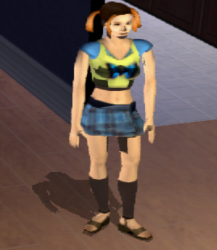
The Sims Bustin' Out - SLUS20842

emu=JakXv2

FIX

Code:
--host-display-mode=16:9
--cdvd-sector-read-cycles=2000
--safe-area-min=0.90 #full screen
--gs-optimize=60fps
--vu0-di-bits=0
--vu1-di-bits=0
--gs-force-bilinear=1
#Speedhacks
--vu1-mpg-cycles=400
--ee-cycle-scalar=1.2
#Force 480p
--gs-progressive=1
# Emu used = Jak X V2

FIX SkipMpegHack (FMV skip)

Code:
-- The Sims - Bustin' Out (NTSC-U)
-- Widescreen hack by Arapapa
-- Emu used = Jak X V2

local gpr = require("ee-gpr-alias")

apiRequest(1.0)

local emuObj = getEmuObject()
local eeObj = getEEObject()
local gsObj = getGsObject()
local eeOverlay = eeObj.getOverlayObject()
local iopObj = getIOPObject()

-- Fix shadow
emuObj.SetGsTitleFix( "forceSimpleFetch", "reserved", { texMode=2  } )

-- Reduce flush count
emuObj.SetGsTitleFix( "SetSelfRender", "reserved", { fbmask=0x00FFFFFF , renderSelf=1 , zmsk=1 , alpha=0 , texMode=2  } )

-- Disabled due to embossing effect problem --jstine
emuObj.SetGsTitleFix( "trianglesAsParticles", "reserved", { hasClut=1,zmsk=1 } )

-- Skip Mpeg Hack
local addr   = 0x100008
local skipMpeg = function()
    while(addr < 0x1000000)
    do
        if eeObj.ReadMem32(addr) == 0x8c830040 then
            if eeObj.ReadMem32(addr + 4) == 0x03e00008 then
                if eeObj.ReadMem32(addr + 8) == 0x8c620000 then
                    eeObj.WriteMem32(addr + 8, 0x24020001)
                    break
                else
                    addr = addr + 4
                end
            else
                addr = addr + 4
            end
        else
            addr = addr + 4
        end
    end
end

emuObj.AddEntryPointHook(skipMpeg)
--We should remove that hook, but we never really hit entry point again.
--emuObj.RemoveEntryPointHook(skipMpeg)

local patcher = function()

-- Widescreen hack 16:9
eeObj.WriteMem32(0x00293a54,0x34218e2a) -- 3421aaab

emuObj.ThrottleMax()
end

emuObj.AddVsyncHook(patcher)

i try commands is nothing.. User emu = Jakxv2
 
Red Card
emu=red dead

Code:
--vu1-mpg-cycles=700
--safe-area-min=0.9
When doing power shots, there is a blur effect applied on the screen. However this blur is rather blocky and broken, How do you fix this with the red dead emu?
 
When doing power shots, there is a blur effect applied on the screen. However this blur is rather blocky and broken, How do you fix this with the red dead emu?
try with this commands:
Code:
--gs-force-bilinear=1
--gs-kernel-cl="up2x2"
--gs-progressive=1
or this in lua:
Code:
apiRequest(0.6)  
 
local emuObj    = getEmuObject()

emuObj.SetGsTitleFix( "forceSimpleFetch", "reserved", { texMode=2 } )
--emuObj.SetGsTitleFix( "forceSimpleFetch", "reserved", {prim=6} )
 

Similar threads

Back
Top