
You are using an out of date browser. It may not display this or other websites correctly.
You should upgrade or use an alternative browser.
You should upgrade or use an alternative browser.
PS4 [Research] PS2 Game Status on (PS4's - PS2 EMU)

kozarovv
Developer
patch=0,EE,001d8020,word,1000000foh WOW! Dude, that was incredibly fast, thank youI'll give it a try right now. I see how you've used the addresses, but how did you convert "word" to 0x48421000? Thanks!
patch=0 = apply only once (not needed more, as value don't change here)
EE = Emotion Engine
001d8020 = Memory address
byte,short,word = byte 000000FF, short 0000FFFF, word FFFFFFFF
1000000f = Patch value, so in word case apply full opcode
eeInsnReplace(0x1D8020, 0x48421000, 0x1000000f)
eeInsnReplace = like patch=1 in pcsx2 but applied only if meet original opcode on selected address
0x1D8020 = Memory address
0x48421000 = Original opcode found on this memory address
0x1000000f = Opcode that will be used instead of above
Getting missing original opcode (require game executable, or even other game elf sometime)
Extract SLXS_YYY.ZZ file from game image
Open file in ps2dis
Push G on keyboard and provide needed address (001D8020 in this case), push enter.
Voila.
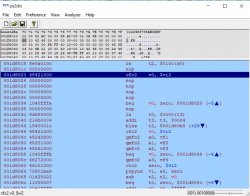
You can additionally click Analyze - Invoke Analyzer to get info about functions, not really needed while porting patches.

sabin1981
Member
Excellent information, thank you very much, easy to understand and hopefully I should be able to put this into practice myself in the future -- unfortunately, in this case, it wasn't successful. I still get the same instant freeze at the start of combat  Ah well. Thank you for trying, nonetheless!
Ah well. Thank you for trying, nonetheless!
kozarovv
Developer
To check that patch from pcsx2 is exactly for that issue, just un-tick "Enable Automatic Gamefixes" and run game AGAIN. If it freeze in the same place, then this CAN BE the same issue. If it freeze in other place THIS CAN BE different issue.Excellent information, thank you very much, easy to understand and hopefully I should be able to put this into practice myself in the future -- unfortunately, in this case, it wasn't successful. I still get the same instant freeze at the start of combat
PS. Try this in config (not lua)
--fpu-accurate-range=0x100008,0x430000
Slow af, but can shed some light on issue.

sandungas
Developer
Good work btw, i been looking at your edits in wiki latelly and wanted to tell youI've been playing with a lot more games lately (been super busy on the wiki)

sabin1981
Member
To check that patch from pcsx2 is exactly for that issue, just un-tick "Enable Automatic Gamefixes" and run game AGAIN. If it freeze in the same place, then this CAN BE the same issue. If it freeze in other place THIS CAN BE different issue.
PS. Try this in config (not lua)
--fpu-accurate-range=0x100008,0x430000
Slow af, but can shed some light on issue.
Thanks again, Kozarovv! I'll try that shortly and see how it runs in PCSX2, then I'll try the FPU option
Good work btw, i been looking at your edits in wiki latelly and wanted to tell you
Oh hey, thank you very much! <3
sabin1981
Member
Okay, now this is weird. Knockout Kings 2002 freezes exactly the same way on PCSX2, with *or* without the automatica game fixes. There's a fix listed in the gameindex.dbf but it obviously doesn't work :\ There's even a report on the official PCSX2 wiki from someone, in January this year, stating that it doesn't work and that it freezes as soon as you start a fight.
So, oh well, I guess that's that then.
So, oh well, I guess that's that then.
sabin1981
Member
Hey guys, sorry for constantly picking your brains on fixing stuff, but I'm having some trouble with the "Disc Swap" option - chiefly that it doesn't actually do anything :| Okay, backstory;
I've been trying to inject Codebreaker (via u/wLoadElf, like I do with many other titles) but I can't edit the ISO of my game. It's Wild Arms Alter Code F and it's a dual layer, if I try and extract or do anything with it I only get Layer0 and the game doesn't work, Apache3 will allow me to extract both layers just fine but cdvdgen (1.5 or 2.0) won't let me create a dual-layer image, only single layer, so I can't copy over the uLaunchELF/Codebreaker.elf files to the disc as I usually do. My idea was to use the disc swap function, create a uLaunchELF disc, load Codebreaker, then when it tells me to insert the game disc, I'd use the PS menu > disc swap option, and continue. Only, that doesn't seem to do anything :\ If I reboot via Codebreaker I'm back at the disc01 uLaunchELF menu and it doesn't load disc02 (Wild ARMS) >_<
Does anyone know how to truly work the disc swap setting? Or perhaps even how to edit/flatten a dual-layer ISO into a larger single-layer? Something/anything so I can inject Codebreaker into the ISO? Thanks guys!
Also, I've added dozens more titles to the wiki and I'll be continuing to do so, it's a blast! Considering the PS4 PS2emu isn't as compatible as the PS2netemu from PS3, it's still remarkably capable! Over 300 playable games and climbing. Right now I'm trying to get Phantasy Star Universe to work, the game looks and runs great, but unfortunately has some geometry/texture/lightsource flickering in places. Not "devastating" but definitely noticeable.
I've been trying to inject Codebreaker (via u/wLoadElf, like I do with many other titles) but I can't edit the ISO of my game. It's Wild Arms Alter Code F and it's a dual layer, if I try and extract or do anything with it I only get Layer0 and the game doesn't work, Apache3 will allow me to extract both layers just fine but cdvdgen (1.5 or 2.0) won't let me create a dual-layer image, only single layer, so I can't copy over the uLaunchELF/Codebreaker.elf files to the disc as I usually do. My idea was to use the disc swap function, create a uLaunchELF disc, load Codebreaker, then when it tells me to insert the game disc, I'd use the PS menu > disc swap option, and continue. Only, that doesn't seem to do anything :\ If I reboot via Codebreaker I'm back at the disc01 uLaunchELF menu and it doesn't load disc02 (Wild ARMS) >_<
Does anyone know how to truly work the disc swap setting? Or perhaps even how to edit/flatten a dual-layer ISO into a larger single-layer? Something/anything so I can inject Codebreaker into the ISO? Thanks guys!
Also, I've added dozens more titles to the wiki and I'll be continuing to do so, it's a blast! Considering the PS4 PS2emu isn't as compatible as the PS2netemu from PS3, it's still remarkably capable! Over 300 playable games and climbing. Right now I'm trying to get Phantasy Star Universe to work, the game looks and runs great, but unfortunately has some geometry/texture/lightsource flickering in places. Not "devastating" but definitely noticeable.

Stayhye
Senior Member
if using multiple disc pkg
remove this from config.txt:
--playgo-disc-per-chunk=0
or just put # in front... eg. #--playgo-disc-per-chunk=0
also, if using the jak emu, you also have this option:
--switch-disc-reset=1 or --switch-disc-reset=0
meaning you can swap disc without the emu resetting.
remove this from config.txt:
--playgo-disc-per-chunk=0
or just put # in front... eg. #--playgo-disc-per-chunk=0
also, if using the jak emu, you also have this option:
--switch-disc-reset=1 or --switch-disc-reset=0
meaning you can swap disc without the emu resetting.
Last edited:
sabin1981
Member
Thanks for the advice, but unfortunately that line isn't even in the config file I'm using in the first place :\
Code:
--isd-git-hash=2db1986e5f494d0efbce7247fc5577ed96c5cb40
--usrd-git-hash=1d4879dbbe0f923cb97f5bbf6dc130aeb4e84d7c
--lua-use-pcall=0
--emulog-file=0
--path-snaps="/tmp/snapshots"
--path-recordings="/tmp/recordings"
--path-vmc="/tmp/vmc"
--path-emulog="/tmp/recordings"
--config-local-lua=""
--load-tooling-lua=0
#--path-patches="/app0/patches"
#--path-trophydata="/app0/trophy_data"
#--path-featuredata="/app0/feature_data"
#--path-toolingscript="/app0/patches"
--ps2-title-id=SLUS-20937
--gs-uprender=2x2
--gs-upscale=EdgeSmooth
--max-disc-num=2
--trophy-support=0
--pad-record=0
--host-audio=1
--rom="PS20220WD20050620.crack"
--ps2-lang=system
--verbose-cdvd-reads=0
--host-osd=0
--host-display-mode=4:3
#--------------experimental fixes
--gs-progressive=1
#--threaded-gs=1
#--gs-adaptive-frameskip=1
#--force-pal-60hz=1
#--------------experimental fixessabin1981
Member
I didn't even know there was a "no reset" option .. however, the problem I'm facing is; when I open the PS menu and select "Switch Disc", it says "you are on Disc 1, choose the disk you wish to switch to" -- I choose the next disk and there's no response. Nothing happens. It doesn't switch, or if it does switch it doesn't show anything. If I open the PS menu the same thing, shows as still on Disc 1, so when I press "Okay!" to the Codebreaker "Insert game disc" option, the emu resets back to Codebreaker's disc instead.
I'll try out your no-reset command and see if that works, thank you
I'll try out your no-reset command and see if that works, thank you
sabin1981
Member
Are you serious!? HAHAHA! Really?? Holy crap, haha!
~edit~
That fixed it ! I hadn't flippin' noticed X/O being swapped. However, as said, the game resets when changing disc... so I'll remake the PKG right now with your "no-reset" command and hey, see if it works. Sir, you rock, thank you
~edit~
It worked ^_^ Now when I switch disc it doesn't reset the emulator, and even better; it remembers the last disc you had selected when you close/reopen the game later. Nice. Anyhow, now I have a game that has two discs baked in, the Codebreaker ISO and the Game. Run the game, select cheats, then start game-- when it prompts for disc, open PS menu, change disc, go back to game and hit continue. Loads right up as if Codebreaker.elf was on the game itself! I love it
Thank you, Stayhye, it's most appreciated!
~edit~
That fixed it ! I hadn't flippin' noticed X/O being swapped. However, as said, the game resets when changing disc... so I'll remake the PKG right now with your "no-reset" command and hey, see if it works. Sir, you rock, thank you
~edit~
It worked ^_^ Now when I switch disc it doesn't reset the emulator, and even better; it remembers the last disc you had selected when you close/reopen the game later. Nice. Anyhow, now I have a game that has two discs baked in, the Codebreaker ISO and the Game. Run the game, select cheats, then start game-- when it prompts for disc, open PS menu, change disc, go back to game and hit continue. Loads right up as if Codebreaker.elf was on the game itself! I love it
Thank you, Stayhye, it's most appreciated!
Last edited:

for some reason the O and X are swapped in the disc swap menu....took me a while to realize i was pressing wrong button to swap
It's managed in the param.sfo :

You should have circle by default. Change to cross or to assigned by the system and enjoy
sabin1981
Member
Amazing. You guys are amazing <3
Surprised and happy to report that Wild ARMS Alter Code F now works great, no longer crashes/freezes during Jack's prologue, runs great and looks great, doesn't even have any text corruption issues that plague PCSX2 (without the pixel offset hack applied) -- there is some slowdown during a handful of spells due to effect, mostly fire, which I'm not sure how to even begin fixing, they're not even visually impressive or system taxing either, but egh... small problems compared to the whole game running properly now
Surprised and happy to report that Wild ARMS Alter Code F now works great, no longer crashes/freezes during Jack's prologue, runs great and looks great, doesn't even have any text corruption issues that plague PCSX2 (without the pixel offset hack applied) -- there is some slowdown during a handful of spells due to effect, mostly fire, which I'm not sure how to even begin fixing, they're not even visually impressive or system taxing either, but egh... small problems compared to the whole game running properly now
Stayhye
Senior Member
Surprised and happy to report that Wild ARMS Alter Code F now works great, no longer crashes/freezes during Jack's prologue, runs great and looks great
what emu are you using? Any fixes applied?
sabin1981
Member
what emu are you using? Any fixes applied?
Jak emu and no fixes whatsoever, just the config-txt you see coded a few posts above
I'm currently rebuilding and trying with
Code:
--gs-progressive=1
--threaded-gs=1
--gs-adaptive-frameskip=1
--gs-optimize-30fps
Though I think optimize-30 is a bad choice, because I *think* WAACF is a 50/60fps game based on region, not 30fps.
Similar threads
-
 PS3 Screen tearing - PS2 480p games on BC PS3
- Started by Alonso240
- Replies: 0
-
 PS3 Questions about problematic back-compat games on CECHA/CHECHB models
- Started by psy1
- Replies: 3
-
-