
RetroArch CE (Unofficial - Community Edition)

PS3 RetroArch CE (Unofficial - Community Edition) Beta 4

Ok so after some digging in the file structure of my PS3 it seems PKGLAUNCH had its own PS3_GAME folder which contains a USRDIR and in turn the same folders contained in RETROARCH (assets, config etc) so it seems this is being used when launching ROMS via webman games and not the one in RETROARCH. Why is there a need for 2 folders which contain the same information? Can I safely remove the one for PKG launch or make a symbolic link to the RETROARCH folder?


Sent from my iPhone using Tapatalk
 
Do you know why there are 2 versions of the retroarch files? How can I have one set of config for Retroarch?

The folder PS3_GAME included in PKGLAUNCH is used to mount the folder as dev_bdvd and app_home

The USRDIR/cores folder in RETROARCH is mapped to PKGLAUNCH, so all the emulators can be used.

Maybe there are other methods to make it work, but I got it working this way.

If you have a better implementation, feel free to submit a pull request:
https://github.com/aldostools/webMAN-MOD/pulls
 
Thanks for the explanation. Not saying I know a better way just trying to work out why I have 2 separate configs for Retroarch in play depending on how I use Retroarch (ROMS via webman games and via Retroarch directly).

Could my particular issue come from the fact that I had the 'official' version of Retroarch installed prior to installing the community version? Would deleting and reinstalling PKGLAUNCH fix the dual config issue?


Sent from my iPhone using Tapatalk
 
Could my particular issue come from the fact that I had the 'official' version of Retroarch installed prior to installing the community version? Would deleting and reinstalling PKGLAUNCH fix the dual config issue?

I don't know the answer. You can try deleting & reinstalling both apps.
 
So I deleted PKGLAUNCH and installed a fresh version and when I launch a ROM from webman games the config is reset to default (not using the config for RETROARCH) and the directories are showing as using dev_bdvd which in my limited knowledge indicates it's trying to use a blueray.

c5ef90624b2d9756438e4aa85ea23bdb.jpg


Sent from my iPhone using Tapatalk
 
The folder PS3_GAME included in PKGLAUNCH is used to mount the folder as dev_bdvd and app_home

The path in /dev_bdvd actually is mapped to /dev_hdd0/game/PKGLAUNCH
So it is using the config in /dev_hdd0/game/PKGLAUNCH/USRDIR/retroarch.cfg

The "cores" folder in /dev_bdvd is mapped to /dev_hdd0/game/RETROARCH/USRDIR/cores

You just need to configure the settings that you need for your emulator. I rarely touch them and my roms work fine.
 
The folder PS3_GAME included in PKGLAUNCH is used to mount the folder as dev_bdvd and app_home

The path in /dev_bdvd actually is mapped to /dev_hdd0/game/PKGLAUNCH
So it is using the config in /dev_hdd0/game/PKGLAUNCH/USRDIR/retroarch.cfg

The "cores" folder in /dev_bdvd is mapped to /dev_hdd0/game/RETROARCH/USRDIR/cores

You just need to configure the settings that you need for your emulator. I rarely touch them and my roms work fine.

Thanks for the reply.

Is there a technical reason why the config can't be mapped to

/dev_hdd0/game/RETROARCH/USRDIR/retroarch.cfg

That way the configs are the same and all changes will be reflected no matter which way you access your ROMS.


Sent from my iPhone using Tapatalk
 
Thanks for the reply.

Is there a technical reason why the config can't be mapped to

/dev_hdd0/game/RETROARCH/USRDIR/retroarch.cfg

That way the configs are the same and all changes will be reflected no matter which way you access your ROMS.


Sent from my iPhone using Tapatalk

You can copy that file to /dev_hdd0/game/PKGLAUNCH/PS3_GAME/USRDIR/retroarch.cfg and test if it works.

I implemented this feature almost 8 years ago in IRISMAN and later in webMAN MOD, and I don't remember all the details.
I used what worked. As I said, maybe there is a better way. If you find one, submit a pull request.
 
I have rebug dex 4.84.2 installed and have the dex version of RetroArch installed (last official build) should I update to the CE version and will it be fine on dex?
 
I have rebug dex 4.84.2 installed and have the dex version of RetroArch installed (last official build) should I update to the CE version and will it be fine on dex?
The last official is installed in a different location:
/dev_hdd0/game/SSNE10000

The CE version is installed in:
/dev_hdd0/game/RETROARCH

So what you could do is copy all saves, bios, thumbnails and remap configs if you have any and make a backup.
Then remove the old version (the official one) and install the CE version.
After that copy the files that I mentioned earlier to their new folder.
Somethings you might need to reconfigure. And then you are done.

why I can't get backgrounds auto? Do I have to download them manually?
Dynamic Backgrounds, like when you are viewing the SNES playlist there is a SNES console behind it, and If you switch to GENESIS playlist the background changes to the GENESIS console behind the playlist? If yes, they only work when you are using the old XMB Interface theme and not the new default OZONE one.
I never used them but that's what I know about.

Here it is a Windows PC tutorial for that.

 
Last edited:
The last official is installed in a different location:
/dev_hdd0/game/SSNE10000

The CE version is installed in:
/dev_hdd0/game/RETROARCH

So what you could do is copy all saves, bios, thumbnails and remap configs if you have any and make a backup.
Then remove the old version (the official one) and install the CE version.
After that copy the files that I mentioned earlier to their new folder.
Somethings you might need to reconfigure. And then you are done.


Dynamic Backgrounds, like when you are viewing the SNES playlist there is a SNES console behind it, and If you switch to GENESIS playlist the background changes to the GENESIS console behind the playlist? If yes, they only work when you are using the old XMB Interface theme and not the new default OZONE one.
I never used them but that's what I know about.

Here it is a Windows PC tutorial for that.

Okay sounds good I'll go ahead and do that.
 
The last official is installed in a different location:
/dev_hdd0/game/SSNE10000

The CE version is installed in:
/dev_hdd0/game/RETROARCH

So what you could do is copy all saves, bios, thumbnails and remap configs if you have any and make a backup.
Then remove the old version (the official one) and install the CE version.
After that copy the files that I mentioned earlier to their new folder.
Somethings you might need to reconfigure. And then you are done.


Dynamic Backgrounds, like when you are viewing the SNES playlist there is a SNES console behind it, and If you switch to GENESIS playlist the background changes to the GENESIS console behind the playlist? If yes, they only work when you are using the old XMB Interface theme and not the new default OZONE one.
I never used them but that's what I know about.

Here it is a Windows PC tutorial for that.


I mean catridge wallpapers (photos), when I scroll the list I would like to see wallpapers of games.
 
I mean catridge wallpapers (photos), when I scroll the list I would like to see wallpapers of games.
I think you are talking about THUMBNAILS. Which can be Screenshots/Snaps from the Game Title, In-Game Screen or Box Scan.

Follow these tips below to auto download them:
https://www.reddit.com/r/RetroArch/comments/h8rc9g/how_to_download_thumbnails_for_all_the_scanned/

If you feel that you prefer to download them manually, you could download them from here and put them in the thumbnails folder corresponding to the name of your playlist:
https://github.com/libretro-thumbnails/libretro-thumbnails

Extra things about thumbnails:
https://docs.libretro.com/guides/roms-playlists-thumbnails/
 
Last edited:
@Crystal Can i make a request to have a UAE Core that play AMIGA CD32 games ?
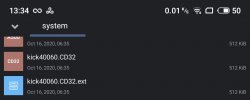
I think you need to source and add a "kick40060.CD32.ext" file into the system directory for thing to work.
https://github.com/libretro/libretro-uae it would be awesome

I started that game on Retroarch CE for PS3:
Put kick40060.CD32 and kick40060.CD32.ext into /dev_hdd0/game/RETROARCH/USRDIR/system/
search, download iso/cue "Defender of The Crown 2 - CD32.zip" , unzip and put bin & cue inside a PS3 folder.
Enjoy it
 
Back
Top