


Boon Tobias
Member
RETROLauncher
-----------------------------------------------------------------------------------------------
My native language is Spanish, use the translator, sorry for the English, I hope it is understood.
-----------------------------------------------------------------------------------------------
What is RETROLauncher?-----------------------------------------------------------------------------------------------
My native language is Spanish, use the translator, sorry for the English, I hope it is understood.
-----------------------------------------------------------------------------------------------
RETROLauncher is a launcher with a graphical user interface (frontend) focused on retro games. It was created entirely in Lua using the Enceladus development environment, in collaboration with RetroArch, POPStarter, Neutrino, wLaunchELF ISR, and OPL to run games and applications.
The main goal of this program is to provide an intuitive, attractive, and highly customizable graphical environment for managing libraries from different retro systems on the PS2, allowing you to keep all those libraries in one place and easily accessible.
RETROLauncher aims to avoid complex configurations, so the settings are kept to a minimum: simply add the games and play. However, all settings are fully editable if an advanced user wishes to modify them.
RETROLauncher was only tested on one console model:
- SCPH-77xxx (NTSC) Japanese.
- With Matrix 1.93 chip.
- FreeMCBOOT 1.8.
Important note:
Enceladus has received significant updates that have modified some commands and functions, so unfortunately, RETROLauncher is no longer compatible with recent versions of Enceladus. To use the new Enceladus features, you need to edit all the lines and commands that are no longer supported (some functions must be removed). However, it's a good option for those using FAT consoles, as one of Enceladus's new features is native hard drive support.
I didn't update my Enceladus version because I encountered some problems updating the code and had to remove some functions. However, for those who want to update Enceladus and take advantage of its new features, it's completely portable and doesn't require modifying many lines of code.
-----------------------------------------------------------------------------------------------
Previews
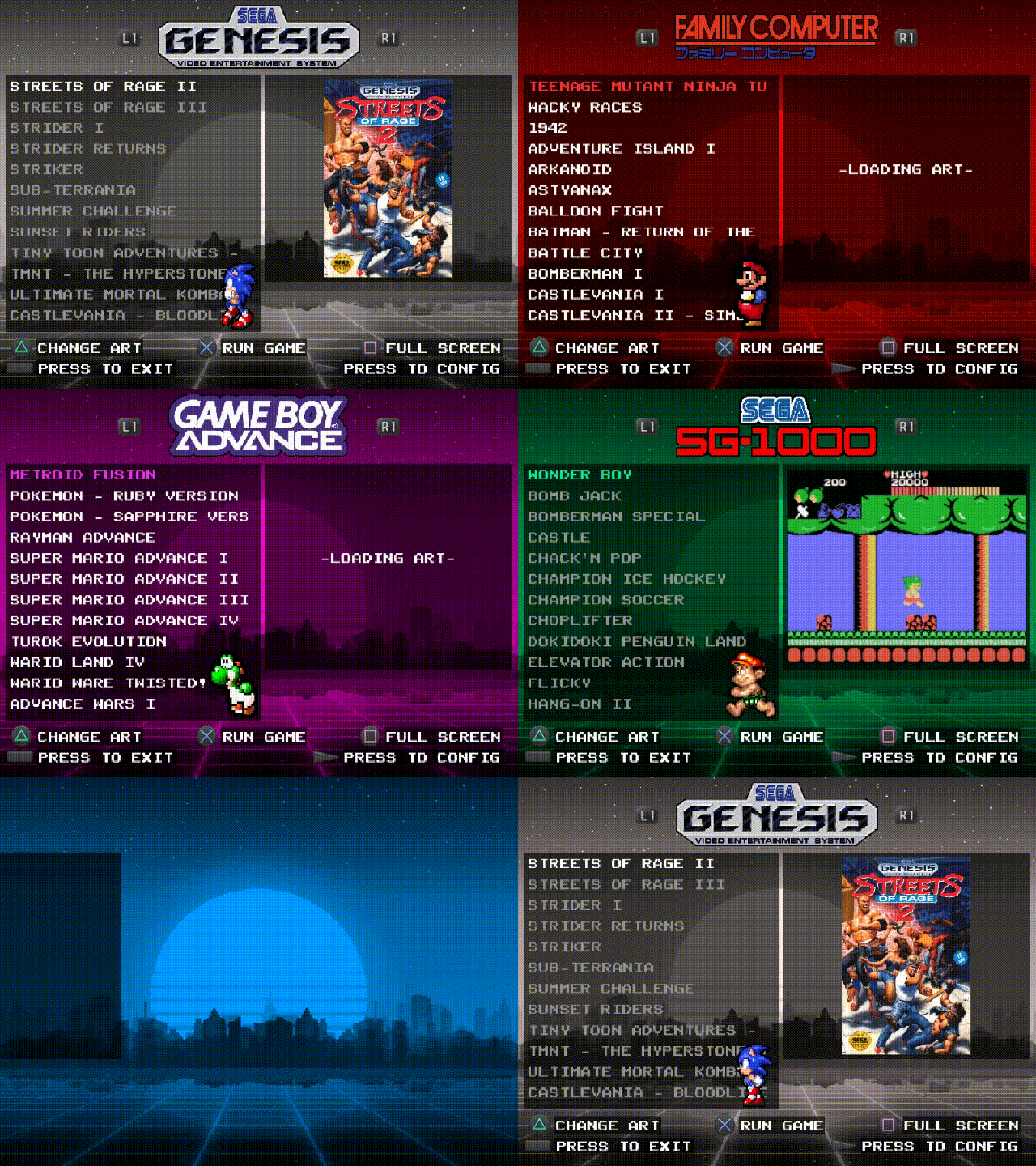
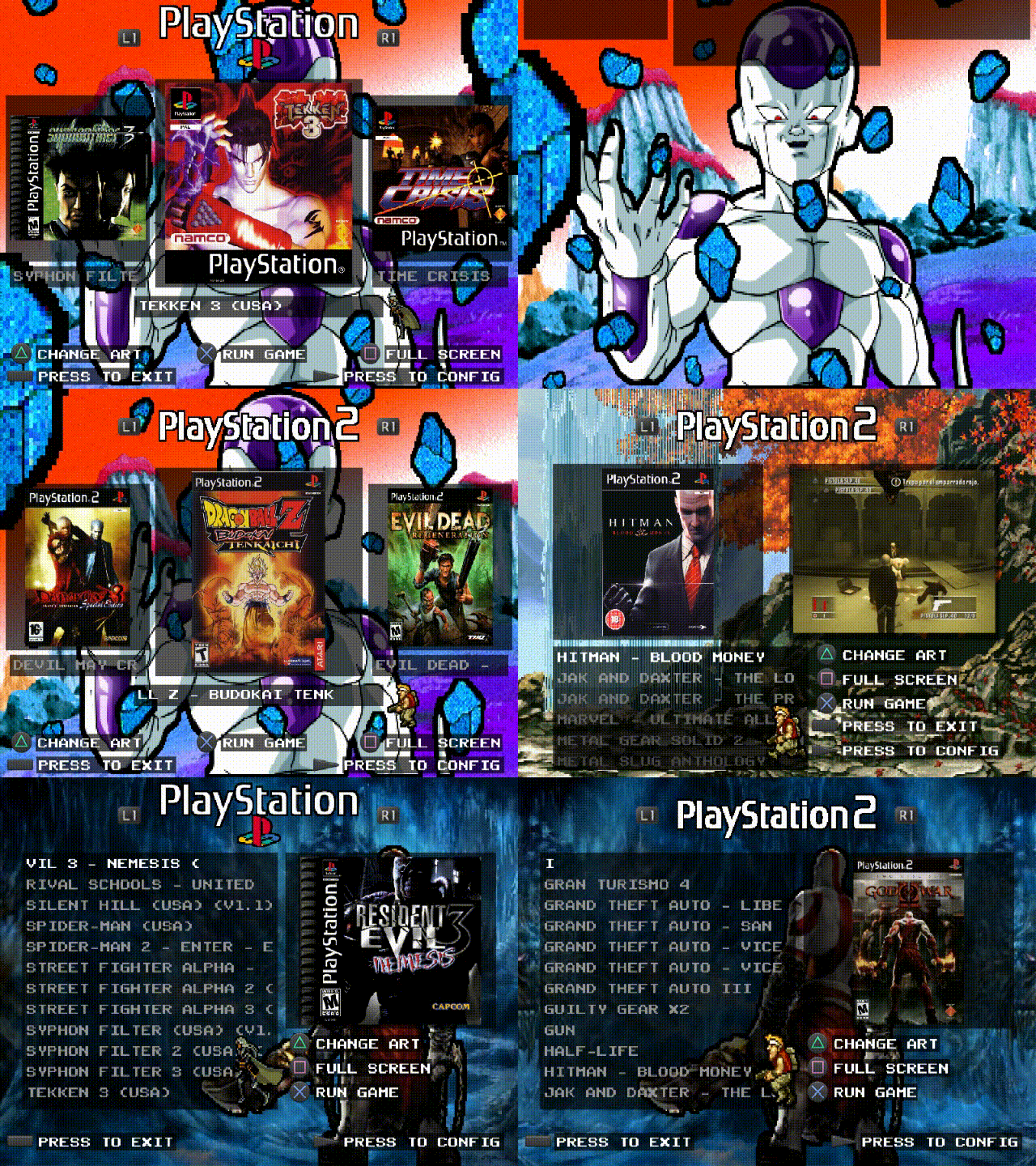
-----------------------------------------------------------------------------------------------
News:Previews
-----------------------------------------------------------------------------------------------
+ Neutrino and its settings have been updated to version 1.8.0.
+ The option to edit the colors and transparency of element shadows has been added.
+ The option to set the transparency of screenshots as the background has been added.
+ The option to always ask which application to use to launch the game has been added.
+ Support for UDPBD was added through the shortcut system.
+ All RetroArch core now support save states.
+ The Atari Lynx system has been added.
+ Configuration menus for POPStarter and OPL have been added.
+ Neutrino settings have been unified.
+ A system for using sprites in the main menu has been added.
+ A system for using animated backgrounds has been added.
+ A language system has been added.
+ All RETROLauncher menus have been reorganized and improved.
+ A browser has been added to the APPS system.
+ wLaunchELF ISR has been updated.
+ RETROLauncher now comes with an OPL version.
+ The core of "Quicknes" for Famicom has been updated, it no longer has problems in PAL 50hz.
+ Updated some Retroarch cores and configurations.
+ Several aesthetic improvements have been added.
+ Several general RETROLauncher issues have been fixed.
+ A numerical index has been added to the list of items.
+ The option to disable WLE from the RETROLauncher settings menu has been added.
+ Some general settings for POPStarter have been added to RETROLauncher.
+ Now, if the PS1 system cannot find the executable in the "POSP" folder, it will look for the ".vcd" executable in the APPS folder (in a subfolder under the game's name).
+ Now, if the PS1 system cannot find the executable, it will ask where to create it, offering the option to create it in the POSP folder or the APPS folder, along with its corresponding "Title.cfg" file.
+ The PS1 system now also lists the ".elf" executables located in the POPS directory, allowing you to add POPStarter executables for hard drives or SMBs.
+ Added SNESticle to run SNES games (only launches the emulator, not the selected game).
+ Added the ability to launch games via OPL (USB games only).
+ The code was restructured and performance was slightly improved.
+ New features have been added for adjusting text fonts.
+ A style editor has been added for creating, editing, and saving different customizable styles for the RETROLauncher main menu.
+ Added a relocation system for Retroarch configuration files. Now when it is detected that the "RETROLauncher" folder was placed in another directory other than the USB root or if it was moved to another directory, the Retroarch configurations will be adjusted to the new directory.
+ Now all RetroArch cores are compatible with exFAT.
+ The image scaling system is refined, the aspect ratio of covers and screenshots will now be completely respected.
+ Added TempGBA by belek666 as an alternative emulator for the GBA system.
+ Added wLaunchelf_ISR by israpps (Matías Israelson) for running applications, giving more compatibility when launching applications.
+ Now all systems save the last position so that when you reboot or change systems it continues from where you left the indicator.
+ Added the ability to change RETROLauncher's video mode to have a correct PAL 50Hz layout.
+ Now when RETROLauncher is set to PAL, all Retroarch settings will be changed to run according to the PAL 50Hz region (although content will still play at 60Hz, which may cause screen tearing). This should fix the audio issues that PAL 50Hz console users are having.
+ Added the ability to restore Cores individually, with this now it will not be necessary to reconfigure all Cores when a configuration fails.
+ You can now enable and disable the background loop (music) when sound effects are active in RETROLauncher.
+ PS2 games placed in the DVD/CD tray will now be listed under the PS2 section, and will also be listed under APPS so that you can find single applications on the DVD/CD or run the game through wLaunchELF.
+ Refined the search for art in the "ART" folder for PS1, PS2 and APPS systems.
+ The custom color system now allows the use of the full range of colors and combinations, still retains the old method for those who want more vivid colors (when transparency is off the colors are applied by the old method).
+ Added an option to load lists individually, with this you can get a little more performance when handling lists at the cost of small pauses when changing systems.
+ Added the ability to jump to the next character in game lists, which will allow us to jump to the next letter more quickly.
+ Added functions for the controller's analog sticks, such as moving through lists or a small zoom in on images.
+ Added ".ZIP" extension for all Retroarch systems (except GBA).
+ Added "TGB Dual" as an alternate core for Game Boy and Game Boy Color (for those titles that support multiplayer).
+ Now, ".ISO" and ".VCD" files containing the structure "XXXX_XXX.XX" in their names will appear without the ID. If RETROLauncher cannot find the artwork in its internal directory, it will look for it in the "ART" folder, using its "ID" prefix for PS2 and the executable name (".elf") for PS1.
+ Added support to detect some of the applications installed by SAS (Save App System)
+ Added IDs translation by dictionary for PS2 games placed on the disc tray, for games from the European, American and Japanese regions (there are 11.230 games available in the dictionary, although more IDs can be added manually) so that when placing a disk let's see the name of the game placed in the PS2/APPS section (supports multimedia).
+ An experimental feature has been added: a shortcut system to launch PS2 games stored on MX4SIO, HDD (exFAT), MMCE, and UDPBD. Thanks to reports from some users, I have confirmed that MX4SIO, MMCE, and UDPBD work correctly, but unfortunately, I have not received any reports of it working on hard drives formatted in exFAT.
Please re-download RETROLauncher to try the new features.
All details in the PDF.
Thank you very much for using RETROLauncher.
-----------------------------------------------------------------------------------------------
-----------------------------------------------------------------------------------------------
Download:
https://drive.google.com/drive/folders/1OQ6Wt-GBP4pEBQ_WNCG8mtwZCzHiLA5k.
Github:
https://github.com/Spaghetticode-Boon-Tobias/RETROLauncher
SNESticle USB (Standalone Emulator):
https://drive.google.com/drive/folders/1OCfIeexEkz0TarsK_KCZ0mLLMgf4DYCO
-----------------------------------------------------------------------------------------------
Last edited:

 !!! I didn't see it hahaha
 !!
!!


