PSP SCUMMVM port for PSPonPS4

@Devildwarf I've been thinking about what you said about PSPSDK being the open source toolchain.
I'm not entirely sure what toolchain I've been using for gcc-11+.
If it'd the official one how can I tell?
 
@Devildwarf I've been thinking about what you said about PSPSDK being the open source toolchain.
I'm not entirely sure what toolchain I've been using for gcc-11+.
If it'd the official one how can I tell?
Ok rebuild it again with C++11 setting on with gcc 9.3.0
https://drive.google.com/file/d/17C37KIfgklXwcNbvSOCWz5OEKOxshD8Z/view?usp=sharing
and the correct paths this time, hopefully that is correct :)
And you know if its the official sdk because you would have got it from Sony when you bought a PSP DevKit. All the ones we are using are from the open source sdk.
 
Ok rebuild it again with C++11 setting on with gcc 9.3.0
https://drive.google.com/file/d/17C37KIfgklXwcNbvSOCWz5OEKOxshD8Z/view?usp=sharing
and the correct paths this time, hopefully that is correct :)
And you know if its the official sdk because you would have got it from Sony when you bought a PSP DevKit. All the ones we are using are from the open source sdk.
Yeah that makes total sense, at first I wasn't sure since I've been using pre-made docker image.

I've tested your build now and unfortunately it's stuck on a black screen in PPSSPP. This is truly a mystery!

So if a dummy like me would to investigate the differences between using something like gcc-8 and gcc-11 in the compile process, how would I go about it, check the makefile? I wonder if different libraries are used between compiler versions.

Reading this page doesn't really make me much wiser:
https://wiki.scummvm.org/index.php?title=Compiling_ScummVM/C++11_Readiness

I also wonder could compiling c++-11 give less permission to the files and folders surrounding the EBOOT? I know this sounds desperate at this point.

EDIT2:
I'm pretty sure it's not something wrong with the plugins since the build work in PPSSPP, but no permission on PS4
 
Last edited:
jacobsson - from you will be version at least 2.5.1?? because that I built - works in PPSSPP1.11 but on ps4 - in error. version 2.6.0 - "could not find any engine capable of running the selected game" :(
 
jacobsson - from you will be version at least 2.5.1?? because that I built - works in PPSSPP1.11 but on ps4 - in error. version 2.6.0 - "could not find any engine capable of running the selected game" :(
Yes, I can confirm 2.6.0 is only working in ppsspp, but not on the PS4.
2.5.1 is the last version I got working on PS4 which can find game engines. 2.6.0 have some kind of file system read problem that needs to be investigated.
 
Last edited:
Here is a test-build of 2.5.1 including a freeware version of Beneath a Steel Sky for you guys to test:

You'll then need to:
1. Replace the content of PSP_GAME/SYSDIR/game with your game files
2. Edit your PSP_GAME/SYSDIR/scummvm.ini to match your game id and game engine, you can find them here
3. Convert your folder into an ISO by dropping your scummvm-folder onto the create_PSPiso_from_folder.bat from JMD-PSP-Tools
4. Use PSP-FPKG to make yourself PS4 scummvm fpkg by choosing your ISO and the config file above
 
@jacobsson
Tried to create an ISO from folder and can't find it after creation. Where is it supposed to be? No output folder or anything.
I dropped PSP_GAME folder onto the bat.
Thanks for your help

UPDATE: SET "WORKDIR=K:\GitHub\JMD-PSP-Tools\ISO Tools\bin"
Should it be a relative path?
 
Last edited:
@jacobsson
Tried to create an ISO from folder and can't find it after creation. Where is it supposed to be? No output folder or anything.
I dropped PSP_GAME folder onto the bat.
Thanks for your help

UPDATE: SET "WORKDIR=K:\GitHub\JMD-PSP-Tools\ISO Tools\bin"
Should it be a relative path?
Ooh yeah I have a vague memory that I fixed that path at some point, let me come back to you when I've checked. I'm pretty sure I made it relative, I'll share my version here
 
For me created pkg (Beneth steel sky provided) is crashing at startup. Tried manual way thru pkg tools using pspfpkg-scummvm-template (I'm terrible at it) and thru PSP-FPKG jabu tool and same result. ISO i ended up creating with UMDGen.
 
Last edited:
For me created pkg (Beneth steel sky provided) is crashing at startup. Tried manual way thru pkg tools using pspfpkg-scummvm-template (I'm terrible at it) and thru PSP-FPKG jabu tool and same result. ISO i ended up creating with UMDGen.
OK so I presume you fixed your folder to ISO problem, thats good!
I'll have to double check my work tomorrow to see if I've shared a bad build. Thank for testing! By the way, does your iso work in ppsspp?
 
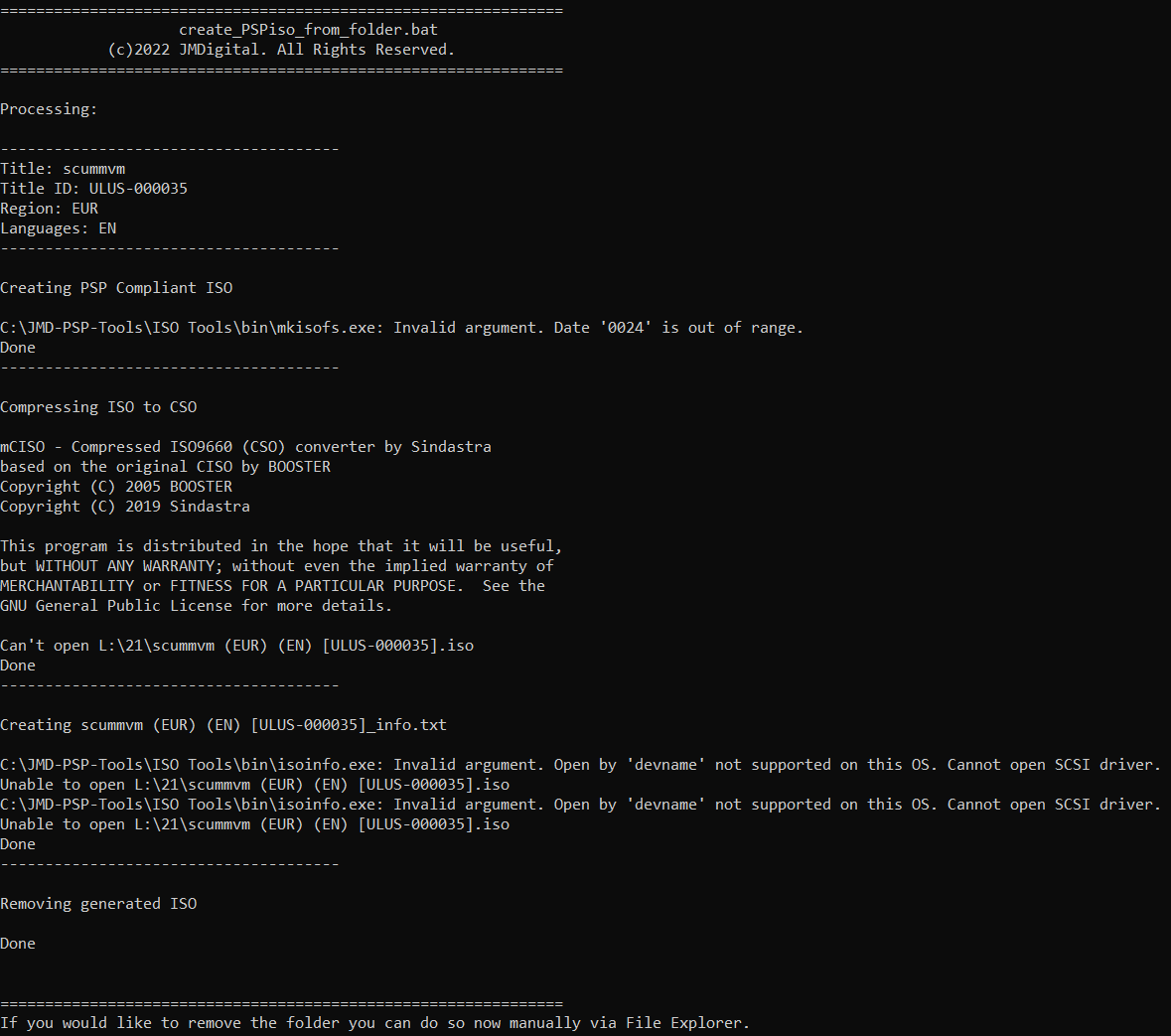
Jacobsson - errors appear when building a BAT file, what's wrong??? This is your file scummvm-2.5.1-psponps4-sky.
d4f114890056cbdcb057221b849216ec.png
 
Last edited:
I'm so sorry guys, life has come in the way lately! Releasing a tested working build is absolutely on top of my list, please bare with me ❤️
 
Update:
Hi there!
So I just wanted to say that I've tried rebuilding the 2.5.1 and also get the app crashing on the PS4, which is weird! I need to go back and redo all the steps manually it seems like. I'll let you know as soon as I figured it out.
 
Back
Top