PS3 Sen Enabler v5.8.0 - 80710A06 Spoof Fix & 4.70 CFW Support

Here is a release that i am sure many PS3 CFW user's will be a fan of as PS3 homebrew developer Evilnat has updated SEN ENABLER to support 4.70 CFW's, also he has a fix for Spoof Error code 80710A06. This update also corrects a bug that affected Cobra DEX firmware with this update. Then Evilnat has also added many requested features in this version of SEN Enabler. Such as 9.99 Spoofer (which can be useful against accidental updates but do not go online with it), Options to install Custom Spoofs, Options to Restore default spoof, and various other new features that have been requested by user's and fans of the homebrew app. that you can see in the full [break]ss[/break] changelog provided by the developer in his latest release quote for SEN Enabler v4.8.0 found below


ICON0-2.png

DON'T USE PUBLIC IDS & REMOVE ANY SPOOF BEFORE USING

Improvements v5.8.0

  • Added support for CFWs 4.70
  • Fixed spoof error 80710A06 for all CFW CEX/DEX (less 3.55)
  • Deleted flash write option
  • Added option to patch all (Less MAC)
  • Fixed bug while enabling access on Cobra DEX CFWs
  • [Requested] Added option for custom spoof
  • [Requested] Added 9.99 Spoofer
  • [Requested] Added option to restore default spoof
  • [Requested] Added option to choose image version
  • [Requested] Added option to choose version
  • [Requested] Added option to choose passphrase

Thanks to GeopByteSs and zrandi for his help


It tooks some weeks to add new features and with new OFW 4.70 and patched spoofers, i had a lot of work to do quickly, sorry to all who have been waiting this release, it has so much work behind :)

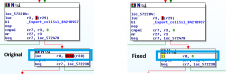
This version of SEN Enabler has spoof fix to avoid 0x80710A06 for all CFW less 3.55, there are many fixes to avoid this error, these are two examples:

Method 1
Patch_1_FULL.png

To make this you need to patch vsh.elf from 0x801E0040 to 0x38000000, search 0x7C7B1B78419E0260 in hexadecimal and add 8 bytes, there need to be patched


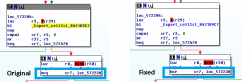
Method 2
Patch_2_FULL.png

To make this you need to patch vsh.elf from 0x419E0014 to 0x409E0014, search 0x7C7B1B78419E0260 in hexadecimal and add 16 bytes, there need to be patched


I added more spoofs options, some people requested a few ones, like 9.99 Spoofer, Custom Spoof, Restore default spoof, Custom Image version , Custom version and Custom Passphrase, i have more requests in my "to do" list, if you don't see your request in this release will be ready in the next one

  • 9.99 Spoofer: If you use this spoof, DON'T TRY TO GO ONLINE!!!, this is only for people who have childs or don't like to update PS3 FW by mistake, if you try to go online with this spoof YOU WILL BE BANNED
  • Custom Spoof: You can choose predefined Image version, Version and Passphrase on Spoof options menu. When you have selected your choice press triangle to do a Custom spoof with your selecteds options
  • Restore default spoof: This option will reset any other SEN Enabler's spoof to his default one, with Image version and Version (For example, if you are on 4.50 with 4.70 spoofed, will reset 4.70 spoofs to 4.50)
  • Image version / Version / Passphrase: This can be selected in spoof optiones menu, you can select your choice, passphrase has only two options, Last and Old, the first one enables SEN access and the second one disables SEN access, a spoof to 4.70 is needed


Enable/Disable Flash write is deleted and never will be back, is replace by Patch all task, this will patch ConsoleID, PSID, hide CFW data, delete temp folders and set mode of your choice (OFW, CFW, APP, PACKAGE) in one button, this doesn't patch MAC, you need to do this first if you want a custom MAC

For those who doesn't know how to enable SEN access, go to SEN/PSN Options and select Enable SEN/PSN access (pressing :[]: button twice in main menu)

Remember to use Charles Proxy now along with SEN Enabler and block three URLs (you can add more if you want), this software will minimize ban risk, but a ban is not 100% avoided on CFW

URLs to block said:
Block all these URLs on Charles or similar:

IF YOU FIND ANY BUG, PLEASE LET ME KNOW

Download & Mirrors:
SEN Enabler v5.8.0 (4.70 Support)

Source: PSX-Place.com

 
Is anyone having the following error message:

"error uploading scoreboards"

after an online seccondary mission on DBZ xenoverse?, because and I am having it, and I get disconnected after that,
it is only me?
 
Misused Sen Enabler, and now i'm back on OFW.

Hello awesome brilliant community. First off let me start by saying, i'm an idiot. :-( Let me explain lol.. I soft modded my PS3 years ago and never really had the desire to play online. But recently, for some reason I decided I feel like playing games online now. So without any research at all I decided to update my system to the latest firmware so I can sign up to PSN. Thinking I can just do the softmod again and be back on beautiful rogero playing online. But nope, I messed it all up. So I found somebody on craigslist who flashes the PS3 and downgrades it for a reasonable price. So, I took it to him and he successfully flashed it and put me on a CFW 4.70 plus installed Sen Enabler for me. He gave me a quick demonstration but I didn't take any notes. So hours later on the same day I decided I want to try playing online. Here's where I mess up again. :-/ I made sure to disable the network first, but instead of selecting a game first from multiman I opened Sen Enabler first holding R2, then enabling the network back on, and then loading a game from multiman. This messed me up again seeing now that my PS3 is back to an OFW 4.70. Am I screwed? Do I have to pay again to get it flashed and downgraded again? I had no idea that this program could do that, I thought the worst that could happen is that I would get banned from online. Any input from this great community will be very appreciated. Thank you in advance!
 
Hello awesome brilliant community. First off let me start by saying, i'm an idiot. :-( Let me explain lol.. I soft modded my PS3 years ago and never really had the desire to play online. But recently, for some reason I decided I feel like playing games online now. So without any research at all I decided to update my system to the latest firmware so I can sign up to PSN. Thinking I can just do the softmod again and be back on beautiful rogero playing online. But nope, I messed it all up. So I found somebody on craigslist who flashes the PS3 and downgrades it for a reasonable price. So, I took it to him and he successfully flashed it and put me on a CFW 4.70 plus installed Sen Enabler for me. He gave me a quick demonstration but I didn't take any notes. So hours later on the same day I decided I want to try playing online. Here's where I mess up again. :-/ I made sure to disable the network first, but instead of selecting a game first from multiman I opened Sen Enabler first holding R2, then enabling the network back on, and then loading a game from multiman. This messed me up again seeing now that my PS3 is back to an OFW 4.70. Am I screwed? Do I have to pay again to get it flashed and downgraded again? I had no idea that this program could do that, I thought the worst that could happen is that I would get banned from online. Any input from this great community will be very appreciated. Thank you in advance!

Are you sure you're on ofw? Did you run a system update?
It shouldn't of automatically ran one if you were on 4.70 cfw.

Sen enabler hides a lot of the cfw options depending what mode you're in.
It should go back to cfw mode when you restart the console.

If not see if you can still run sen enabler. There should be an option to tell it to start in cfw mode instead of ofw mode.
I haven't used it in a while and am on my phone so cant walk you through it completely.
 
Thank you very much for your prompt reply. No, I didn't do any updates. Unfortunately I didn't see any settings within Sen Enabler that said to start up in CFW, Unless I overlooked it. Somebody told me that I should be ok just reinstalling the same CFW. I have to wait until I get home tonight before I get to test these recommendations. Again, thank you very much. I am very optimistic now after hearing that my PS3 has hope.
 
Shutdown the ps3 from inside sen enabler. And all will back to normal. Just press start there.

Thank you, but I did another dumb thing last night after I thought I messed it up. I did a "Restore PS3". Could that mess me up? I wish I was home so I could try all the recommendations I've been getting, but won't be until 6 tonight. :-/
 
I messed up again.. LMAO!! I tried reinstalling the CFW but I forgot I had a game in the console. So it went down to OFW 3.70. I guess it took whatever firmware the game needed to be on. I'm just taking it to get flashed again today. This is becoming an expensive lesson. :-/ It's funny though, because I had it working beautiful for a few years, over a hundred games.. But the moment I get an itch to play online i have to take it to get flashed twice in a week.. lol
 
If your QA flagged it will install whatever firmware is on the disc over a flash drive. Doesn't matter if its a lower firmware then you are on or not. Happens with Sony bluray movies as well.
 
Hi there !

That's a great post .. thank you very much for this.

I only have a question, as I never dared to play online, this time, I decided to get started with it.
I have downloaded the Sen Enabler.rar, and have installed the .PKG.

Then, I have activated the SEN/PSN enabler .. About this, I have a doubt, I guess it always stays activated right ? because when I restart my PS3, and go again into the settings, it asks for disabling . So I guess I am right about it ..


Now the real question that I have is .. What are the exactly steps in order, to play online the most safely possible .. ?
Because I've seen there is the HIDDING stuff .. ( IPF, APP HOME etc.. )
I've seen there is the " cleaning history files " ..

Which should I do first? is there any importance ? and, should I clean the history, when I start the PS3, or just after have played, before shutting down .. ?

Sorry for being a noob.. it's that I have never played online with CFW yet ..

Thank you very much.
 
Last edited:
Hi there !

That's a great post .. thank you very much for this.

I only have a question, as I never dared to play online, this time, I decided to get started with it.
I have downloaded the Sen Enabler.rar, and have installed the .PKG.

Then, I have activated the SEN/PSN enabler .. About this, I have a doubt, I guess it stays always activated right ? because when I restart my PS3, and go again in the settings, it asks for disabling . So I guess I am right about it ..


Now the real question that I have is .. What are the exactly steps in order, to play online the most safely possible .. ?
Because I've seen there is the HIDDING stuff .. ( IPF, APP HOME etc.. )
I've seen there is the " cleaning history files " ..

Which should I do first? is there any importance ? and, should I clean the history, when I start the PS3, or just after have played, before shutting down .. ?

Sorry for being a noob.. it's that I have never played online with CFW yet ..

Thank you very much.

I prefer PSN Patch myself but its up to you. I like PSN Patch as it runs from a random location so harder to spot IMO and it locks out you out of PSN unless you are fully stealthed.
 
So, you guess the PSN patch is better .. ? Would you have a version for my CFW Habib Cobra 4.65 V1.02 CEX .. ? I find many things, but I'm not sure of myself, and I don't wanna make any mistake ..

But if so, I suppose that I'll have to DISABLE the PSN Access which is provided by the SEN ENABLER .. ? to use the PSN Patch by after .. ?
 
Back
Top