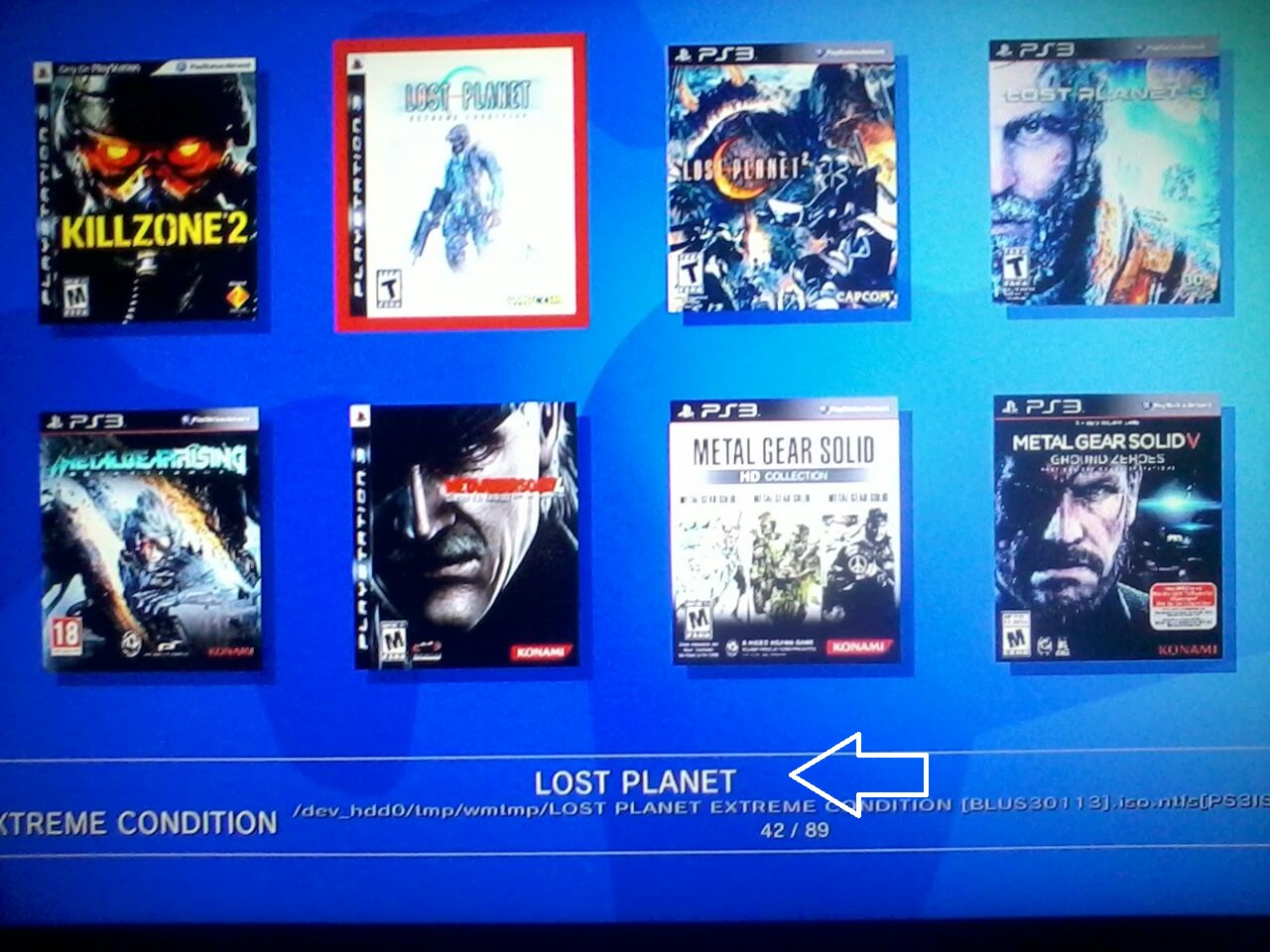
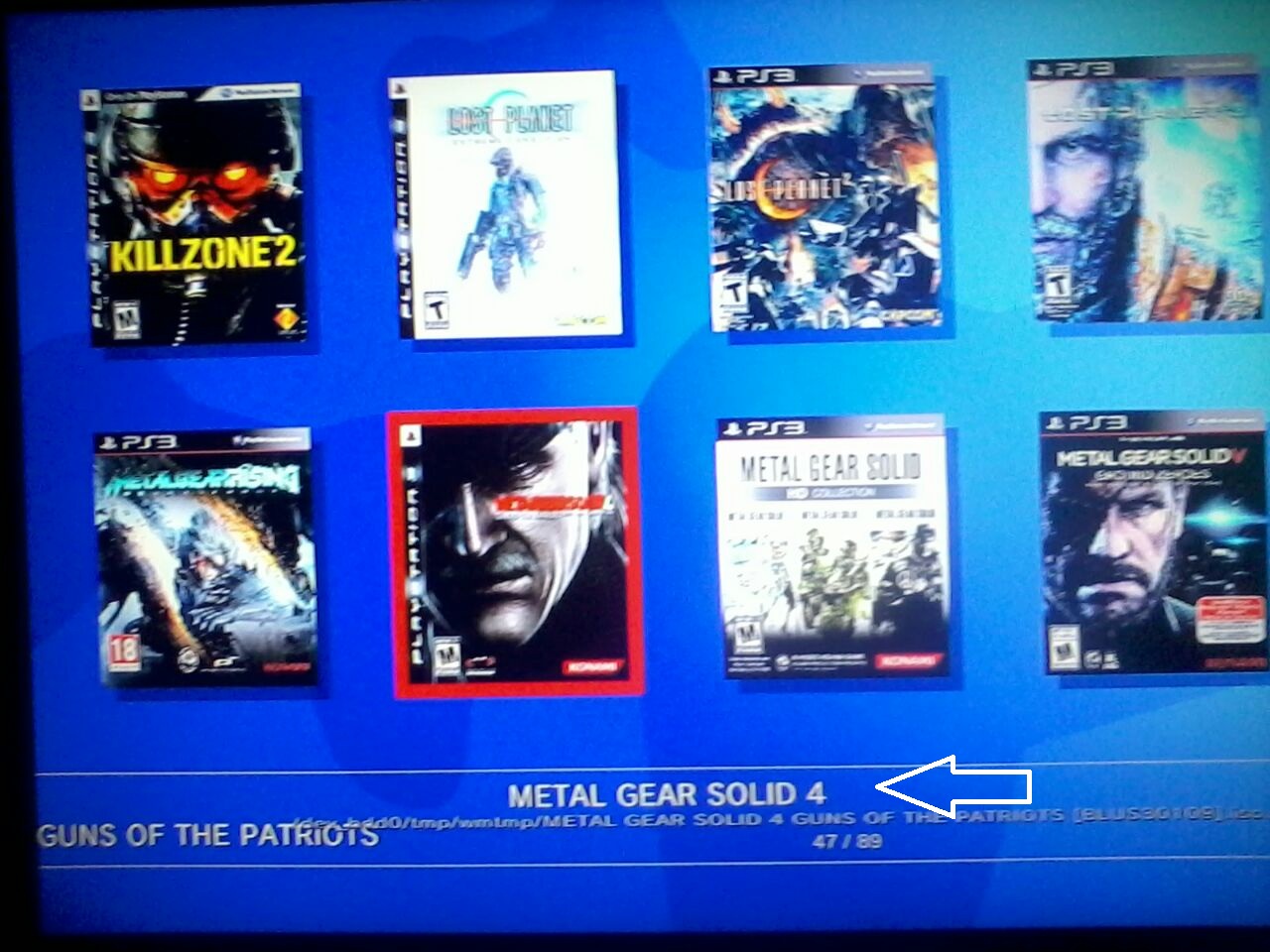
We have seen developer @deank cooking up some nice brew lately, the latest creation of sLaunch has now evolved into a new plugin called sMAN, bringing the original vision of the developer to this single plugin containing webMAN & sLaunch, rather then having two separate plugins loaded at boot time (like the preview releases) deank uses a single plugin slot while making sLaunch an even faster sprx loaded dynamically. For simplicity, he concatenated into just one file called sman.sprx the various sprx parts of the app (rawseciso/netiso/slaunch/sman) as well as the html parts of the XMB "Sman Games" feature. If you like to use this alternative UI for loading games, then you should use the sMAN plugin going forward, if you like the traditional way (w/ My Games) then you can use the XMB feature or simply switch to the webMAN plugin as both version will still available for users.

sman.jpg

  • Now, let's move forward to the next step...

    Later today I'll release the "sMAN" - which is webMAN + sLaunch in one plugin. The reason - this is what webMAN was supposed to be - the way I wanted to be since day one:
    • Use only one plugin slot
    • Use about 128KB less vsh memory (about 384KB total vsh memory)
    • Support for /dev_usb000 to /dev_usb128
    • No need for boot delays for scanning usb drives
    • No need for XML generation, "refresh xml" or other complicated tasks
    • No need for the "My Games" entry in XMB (no need for custom category_game.xml)
    • Simplified setup page, eject/unmount/rescan/grouping options available within sMAN's front-end (sLaunch)
    • Support for over 1000 games
    • FTP/WEB/NTFS/NETISO support by the sMAN's back-end (webMAN)
    • Simple use in any cobra compatible CFW by adding sman.sprx to boot_plugins.txt without modifying other files
    • The front-end (menu) is not using resources when not active (opposed to slaunch.sprx)
    • Updated - it now supports switching groups/content-type (ALL/PS1/PS2/PS3/PSP/VIDEO) - press the [SQUARE] button.

    sMAN
    : http://deanbg.com/sman.sprx

    Dean

    p.s. The features in bold will be gradually introduced for easier transition for the users who decide to switch to sMAN.

    Edit: eventually deank decided to add the XMB "Webman Games" feature to sMan as many end users were asking for it.
    It brings back the old XML creation problem he originally wanted to get rid of however it works quite well.
    The only real glitch in sMan 1.11n (& in the latest wMM actually) is found with a limited number of ntfs hdd where the partition cannot be read using the libntfs_ext library port. Hopefully this bug should get fixed after investigation...

    The XMB Game list remains optional however, to be toggled in the sMan settings page.


  • Random Comments about sMAN from deank
    • The good thing about sMAN is that it doesn't require large amounts of memory no matter how many games you have. It can handle 2000, 3000, 5000 games even.
    • sMAN is working a bit faster than sLaunch (at least it looks that way).
    • If you decide to use sman.sprx - remove webftp_server.sprx and slaunch.sprx from your boot_plugins.txt. It is not possible to use them at the same time.
    • Yes, fan-control is still there, because it is "webMAN" in the background. For languages - there is nothing different to webMAN - you'll have to compile it yourself with proper gui.h.


  • Video (POC Version)
    ScreenShot (from preview version)
    --------------------------------------------------------------------
    slaunch_preview.jpg


Last edited by a moderator:
So i've run into a problem...I think... I installed sman to root of hdd0 , made changes in the cobra plugin txt...everything was great. so I put a "#" in front of the line so as NOT to load sman.sprx like this
# /dev_hdd0/sman.sprx

when I rebooted, the sMAN v1.00n notification window did NOT pop up so i figured great...BUT the my games folder is still there and so are the 3 directories. of course if you click them , the ps freezes, gotta do an improper shutdown restore thing...so then I just removed sman.sprx all together , full reboot ...folder is still there with the 3 directories.

I have rebug 4.81.02 cex with full wMM 1.46.01 installed but it was turned off and has been off in the toolbox this whole time...so how do I get the my games folder to go away after "turning off" sMAN?
 
So i've run into a problem...I think... I installed sman to root of hdd0 , made changes in the cobra plugin txt...everything was great. so I put a "#" in front of the line so as NOT to load sman.sprx like this
# /dev_hdd0/sman.sprx

when I rebooted, the sMAN v1.00n notification window did NOT pop up so i figured great...BUT the my games folder is still there and so are the 3 directories. of course if you click them , the ps freezes, gotta do an improper shutdown restore thing...so then I just removed sman.sprx all together , full reboot ...folder is still there with the 3 directories.

I have rebug 4.81.02 cex with full wMM 1.46.01 installed but it was turned off and has been off in the toolbox this whole time...so how do I get the my games folder to go away after "turning off" sMAN?

What I would do: delete xmlhost and tmp folders in /dev_hdd0 and reboot. If you want wMM back again, re-enable it via rebug toolbox (that will load webftp_server.sprx in dev_flash/vsh/module then it will regenerate those folders back, hopefully replacing "my games" for "webman games" back again.

Backup everything before deleting, just in case. I'm no expert.
 
What I would do: delete xmlhost and tmp folders in /dev_hdd0 and reboot. If you want wMM back again, re-enable it via rebug toolbox (that will load webftp_server.sprx in dev_flash/vsh/module then it will regenerate those folders back, hopefully replacing "my games" for "webman games" back again.

Backup everything before deleting, just in case. I'm no expert.

after a few tests the xmlhost is the only thing it seems I need to delete :) at least for this phase of testing.


ooops nevermind ..i wrote some stuff earlier here but it was my FTP's programs fault... the file wasn't showing i had to restart the ftp twice and then it showed! file was there
 
Last edited:
@deank

Games with the big title stay out of the standard

9YNGUXvj.jpg


8YG45vWY.jpg
It looks the same problem i reported here with some special characters that are displayed incorrectlly as "linefeeds"
http://www.psx-place.com/threads/up...gin-using-idle_plugin.12542/page-7#post-72687

Actually, i remeber the metal gear solid had the "weird" character exactlly in the same position than your screencapture, so i bet is the same problem :)

Do you have uncharted 3 ? (i think it was the complete edition, or a goty, or whatever, not the normal version)
Can you see if it happens with uncharted 3 too ?... because if it happens we can be sure is exactlly the same problem (and the same weird character used in all them)

And can you upload the PARAM.SFO file from those games to take a look ?
Im curious to see wich character is causing this... it should be one of the "extended" characters (not basic ascii) but still... the ps3 firmware supports a really wide range of characters included extended, asian, cyrillic, etc, etc, etc... so im really curious to see what is happening
 
I've done extensive tests with multiman regarding special characters. there were four that would fail from what I recall. @ and double spacing were two of them. I've forgotten what the other two were. maybe that's what ur encountering? it could be a < or > character as well. when I backed up my psx saves, I got an error regarding the file name saying that < > were part of the file name and to rename the game save while in ulaunch.elf. those two might also be a problem.
 
It looks the same problem i reported here with some special characters that are displayed incorrectlly as "linefeeds"
http://www.psx-place.com/threads/up...gin-using-idle_plugin.12542/page-7#post-72687

Actually, i remeber the metal gear solid had the "weird" character exactlly in the same position than your screencapture, so i bet is the same problem :)

Do you have uncharted 3 ? (i think it was the complete edition, or a goty, or whatever, not the normal version)
Can you see if it happens with uncharted 3 too ?... because if it happens we can be sure is exactlly the same problem (and the same weird character used in all them)

And can you upload the PARAM.SFO file from those games to take a look ?
Im curious to see wich character is causing this... it should be one of the "extended" characters (not basic ascii) but still... the ps3 firmware supports a really wide range of characters included extended, asian, cyrillic, etc, etc, etc... so im really curious to see what is happening


http://www.psx-place.com/threads/sm...ingle-plugin-by-deank.12724/page-2#post-72915

I also reported a similar issue
 
I think is a character that belongs to the group of "trademark", "copyright", or "registered", and are upperscored
Note in his screencaptures where the problermatic character is located... in between the "name of the franquise" and "name of the game", like this:
Game Franquise© Game Name

Only a few games uses it in the name... but it should be very common
 
a number of games use that on the 360. the game name is extracted from the default.xex (the equivalent of the eboot.bin on the system). the registered/trademarked icon would be displayed in the hacked dash. I'd usually rename the games to remove the icon since the hacked dash uses a metadata indexer like the ps3 does. the 360 itself doesn't though. lol I've not done that with the ps3 before.
 
I was reading your message when you posted it, but i didnt said anything because i could not imagine what was the problem. Maybe is related, but not so sure
An interesting detail in your screencapture is the castlevania name has a ™ at the end (trademark upperscored character) taken from PARAM.SFO

So the ™ doesnt seems to be the problem... at least initially because sMAN is displaying it fine on screen, it can be seen in your screencapture
 
@Joonie's problem is extraction of ICON0.PNG and PARAM.SFO from ntfs iso files. It succeeds with the first one, but then for some reason it can't unmount the iso and mount the next one - hence all .PNG and .SFO files are from Castlevania.
 
@Joonie's problem is extraction of ICON0.PNG and PARAM.SFO from ntfs iso files. It succeeds with the first one, but then for some reason it can't unmount the iso and mount the next one - hence all .PNG and .SFO files are from Castlevania.

cbf040b184f8063ddfc4559440dad8b2.jpg


Thanks @deank the issue seems fixed with the latest sman! Now I need to fill all those missing covers xD


Sent from my iPhone using Tapatalk
 
It should have extracted the ICON0.PNG files for the ntfs iso games. I wonder why it didn't...
May be you can restart the PS3 (check if content scan is enabled at startup) and see if it will extract the icons. If you have multiMAN and your PS3 has internet you can simply hover each game and it will download the cover - then it will be available for sMAN.
 
sMAN doesn't extract the icons like wMM. It mounts the iso and gets the files, then unmounts and proceeds to the next one. It takes a while sometimes...

I see you have 204 games, so look at the radar icon when XMB loads... It will spin for each ISO while it extracts the files - let it run until it finishes, may be it will take 2-3 mins.
 
sMAN doesn't extract the icons like wMM. It mounts the iso and gets the files, then unmounts and proceeds to the next one. It takes a while sometimes...

I see you have 204 games, so look at the radar icon when XMB loads... It will spin for each ISO while it extracts the files - let it run until it finishes, may be it will take 2-3 mins.

After I launched the game that had the missing cover, now it shows fine although while some others still not shown. I remember the original webMAN used to have the same behavior as your sman now

2e226d72a59640e1a14000992e612e04.jpg


Sent from my iPhone using Tapatalk
 
Wow, That looks stunning on the ultra wide screen.

I was only just reminiscing and looking at screenshots from my old triple monitor setup.
Was so much fun for racing and fps games.

uOzBmC2.jpg


How well does it work for ps3 gaming? Guessing the ratios would be a bit out of whack?

Yeah I got LG 29" 21:9 Ultrawide Monitor, I didn't buy this for console gaming as none of them including current gen ones supports this (2560x1080) and it looks ugly for PS3 games (720p and 1080p)

However I love watching movies on this monitor, otherwise I just use my 55" Samsung Curved UHD TV :)


Btw this is how It looks on PC gaming

1327bf60629ee55e02c885dc47b13a98.jpg
 

Featured content

Trending content

Back
Top