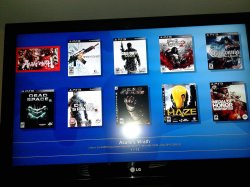
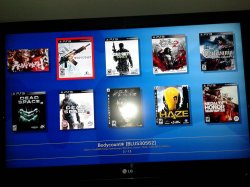
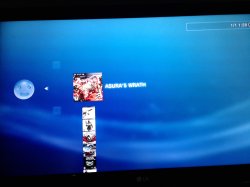
We have seen developer @deank cooking up some nice brew lately, the latest creation of sLaunch has now evolved into a new plugin called sMAN, bringing the original vision of the developer to this single plugin containing webMAN & sLaunch, rather then having two separate plugins loaded at boot time (like the preview releases) deank uses a single plugin slot while making sLaunch an even faster sprx loaded dynamically. For simplicity, he concatenated into just one file called sman.sprx the various sprx parts of the app (rawseciso/netiso/slaunch/sman) as well as the html parts of the XMB "Sman Games" feature. If you like to use this alternative UI for loading games, then you should use the sMAN plugin going forward, if you like the traditional way (w/ My Games) then you can use the XMB feature or simply switch to the webMAN plugin as both version will still available for users.

sman.jpg

  • Now, let's move forward to the next step...

    Later today I'll release the "sMAN" - which is webMAN + sLaunch in one plugin. The reason - this is what webMAN was supposed to be - the way I wanted to be since day one:
    • Use only one plugin slot
    • Use about 128KB less vsh memory (about 384KB total vsh memory)
    • Support for /dev_usb000 to /dev_usb128
    • No need for boot delays for scanning usb drives
    • No need for XML generation, "refresh xml" or other complicated tasks
    • No need for the "My Games" entry in XMB (no need for custom category_game.xml)
    • Simplified setup page, eject/unmount/rescan/grouping options available within sMAN's front-end (sLaunch)
    • Support for over 1000 games
    • FTP/WEB/NTFS/NETISO support by the sMAN's back-end (webMAN)
    • Simple use in any cobra compatible CFW by adding sman.sprx to boot_plugins.txt without modifying other files
    • The front-end (menu) is not using resources when not active (opposed to slaunch.sprx)
    • Updated - it now supports switching groups/content-type (ALL/PS1/PS2/PS3/PSP/VIDEO) - press the [SQUARE] button.

    sMAN
    : http://deanbg.com/sman.sprx

    Dean

    p.s. The features in bold will be gradually introduced for easier transition for the users who decide to switch to sMAN.

    Edit: eventually deank decided to add the XMB "Webman Games" feature to sMan as many end users were asking for it.
    It brings back the old XML creation problem he originally wanted to get rid of however it works quite well.
    The only real glitch in sMan 1.11n (& in the latest wMM actually) is found with a limited number of ntfs hdd where the partition cannot be read using the libntfs_ext library port. Hopefully this bug should get fixed after investigation...

    The XMB Game list remains optional however, to be toggled in the sMan settings page.


  • Random Comments about sMAN from deank
    • The good thing about sMAN is that it doesn't require large amounts of memory no matter how many games you have. It can handle 2000, 3000, 5000 games even.
    • sMAN is working a bit faster than sLaunch (at least it looks that way).
    • If you decide to use sman.sprx - remove webftp_server.sprx and slaunch.sprx from your boot_plugins.txt. It is not possible to use them at the same time.
    • Yes, fan-control is still there, because it is "webMAN" in the background. For languages - there is nothing different to webMAN - you'll have to compile it yourself with proper gui.h.


  • Video (POC Version)
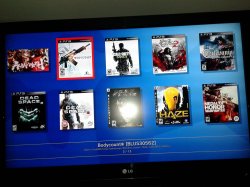
    ScreenShot (from preview version)
    --------------------------------------------------------------------
    slaunch_preview.jpg


Last edited by a moderator:
I have some good news :)

I finally solved the issue/crash when PS1 game is loaded/played then unloaded and another PS1 game is loaded (for NTFS and NETISO games). It now works properly without crashing at the start of the second game.

I'll update sman later and will let you know.

This issue was present in webMAN since day one, but is now fixed. :)
 
As I said before, it was just disable the webman mod rebug by the toolbox and add the sMAN in the hdd0

doesn't matter if it was installed on the dev_flash or on dev_hdd0 the result is the same, i will also go back to webMAN Mod :|


@deank sounds good, hopefully it fixed my problem
 
Last edited:
start button seems to be an issue for some people, maybe you could add more buttons in the config and the user can choose the button (or combo) to start sman
 
sMAN 1.02 is now available:

http://deanbg.com/sman.sprx
http://deanbg.com/sMAN_1.02.zip

sman.jpg


* Added "Setup" option in side-menu
* Removed xml generation - no need for custom category_game.xml anymore
* Removed xai_plugin/idle_plugin usage
* Added x2 upscale for small images/covers (w/h < 336)
* Added indication of current group mode (PS3 1 / xxx) under title name/path
* Removed "My Games" entry from XMB - hold [START] to launch sMAN
* Changed netiso/rawseciso implementation (external) - use plugin slot #0
* Fixed crash when trying to load another PS1 title after one is played (ntfs/net)


Thanks to @bguerville for his help about loading xmb plugins: http://www.psx-place.com/threads/webman-1-45n-with-new-ntfs-support-by-deank.12437/page-4#post-70862

Dean
 
Last edited:
sMAN 1.02 is now available:

http://deanbg.com/sman.sprx
http://deanbg.com/sMAN_1.02.zip

sman.jpg


* Added "Setup" option in side-menu
* Removed xml generation - no need for custom category_game.xml anymore
* Removed xai_plugin/idle_plugin usage
* Added x2 upscale for small images/covers (w/h < 336)
* Added indication of current group mode (PS3 1 / xxx) under title name/path
* Removed "My Games" entry from XMB - hold [START] to launch sMAN
* Changed netiso/rawseciso implementation (external) - use plugin slot #0
* Fixed crash when trying to load another PS1 title after one is played (ntfs/net)


Thanks to @bguerville for his help about loading xmb plugins: http://www.psx-place.com/threads/webman-1-45n-with-new-ntfs-support-by-deank.12437/page-4#post-70862

Dean
awesome :D
 
All of my flash drives have this issue. They were formatted NTFS using windows on a windows 10 computer. I guess my PS3 has a USB issue. The games all work fine, however whatever the first iso is on the flash drive is the cover will not show. Also it should pull the game id from the iso but the first iso does not show that either.
 

Attachments

  • 20170219_093627.jpg
    20170219_093627.jpg
    1.6 MB · Views: 596
  • 20170219_093643.jpg
    20170219_093643.jpg
    1.5 MB · Views: 567
May be you can rename the iso file not to include the apostrophe ( ' ) symbol and try again.

Unfortunately that did not work either.

The strange part is it is one cover and it happens on every USB Flash Drive I have tried. I even renamed all ISO to not have any special characters.
 

Attachments

  • Capture.PNG
    Capture.PNG
    41 KB · Views: 714
@deank

I removed sman and reinstalled WebMan 1.47n and all covers display correctly. Attached is a screenshot. Any ideas on why WebMan would work for me but sman 1.02 will not? Thanks for the support and excellent work.
 

Attachments

  • WebMan1.47n.jpg
    WebMan1.47n.jpg
    1.1 MB · Views: 512
  • sman1.02.jpg
    sman1.02.jpg
    1.5 MB · Views: 504
I've doing that since the beginning without any crash problems.

The next sMAN version will require to be named sman.sprx and located in /dev_hdd0/sman.sprx.

The reason for it is that the sprx itself will have added resources (glued to the sprx file) with background, icons and other things. sMAN will need to know its location to be able to extract these for its normal operation. And I don't like this "webftp_server/sman" swaping.

boot_plugins.txt with the propler path:

/dev_hdd0/sman.sprx

That is simple enough. I don't understand all these youtube videos with 15 min explanations how to swap/use sMAN. If you're on rebug just delete the webftp_server.sprx from your flash and use a proper boot_plugins.txt file.
 
Last edited:
Back
Top