SNESticle

PS2 SNESticle LBA Fixed

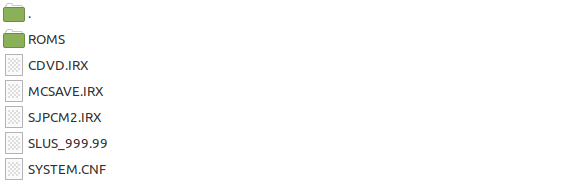
If I remember correctly I had to create the PS2 disc from scratch by draging & droping all files needed. Just adding all roms into the folder did not work for me

 
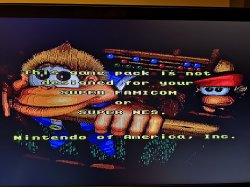
I'm using the ISO from the first post and the Donkey Kong Country 3, version Europe . The emulator does not recognise .SFC so i renamed it to .SMC but i get this . Where can i find the full converter ? Should i keep trying or does the iso work only with NTSC roms ? I'd like Europe
 

Attachments

  • IMG_20231217_231720.jpg
    IMG_20231217_231720.jpg
    337.5 KB · Views: 168
What's the difference between these two file types? SMC stands for Super Magicom, a game backup device that would add an extra header to the dumped ROM. SMC files are basically SFC files with an extra set of bits prepended to the game ROM.
 
I'm using the ISO from the first post and the Donkey Kong Country 3, version Europe . The emulator does not recognise .SFC so i renamed it to .SMC but i get this . Where can i find the full converter ? Should i keep trying or does the iso work only with NTSC roms ? I'd like Europe

It's because of the region lock.
This "block" should be removed but I suppose this is against the forum rules.
 
I noticed that this emulator does not like PAL games . It's very much optimised for NTSC . I tried to boot some PAL games , some are region locked and the others that boot just run slow ( ex : Street Fighter ) . Was it like that on real hardware ? You can test with the Windows emulator and it will work the same on PS2 .

I found a list of games that are region locked, that explains my error above with DCK3 .

90 Minutes – European Prime Goal
ActRaiser 2
Adventures of Batman & Robin, The
Adventures of Dr. Franken, The
Adventures of Mighty Max, The
Animaniacs
Art of Fighting
Asterix & Obelix
Batman Returns
Biker Mice from Mars
BioMetal
California Games II
Castlevania – Vampire's Kiss
Clay Fighter
Claymates
Dirt Racer
Donald in Maui Mallard
Donkey Kong Country
Donkey Kong Country 2
Donkey Kong Country 3
Dragon – The Bruce Lee Story
Eek! The Cat
Eric Cantona Football Challenge
Fatal Fury Special
Fever Pitch Soccer
Flintstones, The
Foreman for Real
GP-1
Hebereke's Popoitto
Hebereke's Popoon
Illusion of Time
International Superstar Soccer
International Superstar Soccer Deluxe
Joe & Mac 3 – Lost in the Tropics
K.H. Rummenigge's Player Manager
Kevin Keegan's Player Manager
Kick Off 3 – European Challenge
Kid Klown in Crazy Chase
Kirby's Dream Course
Kirby's Fun Pak
Kirby's Ghost Trap
Lethal Enforcers
Lothar Matthaeus Super Soccer
Lucky Luke
Manchester United Championship Soccer
Mario's Time Machine (Germany)
Marko's Magic Football
Mega lo Mania
Metal Marines
NBA Give 'n Go
NBA Hang Time
Nigel Mansell's World Championship Racing
Pac-Attack
Pac-In-Time
Pac-Man 2 – The New Adventures
Pinocchio
Plok
Pop'n TwinBee
Pop'n TwinBee – Rainbow Bell Adventures
Populous II – Trials of the Olympian Gods
Prehistorik Man
Revolution X
RoboCop versus The Terminator
R-Type III
Samurai Shodown
Secret of Mana
Smash Tennis
Smurfs, The
Soccer Kid
Soccer Shootout
Soul Blazer (Germany, France)
Space Invaders
Sparkster
Speedy Gonzales in Los Gatos Bandidos (Proto)
Spirou
Star Trek – The Next Generation – Future's Past
Striker
Stunt Race FX
Sunset Riders
Super Conflict
Super Ice Hockey
Super International Cricket
Super Mario All-Stars and Super Mario World
Super Mario World 2 – Yoshi's Island
Super Metroid
Super Pinball – Behind the Mask
Super Putty
Terranigma
Tetris & Dr. Mario
Tetris 2
Tetris Attack
Tintin – Prisoners of the Sun
Tintin in Tibet
Tiny Toon Adventures – Wild & Wacky Sports
Top Gear 2
Tuff E Nuff
WeaponLord
Winter Gold
Wolfenstein 3D
World Cup Striker
X-Kaliber 2097
Yoshi's Safari
Zombies
 
I am having some trouble running this emulator

I first tried running the ISO through Open PS2 Loader, however it squishes the games down to widescreen with black bars on the top and bottom. I tried forcing various display modes through GSM; NTSC interlaced did the same thing, NTSC Non-interlaced was no longer widescreen but the bottom half of the screen was missing, and my TV couldn't display the HDTV or PAL modes at all.
I then tried running the .elf directly, and while the aspect ratio issue was fixed, two new problems emerged: Firstly, I couldn't access the CDFS on any of the discs I had burned ROMs onto: a CD I burned with CDGenPS2, and a DVD I burned with the DVD Video filesystem, both of which could be read by ULaunchElf, but not SNESticle. However, this isn't a major issue since I can load games onto a memory card. The other issue is that there was no sound, which I didn't know where to start trying to fix. To be clear the sound was working in the ISO version, just not the .elf.
Does anyone know what could be going wrong here?
 
i have a same problem. When i start the iso with opl this emulator, couldnt display my tv.
This Problem i have also with .elf, wenn i start directly....
 
I have a question
can I just burn the emulator with the roms on a cd and play it on my chiped ps2 or lunching it through opl or uLE is necessary?
 
ROMS need to be in the ROMS folder:
tak.png

Theoretically if you have a chipped console you should be able to write it on a disc instead of playing it through OPL.


BTW does anybody was able to play\boot The lost Vikings, Blackthorne?
 
I've just acquired the new Super Mario Bros NES to SNES port. I find that there is a high pitch tone in Snesticle upon starting the game for the first time. Once a first brick is smashed though, the noise stops and everything is fine from there on. Graphically it runs great. I can't speak as to whether this happens on real hardware. I will check that I have the latest Snesticle ISO.
 
Snesticle can also run NES roms with the .nes extension ! Just pop them in the ISO alongside SNES roms. Perhaps it's built on the original NES Nesticle.
This may be old news to some but it's a new discovery to me. There doesn't seem to be much about this on the web but I found some file extension discussion which put me onto it. Some mappers are not supported, but the original NES SMB runs perfectly and with the proper sound, which differs in ports.
 
Megaman X isn't the only game that glitches out from the pause menu. Megaman 7 and Rockman & Forte have that issue as well. R&F is particularly bad, as pausing the game just once will permanently F%$# up all background tiles, including menus, until you reset the game.
As for Megaman X2 and X3, they give an ingame error because of chip incompatibilities that turns every character sprite invisible so it's pretty much unplayable.
So it's got a thing against Megaman lol. It's sad... cause otherwise, the games that work do so beautifully, and the sound emulation is WAY better than SNES Station.
 
El emulador funciona bien, pero se ve muy comprimido imagen en tv crt ¿Es posible colocarlo la imagen en 4.3?

The emulator works well, but the image on the CRT TV looks very compressed. Is it possible to place the image in 4.3?
 
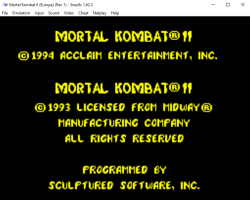
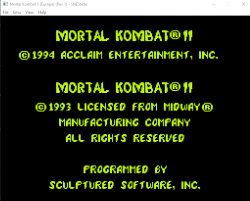
When i first tested on PS2 i thought..wow ..the graphics looks bad, SNES did not age well . I got curious to test some more and i made a comparison between Snesticle and Snes9x on PC. Snesticle looks very pixelated from close, it's like the sharpness is set to the max but on a low resolution it doesn't look good . On a 26" HDTV it looks better if you step back 2 meters . On a 40" 4K i think you need to step back 4 meters.
A "sharpness" set in the middle would be more accurate . I know this is an incomplete emulator, it's like a good TV show that got cancelled . The source code that was released was for PS2 or PC ? Maybe someone can make some optimisations for PS2 like the sharpness setting and 4:3 support .
 

Attachments

  • mk2_snes9x.png
    mk2_snes9x.png
    31.8 KB · Views: 82
  • mk2_snesticle.png
    mk2_snesticle.png
    26.4 KB · Views: 82
Last edited:
@arcadekidflo On snescticle screenshot, this is how it should looks like and how it looks like on SNES (upscalled by lossless nearest neighbor algo). It is not any sharpness set on... On SNES9x screenshot You have turned on some ugly filtering which makes that game blurry and unreadable.
 
Resolution: between 256x224 and 512x448. Most games used 256x224 pixels since higher resolutions caused slowdown, flicker, and/or had increased limitations on layers and colors (due to memory bandwidth constraints); the higher resolutions were used for less processor-intensive games, in-game menus, text, and high resolution images.

I always thought SNES had 640x480 because it looked good on a CRT . But when testing on LCD i can see how low the resolution was . Maybe a CRT shader would improve the experience but, like i said, this in incomplete . Is there a ROM utility that can show info about the resolution ?
 
Last edited:

Similar threads

Back
Top