
adhil_commander
Forum Noob
I too wanna do with fifa 18 backup could tell which post ExodusThanks works i tested fifa18 and skate 3 :P

I too wanna do with fifa 18 backup could tell which post ExodusThanks works i tested fifa18 and skate 3 :P
Where is the game pkg we would have 2 pkg if we do this sir. Helpthis link have every program you need https://mega.nz/#!MToDTTRJ!fR7s-tajbiy_cIYNbdOjFdEP8SzCgH-wlzCAaukS9_Y
but you need pkgview and param.sfo editor, search it
extract it, goto the folder PS3 CONVERTER BY ALEX, paste the PS3_GAME only, open convert.bat, in the cmd type the titleid but in psn style
example
BLUSXXXXXX change to NPUBXXXXXXX
BLESXXXXXX change to NPEBXXXXXXX
wait for complete,now from the converted folder, open the param.sfo edit it change the game type from blue disc game to hard drive game, also change the gameid to psn style
now download the game's update via ***PlayStation Store***,then open the pkg with pkgview and goto the folder USRDIR, extract only the eboot.bin from the last update and paste it in the USRDIR of the converted folder
now extrac the trueancestor pkg repacker and paste the whole converted folder to game folder of the program (if game folder doesnt appear, open the program and paste it, open truancestor type 1,select the game folder, and repack it, now the game have its own pkg installer
now install the program folder from the every program .rar you downloader, and extract the CREATE_PKG.rar and now you need to create the pkg of the lic.dat (because trueancestor doesnt create pkg with lic.dat)
create new folder with the gameid (original) like BLESXXXXXX or BLUSXXXXXX, go to the converted folder (not the pkg) and copy the root folder, but except the USRDIR folder, paste it in the new folder and open the param.sfo of the new folder, now change the gameid back to the original NPEB/NPUB to BLES/BLUS, and the game type to bluedisc game, save and copy everything inside from the new folder to the pkg folder of CREATE_PKG program, now open create_pkg.bat, and in the same folder you have the licdir's pkg
NOW IN PS3, install it first the original game's update, and goto the exploit and enable debug pkg, install the game, and the licdir pkg, if your game runs, congratulations you converted succefully!
Guys sorry for my bad english but im trying to help because i installed my backups with this tutorial, thanks for the devs!

this link have every program you need .........
but you need pkgview and param.sfo editor, search it
extract it, goto the folder PS3 CONVERTER BY ALEX, paste the PS3_GAME only, open convert.bat, in the cmd type the titleid but in psn style
example
BLUSXXXXXX change to NPUBXXXXXXX
BLESXXXXXX change to NPEBXXXXXXX
wait for complete,now from the converted folder, open the param.sfo edit it change the game type from blue disc game to hard drive game, also change the gameid to psn style
now download the game's update via ***PlayStation Store***,then open the pkg with pkgview and goto the folder USRDIR, extract only the eboot.bin from the last update and paste it in the USRDIR of the converted folder
now extrac the trueancestor pkg repacker and paste the whole converted folder to game folder of the program (if game folder doesnt appear, open the program and paste it, open truancestor type 1,select the game folder, and repack it, now the game have its own pkg installer
now install the program folder from the every program .rar you downloader, and extract the CREATE_PKG.rar and now you need to create the pkg of the lic.dat (because trueancestor doesnt create pkg with lic.dat)
create new folder with the gameid (original) like BLESXXXXXX or BLUSXXXXXX, go to the converted folder (not the pkg) and copy the root folder, but except the USRDIR folder, paste it in the new folder and open the param.sfo of the new folder, now change the gameid back to the original NPEB/NPUB to BLES/BLUS, and the game type to bluedisc game, save and copy everything inside from the new folder to the pkg folder of CREATE_PKG program, now open create_pkg.bat, and in the same folder you have the licdir's pkg
NOW IN PS3, install it first the original game's update, and goto the exploit and enable debug pkg, install the game, and the licdir pkg, if your game runs, congratulations you converted succefully!
Guys sorry for my bad english but im trying to help because i installed my backups with this tutorial, thanks for the devs!
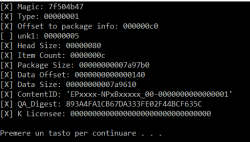
 Since it's 4AM i'll leave for today. Thanks for your support
same here also there is no data blobset file in bles without that how to install the game we need 3 pkg but i got only 2 with above trick.Since @Bakugo guide didn't work for me, I've tried this but when I try to make lic pkg, it generates a broken one. CREATE_PKG gives me this: EPxxxx-NPxBxxxxx_00-0000000000000001.pkg.
I put BLESxxxxxx folder in pkg folder and after I open create_pkg.bat it says View attachment 11015
It's like 3 days I'm trying to make a single converted game work
I think the first PKG you've to install, according to @PattrickH 's guide, is the last possible update that it's available for your game. I've got it thank to Aldo's tools PS3 Game Updatessame here also there is no data blobset file in bles without that how to install the game we need 3 pkg but i got only 2 with above trick.

i don't have that aldos game update but i have game updater v 1.3 , did you have 3 pkg after all setps of that trick ?I think the first PKG you've to install, according to @PattrickH 's guide, is the last possible update that it's available for your game. I've got it thank to Aldo's tools PS3 Game Updates
View attachment 11016
Then, game pkg and at the end, lic pkg. But again, I'm not sure, It didn't work for me. It is not mentioned to resign them, either. This way looks tricky. I think we should find a way to make the original Bakugo guide to work!
Tomorrow I'll try again, I'm exhausted, good luck

Hi!Okay, I've figured it out, here's how to do it:
The game should have a LICDIR/LIC.DAT. If it doesn't, you might be able to generate it, use google.
First you need to "prepare" the game like you would for backup injection using something like CFW2OFW Helper.
Simply put the PS3_GAME folder in the same place as the .exe and run it. It will download and unpack the updates by itself.
This should give you 2 folders, one starting with BL/BC (BLUS, etc) and one starting with NP (NPUB, etc).
Then you need to download this tool, place the BL/BC+NP folders in the same folder as the .bat, and run the .bat.
This should make 3 pkgs, all starting with 000000-NP.
Run these 3 pkgs through ps3xploit_rifgen_edatresign.exe to obtain _signed.pkg versions.
Install all 3 of these on your PS3 without Debug PKG enabled.
You should now be able to play!


Answer me anyoneView attachment 11019 guys help me i am facing this problem when i try to open ps3 aldo's updater. how you fix this help
It asks me for a disc again. What am I missing?
Yup it will work remember to enable HAN BEFORE INSTALLINGIf i download a game from ***PlayStation Store*** (Pkg) and download its .rap and install the game and rif pkg it would work? example Sonic Generations or Far Cry 4
It would be easier and didnt need cfw2ofw (we could play any game)
Same, lemme know if you'll find the answer.
Okay, I've figured it out, here's how to do it:
The game should have a LICDIR/LIC.DAT. If it doesn't, you might be able to generate it, use google.
First you need to "prepare" the game like you would for backup injection using something like CFW2OFW Helper.
Simply put the PS3_GAME folder in the same place as the .exe and run it. It will download and unpack the updates by itself.
This should give you 2 folders, one starting with BL/BC (BLUS, etc) and one starting with NP (NPUB, etc).
Then you need to download this tool, place the BL/BC+NP folders in the same folder as the .bat, and run the .bat.
This should make 3 pkgs, all starting with 000000-NP.
Run these 3 pkgs through ps3xploit_rifgen_edatresign.exe to obtain _signed.pkg versions.
Install all 3 of these on your PS3 without Debug PKG enabled.
You should now be able to play!
