
You are using an out of date browser. It may not display this or other websites correctly.
You should upgrade or use an alternative browser.
You should upgrade or use an alternative browser.

In C programs you need to add \xC2\xAE for ®. Or add the hex characters C2 AE to the file name.
If you need to display these characters in PARAM.SFO you need to edit the file with an hex editor or use a PARAM.SFO that support unicode characters. Unfortunately my PARAM.SFO Editor only supports ANSI characters due a limitation of VB5.
Here is a table with the literal values for some UTF8 characters, including the ones that you mentioned.
https://www.utf8-chartable.de/unico...ber=128&utf8=string-literal&unicodeinhtml=hex
@DeViL303 has updated the system file imagefont.bin that includes several new icons in UTF8 (some are animated) that can be used in file names, PARAM.SFO, XML and in many other places. It even allows to create ASCII art
If you need to display these characters in PARAM.SFO you need to edit the file with an hex editor or use a PARAM.SFO that support unicode characters. Unfortunately my PARAM.SFO Editor only supports ANSI characters due a limitation of VB5.
Here is a table with the literal values for some UTF8 characters, including the ones that you mentioned.
https://www.utf8-chartable.de/unico...ber=128&utf8=string-literal&unicodeinhtml=hex
@DeViL303 has updated the system file imagefont.bin that includes several new icons in UTF8 (some are animated) that can be used in file names, PARAM.SFO, XML and in many other places. It even allows to create ASCII art
Last edited:

Is it possible to use symbols like ™, ©, ®, ℠ in the name for the folder on PS3? If so, how to do it?
My PS3 is CEH-2504B, software version is CFW 4.84.2 REBUG.
It depends where you want to use them exactly. I just copied those 4 from your post and pasted directly into xmbml and they work as is, nothing special required.

DarkVit
Member
@aldostools I didn't quite understand your answer. I know that with PARAM.SFO I can change the name of the game. However, I want to change the name of the folder, not a game.
@DeViL303 Yes, this is exactly what I want to achieve. How did you do this? I want to use these characters in the name of the Album.
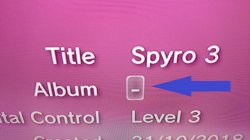
@DeViL303 Yes, this is exactly what I want to achieve. How did you do this? I want to use these characters in the name of the Album.
That is a little complicated, that information is only in the database. and it seems the database does not support those characters.
I just tried to add some and it did not work. If the character was supported you would need to add some placeholder characters, like "XXX", then save that. Then dump the database files from dev_hdd0/mms/ and search through them with a HEX editor until you find the XXX and replace it there.

Then look in this file with a hex editor:

Then edit it

But I tried it and it did not work.

There might be a another way by adding them to imagefont.bin, but to be honest its too much hassle to be worth it.
I just tried to add some and it did not work.
If the character was supported you would need to add some placeholder characters, like "XXX", then save that. Then dump the database files from dev_hdd0/mms/ and search through them with a HEX editor until you find the XXX and replace it there.Then look in this file with a hex editor:
Then edit it
But I tried it and it did not work.
There might be a another way by adding them to imagefont.bin, but to be honest its too much hassle to be worth it.
Last edited:
That is a little complicated, that information is only in the database. and it seems the database does not support those characters.
I just tried to add some and it did not work.
View attachment 32605
Then look in this file with a hex editor:
View attachment 32608
Then edit it
View attachment 32609
But I tried it and it did not work.
View attachment 32610
There might be a another way by adding them to imagefont.bin, but to be honest its too much hassle to be worth it.
I see that you didn't add the characters properly. You added the 3 characters as single characters.
For (R) you need to add C2 AE (2 characters) like you see in WipeOut(R) HD.
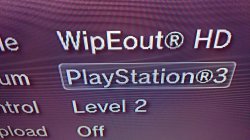
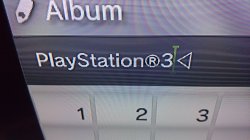
@DeViL303 Once you said you copied the characters from my forum post, I tried to do the same and it worked. The simplest solutions are the best.
View attachment 32617 View attachment 32618
LOL I think DeViL303 was talking about he could paste the characters from your post to a XML file.
But you're right... copying the Unicode text from the PS3 browser and pasting it to the on screen editor works perfectly.
It works with other Unicode symbols too, like ★ ♡ ♬ etc.
It depends where you want to use them exactly. I just copied those 4 from your post and pasted directly into xmbml and they work as is, nothing special required.
View attachment 32603
Hi pro, I'm from Vietnam, and my language has fonts like ă, â, ê, ă, ế,....... so how can I add these characters to ps3, I tried replacing the font with unicode, but ps3 still doesn't accept those characters, I hope you can answer me. Thank you very much
Charles_n_town
Senior Member
I don't know what those are in hex, but it sounds like @DeViL303 and @aldostools added unique characters to the database directly. The metadata file is in the mms folder iirc. Be careful you don't mess up or else it will rebuild the database. I think each unique character is two bytes in size (i.e. four characters). It's essentially the same way I added Tetris block characters to folder names on the wiiu. Like this: https://www.psx-place.com/threads/some-fun-w-hex-editing-on-the-wii-u.45142/Hi pro, I'm from Vietnam, and my language has fonts like ă, â, ê, ă, ế,....... so how can I add these characters to ps3, I tried replacing the font with unicode, but ps3 still doesn't accept those characters, I hope you can answer me. Thank you very much
Charles_n_town
Senior Member
Hi pro, I'm from Vietnam, and my language has fonts like ă, â, ê, ă, ế,....... so how can I add these characters to ps3, I tried replacing the font with unicode, but ps3 still doesn't accept those characters, I hope you can answer me. Thank you very much
btw, not sure if you read my post, but I was going to add that you may have to add the characters to the imagefont first. I've never messed with it, so I wouldn't know what to do exactly, but you can probably get your hex code by typing the character(s) into a text document, then dropping that into a hex editor to see what's output in hex code. I don't know if all characters are two bytes or just unique ones, but the wiiu actually had all of them two bytes iirc. I don't remember if there were gaps in between each character, but the ascii looked like gibberish. it should look like your characters though in this case. I assumed a Vietnamese console would have the characters incorporated, unless it's a different region of the console. I'm not really sure tbh, but it looks like they used the browser to copy and paste characters without having to input the hex code manually into the database. DeViL has the name of the file above if you have to do it that way. I couldn't remember the exact name. I've never messed with it, because it would be very sensitive. I remember the wiiu one being that way. if you messed up, the folder name would be gibberish or the console would freeze at getting to the home menu. this is less risky though, because it will just rebuild the database.
btw, not sure if you read my post, but I was going to add that you may have to add the characters to the imagefont first. I've never messed with it, so I wouldn't know what to do exactly, but you can probably get your hex code by typing the character(s) into a text document, then dropping that into a hex editor to see what's output in hex code. I don't know if all characters are two bytes or just unique ones, but the wiiu actually had all of them two bytes iirc. I don't remember if there were gaps in between each character, but the ascii looked like gibberish. it should look like your characters though in this case. I assumed a Vietnamese console would have the characters incorporated, unless it's a different region of the console. I'm not really sure tbh, but it looks like they used the browser to copy and paste characters without having to input the hex code manually into the database. DeViL has the name of the file above if you have to do it that way. I couldn't remember the exact name. I've never messed with it, because it would be very sensitive. I remember the wiiu one being that way. if you messed up, the folder name would be gibberish or the console would freeze at getting to the home menu. this is less risky though, because it will just rebuild the database.
Thank you very much, i tried adding to imagefont.bin but it has a little problem. it asks for .cfg file but i don't know what to write in there
Charles_n_town
Senior Member
dunno, but I found this: https://www.psx-place.com/threads/imagefont-bin-tool-for-ps3-and-vita.25150/
Thank you very much, i tried adding to imagefont.bin but it has a little problem. it asks for .cfg file but i don't know what to write in there
it might be beneficial to you.
I will look into it, thank you very much.dunno, but I found this: https://www.psx-place.com/threads/imagefont-bin-tool-for-ps3-and-vita.25150/
it might be beneficial to you.
Charles_n_town
Senior Member
I got it to work through hex editing, but it didn't like that last character, so maybe not:

I got it to work through hex editing, but it didn't like that last character, so maybe not:
View attachment 44935
wow. is it possible, this edits the hex in the param sfo file?. i want to bring these ă ê ê ă words into the pes game on ps3, can you help me try it. thank you
Charles_n_town
Senior Member
probably. I hex edited the metadata database in this case. the game name is repeated many times throughout, so you have to hex replace all occurrences.
Similar threads
-
-
 PS3 Question about SACD playback and ripping on the PS3 CECHA00
- Started by MCMLXXVII
- Replies: 7
-
 PS3 Installing an 'OtherOS' on PS3 in [current year]..
- Started by Metroid_Hybrid
- Replies: 1
-
 PS3 XMB displaying generic images for ISO folders
- Started by Razzee
- Replies: 1