PS3 Syscon fan settings (Coordinate Graphs)

I been reviewing how much things are missing to complete the page in wiki and my graphs, are related wth some PS3 fat models, maybe you can help completing it

I have the thermal configs for DIA-001 but i dont have the syscon output of this commands, i need them because im publishing them in wiki, and are handy to me because im "copypasting" this values directly in photoshop, the style is pretty much the same made by vyktor in this pastebin of the REX-001 https://pastebin.com/raw/qztMA4gD

DIA-002 motherboard (PS3 model: CECHJxx, CECHKxx)
Code:
>$ revision
>$ version
>$ tzone
>$ fantbl get 0
>$ fantbl get 1
>$ tshutdown get 0
>$ tshutdown get 1
>$ eepcsum

--------------------------------
Also, i would like to have a definitive confirmation of the thermal config used in two superslim motherboards:
PPX-001 (probaly identical to the thermal config found in PQX-001)
RTX-001 (probaly identical to the thermal config found in REX-001)

The problem is pretty much the same that happened yesterday... when we was talking about the graph i made for JTP-001 i realized zecoxao shared a syscon dump from JSD-001 here https://www.psx-place.com/threads/s...o-what-does-it-mean.26148/page-21#post-318032
After our talk i was comparing them and yeah... bingo, JTP-001 and JSD-001 are sharing the same thermal config (as expected because the hardware is almost identical)... but this means the image i made for the JTP-001 is outdated. I need to change the title at top of the image and mention both motherboard models, JTP-001 and JSD-001 :/
q8MrDdh.jpg
 
Last edited:
I been playing around with text highlighting effects in wiki and made this
Clipboard01.png


Im posting it here because i think is a nice introduction to see how it works, also because the "simple" method i explained to @vyktormvmpay25 in this post to modify the thermal config was not so simple
What i was suggesting is to modify only the speeds (from inside the "fancon" tables at top), this way we are sure the custom config will work fine. Actually, if you are afraid you can take the original "duty" values and sum the same value to them (as example you can add +0x10 to all them... so the resulting speeds will be proportional to the originals but a bit "boosted")

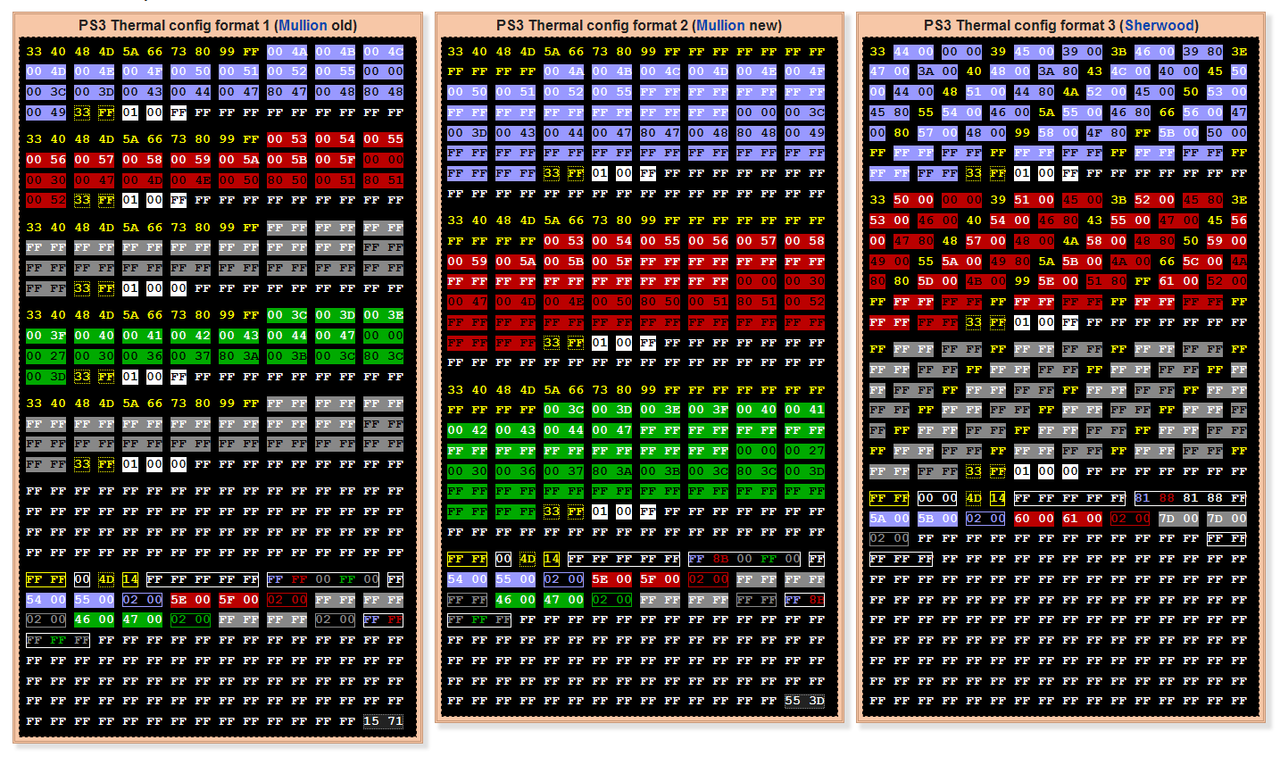
My goal wen i explained that was to do some kind of small tutorial of the easyest way posible... but it was not so easy because i was doing it in a sherwood (format 3) where the "duty" values are separated by 4 bytes... so we need to run a lot of write operations at different offsets

My point now is... in mullion syscons all the "duty" values are located consecutivelly (the values with yellow font on top of black background, 1 byte each) so is a lot easyer to do in mullion syscons ;)
For CELL you just need to write ten bytes in a single write operation... another ten for RSX... and another ten for SB (if needed)
3 writes operations in total... supereasy ;)

*and another 3 writes operations if you want to change the "trp", "tshutdown", "hyst" at bottom
Or... write all the values at bottom in a single stream... remember all values for temperature have a lenght of 2 bytes, and have a colored background in my image (blue=cell, red=rsx, green=sb)
 
Last edited:
And there is another detail that worths to be explained because i made i mistake in what i was explaining in my mini-tutorial in this forum thread
Clipboard01-copy.png

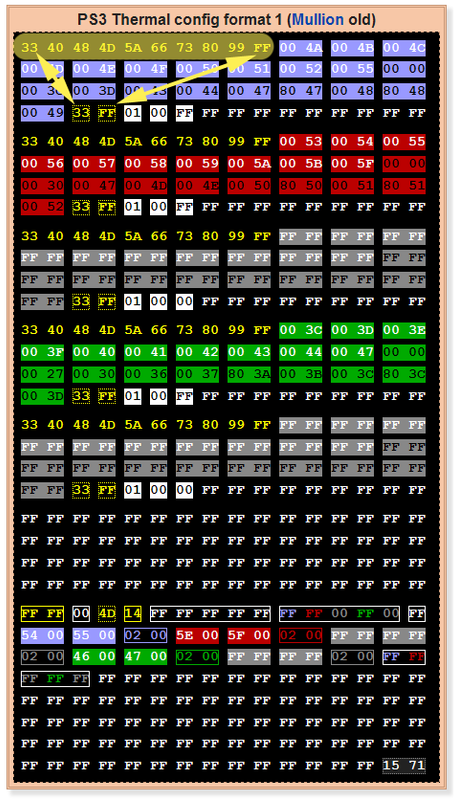
The values i sprayed in yellow represents the fan speeds for CELL, the thermal config format have room for 10 speeds, and the 10 speeds are used, so are 10 speeds in total, 1 byte each
The first 0x40 bytes in this sample are the "FanconNo" = 01 ... associated by software with the thermal sensor from... "TZoneNo" = 01 for CELL
Note the speeds in the other fancon tables are the same, you need to change the duty values (speeds) in all the fancontables to match
As you can see the first speed is always 0x33 (except in some of the latest superslim models), and the last is always 0xFF (represents 100% fan speed)
And the 2 bytes 33FF at bottom of the fancon table (pointed by the arrows) and written in yellow text + a dotted yellow outline are the "duty_min" and "duty_max" (of this fancon table, but they needs to match too in the other fancon tables)

The point is... in the method i was suggesting where is only needed to modify the "duty" values (but not the "duty_min" neither the "duty_max) we need to respect the first and the last speeds of the sequence
In other words... if the original speeds are:
33 40 48 4D 5A 66 73 80 99 FF
We can sum +0x10 to them (except the first and the last), resulting in this:
33 50 58 5D 6A 76 83 90 A9 FF

Then write the 8 bytes in a single write operation, for CELL... RSX... etc...

--------------
Maybe the + 0x10 is a bit excesive, i have not tryed it, but for sure this is going to work, and in some way it respects a bit the original settings calculated by the engineers, so is not so bad
I would say is an small improvement over the officials and easy to do
*And remember, is needed to run the command "eepcsum" after the changes and update the last 2 bytes of the thermal config region with the new checksum
 
Last edited:
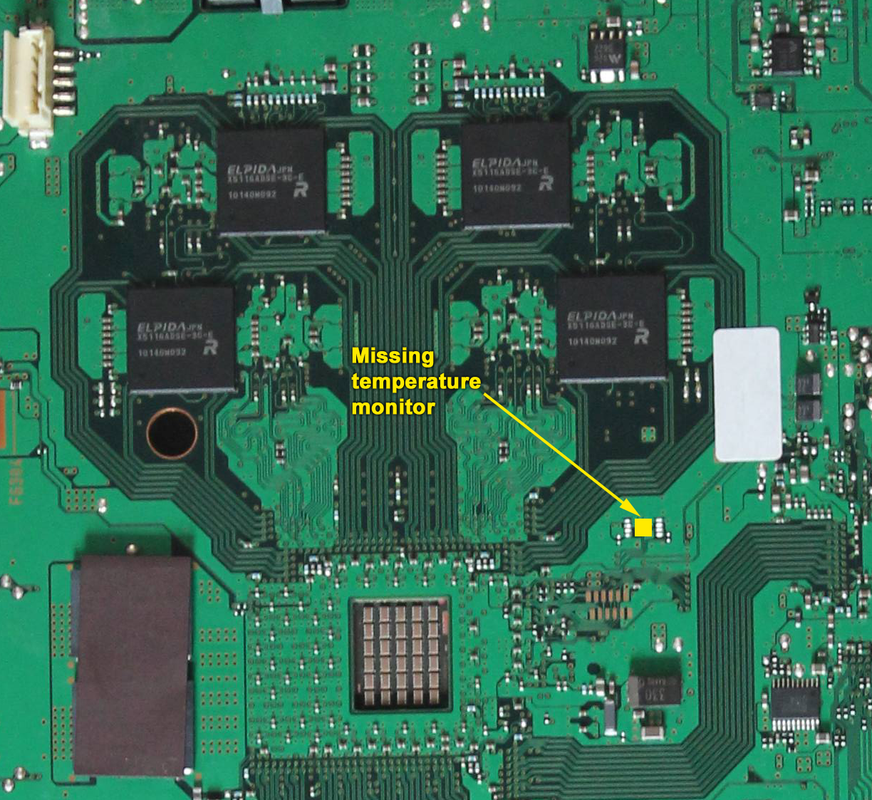
I been updating the info and some images related with the temperature monitors in wiki and i found something not documented before, but i need help from someone with a DIA-001 or DIA-002 motherboards for a confirmation

The point is... all the thermal configs for all PS3 models reserves a fantable for southbridge but only some of this thermal configs contains valid settings for it
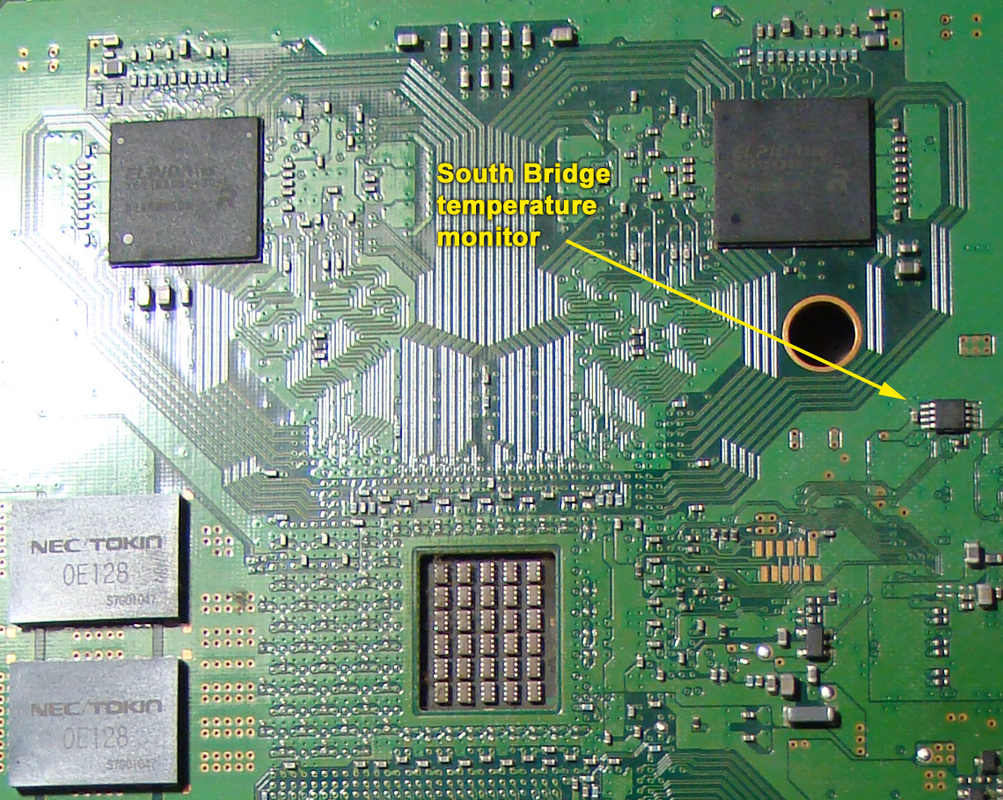
The first motherboard models COK-001, COK-002, and SEM-001 have the thermal monitor for southbridge , and also his thermal configs contains valid data for it. This thermal configs are monitoring 3 sensors in total (CELL, RSX, SB), the most notable difference when looking at the thermal components is the SEM-001 was a complete redesign and they moved the south bridge temperature monitor to the opposite side of the motherboard (and also it was displaced far away from the south bridge)

Well... the thermal configs for the next PS3 motherboard models (DIA-001 and DIA-002) doesnt contains valid data for southbridge, but it seems the circuit was designed with the temperature monitor for southbridge in the same position than SEM-001 (at the opposite side of south bridge and a bit far away from it, in direction to the system RAM chips)
Actually... the DIA-001 have the south bridge temperature monitor... is just his thermal config that is ignoring it but i guess can be enabled by software
DIA-001-SB-temperature-monitor.png

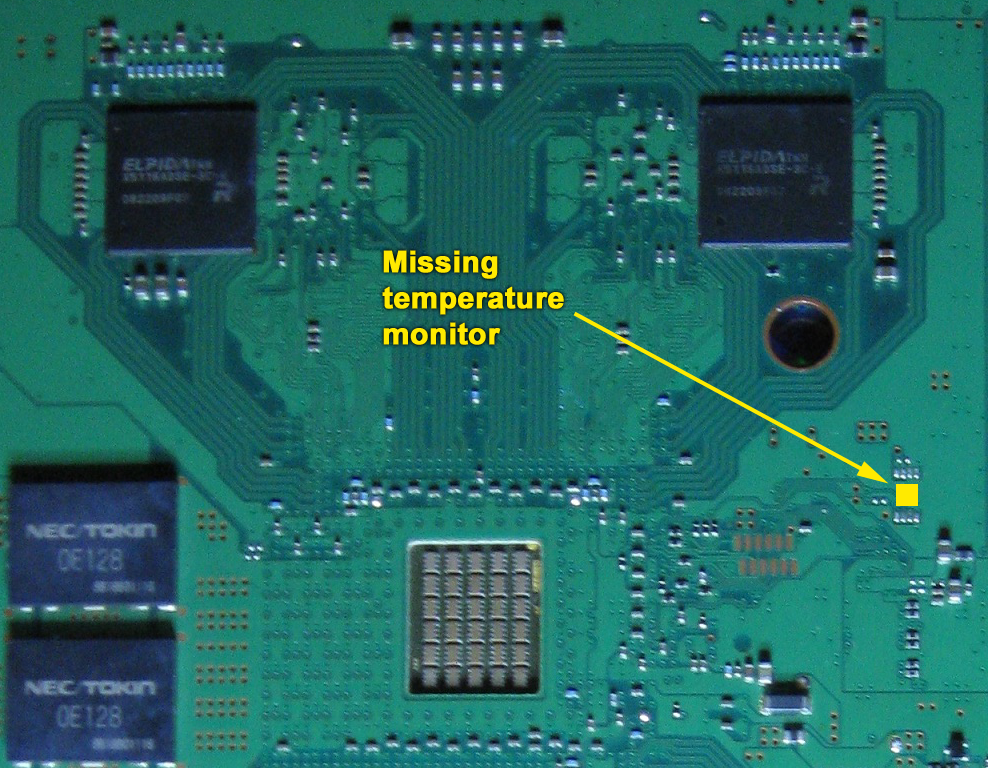
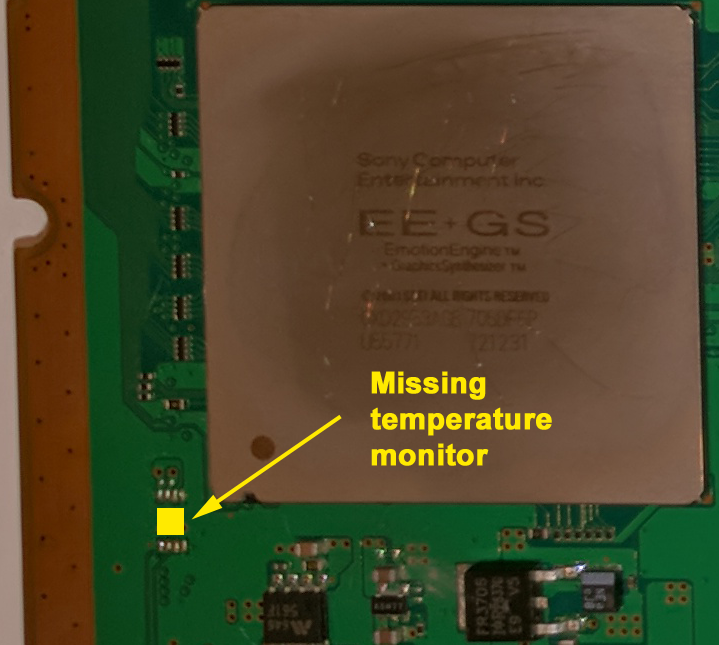
And the design of the DIA-002 doesnt differs so much, it seems there are solder pads for it but the component is missing. In this case i guess it can be added (taken from a DIA-001 because are configured with an ID specific for south bridge)
DIA-002-SB-temperature-monitor.png


I need help from someone with a DIA-001 or DIA-002 motherboards to confirm it with a multimeter because i dont have a DIA001 or DIA-002 to check it in both
Is easy... keep in mind the "data bus" (provided by syscon) is shared by all the temperature monitors of the motherboard (all them are connected to the same "2 wires" data bus)
I just want to know if this components in the images im uploading are connected with the pins 1 and 2 of the temperature monitors of CELL/RSX, check the images in wiki, there are photos to identify where are the others
 
Last edited:
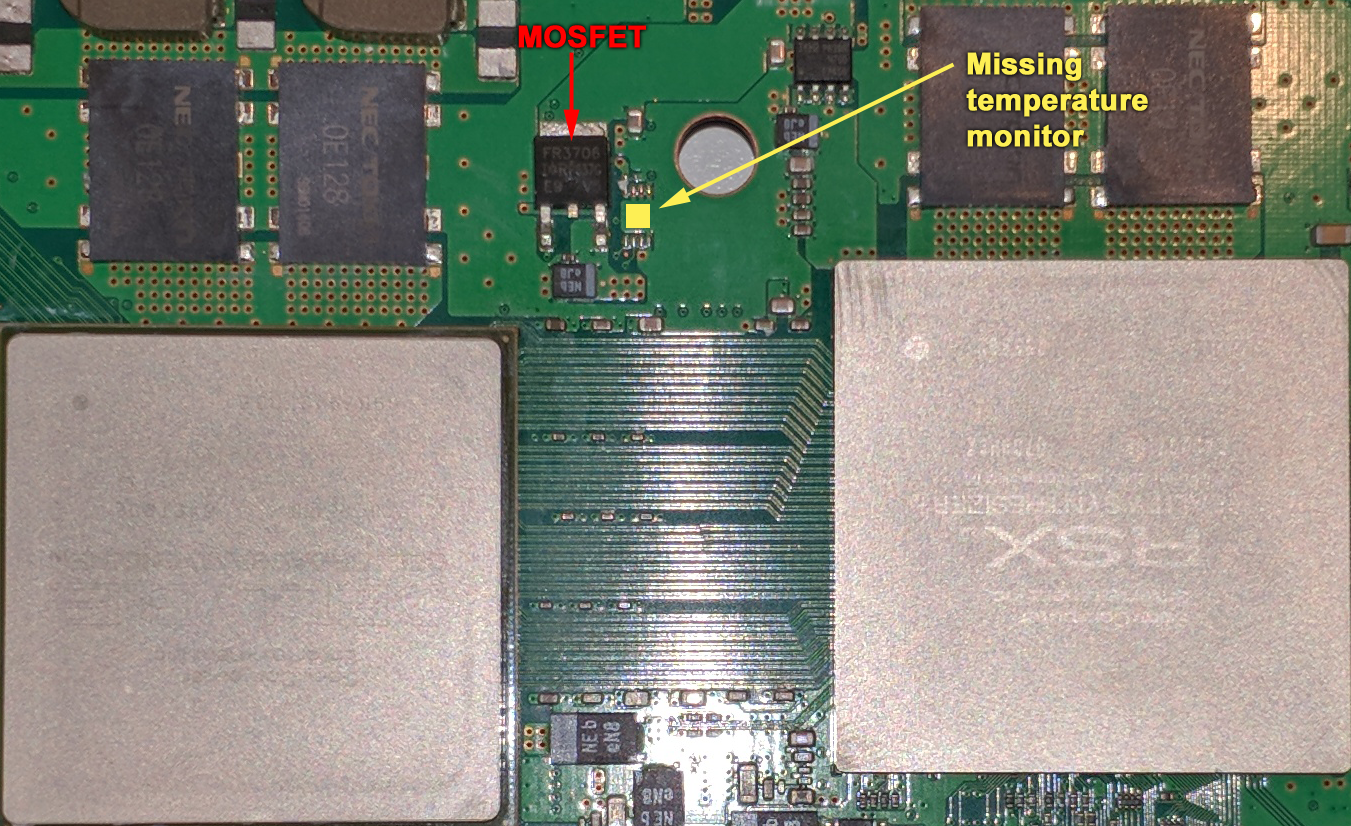
For the record... it seems the circuit of the DEB-001 motherboard (from PS3 model DECR-1400) allows to install a temperature monitor for south bridge too
DEB-001-SB-temperature-monitor.png


This ones (DIA-002 and DEB-001) are the last motherboards using a syscon from the mullion series... after them (VER-001) sony was using syscons from the sherwood series
 
Hi @vyktormvmpay25, did you find out a fix for error 0xa0092113? My COK-001 get same error message as shown in following
Thanks in advanced!
>$ errlog
[SSM] state: 0600 -> 0000
[SSM] Error state is cleared.
(PowerOff State)
[SSM] state: 0000 -> 0101
Bringup Mode #0 (0xFF)
[SSM] ssmCb_OnStartingBePowOn() called.
[SSM] Bringup mode : syspm_stat=00000000/00000000
[POWSEQ] PowerSeq_Setup called.
[SSM] state: 0101 -> 0301
[SSM] PowSeq Fail : Detected !
[SSM] state: 0301 -> 0700
[POWSEQ] AV Backend Letup
[SSM] Shutdown mode : syspm_stat=00000000/00000000
[ERROR]: 0xa0092113
[POWSEQ] PowerSeq_Letup called.
[SSM] state: 0700 -> 0600
(PowerOff State) (Fatal)
errlog
ofst[ 16]:err_code:0xffffffff, clock:0xffffffff
ofst[ 20]:err_code:0xffffffff, clock:0xffffffff
ofst[ 24]:err_code:0xffffffff, clock:0xffffffff
ofst[ 28]:err_code:0xffffffff, clock:0xffffffff
ofst[ 32]:err_code:0xffffffff, clock:0xffffffff
ofst[ 36]:err_code:0xffffffff, clock:0xffffffff
ofst[ 40]:err_code:0xffffffff, clock:0xffffffff
ofst[ 44]:err_code:0xffffffff, clock:0xffffffff
ofst[ 48]:err_code:0xffffffff, clock:0xffffffff
ofst[ 52]:err_code:0xffffffff, clock:0xffffffff
ofst[ 56]:err_code:0xffffffff, clock:0xffffffff
ofst[ 60]:err_code:0xffffffff, clock:0xffffffff
ofst[ 64]:err_code:0xffffffff, clock:0xffffffff
ofst[ 68]:err_code:0xffffffff, clock:0xffffffff
ofst[ 72]:err_code:0xffffffff, clock:0xffffffff
ofst[ 76]:err_code:0xffffffff, clock:0xffffffff
ofst[ 80]:err_code:0xffffffff, clock:0xffffffff
ofst[ 84]:err_code:0xffffffff, clock:0xffffffff
ofst[ 88]:err_code:0xffffffff, clock:0xffffffff
ofst[ 92]:err_code:0xffffffff, clock:0xffffffff
ofst[ 96]:err_code:0xffffffff, clock:0xffffffff
ofst[100]:err_code:0xffffffff, clock:0xffffffff
ofst[104]:err_code:0xffffffff, clock:0xffffffff
ofst[108]:err_code:0xffffffff, clock:0xffffffff
ofst[112]:err_code:0xffffffff, clock:0xffffffff
ofst[116]:err_code:0xffffffff, clock:0xffffffff
ofst[120]:err_code:0xffffffff, clock:0xffffffff
ofst[124]:err_code:0xffffffff, clock:0xffffffff
ofst[ 0]:err_code:0xa0092113, clock:0xffffffff
ofst[ 4]:err_code:0xa0092113, clock:0xffffffff
ofst[ 8]:err_code:0xa0092113, clock:0xffffffff
ofst[ 12]:err_code:0xa0092113, clock:0xffffffff
[mullion]$

going first with cook002 .wtf does this?
>$ hversion
hversion
CokB10
>$ firmud
firmud
ID SETTING: FE FF FF 1F
------------------
0000 0000 0000 0000 0000 0000 0000 0000 0000 0000 0000 0000 0000 0000 0000 0000
0000 0000 0000 0000 0000 0000 0000 0000 0000 0000 0000 0000 0000 0000 0000 0000
0000 0000 0000 0000 0000 0000 0000 0000 0000 0000 0000 0000 0000 0000 0000 0000
0000 0000 0000 0000 0000 0000 0000 0000 0000 0000 0000 0000 0000 0000 0000 0000
0000 0000 0000 0000 0000 0000 0000 0000 0000 0000 0000 0000 0000 0000 0000 0000
0000 0000 0000 0000 0000 0000 0000 0000 0000 0000 0000 0000 0000 0000 0000 0000
0000 0000 0000 0000 0000 0000 0000 0000 0000 0000 0000 0000 0000 0000 0000 0000
0000 0000 0000 0000 0000 0000 0000 0000 0000 0000 0000 0000 0000 0000 0000 0000
0000 0000 0000 0000 0000 0000 0000 0000 0000 0000 0000 0000 0000 0000 0000 0000
0000 0000 0000 0000 0000 0000 0000 0000 0000 0000 0000 0000 0000 0000 0000 0000
0000 0000 0000 0000 0000 0000 0000 0000 0000 0000 0000 0000 0000 0000 0000 0000
0000 0000 0000 0000 0000 0000 0000 0000 0000 0000 0000 0000 0000 0000 0000 0000
0000 0000 0000 0000 0000 0000 0000 0000 0000 0000 0000 0000 0000 0000 0000 0000
0000 0000 0000 0000 0000 0000 0000 0000 0000 0000 0000 0000 0000 0000 0000 0000
0000 0000 0000 0000 0000 0000 0000 0000 0000 0000 0000 0000 0000 0000 0000 0000
0000 0000 0000 0000 0000 0000 0000 0000 0000 0000 0000 0000 0000 0000 0000 0000
0000 0000 0000 0000 0000 0000 0000 0000 0000 0000 0000 0000 0000 0000 0000 0000
0000 0000 0000 0000 0000 0000 0000 0000 0000 0000 0000 0000 0000 0000 0000 0000
0000 0000 0000 0000 0000 0000 0000 0000 0000 0000 0000 0000 0000 0000 0000 0000
0000 0000 0000 0000 0000 0000 0000 0000 0000 0000 0000 0000 0000 0000 0000 0000
0000 0000 0000 0000 0000 0000 0000 0000 0000 0000 0000 0000 0000 0000 0000 0000
0000 0000 0000 0000 0000 0000 0000 0000 0000 0000 0000 0000 0000 0000 0000 0000
0000 0000 0000 0000 0000 0000 0000 0000 0000 0000 0000 0000 0000 0000 0000 0000
0000 0000 0000 0000 0000 0000 0000 0000 0000 0000 0000 0000 0000 0000 0000 0000
0000 0000 0000 0000 0000 0000 0000 0000 0000 0000 0000 0000 0000 0000 0000 0000
0000 0000 0000 0000 0000 0000 0000 0000 0000 0000 0000 0000 0000 0000 0000 0000
0000 0000 0000 0000 0000 0000 0000
PWSEQ 00
WMZON 00
WMFAN 00
WMZON 0C
WMFAN 03
WMZON 01
WMZON 20
WMZON 22
ERRLG 12 A0A0 2031
WMFAN 01
SSM 80
S_SPM 03 0000 00F4
S_SPM 05 0000 00F4
S_SPM 69 FFFF FFFF
S_SPM 6B
SSM 00
CMRCV 34
CMRCV 33
CMRCV 22
CMRCV 22
CMRCV 33
CMRCV 22
CMRCV 22
CMRCV 22
CMRCV 33
CMRCV 22
CMRCV 33
CMRCV 22
CMRCV 22
CMRCV 33
CMRCV 22
CMRCV 22
CMRCV 22
CMRCV 22
CMRCV 22
CMRCV 22
CMRCV 22
CMRCV 22
CMRCV 22
CMRCV 22
CMRCV 22
CMRCV 22
CMRCV 22
CMRCV 22
CMRCV 22
CMRCV 22
CMRCV 22
CMRCV 22
CMRCV 22
CMRCV 22
CMRCV 22
CMRCV 22
CMRCV 22
CMRCV 22
CMRCV 33
CMRCV 22
CMRCV 22
CMRCV 22
CMRCV 32
CMRCV 60
CMRCV 61
S_DIG 00
CMRCV 36 0009
CMRCV 36 0010
CMRCV 36 0012
CMRCV 36 000F
CMRCV 36 000A
WMFAN 25 0003
WMFAN 25 0003
WMFAN 25 0003
CMRCV 36 000B
SSM 48
*** DATA ABORT ***
lr:0000E2DE
SPSR:0000007F
r0:03800000
r1:0000005F
r2:200000DF
r3:0000E2DB
r4:00044B23
r5:00000000
r6:0200344C
>$
i can't dump this I think is something wrong from 72ff, i can read until there but will be a pain to dump manualy.
something that i dont know as well

>$ hversion
hversion
CokB10
>$ portscan
portscan
|DATA.... ........ DIR..... ........ FUNC.... ........ PULLUP.. ........ HI
Z..... ........
|FEDCBA98 76543210 FEDCBA98 76543210 FEDCBA98 76543210 FEDCBA98 76543210 FE
DCBA98 76543210
-----+--------------------------------------------------------------------------
---------------
PortA|00000000 11001100 iiiiiiii ooiooioo pppppppp pppppppp -------- -------- nn
nnnnnn nnnnnnnn
PortB|00000000 00000011 iiiiiiii ooooooii pppppppp pppppppp -------- -------- nn
nnnnnn nnnnnnnn
PortC|00000000 00000000 iiiiiiii oooooooo pppppppp pppppppp -------- -------- nn
nnnnnn nnnnnnnn
PortD|00000000 00000000 iiiiiiii oioooooo pppppppp pppppppp -------- -------- nn
nnnnnn nnnnnnnn
PortE|00000000 11101100 iiiiiiii iiiiiiii pppppppp pppppppp -------- -------- nn
nnnnnn nnnnnnnn
PortF|00000000 11000100 iiiiiiii iiiiiioo pppppppp pppppppp -------- -------- nn
nnnnnn nnnnnnnn
PortG|00000000 00100110 iiiiiiii ooiiioio pppppppp pppppfpf -------- -------- nn
nnnnnn nnnnnnnn
PortH|00000000 11100100 iiiiiiii iiiiiiii pppppppp pppppppp -------- -------- nn
nnnnnn nnnnnnnn
PortI|00000000 11011001 iiiiiiii iooiooii pppppppp pppppppp -------- -------- nn
nnnnnn nnnnnnnn
PortJ|00000000 10000000 iiiiiiii iiiioooo ffffffff ffpfpppp -------- -------- nn
nnnnnn nnnnnnnn
PortK|00000000 00000000 iiiiiiii iiiiiioo pppppppp pppppppp -------- -------- nn
nnnnnn nnnnnnnn
PortL|00000000 00000000 iiiiiiio oooooooo pppppppp pppppppp -------- -------- nn
nnnnnn nnnnnnnn
PortM|00000000 00000000 iiiiiiii ooiiiiii pppppppp pppppppp -------- -------- nn
nnnnnn nnnnnnnn
PortN|00000000 00000000 iiiiiiii iooiiiii pppppppp pppppppp -------- -------- nn
nnnnnn nnnnnnnn
PortO|00000000 00001000 iiiiiiii oiiooiii pppppppp pppppppp -------- -------- nn
nnnnnn nnnnnnnn
PortP|00000000 11001111 iiiiiiii oiiiooio pppppppp fpppffpp -------- ----u--- nn
nnnnnn nnnnnnnn
PortQ|00000000 00001110 iiiiiiii iiooiiio pppppppp ppppffpp -------- -------- nn
nnnnnn nnnnnnnn
PortR|00000000 00000100 iiiiiiii iiiioiii pppppppp pppppppp -------- -------- nn
nnnnnn nnnnnnnn
[mullion]$
>$
[mullion]$

>$ patchcsum
patchcsum
r1 csum: [00030266] [018DB626] [90662679]
r2 csum: [000069C5] [0046B830] [5E535A06]
[mullion]$
>$ patchvereep
patchvereep
major:0x0001
minor:0x0001
patch:0x0003
revision:0x0003
[mullion]$
>$ patchverram
patchverram
major:0x0001
minor:0x0001
patch:0x0003
revision:0x0003
[mullion]$
>$ revision
revision
0C16
[mullion]$
>$ rrsxc
rrsxc
*** Invalid Argument ***
[mullion]$
>$ version
version
v1.1.3_k1
This is all i can get as don't know how to connect on SB or if its working with scrap board.No rsx and something wrong with clock generator even all 4 ic around sata were changed. water damage board .goood for experimental things.
Error
errlog
ofst[120]:err_code:0xffffffff, clock:0xffffffff
ofst[124]:err_code:0xa0092113, clock:0xffffffff
ofst[ 0]:err_code:0xa0092113, clock:0xffffffff
ofst[ 4]:err_code:0xa0092113, clock:0xffffffff
ofst[ 8]:err_code:0xa0092113, clock:0xffffffff
ofst[ 12]:err_code:0xa0092113, clock:0xffffffff
ofst[ 16]:err_code:0xa0092113, clock:0xffffffff
ofst[ 20]:err_code:0xa0092113, clock:0xffffffff
ofst[ 24]:err_code:0xa0092113, clock:0xffffffff
ofst[ 28]:err_code:0xa0092113, clock:0xffffffff
ofst[ 32]:err_code:0xa0092113, clock:0xffffffff
ofst[ 36]:err_code:0xa0003001, clock:0xffffffff
ofst[ 40]:err_code:0xa0003001, clock:0xffffffff
ofst[ 44]:err_code:0xa08014ff, clock:0xffffffff
ofst[ 48]:err_code:0xa0801701, clock:0xffffffff
ofst[ 52]:err_code:0xa0092113, clock:0xffffffff
ofst[ 56]:err_code:0xa0092113, clock:0xffffffff
ofst[ 60]:err_code:0xa0092113, clock:0xffffffff
ofst[ 64]:err_code:0xa0092113, clock:0xffffffff
ofst[ 68]:err_code:0xa0092113, clock:0xffffffff
ofst[ 72]:err_code:0xa0092113, clock:0xffffffff
ofst[ 76]:err_code:0xa0092113, clock:0xffffffff
ofst[ 80]:err_code:0xa0092113, clock:0xffffffff
ofst[ 84]:err_code:0xa0092113, clock:0xffffffff
ofst[ 88]:err_code:0xa0092113, clock:0xffffffff
ofst[ 92]:err_code:0xa0092113, clock:0xffffffff
ofst[ 96]:err_code:0xa0092113, clock:0xffffffff
ofst[100]:err_code:0xa0092113, clock:0xffffffff
ofst[104]:err_code:0xa0092113, clock:0xffffffff
ofst[108]:err_code:0xa0a02031, clock:0xffffffff
ofst[112]:err_code:0xa0a02031, clock:0xffffffff
ofst[116]:err_code:0xa0a02031, clock:0xffffffff
>$ eepcsum
eepcsum
Addr:0x000032fe should be 0x528c
Addr:0x000034fe should be 0x7115
Addr:0x000039fe should be 0x0038
Addr:0x00003dfe should be 0x00ff
Addr:0x00003ffe should be 0x00ff
>$
>$ r 72ff 2
r 72ff 2
+0 +1 +2 +3 +4 +5 +6 +7 +8 +9 +A +B +C +D +E +F
-----------------------------------------------
FF FF
[mullion]$
>$ r 73ff 2
r 73ff 2
+0 +1 +2 +3 +4 +5 +6 +7 +8 +9 +A +B +C +D +E +F
-----------------------------------------------
FF Error status : c6000006
*** MMIO Access Error ***
[mullion]$
>$ r 73fe 1
r 73fe 1
+0 +1 +2 +3 +4 +5 +6 +7 +8 +9 +A +B +C +D +E +F
-----------------------------------------------
FF
[mullion]$
>$ r 73fe 2
r 73fe 2
+0 +1 +2 +3 +4 +5 +6 +7 +8 +9 +A +B +C +D +E +F
-----------------------------------------------
FF FF
[mullion]$
>$
this is maximum
 
I'm no longer got those boards, never found it, it was kind of cell problems or liquid damage or dropped unit on that case, tried to change all ic's around clock generator area did not help so I understand it was either internal short inside board, either cell probably got defective after delid or it was there before. Can't remember, seen to many boards. I would like to read about your problem on syscon finding YLOD thread https://www.psx-place.com/threads/f...syscon-first-steps-and-error-reporting.30100/
Let's keep a bit of order here. You may get there more advice from different people with experience.
 
I'm no longer got those boards, never found it, it was kind of cell problems or liquid damage or dropped unit on that case, tried to change all ic's around clock generator area did not help so I understand it was either internal short inside board, either cell probably got defective after delid or it was there before. Can't remember, seen to many boards. I would like to read about your problem on syscon finding YLOD thread. Let's keep a bit of order here. You may get there more advice from different people with experience.
Thanks, I will do so.
 
@vyktormvmpay25, @marciolsf, @sandungas, @db260179 (everyone really). I have some observations Ineed help with and think warrant further investigation.
I cant comment much about your research of the COK-001 circuit because i always focused my interest in the PS3 slims, not the PS3 fats, and there is no service manual of the slims, i know the knowledge of the fats is going to unveil many secrets of the slims, but for me trying to understand the fats to apply the knowledge on the slims is a bit overwhelming, also the power lines had big redesigns (specially when they removed EE+GS)
Also, you are very technical about electronic engineering, most of the times i cant follow your explanations (specially when using component references specific for the COK-001)
But i can see you are about to masterize the service manuals and reach the shambhala of PS3 power, awesome work :encouragement:

Im quoting you here because is related with the temperature monitors, the other day while taking a look at one of your schematics i realized about something a bit weird, i dont expect you to have a direct answer to solve this mistery but i would like to know your oppinion
BTW, I'm going to revise that picture to include some more of the CPU voltages. Thanks to @marciolsf's suggestion I look at IBM's Hardware Installation Guide for the 65nm Cell I have learned a TON more about the CPU, and incidentally about the RSX...
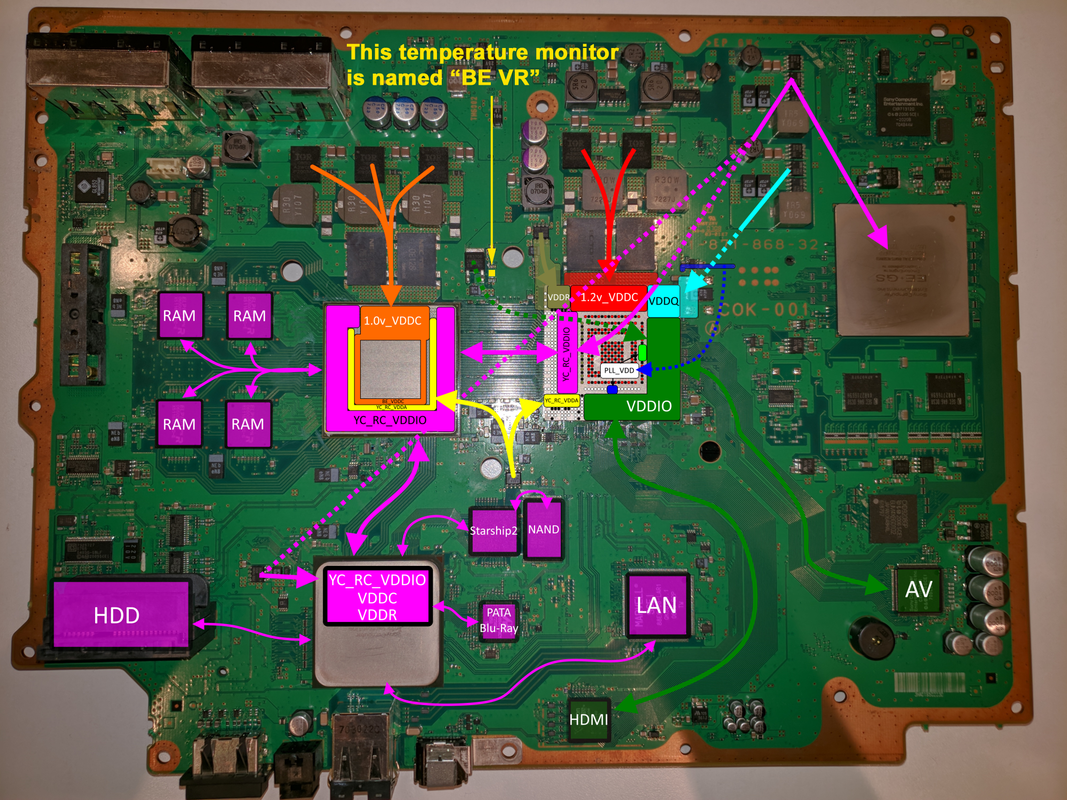
The "problem" is related with this image you made time ago:
COK-001_PWR_FlowChart.png


But let me introduce you to the mistery... uhhhh
The circuit of the COK-001 and COK-002 is designed to install 5 temperature monitors... there are solder pads for them but only 3 are present (CELL/RSX/SB), im not going to post photos of them because most of you knows where are located and how they looks
The other 2 temperature monitors are located here:
COK-001_EEGS_temperature_monitor.png

COK-001_VRM_temperature_monitor.png


We know his names because syscon shows them when we run the command "tzone", as example (this is different in other motherboards, only the COK's have 5)
Code:
> tzone
00: 1st BE Primary
01: RSX Primary
03: BE VR
14: SB
15: EE+GS

So... "BE VR" is the temperature monitor in between CELL and RSX (named IC6108 in the service manual), and is meassuring the temperature of:
1) The mosfet SUD40N02-08-E3 (named Q6310 in the service manual)
2) The voltage regulator BD3520FVM-TR at the other side of the motherboard (named IC6303 in the service manual)

Both components are the responsibles to generate the +1.2V_YC_RC_VDDIO line... but in your schematic you are drawing a single "dotted green arrow" to RSX (while the codename of this temperature monitor is "BE VR"... you know "CELL BE Voltage Regulator"
So my question is... are you sure they are feeding RSX only ?
The line +1.2V_YC_RC_VDDIO doesnt have any relationship with CELL ?
Or is just sony recycled the codename of "BE VR" to use it for "RSX VR" ?
As far i know there is not any mention of a temperature monitor named "RSX VR" in any syscon firmware, not even in pre-retail or the reference tool PS3 models, for curiosity sake, at bottom of this code we have a list of the output of the "tzone" commands in all documented PS3 models, as you can see the reference tool PS3 models have some temperature monitors that doesnt exists in retails, as example the temperature monitor named "XDR Primary" or "Air Intake" but not a single mention ever to "RSX VR"
 
Last edited:
I cant comment much about your research of the COK-001 circuit because i always focused my interest in the PS3 slims, not the PS3 fats, and there is no service manual of the slims, i know the knowledge of the fats is going to unveil many secrets of the slims, but for me trying to understand the fats to apply the knowledge on the slims is a bit overwhelming, also the power lines had big redesigns (specially when they removed EE+GS)
Also, you are very technical about electronic engineering, most of the times i cant follow your explanations (specially when using component references specific for the COK-001)
But i can see you are about to masterize the service manuals and reach the shambhala of PS3 power, awesome work :encouragement:

Im quoting you here because is related with the temperature monitors, the other day while taking a look at one of your schematics i realized about something a bit weird, i dont expect you to have a direct answer to solve this mistery but i would like to know your oppinion

The "problem" is related with this image you made time ago:
COK-001_PWR_FlowChart.png


But let me introduce you to the mistery... uhhhh
The circuit of the COK-001 and COK-002 is designed to install 5 temperature monitors... there are solder pads for them but only 3 are present (CELL/RSX/SB), im not going to post photos of them because most of you knows where are located and how they looks
The other 2 temperature monitors are located here:
COK-001_EEGS_temperature_monitor.png

COK-001_VRM_temperature_monitor.png


We know his names because syscon shows them when we run the command "tzone", as example (this is different in other motherboards, only the COK's have 5)
Code:
> tzone
00: 1st BE Primary
01: RSX Primary
03: BE VR
14: SB
15: EE+GS

So... "BE VR" is the temperature monitor in between CELL and RSX (named IC6108 in the service manual), and is meassuring the temperature of:
1) The mosfet SUD40N02-08-E3 (named Q6310 in the service manual)
2) The voltage regulator BD3520FVM-TR at the other side of the motherboard (named IC6303 in the service manual)

Both components are the responsibles to generate the +1.2V_YC_RC_VDDIO line... but in your schematic you are drawing a single "dotted green arrow" to RSX (while the codename of this temperature monitor is "BE VR"... you know "CELL BE Voltage Regulator"
So my question is... are you sure they are feeding RSX only ?
The line +1.2V_YC_RC_VDDIO doesnt have any relationship with CELL ?
Or is just sony recycled the codename of "BE VR" to use it for "RSX VR" ?
As far i know there is not any mention of a temperature monitor named "RSX VR" in any syscon firmware, not even in pre-retail or the reference tool PS3 models, for curiosity sake, at bottom of this code we have a list of the output of the "tzone" commands in all documented PS3 models, as you can see the reference tool PS3 models have some temperature monitors that doesnt exists in retails, as example the temperature monitor named "XDR Primary" or "Air Intake" but not a single mention ever to "RSX VR"
The dotted line indicates it passes through an internal layer of the board and comes out at the SB. But I know more about the Voltage line now then I did when I made that image and need to revise that diagram. Namely, 1.2v_YC_RC_VDDIO from that mosfet. It provides the Digital FlexIO voltage level the SB and CELL interface operates off. RSX_VDDR is the same, but for the RSX side.

What still confuses me about it is why the CPU/SB and RSX have separate source for their FlexIO voltage. I think the reason for it is so the RSX can be initialized sequentially, but I really would need some technical documentation about the RSX to learn more.

I've been reading IMB's CELL hardware installation guide, which describes the POR and FW initilazation steps in great detail. I have been able to use it to define the general order of events (syscon switches, which voltages turn on in order, how/when the Cell is initialized, the FlexIO calibrated (BitTraining) and initialized, etc) and am currently trying to fit these into the SYSCON step numbers so we know exactly what's happening at that stage in the Power On Sequence Test.

I recently finished a review of the SYSCON errorlogs and collated all the errors reported on the forums. They help paint a picture of what error can occure at each step number. That's been helpful to get the order of events figured out too, but that install guide is where it's at. I mean, complete with flow charts and debugging steps. It even has example code for how the Cell is configured. Everything from explaining the exact voltage divider values for refrence voltages, to explaining SYSCON, XDR, SB, and RSX integration. I doubt I could relate the information better than they already did.

I highly suggest you read it. And do so in steps. The first day I felt overwhelmed and in over my head (especially with the code), but the second day it started making more sense. You just have to dissect it and work through it, accepting that its necessarily complicated.

I can see why developers hated maging Games on the PS3. The CELL is a PITA.
 
I guess i was not able to explain the "problem", let me try again by drawing on top of your image
COK-001-PWR-Flow-Chart-copy.png

But in your drawing there is only 1 green dotted line (VDDIO) from the mosfet next to it ----> to the RSX
By looking at your image it looks like the "BE VR" temperature monitor is related with RSX (not BE)

Thats the weird detail. What do you think about it, can you figure some reason why they decided to use the name "BE VR" ?
Right now i only see 2 options, either the official codename "BE VR" is wrong... or your image is wrong
 
Right, that's a mistake and that picture needs updated. I will work up a new one. One that matches the same color scheme I have been using for the RSX pinout/voltage pics.
 
Right, that's a mistake and that picture needs updated. I will work up a new one. One that matches the same color scheme I have been using for the RSX pinout/voltage pics.
Nice, please advise me when you have something related with that components next to the "BE VR", i been wondering what means the codename "BE VR" since many time ago, the other day i was lurking the service manuals, photos, and your schematics of power lines and i hitted with this contradiction
Right now it looks like is not posible for both things to be right, the official codename "BE VR" seems to indicate is related with CELL BE, but in your drawing it seems to be dedicated to RSX
So either... you are missing some lines from the temperature monitor "BE VR" in direction to CELL... or the official codename is wrong

The theory of the official codename being wrong is not so farfetched. As far i understand they was doing some weird things in the reference tool PS3 models, there are 2 "tzones" disabled in them (unknown codenames), probably it was something used in very old prototypes, they was removing the software support but not completly... later it seems they "recycled" part of this support for the retail COK's when they added the codename "BE VR"

Btw, for curiosity sake, the temperature monitors for CELL and RSX are configured as "remote sensor", this means there is a electrical connection (2 lines for the sensor) in between them and the other component
But the temperature monitors named "SB", "EE+GS", and "BE VR" are configured as "local sensor", this means there is not any electrical connection in between them and the other components... they are meassuring heat of the surrounding components just by proximity, i wrote something in wiki about this the other day https://www.psdevwiki.com/ps3/Thermal#Local_VS_Remote_sensor

This detail is important because we dont know how to configure them... so if someone wants to add the missing tempeature monitors the only known way to do it is by using a temperature monitor already configured as "local"... and the only temperature monitor configured as "local" in the retail PS3 models is the one for "SB" (only present in COK-001, COK-002, SEM-001, DIA-001)
Sadly, this is not enougt... because every temperature monitor have a unique identifyer to identify it on the shared "2 wires" SMBus (that connects all temperature monitors together in cascade with the syscon)
The point is... is you add a temperature monitor from the south bridge of a COK-001 into the position of the temperature monitor for "EE+GS" i guess is not going to work because syscon is going to find 2 temperature monitors for "SB"

Another important detail related with modding... we can solder 2 wires to the SMBus channel (1 more for power and 1 more for GND) and take the 4 wires to any other position... lets say... if you place a temperature monitor configured as "local" in the frontal panel of the PS3 then is going to meassure ambient temperature :) ...or you could place it inside the PSU
The thermal config format supporting 5 fancon tables is a good feature, but in my oppinion the best feature of it is later you can display this 5 temperatures from gameOS, because (in theory) the syscall used to request the temperature should be able to exchange the info of the 5 temperature monitors with syscon... is pretty much what happens when you run the command "tmp" (to display the temperature of a specific temperature monitor on real time) where is needed to indicate the identifyer of the "tzone"
CELL=0x01, RSX=0x02, BEVR=0x03, SB=0x14, EEGS=0x15
 
Last edited:
The picture is wrong, the schematic is right. CPU/SB share that BEVR to provide the FlexIO a Digital +1.2V. The RSX has it's own MOSFET to provide it's side of the FlexIO with Digital voltage. I'm still a bit unsure why it's side has separate supply voltage for the FlexIO digital interface. They call it VDDR, but @M4j0r assures me that's for the FlexIO. So okay, they are powered separately. But Why? The theory I came up with is so the RSX can be initialized on the FlexIO in a later step than the CELL/SB. A theory the CELL Hardware installation guide supports. And perhaps so the voltage of Cell/RSX can be independently set. Perhaps the 90nm, 65nm, and 40nm RSX VDDR do not all need to be at the same voltage level, but maybe the CELL/SB have to stay at 1.2V. If they used the same supply for all 3, they would loose flexibility in future CELL/RSX revisions. Not to mention it'd pull a lot of current. Or I don't understand the purpose of VDDR correctly. That's likely.

BEVR = Broadband Engine Voltage Regulator. Its configured as a local sensor, meaning its measuring its own onboard thermocouple. So they place the thermal monitors as close to the chip as possable to get the closest to an accurate temperature as possable. But it's not as good as having a thermocouple inside the hottest core of the Dies itself. So they can also be configured to read out an external thermocouple. The RSX & CELL have internal thermocouples that connect VIA BGA pads to this external thermocouple port on the thermal monitor. This way it can monitor the DIE temperature most accurately.

BEVR is just a beefy MOSFET. The engineers were probably worried it might get too hot. Same with the unpopulated EE+GS thermal monitor. They probably used those to asses the thermals pre-launch, just to be sure a thermal pad would be enough for the EE+GS, and no heat sink was needed for the BEVR.

These thermal monitors are in the schematic marked with XX to indicate they're not populated. Evidently, they decided prior to launch the thermals of those components were adequately managed with the final thermal design. The Thermal Monitors were not needed at that point.

The thermal Monitors themselves are an ADT7461 and the Datasheet has installation notes to help you understand how they are configurable. Hysteresis, accuracy, etc. I read through it not too long ago. I was curious about the idea of repopulating them, but as you say they need to be enabled in FW and most likely that was removed in retail models. I suggest you read that datasheet to help you understand what SONY was doing with them. SONY's engineers pretty faithfully followed the application notes and examples when designing the PS3 schematic. You'll see similarities in schematic diagrams all the time, the same resistor/capacitor networks, arrangment of IC's, etc. I often find myself thinking things like...
hey that arrangement of resistors looks familiar."

"those values match up perfectly."

"So this is what they were doing. COOL!"

"Wow, they basically copied the exact same arrangement in the example, then sold millions of consoles...lol! I guess if the Manufacturer say's to do it that way, SONY does just that! At least you know it'll work. I mean, why reinvent the wheel and create potential issues when you have a working example right in front of you in the datasheet? Not a bad Idea really."
 
At the syscon firmware level it seems the 5 monitors are supported, this is why his names are displayed when we run the command "tzone" and also why syscon displays a list with lof of FF's when running the command "fantbl get" with one of his "fanconNo"
As example, "fantbl get 3" for BEVR (or "fantbl get 5" for EEGS) are displaying the real data from the "thermal config" region of the EEPROM (in COK-001 and COK-002 only)

What i meant when i said we dont know how to configure them, is because time ago vyktor and me was taking a look at the datasheets to figure if it was posible to "sniff" it but we could not find how
Also, another doubt i have is if syscon is configuring something in them "on the fly"... you know, everytime the power line dedicated to the monitors is switched on probably they are replying with a "hey im online" and syscon could sent some config registers at that time to calibrate them
There is also another thing that im not so sure if can be configured, the ID (or better said... the "I2C address)". In the ordering codes of the datasheets it can be seen how the same product had 2 (or more) product codes that depends of his ID
As example, the CELL monitors of all PS3 models seems to have I2Caddress=0x4C (while RSX is I2Caddress=0x4D)
The monitors have a "rewritable" area for registers (used to store configurations) but as far i remember from the registers info in the datasheets there is not any register to change the I2C address

And yeah, sony recycled some details from the monitor datasheets, as example the name "TZone"... this is exactly how is named the sensor in the texas instrument monitors... is intended as something abstract that applyes to both sensor types (local or remote)
 
Last edited:
@RIP-Felix @vyktormvmpay25 @M4j0r i just realized about something pretty cool, take another look at the pinout of the temperature monitors in wiki, i been editing it today https://www.psdevwiki.com/ps3/Thermal

It seems all the temperature monitors of the manufacturer/model Analog Devices AD51 and configured as local (SB, EEGS, BEVR) can be given a "I2C address" by the logic state of pins A0, A1, A2 (pulled up to volts, or pulled down to ground)
The I2C address of SB is achieved by connecting: A0=UP, A1=DOWN, A2=DOWN
The I2C address of EEGS is achieved by connecting: A0=DOWN, A1=UP, A2=DOWN
The I2C address of BEVR is achieved by connecting: A0=DOWN, A1=DOWN, A2=DOWN

The awesome thing about it is this means the "I2C address" is not really hardcoded in them... so you can take the SB temperature monitor from a motherboard and solder it in the position of the EEGS temperature monitor of a different motherboard... just by soldering pins A0, A1 and A2 in a different way
Also, the circuit of the PS3 motherboards is designed to do this configuration as a consequence of how the pins are bridged by copper traces, there is no need to do any special wiring because the motherboard is doing that bridges in a different way for everyone of them

For modding (incase the temperature monitor is going to be "floating" with wires, not directly soldered in the motherboard) it means you can choose the "I2C address" for it
Lets say... in a COK-001 or COK-002 motherboards you can use 4 wires to place a temperature monitor inside the PSU and give it the I2C address of "BEVR" by connecting pins 4,5,6,7 together... it should work because the syscon firmware (and the thermal config format) seems to supports it, the only "weird" thing is it will be reported with the name "BEVR" but doesnt matters much because you already know is the PSU :D
 
Last edited:

Similar threads

Back
Top