PS3 Syscon fan settings (Coordinate Graphs)

@M4j0r the other day i realized about something i would like to comment with you, this is going to be tricky because the theory is based in a bunch of small details and speculations but i think it makes sense enought to drive you crazy a bit
The long story short is i think the thermal configs for sherwoods are only 0x1B0 lenght (instead of the 0x200 in mullions)

Pleae take a look at this table when reading my brainstroming and click in the arrow at top of the table to sort rows for sherwoods
https://www.psdevwiki.com/ps3/Talk:SC_EEPROM#Experimental_table
And this page too
https://www.psdevwiki.com/ps3/Template:Syscon_checksums

I was thinking in what im going to explain since some weeks ago, my first inspiration came from how the checksum protected regions are organized. In mullion there are 5 cheksums and we are considering the first checksum contains 2 areas named "Platform Config" and "Hardware Config" (0x100 bytes each). This names and the way how are splitted are custom, given by you time ago
But for the syscon firmware this 2 areas are a single entity, at least for the matter of how the checksums was implemented, is an area of 0x200 bytes protected by a single checksum
Eventually i was lurking the syscon FLASH dumps in a hexeditor and i realized the mullion firmwares contains 5 error strings associated with the 5 checksums (are posted at bottom of the second link) and we can see the codenames of the 5 regions in them :)
The first checksum belongs to a region codenamed MP_AREA. I cant imagine what means the MP but i guess we should join together "Platform Config" and "Hardware Config" in the same way sony is doing (and eventually change the custom name to the official codename if at some point we figure what means the MP)
Anyway.. thats another story... my main point about this is the regions we are naming "Platform Config" and "Hardware Config" are located together and consecutivelly (without gaps in between them, as said... it seems syscon firmware considers is a single region)

The other day, when you published the syscon patches for the frankenstein RSX (that requires writing in the region we are naming "Hardware Config") i realized in sherwoods both areas was moved before the thermal config region... and that made me return to the previous brainstorming
The point is... in shwerood there is only 1 checksum, protecting 0x800 bytes (includes several regions). I always though they never "unprotected" regions by removing or modifying the checksum protected regions but i was not able to make them match until now

As you can see, in the current version of the table im considering the region named "Config Ring" and "Debug 2" with 0x200 bytes each (names taken from the official codenames of the error strings) are located inmediatly after the "thermal config" region because this allows me to locate all the regions that was protected by checksums in mullions together in sherwoods
In other words... sherwoods only have a checksum, located at the last 2 bytes of the "Debug 2" (just because is the last checksum protected region)... but the checksum is protecting the same regions than mullion, is like they was trying to keep some kind of "backward compatibility" for the checksums

The region we are naming "On/Off Count/Time" is the first not protected by a checksum, and is located inmediatly after "Debug 2" region (in other words, inmedatly after the checksum of the previous 0x800 bytes)
The problem is more obvious in a hexeditor... go to offset 0x800 and drag the mouse to highlight the previous 0x400 ("Config Ring" and "Debug 2") and this position is the end offset of the "thermal region"
In other words... if we substract 0x400 to 0x800 it means the "thermal config" ends at 0x400
So... it seems the thermal config in sherwoods have a size of 0x1B0 (starts at 0x250 and ends at 0x400)
We always was considering the thermal config in sherwoods had a size of 0x200 (like mullion), but im wondering if we should consider that have a different size (in that case it would be needed to update some pages in wiki), what do you think ?, im asking with the hope you have some proof to confirm or debunk this theory about the thermal config size in sherwoods
 
Last edited:
Yesterday I've tried to monitor temperatures in cok001 with 40nm. Just I thought SB uart will give auto temperatures out on putty but I was wrong. What is happening was webman when we load on screen in XMB that temperature monitor, we get from uart syscon automatically temperatures monitoring in cmd without any running commands. I've stopped webman monitoring and set it to syscon without pressing "start +select " and syscon uart didn't show any temperatures automatically in putty or interfering in cmd with my commands. It is kind strange when unit using webman in evilnat last cfw after few restart will give few 2031. If I set webman on syscon, restart about 20 times not a single error in errlog.
@sandungas I'll test that set of fantbl mentioned by RIP-Felix on Frankenstein thread. What do you advise?
 
Yesterday I've tried to monitor temperatures in cok001 with 40nm. Just I thought SB uart will give auto temperatures out on putty but I was wrong. What is happening was webman when we load on screen in XMB that temperature monitor, we get from uart syscon automatically temperatures monitoring in cmd without any running commands. I've stopped webman monitoring and set it to syscon without pressing "start +select " and syscon uart didn't show any temperatures automatically in putty or interfering in cmd with my commands. It is kind strange when unit using webman in evilnat last cfw after few restart will give few 2031. If I set webman on syscon, restart about 20 times not a single error in errlog.
@sandungas I'll test that set of fantbl mentioned by RIP-Felix on Frankenstein thread. What do you advise?
If you want to check real time temperatures on the fly via syscon UART, you can simply run the commands

tmp 0 (for CPU)
tmp 1 (for RSX
tmp 14 (for southbridge)

Also things like
duty get 0 (see current fanspeed)
 
If you want to check real time temperatures on the fly via syscon UART, you can simply run the commands

tmp 0 (for CPU)
tmp 1 (for RSX
tmp 14 (for southbridge)

Also things like
duty get 0 (see current fanspeed)
Yes I know all (I really read all those before asking I'm trying to figure out myself). The point was just searched one method to read automatically as webman monitoring but seems it gives interference with cmd syscon uart if they run in same time. Just test any CXR and run webman monitor in XMB, you get in same time values from tmp 0/1 and you won't understand nothing in cmd. If you open same com port with putty you get same monitor in putty running automatically. Wierd tied functions from app.
Also could you check from time to time if you get rare 2031 error? Not very often, just when you modify fan speed from webman and reset to save data from it. I seen that but not big deal as after I set syscon, won't give that error anymore. Kind fals value.
 
Last edited:
Yes I know all (I really read all those before asking I'm trying to figure out myself). The point was just searched one method to read automatically as webman monitoring but seems it gives interference with cmd syscon uart if they run in same time. Just test any CXR and run webman monitor in XMB, you get in same time values from tmp 0/1 and you won't understand nothing in cmd. If you open same com port with putty you get same monitor in putty running automatically. Wierd tied functions from app.
Also could you check from time to time if you get rare 2031 error? Not very often, just when you modify fan speed from webman and reset to save data from it. I seen that but not big deal as after I set syscon, won't give that error anymore. Kind fals value.
Ah, yes, I know what you mean. But it still is possible.

What happens is that the output gets flooded with Webman stuff yes. Every 3 seconds.
But you can simply run the
"tmp" command repeatedly as many times as necessary and eventually you will get past Webman clutter.
Just hit enter key repeatedly

Maybe not ideal but it works
 
q8MrDdh.jpg


Wow, SONY let the 40nm RSX get to 83C before ramping fans at all! And it tops out a 100C! No wonder the RSX Heatsink is so small on slims. They let the damn thing cook!

This bring up some interesting points.
  1. SONY decided the 40nm RSX was reliable, even operating in the mid 80s. Those are the operating temps of chips today, and they do tend to be fine. So perhaps the BGA flex and Bumps had been sorted out by this time. Thermal adhesive is stronger for one.
  2. The COK-00X model's Heatsink is built to dissipate the 90nm RSX. So it's OP for the 40nm, having no trouble keeping it under 55C. Even if the thermal paste were to begin deteriorating, the temps can rise a lot before they even get close to the normal operating temps in the slim consoles they were designed for.
  3. If slims are reliable, even with that much heat on the RSX, then it should be even more reliable in a BC model with an OP heatsink.
  4. The early model Super Slims (MSX and MPX) had a 40nm RSX (CXD5302), which didn't even ship with an IHS. So it's not stiffened at all! Evidently, SONY engineers decided it was reliable enough to not need the additional support. Or got cost's down by removing the IHS and using direct die contact. AFAIK we don't have the thermal config of these MB revisions yet.
    • I would be curious if they increased the fan curve's to keep the chip cooler. If so, perhaps they were compensating for the lack of an IHS to stiffen the package. Instead, they reduced the Delta T to reduce BGA strain.
    • Or if they kept temps the same, then they decided it was reliable enough without the IHS for support. That is useful for us to know, because it means we shouldn't need to glue the IHS of 40nm RSX's back on, if we remove them.
I want to talk fan curve theory now. If you look at a typical heat soak curve it's logarithmic growth. It rises fast then begins slowing down as the console reaches thermal soak. It's thermal mass resists and absorbs as much heat as it can, slowing as it reaches the hottest temperature the heat source can drive into it.
iu

Ignore the materials they used in the graph above. That's besides the point. The point is that's what the PS3's temp curve would look like if you unplugged the fan and let it reach thermal soak (assuming nothing overheated and broke first).

In theory you would want to use a fan curve that ramped up exponentially, coresponding to the inverse of the Logarythmic heat soak growth curve. This would cancel it out and produce a linear constant temperature (the inverse of a log is an exponential).

The problem is that we don't know what the heat soak curve for the PS3 is. All we have is SONY's default curve, which in theory should be the invers of the thermal soak curve. SONY did shift the exponential curve to prioritize acoustics, but they likely didn't alter the shape of the exponential curve (how quickly it ramps up). Maybe it's better if I use graphs to illustrate...
Cell default fan curve.png

The upper themperature fan curve follows an exponential cuve extreamly well. I applied an exponential transform (trendline) to best fit the curve, displayed the equation, and it's R squared value on the graph. The closer the R-squared value is to 1, the better that equation fits the data. It tells me that SONY did indeed use an exponential fan curve to ramp up fan%. So If we change fan% in our custom fan curve, it should not deviate from the shape of that curve significantly. We can shift the entire curve down, by just reducing the upper and lower thresholds to a lower number. We just have to reduce them all by the same amount, so as not to change the shape of the curve. Like this...
Cell custom fan curve.png

Now that trend line is useful because it allows me to dial the temps in to match the curve better and achieve a "theoretically" better curve. The one above has an R-sqr of 0.9957. Basically fit's the exponential curve perfectly. It's shifted down to keep the Cell between 64-75C. Far more reasonable.

Now the lower curve is a different story altogether. It doesn't fit any transforms. It appears to be chosen purely based on sound performance and reducing the annoyance of fan% changes. In other words, it keeps the fan at each ramp level longer, so it's not changing all the time like webMAN does. SONY's curve is wonky, with steps at 25-28% and again at 30-35%, before following a normal looking curve thereafter. I believe they did this to keep the console at one fan% when idling. And another while gaming.

After it reaches thermal soak and the console is idling it ramps up one step and stays there. The stair casing of the lower threshold won't let it go back to 20%, because the thermal mass of the console is already soaked with heat and the HS cannot cool the console below the threshold. After 5 minutes or so the temps have reached 74C and it ramps up to 25%. That's usually where it'll stay in idle (with good paste). For it to bump back down to 20% it has to cool the Cell to 60C, which would require 30% fan speeds to accomplish...
Cell temp vs Percentage.png


It can't do that with 25% fan, so it's stay at 25% from now on. It's might bump up to 28% if the cell gets above 75C. And if that happens, it'll stay there too, because 28% is only able to cool the CELL to 63C. Since it can not cool the Cell below 61C, which is the threshold needed to bump the fan% back down to 25%, once at 28% it'll stay there. So it's a ratcheting system. Once fan% goes up, it doesn't come down.

But that's just for Idle temps. This is actually a feature, not a con. They're keeping it at that fan percentage so your mind can filter it out. When you're watching a Bluray, the fans will probably ramp up to 25% or maybe even 28%, but once there it's stay put. It won't keep shifting up or down, distracting you. A constant drone is easier to filter out, than a fan oscillating between 2 speeds.

The second ratcheting step corresponds to gaming temps. The principal is the same, but you will be taxing the system more while playing games. So they made another "ratchet" from 30-33%. In my tests with a delided cell, the default SYSCON curve has no trouble keeping the cell at about 75C with 30-35% fan speeds. Even in GTA5, one of the most intensive PS3 games. The story is the same. 28% fan speed isn't enough to keep the cell below 76C. Once it gets up to 76C the fan ratchets up to 30%. If 30% isn't enough to keep the CELL below 77C, then the fan will bump to 35%. 30-35% is usually sufficient to keep the temps below 77C. Once there the fans wont return to 28% until the Cell falls below 67C. That's not going to happen in game, but it will easily drop below that once you pause or exit back to XMB.

From the user's perspective the fan pretty much stays between 2 or maybe 3 different fan steps no matter what you do. That's with good paste.

With aging paste, it needs fans to keep the temps below 77C. So it ramp up quite steeply thereafter. SONY tries to keep the cell below 80C. And does so quite aggressively. But they realize the fan above 35% is harsh, and so it ramps down pretty easily. They don't "ratchet" after 40%, they want the sound to return quickly back to tolerable levels. So they follow a more traditional curve above 40% (for the lower threshold).

To summarize:
  • Tupper is a traditional high limit fan curve following an exponential curve to cancel out the logarithmic growth curve of a heating console. I believe it was offset too high, prioritizing sound performance over thermal performance (especially for the RSX).
  • Tlower is a ratcheting system designed to keep the fan% at a certain plateou for as long as possible. SONY designed it carefully to prevent the Fan% from changing very much during the 2 main uses of the console...
    1. Consuming Media = Movies, streaming, music, internet, browsing PSN, or just idling in XMB.
    2. Gaming
 
@RIP-Felix i been reading your post several times but i only understand around 10% of it, please remember my english is limited, when you throw concepts like "a typical heat soak curve", "thermal mass resists", "Logarythmic heat soak growth curve", and later you enter in technical calculations with "delta T", or the description of the graph with "The one above has an R-sqr of 0.9957" i get completly lost

There are a lot other details from your post i understood and i could discuss, but your post is so massive that it would take me several hours to reply to every detail i would like to comment. It takes me more time because i have problems organizing my walls of texts if i have to write in english, and even dedicating many time doesnt works, usually i cant find a short and accurate way to express myself so my efforts gets lost because people doesnt understands me
Actually, writiing this post took me around 30 minutes, and im not replying to anything, is just i need to choose very well the words to make you understand that im not ignoring you... is just overwhelming but i will try to comment about all that later on
 
Btw, i have to announce a milestone related with my graphs and the page in wiki https://www.psdevwiki.com/ps3/Syscon_Thermal_Configs
A couple of days ago @vyktormvmpay25 sent me the UART command output of some related thermal info from DIA-002 motherboard. This completes the info i was adding in wiki (and my graphs) for ALL retail PS3 models, in other words... im more motivated to do the photoshop work and complete the collection of temperature graphs because now i have all the info i needed

The only thing missing (next milestone) is a confirmation of this 2 motherboard models. The "problem" is... im adding the motherboard names in the title of my graphs, but right now im not going to add the names PPX-001 or REX-001 to any graph because im not sure about them
I been reviewing how much things are missing to complete the page in wiki and my graphs...
...i would like to have a definitive confirmation of the thermal config used in two superslim motherboards:
PPX-001 (probaly identical to the thermal config found in PQX-001)
RTX-001 (probaly identical to the thermal config found in REX-001)
Is not a big problem though... i dont have any excuse to delay my work on the graphs because i can edit them later to add the motherboard names but this would be an small annoyance anyway because it would mean i will have to publish 2 different versions of 2 them


-------------
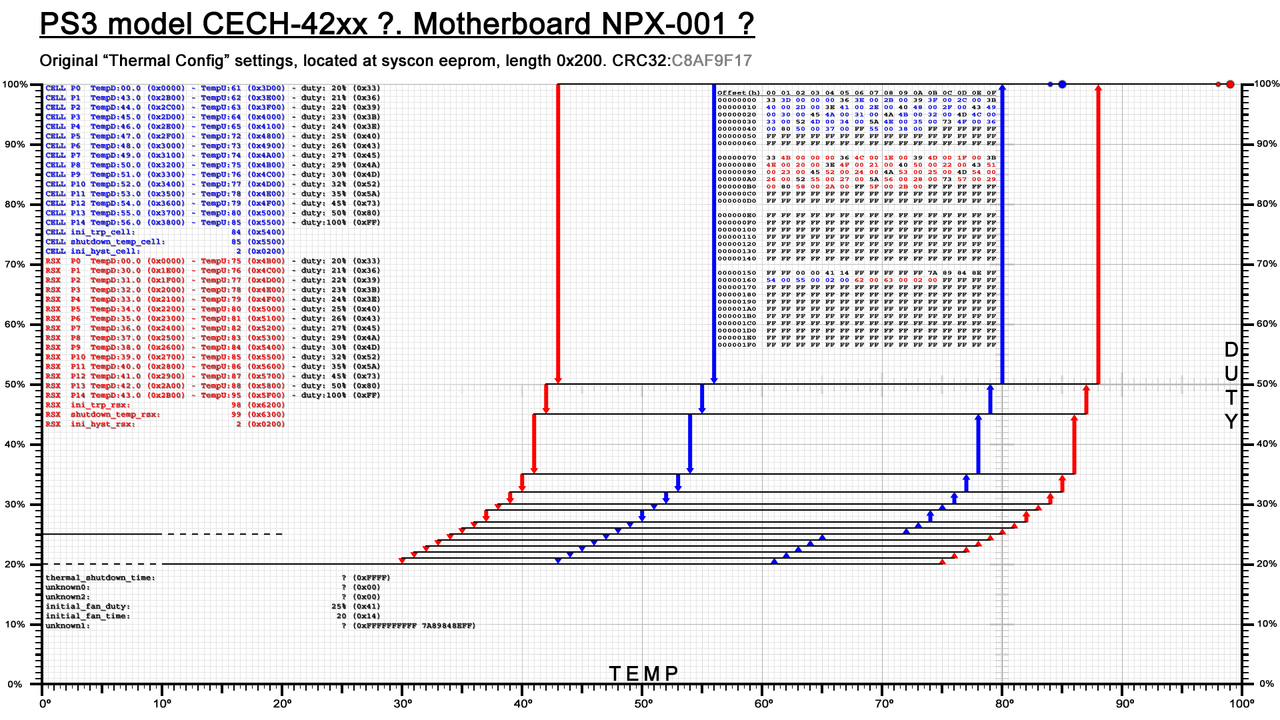
Just for curiosity sake... i made a graph for a superslim some weeks ago, but the result was so weird that i didnt published it (if i remember right, but maybe i did, not sure)
12-NPX-C8-AF9-F17.png

As you can see the "tempD" values are so displaced to left that the only solution i found to display the hexview was to merge it in between the vertical lines :/
I dont like this solution at all, as i mentioned some weeks ago, i really want the graphs for all the PS3 models to match in the exact location of some elements (the hexview is one of them) so this style is not aceptable, im just publishing it because this is when i realized i have to reorganize the location of elements in all the graphs i made
You know... a weird detail in one of them affects all the others... so i need to draw all them (only vertical arrows and horizontal lines for dutys) and later i need to find the optimal location of the other elements
I was thinkiing in it and found a solution but is going to look very different, im still not completly sure if it will be good enought though :/
 
Last edited:
@RIP-Felix i been reading your post several times but i only understand around 10% of it, please remember my english is limited, when you throw concepts like "a typical heat soak curve", "thermal mass resists", "Logarythmic heat soak growth curve", and later you enter in technical calculations with "delta T", or the description of the graph with "The one above has an R-sqr of 0.9957" i get completly lost

There are a lot other details from your post i understood and i could discuss, but your post is so massive that it would take me several hours to reply to every detail i would like to comment. It takes me more time because i have problems organizing my walls of texts if i have to write in english, and even dedicating many time doesnt works, usually i cant find a short and accurate way to express myself so my efforts gets lost because people doesnt understands me
Actually, writiing this post took me around 30 minutes, and im not replying to anything, is just i need to choose very well the words to make you understand that im not ignoring you... is just overwhelming but i will try to comment about all that later on
You're consumed with another project. Don't worry about me, I'm just over here doing my own thing. I'm trying to develop a custom fan curve that's less insane. But I wanted to understand the theory behind what SONY was doing, so I can preserve it's function in my curve, but lower the max temps they used to something more reasonable. I'm hoping it will be good enough to just point people to. "Just copy/paste this in and your good to go." That kind of thing.
 
You're consumed with another project. Don't worry about me, I'm just over here doing my own thing. I'm trying to develop a custom fan curve that's less insane. But I wanted to understand the theory behind what SONY was doing, so I can preserve it's function in my curve, but lower the max temps they used to something more reasonable. I'm hoping it will be good enough to just point people to. "Just copy/paste this in and your good to go." That kind of thing.
Im of that way of thinking too, first i would like to know what they was trying to achieve and figure that "sony engineers favourite rules" i was talking before in other posts
After understanding that im not afraid of breaking (a bit) that rules, and the different ways to break that rules needs to be discussed because a lot of them are going to be personal oppinions until we have a real proof if our theories are correct

A good example of this (very related with what you was asking, i hope this answers one of your questions) is how they calculated the values for "tempU"... take a look at the location of the vertical up red arrows in the graphs i published
Is not an algorythmic progression... they just substracted 1ºC for every "p" step
Think in it this way... when you are designing a graph from scratch, the first thng you need to do is to draw the spot for the "RSX tshutdown"... and probably you want to locate it at a temperature around 80ºC or 85ºC, right ? (like most of us)

After that you can apply the simple formulas i mentioned in the pacoretaco thread to find the "trp" and the higest value of "RSX tempU"
trp = tshutdown -1ºC
The highest value of tempU = tshutdown

So...
rsx tshutdown = 85
rsx trp = 84
rsx tempu p9 = 85
rsx tempu p8 = 84
rsx tempu p7 = 83
rsx tempu p6 = 82
rsx tempu p5 = 81
rsx tempu p4 = 80
rsx tempu p3 = 79
rsx tempu p2 = 78
rsx tempu p1 = 77
rsx tempu p0 = 76

Im only mentioning a total of 10 "p" states because the thermal config format of COK-001 and COK-002 only allows for 10 speeds (from p0 up to p9)... but the same rules applyes to all the other PS3 models... some have 14 or 16 speeds (but all them except COK-001 and COK-002 allows to use up to 20 speeds)

In the way how you are representing them in a graph with a single line... the resulting shape created by the "control dots" depends of where you locate the horizontal lines for the speeds, im not sure how to explain this without doing some drawings but lets say... imagine we could move the horizontal lines in my graphs with the hand... by moving them up or down we can achieve a straight line like a /... or something more like a J shape

-----------------
Ok, now that i explained this "sony engineers favourite rule" is when we can discuss if following it strictly or not following
You know... the only reason to not following would be if we can achieve some improvement... but im not so sure about that

One way or the other... if we are going to break this rule i really think we should do it by following some strict math rule, lets say... what they did was to substract 1ºC in every step, thats fine, easy to do, and incase of doubts i strongly suggest to do it
But we could do it by substracting -0.5Cº (in the higests "p" steps) and gradually increase that substraction to -1.0ºC then to -1.5ºC then to -2.0ºC (in "p0")
The diffrence would be subbtle, and we would be still respecting a bit what they did

*Remember the temperatures can be meassured in decimals, the accuracy depends of the temperature monitor model, i wrote an explanation about it here https://www.psdevwiki.com/ps3/Thermal#Temperature_Data_Format
There are some temperature monitors that can be configured with an accuracy (resolution) as tiny as 0.0625°C ...thats a lot of fractions for every 1ºC unit
But we dont really know the exact resolution configured in the temperature monitors so we dont know how much picky we can go when configuring the syscon thermal config
All i know is most (i think all) the thermal configs for all PS3 models have some temperature values using 0.5ºC
So... is safe to use temperature values of half a celsius degree to create this kind of subtle deviations that breaks a bit the "sony engineers favourite rules", all PS3 models should support it

EDIT:
Just to be explicit... we could do this... but right now im not sure if is a good or a bad idea
rsx tshutdown = 85
rsx trp = 84
rsx tempu p9 = 85
rsx tempu p8 = 84.5 <------------- -0.5ºC
rsx tempu p7 = 84 <--------------- -0.5ºC
rsx tempu p6 = 83.5 <------------- -0.5ºC
rsx tempu p5 = 82.5 <------------- -1ºC
rsx tempu p4 = 81.5 <------------- -1ºC
rsx tempu p3 = 80 <--------------- -1.5ºC
rsx tempu p2 = 78.5 <------------- -1.5ºC
rsx tempu p1 = 76.5 <------------- -2ºC
rsx tempu p0 = 74.5 <------------- -2ºC
 
Last edited:
I was also going to comment a bit more but I quickly got overwhelmed haha

Wow, SONY let the 40nm RSX get to 83C before ramping fans at all! And it tops out a 100C! No wonder the RSX Heatsink is so small on slims. They let the damn thing cook!

This bring up some interesting points.
  1. SONY decided the 40nm RSX was reliable, even operating in the mid 80s. Those are the operating temps of chips today, and they do tend to be fine. So perhaps the BGA flex and Bumps had been sorted out by this time. Thermal adhesive is stronger for one.
  2. The COK-00X model's Heatsink is built to dissipate the 90nm RSX. So it's OP for the 40nm, having no trouble keeping it under 55C. Even if the thermal paste were to begin deteriorating, the temps can rise a lot before they even get close to the normal operating temps in the slim consoles they were designed for.
  3. If slims are reliable, even with that much heat on the RSX, then it should be even more reliable in a BC model with an OP heatsink.
  4. The early model Super Slims (MSX and MPX) had a 40nm RSX (CXD5302), which didn't even ship with an IHS. So it's not stiffened at all! Evidently, SONY engineers decided it was reliable enough to not need the additional support. Or got cost's down by removing the IHS and using direct die contact. AFAIK we don't have the thermal config of these MB revisions yet.
    • I would be curious if they increased the fan curve's to keep the chip cooler. If so, perhaps they were compensating for the lack of an IHS to stiffen the package. Instead, they reduced the Delta T to reduce BGA strain.
    • Or if they kept temps the same, then they decided it was reliable enough without the IHS for support. That is useful for us to know, because it means we shouldn't need to glue the IHS of 40nm RSX's back on, if we remove them.
First to make those conclusions, it is worth looking at the rest of the fan tables for the other models too.
Yes the slim RSX curve begins at 83c and ends at 100c which may seem nuts...
But this is not new!
90nm CECHA also do exactly the same (83c), and CECHG (90nm as well) actually increased the curve even more! (84c and with a lower rpm fan at same speeds) Is not that they were "confident" about 40nm... They were "confident" about all.
65nm also even higher curve in general...

But you may be confusing these "RSX fan curves" with "operating temperatures" because in reality these curves mean very little...
I have great respect for Sony engineers but I dont think they thought about these numbers very hard.
It almost seems like they filled the table by adding 1. If you watch the "new" fan curves it looks like they are "higher" but the cynical inside me sees that the "redesign" was just a result of now having p0 to p14, instead of p0 to p9... So they kept counting past the old maximum just to fill the bigger table hahahaha

And I kinda understand why they did this job like that becsuse these numbers should not really be in effect anyway. CPU is always deciding the fan speeds for all, and I agree with them because CPU is not only more important but also much more stable and predictable temperatures.
We talked about this more in my fan curve modification thread.

Counter-intuitively you need to look at the CPU curves to get an idea of how hot the RSX is going to run in the real world. Newer fat seem the hottest of all. And oldest fat seem actually not that hot at all.

In any case what I am trying to say (besides that Sony maybe should have hired you hehe) Is that there is no need to complicate the theory behind these things too much. The best fan curves can only be reached with real world experimentation and tweaking. There is no need to be afraid of doing things wrong. Just try whatever, see if it works for you or how you can improve it etc...

I also encourage you to try my fan curves which I made that way and tested in the real world for about a year now. I will be happy to hear how you would "improve" them and based on what criteria but there is no harm in making "mistakes"...

For us it is all a good thing because we have a lot of things to tweak.
Even that "trp" we still dont really know what it does, but you can change it anyway.
 
Don't get too hung up on the linear-ish manner they raise the Tupper temp. It's the rate of change for fan% that I'm talking about. Its the Fan% that ramps up in speed exponentially.

My point was that we can change lower the temps as long as we respect the shape of that curve. So If wanter to lower max temps by 10c, the lower all of them by 10c. Don't go changing some by 10c and others by 4c...all haphazardly. That will change the shape of the curve.

And If you wanted to change the fan%, then you could, but again you should respec the shape of the curve, because it was probably desighed to ramps up at a certain rate to respond in a reasonable amount of time to suddon thermal loads. Not overcompensate ramping fans too quickly (becoming anoying, like webMAN) or too slowly which would allow the chips to overheat befor the fans respond in time. The curve should ramp up at the right rate.
 
Im reading my previous post and there is an small mistake that is itching, let me fix it because the math formulas i mentioned are probably the most important trick to create a custom thermal config

As mentioned before, the first thing you need to do is to decide the tshutdown of the RSX (the big red dot at top-right corner)
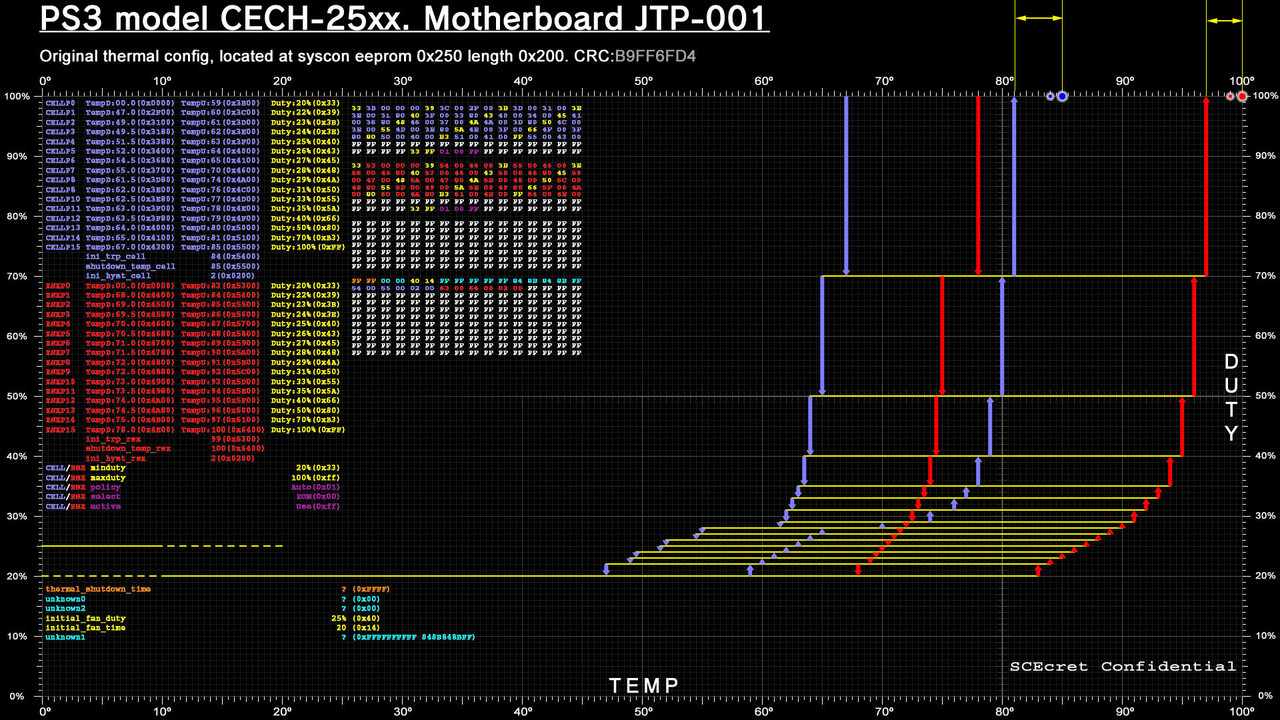
Syscon-fantbl-settings-v23-copy.jpg

In my graphs the tshutdowns are the big dots at most top... and the trp are the small dots at his left (always 1ºC lower than tshutdown), and the tip of the higest vertical arrow is the higest value of "tempU"

The horizontal arrows i painted in this version of the graph (outside of it) are the difference in between "tshutdown" and the higest "tempU"
For JTP-001 motherboard this difference is 4ºC for CELL and 3ºC for RSX... but we can consider both should be 4ºC for this motherboard (RSX is closer just because they didnt wanted to exceed 100ºC, represented as the vertical right border in my graphs)

Well... that difference of around 5ºC is pretty much the same in all PS3 models... some increases it up to 8ºC as far i remember, but not much than that... there are some that "breaks" this rule but i consider it was a mistake (really, breaking this rule doesnt achieves any improvement as far i understand)
Ok... let me repeat my example before about how to generate the curve for the "tempU" values, more accuratelly this time using a difference of 5ºC in between "tshutdown" and the higest "tempU", and without decimals to simplify it

Lets say the RSX tshutdown is = X (whatever temperature you want to use, i guess everybody is going to agree about not exceding 85ºC with this value)

rsx tshutdown = x
rsx trp = x-1
rsx tempu p9 = x-5
rsx tempu p8 = x-6
rsx tempu p7 = x-7
rsx tempu p6 = x-8
rsx tempu p5 = x-9
rsx tempu p4 = x-10
rsx tempu p3 = x-11
rsx tempu p2 = x-12
rsx tempu p1 = x-13
rsx tempu p0 = x-14

After that you can "clone" it for CELL... by substracting around 10ºC (this is another constant in most PS3 models, the higest temperature values of RSX are always around 5ºC or 10ºC higher than CELL), so the maths formulas still using the x as the RSX tshutdown are:

cell tshutdown = x-10
cell trp = x-1-10
cell tempu p9 = x-5-10
cell tempu p8 = x-6-10
cell tempu p7 = x-7-10
cell tempu p6 = x-8-10
cell tempu p5 = x-9-10
cell tempu p4 = x-10-10
cell tempu p3 = x-11-10
cell tempu p2 = x-12-10
cell tempu p1 = x-13-10
cell tempu p0 = x-14-10

In other words... we can generate the 2 "tempU" curves for CELL and RSX automatically derivated from the "rsx tshutdown"
Thats the basic design... after that you can do some tests to fine tune them but thats another story
And btw, the other 2 curves for the "tempD" can be cloned too (using the curves for tempU" as reference and substracting around 15ºC)

The design of the thermal config of the JTP-001 motherboard is fine in this details... but as @Pacorretaco said, dont take that temperature values as real world results... what they did in JTP-001 is to increase the "tempU" of RSX a lot (visually... they moved the curve a lot to right), im not sure why, i need to create the other graphs from the other slim models before and after to compare them, but in my oppinion it was a bad idea. The result is the RSX become a lot more insensitive to heat control... using the fable from other thread... in JTP-001 motherboard CELL is "driving the car" most of the time
 
Last edited:
Don't get too hung up on the linear-ish manner they raise the Tupper temp. It's the rate of change for fan% that I'm talking about. Its the Fan% that ramps up in speed exponentially.

My point was that we can change lower the temps as long as we respect the shape of that curve. So If wanter to lower max temps by 10c, the lower all of them by 10c. Don't go changing some by 10c and others by 4c...all haphazardly. That will change the shape of the curve.

And If you wanted to change the fan%, then you could, but again you should respec the shape of the curve, because it was probably desighed to ramps up at a certain rate to respond in a reasonable amount of time to suddon thermal loads. Not overcompensate ramping fans too quickly (becoming anoying, like webMAN) or too slowly which would allow the chips to overheat befor the fans respond in time. The curve should ramp up at the right rate.
Hmm, except the "shape of the curve" in my eyes is the single biggest problem with the default design.
For us, changing that shape is the best thing we can do, it is not haphazard, it is very deliberate and thought out. I'd almost say it is our duty...

You can always respect or copy... but if you copy, copy the good stuff that you know is good. Dont copy the silly stuff when you can make it better. Thats why we are modifying.

The way this original "shape" works, is that the speed will stay absolutely flat until the first target temperature is reached (let's say 75c). This is a rise from room 20c to 75c with the fan literally "waiting" in such a way that this temperature rise happens as fast and sharp as possible in every cycle.
If you were worried about "thermal cycles" or whatever, I think we can agree that a sharp rise by design is not the best for reliabilty. And slow and progressive would be better than fast and sharp. I mean, you can not really make it any worse... (Well yes if you need delid hehe)

For comfort, this is a disaster too. Because yeah even if it seems like the machine is dead quiet for a relatively long time when you first turn it on... Then suddenly the target temperature will be reached or worse yet, surpassed. It will transiriton from initial whisper-quiet minimum, to comfortable, to medium, to high and even to extreme speeds ALL in a matter of seconds! Sometimes even faster than it takes the temperatures to start dropping properly (because they are also only apart by 1c... for vastly different fan speeds) (Not that different to webman...)

This is not something we should keep... This is an issue we should fix. People get "scared" by these sudden fan speed changes. And it is normal to get scared... It looks like it is just chilling at minimum there and all of a sudden there is a jet engine there taking off... What the hell haha.

I can elaborate more on why I chose the numbers I did. Yes some by 10c others by 4c but I can say it is not haphazard at all. Sure we can probably find ways to improve because there is no single "perfect". And of course not everybody needs to like and use the same speeds... But if you try it in the real world you will see.
It is difficult to mess up really, and there is no harm in trying.
However you also know me... I wouldnt be confortable telling people to try my shared settings if I didnt have reasons to think they are good. Anyone can make haphazard without my help haha
 
Because yeah even if it seems like the machine is dead quiet for a relatively long time when you first turn it on... Then suddenly the target temperature will be reached or worse yet, surpassed. It will transiriton from initial whisper-quiet minimum, to comfortable, to medium, to high and even to extreme speeds ALL in a matter of seconds! Sometimes even faster than it takes the temperatures to start dropping properly (because they are also only apart by 1c... for vastly different fan speeds) (Not that different to webman...)

This is not something we should keep... This is an issue we should fix. People get "scared" by these sudden fan speed changes. And it is normal to get scared... It looks like it is just chilling at minimum there and all of a sudden there is a jet engine there taking off... What the hell haha.
Yeah, this is a very important concept to keep in mind, and is specially problematic in the COK boards because only have 10 speeds

lets say... when we design the thermal config we need to select 10 speeds, one of them is 100% so we just can configure 9 speeds... and 2 or 3 of them are dedicated to the "defcon speeds". This defcon speeds are always higher than 40% because everybody considers the noise generated by speeds over 40% annoying (even sony engineers consider this). And are really needed because we are not going to jump from 40% to 100% in a single step, is needed to dedicate a couple of speeds for intermediate points in between 40% and 100%... so... ok, one speed dedicated to 100%, and a couple more for the "defcon speeds" lets say at 60% and 80%

At this point are remaining only 7 speeds to configure, and this ones are going to be the ones used 99% of the time, the fact is the "defcon speeds" and the 100% is not supposed to be used ever in a heatly PS3

From that 7 speeds we need to dedicate at least 2 or 3 configured in the range of "full workload" (in other words, inside games with high requirements)
And the others was dedicated to the lowest speeds (very close to the minimal speed), just because sony was trying to keep the PS3 quiet at the lower temperatures... in other words they was trying to create smooth speed transitions when the PS3 have a low workload... but we dont need that !

I mean... the effect achieved by softening the noises of the fan speed transistions at low temperatures can "cheat" an standard consumer, but we are hardware freaks and we know very well that the fan speed is going to increase so we dont need to soften the noise levels at the first half an hour after we boot the PS3
Specially considering the COK only have 10 speeds and you need to configure them very well as if they was GOLD BRO !
Is a lot better to dedicate that speeds to the temperature range when the PS3 is inside a game

In the PS3 slims this problem is not so critical because there are a lot more speeds availables to configure, but i remember some PS3 fat models have a big problem with this
Literally you are jumping from "p0" to "p4" or higer in just a few seconds, is pretty much like if you remove the intermediate speeds, thats a waste
 
Last edited:
Yeah, this is a very important concept to keep in mind, and is specially problematic in the COK boards because only have 10 speeds

lets say... when we design the thermal config we need to select 10 speeds, one of them is 100% so we just can configure 9 speeds... and 2 or 3 of them are dedicated to the "defcon speeds". This defcon speeds are always higher than 40% because everybody considers the noise generated by speeds over 40% annoying (even sony engineers consider this). And are really needed because we are not going to jump from 40% to 100% in a single step, is needed to dedicate a couple of speeds for intermediate points in between 40% and 100%... so... ok, one speed dedicated to 100%, and a couple more for the "defcon speeds" lets say at 60% and 80%

At this point are remaining only 7 speeds to configure, and this ones are going to be the ones used 99% of the time, the fact is the "defcon speeds" and the 100% is not supposed to be used ever in a heatly PS3

From that 7 speeds we need to dedicate at least 2 or 3 configured in the range of "full workload" (in other words, inside games with high requirements)
And the others was dedicated to the lowest speeds (very close to the minimal speed), just because sony was trying to keep the PS3 quiet at the lower temperatures... in other words they was trying to create smooth speed transitions when the PS3 have a low workload... but we dont need that !

I mean... the effect achieved by softening the noises of the fan speed transistions at low temperatures can "cheat" an standard consumer, but we are hardware freaks and we know very well that the fan speed is going to increase so we dont need to soften the noise levels at the first half an hour after we boot the PS3
Specially considering the COK only have 10 speeds and you need to configure them very well as if they was GOLD BRO !
Is a lot better to dedicate that speeds to the temperature range when the PS3 is inside a game

In the PS3 slims this problem is not so critical because there are a lot more speeds availables to configure, but i remember some PS3 fat models have a big problem with this
Literally you are jumping from "p0" to "p4" or higer in just a few seconds, is pretty much like if you remove the intermediate speeds, thats a waste
Yes, this is something that I had very present in mind when I elaborated my fan curves about a year ago now. Counting 1+1+1 like the original design did is the haphazard and lazy thing to do, not what I did. Changing this was always the whole point about touching the Syscon fan settings in the first place.

Maybe this would fit better in my thread about the modification but what I did is something like this:

I "subdivided" the p0 to p9 "phases" into
-Initial warmup
-Normal operation
-And panic/defcon as you say

A healthy machine in proper condition should not really be reaching the panic speeds (Over 40%) so we dont need many steps in that area. I didnt focus too much on those, except I "nuked" one or two of them to have more for the other useful stages below.

I put 2 more "non standard" intermediate speeds in the "normal operation" area. One between 30 and 35 (about 33%) Which I found to be a nice upper limit for comfortable operation
And another 0x47 which is almost the same as the standard 0x48 (about 27%) which is what I consider the intended minimum operating target speed. The minimum comfortable speed that the machine could spend most of the time running at. Becsuse this is a speed that I introduced, it could easily be changed but I liked 0x47. A very well maintained machine can run perfectly cool with this speed. But 30% and 33% are perfectly OK too for most machines.
For people that care a lot about quiet, 25% could also be possible, but I think 27 is reasonable. There is also a lot of variations like ambient temperature, even different fan models. This can accomodate.

Then the first 2 are the warmup speeds. 20 is the initial one just meant for the first minute or two and 25% shortly after.

Theres more thinking that went into this but you can probably get some idea
 
When i was writing the math formulas i was not considering that effect but now we are talking about in i think in COK motherboards is really needed to consider it, so the formula should change a bit, im going to try to increase the substracted value exponentially in this example

rsx tshutdown = x
rsx trp = x-1
rsx tempu p9 = x-05
rsx tempu p8 = x-06-0.5
rsx tempu p7 = x-07-1.0-0.5
rsx tempu p6 = x-08-1.5-1.0-0.5
rsx tempu p5 = x-09-2.0-1.5-1.0-0.5
rsx tempu p4 = x-10-2.5-2.0-1.5-1.0-0.5
rsx tempu p3 = x-11-3.0-2.5-2.0-1.5-1.0-0.5
rsx tempu p2 = x-12-3.5-3.0-2.5-2.0-1.5-1.0-0.5
rsx tempu p1 = x-13-4.0-3.5-3.0-2.5-2.0-1.5-1.0-0.5
rsx tempu p0 = x-14-4.5-4.0-3.5-3.0-2.5-2.0-1.5-1.0-0.5

Basically, im substracting the -1 like the sony engineers but im also substracting a value that varies exponentially
Im using decimals, and is just an example but the resulting temperatures doesnt looks bad, at the bottom i have a displacement of:
p0 = x-14-4.5-4.0-3.5-3.0-2.5-2.0-1.5-1.0-0.5 = 36.5ºC from my previous example
If we consider the variable x (RSX tshutdown) is configured to 85ºC it would mean the lowest value of "rsx tempU" results in 48.5ºC

Visually it results in the bottom of the graph displaced to the left... in other words, we are entering in the area of "normal workload" sooner and as a result we can adjust this area more accuratelly because we can dedicate most of the speeds to it

Btw, another thing i consider convenient to do in COK is to increase the minimal fan speed from the factory 20% to something higher, this is another trick that allows to adjust the thermal config more precisselly inside the "normal workload" area
Lets say... we know the PS3 requires a minimal temperature to work normally, even in idle... the most efforts we dedicate to configure settings under that temperature is the most settings we are wasting in something that is not completly needed

In the PS3 models that allows to use up to 20 speeds we can dedicate a bunch of speeds to very low temperatures while the PS3 is doing the initial warmup, but in COK with only 10 speeds is something to consider
 
Last edited:
When i was writing the math formulas i was not considering that effect but now we are talking about in i think in COK motherboards is really needed to consider it, so the formula should change a bit, im going to try to increase the substracted value exponentially in this example

rsx tshutdown = x
rsx trp = x-1
rsx tempu p9 = x-05
rsx tempu p8 = x-06-0.5
rsx tempu p7 = x-07-1.0-0.5
rsx tempu p6 = x-08-1.5-1.0-0.5
rsx tempu p5 = x-09-2.0-1.5-1.0-0.5
rsx tempu p4 = x-10-2.5-2.0-1.5-1.0-0.5
rsx tempu p3 = x-11-3.0-2.5-2.0-1.5-1.0-0.5
rsx tempu p2 = x-12-3.5-3.0-2.5-2.0-1.5-1.0-0.5
rsx tempu p1 = x-13-4.0-3.5-3.0-2.5-2.0-1.5-1.0-0.5
rsx tempu p0 = x-14-4.5-4.0-3.5-3.0-2.5-2.0-1.5-1.0-0.5

Basically, im substracting the -1 like the sony engineers but im also substracting a value that varies exponentially
Im using decimals, and is just an example but the resulting temperatures doesnt looks bad, at the bottom i have a displacement of:
p0 = x-14-4.5-4.0-3.5-3.0-2.5-2.0-1.5-1.0-0.5 = 36.5ºC from my previous example
If we consider the variable x (RSX tshutdown) is configured to 85ºC it would mean the lowest value of "rsx tempU" results in 48.5ºC

Visually it results in the bottom of the graph displaced to the left... in other words, we are entering in the area of "normal workload" sooner and as a result we can adjust this area more accuratelly because we can dedicate most of the speeds to it

Btw, another thing i consider convenient to do in COK is to increase the minimal fan speed from the factory 20% to something higher, this is another trick that allows to adjust the thermal config more precisselly inside the "normal workload" area
Lets say... we know the PS3 requires a minimal temperature to work normally, even in idle... the most efforts we decicate to configure settings under that temperature is the most settings we are wasting in something that is not completly needed

In the PS3 models that allows to use up to 20 speeds we can dedicate a bunch of speeds to very low temperatures while the PS3 is doing the initial warmup, but in COK with only 10 speeds is something to consider
I understand the wish to use a "formula" to try to do it "right" but to be honest I think they used a formula just to be lazy, not to do it right.

Even if that is looking much better now,
If you use any "formula" like that, you are treating all the phases as if they were the same, when in reality there are fundamental differences between them.
For example, warmup phases should not be following the same "rules" as operating phases or panic phases.

In the same way, I dont think it is a good idea to change or remove the 20% initial warmup speed. Because is just there to be the first speed the user hears when they press the power button. It doesn't need to be high, is just for the first minute or so.

You can make the warmup phase much shorter like I did, but no need to touch the speed of the first phase.
You could also wedge a non-standard speed there like I added 27% or 33%, you could add something like 23%
But the machine is not supposed to work at speed under 25% anyway...

And yes as you say we have a limited number of phases but 0 to 9 is still plenty I think. Is also not that good to use many different steps because the speed changes are what distract the user the most. So we can put more intermediate steps but only if we have good enough reason.

Then there is the big fact that RSX curve also should not be following the same rules as CPU curve...

In any case I think this chat probably belongs more in the modification thread because I am beginning to see that people are missing some explanations there and therefore making some wrong judgements of this complex stuff.
 
Last edited:
My approach is going to be this.

  1. Delid IHS' and apply MX-5
  2. Burn in the paste with 2 hr test. Then let it cool and settle overnight. I always get about 1C lower temps the next day.
  3. Use default SYSCON Fan to Record idle temps and fan% in XBM after the console has reached thermal soak (15 mins or so)
  4. Use default SYSCON Fan to record Highest temps and Fan% in a demanding game like GTA5.
  5. Choose a temperature I would like to keep the CELL at in XMB. Say 65-68C. Then enable webman at that setpoint and allow it to reach equalibrium. Record the Fan%.
  6. Repeat step 5, but for temps in game with a setpoint based on the highest fan% I can stand. So I adjust the in game setpoint until the temps are as close to the XMB setpoint they can be without going over the fan% I find unbearable (44%, but depends on fan model and bearing condition)
  7. Once I know what my desired idle XMB and max stress Fan%'s are supposed to be, I can then calibrate SONY's curve to my numbers witout changing the shape of the curve. The rate of change, not the temps or fan%. Those will change to suit my needs, but how quickly they ramp up will stay the same because I'm keeping the exponential curve. I'm just shifting it down. Sorry if the Math(s) is(are) anoying, but this is a practical application and reason you should pay attention in school.
  8. Tlower is just going to be a matter of listening to the console and adjusting it to keep it from ramping up/down too much.
I'm not trying to make an enthusiast fan curve. Not for best possable performance. I'm trying to make a ballanced curve that acomplishes the same goals SONY was after, to appeal to the wider audiance of people that hate being distracted by the noise. I'm just turning the insanity down from bat $h!t crazy to "ok, I can live with that."
 
I'm not trying to make an enthusiast fan curve. Not for best possable performance. I'm trying to make a ballanced curve that acomplishes the same goals SONY was after, to appeal to the wider audiance of people that hate being distracted by the noise. I'm just turning the insanity down from bat $h!t crazy to "ok, I can live with that."
Ok but did you try my settings?
Because that was my idea too...
You just have to copy and paste, then say if they are crazy or not and help improve them if necessary or come up with alternatives.

For me step 0 is writing the modified settings. It is the first thing I do after getting access to internal commands...

Even if the board is still not working, I do it then in 1 go and then I can rest easy. The first time the thing boots, will already be protected even if it has no heatsink on

And dont forget everything is harmless, tested and fully reversible if you change your mind for some reason. Nothing is set in stone... And it is hard to make it worse than original...
 

Similar threads

Back
Top