
You are using an out of date browser. It may not display this or other websites correctly.
You should upgrade or use an alternative browser.
You should upgrade or use an alternative browser.
PS3 Syscon fan settings (Coordinate Graphs)
- Thread starter sandungas
- Start date
any guesses anyone I really want to get this superslim back on I am currently ordering the temp ics or should I just get a dead board and what other components should I replace @sandungasYes pqx is superslim cech4200a series.
Not ihs related its soldered and probaly the tmp441a related cause just before it died I repasted it with a cheap hy650 something paste 10 tens before it died no stress games other than ps2 classic that I delete because of artifacting and a couple of low end psn games no artifacts on them.So I am taking the tmp11a as entity of interest here also coming back to my inquiry what's other things should I measure to replacing it and what other components should I replace other the both rex and cells tmp411a and tmp411b.
@RIP-Felix you can help with my case feel free to check to my previous posts.

RIP-Felix
Senior Member
You can try them, but if they don't work, I don't know how far you are willing or able to take it. Can you reball the CPU, for example?
It's tricky getting the later models fixed. There aren't any service manuals or schematics for them, making troubleshooting a real PITA. I think there are a lot of no fixes because of how little we really know. And the fact they are cheap/less desirable than the BC models.
It's tricky getting the later models fixed. There aren't any service manuals or schematics for them, making troubleshooting a real PITA. I think there are a lot of no fixes because of how little we really know. And the fact they are cheap/less desirable than the BC models.
okay I just get a dead board and replace ics as well as surrounding components and as for the reball that will be in future.You can try them, but if they don't work, I don't know how far you are willing or able to take it. Can you reball the CPU, for example?
It's tricky getting the later models fixed. There aren't any service manuals or schematics for them, making troubleshooting a real PITA. I think there are a lot of no fixes because of how little we really know. And the fact they are cheap/less desirable than the BC models.

sandungas
Developer
The data channel is shared by all the monitor chips, so if you have a good reading in one of them, but a bad reading in the other it means the data channel is working fineHey @sundungas I am having the A801200 on a pqx-001 motherboard and am thinking about replacing the tmp411A (The cell temp sensor and yes I tried sys on diag and looked-up the thermal error) so is there anything else I should keep in mind before replacing both rsx and cell tmp411A and B.
Any other circuit to test any surrounding components to replace
All the monitor chips also shares the power line, so applyes the same rule, if one of the monitors is giving good readings it means the others are powered correctly
Every monitor chip have 2 lines connected to the the CELL sensor, every line have a SMD resistor "inline" and there is an additional capacitor in between them
This 3 SMD components are critical to "calibrate" the signal coming from CELL, the error 1200 belongs to the group of overheat errors... is just we dont know it the monitor chip is sending an incorrect value or if is dead (not sending any value)
https://www.psdevwiki.com/ps3/images/8/83/IC1101_CELL_BE_Temperature_Monitor.png
This is the schematic of a CECHA where can be seen the 3 tiny components, i guess this circuit design is identical in all the PS3 models (but the value of that 2 resistors and the capacitor could vary, im not sure)
*Btw, to make the tests easyer you can solder the new monitor chip with wires (temporally) just to see if it works
Last edited:

Ganjo
Member
Is this the correct data to input and fix this fan table?
fantbl setini 0 p0 00.00 74.00 33
fantbl setini 0 p1 60.00 75.00 40
fantbl getini 0
fancon No:00
P0: TempD:0.0(0x0000) - TempU:74.0(0x4a00) duty:100%(0xff)
P1: TempD:60.0(0x3c00) - TempU:75.0(0x4b00) duty:100%(0xff)
P2: TempD:61.0(0x3d00) - TempU:76.0(0x4c00) duty:28%(0x48)
P3: TempD:67.0(0x4300) - TempU:77.0(0x4d00) duty:30%(0x4d)
P4: TempD:68.0(0x4400) - TempU:78.0(0x4e00) duty:35%(0x5a)
P5: TempD:71.0(0x4700) - TempU:79.0(0x4f00) duty:40%(0x66)
P6: TempD:71.50(0x4780) - TempU:80.0(0x5000) duty:45%(0x73)
P7: TempD:72.0(0x4800) - TempU:81.0(0x5100) duty:50%(0x80)
P8: TempD:72.50(0x4880) - TempU:82.0(0x5200) duty:60%(0x99)
P9: TempD:73.0(0x4900) - TempU:85.0(0x5500) duty:100%(0xff)
EDIT:For some reason 33 sets it to 32%. I set it to 30 and it still goes to 100% fan speed
EDIT2: NVM forgot the fix checksums
fantbl setini 0 p0 00.00 74.00 33
fantbl setini 0 p1 60.00 75.00 40
fantbl getini 0
fancon No:00
P0: TempD:0.0(0x0000) - TempU:74.0(0x4a00) duty:100%(0xff)
P1: TempD:60.0(0x3c00) - TempU:75.0(0x4b00) duty:100%(0xff)
P2: TempD:61.0(0x3d00) - TempU:76.0(0x4c00) duty:28%(0x48)
P3: TempD:67.0(0x4300) - TempU:77.0(0x4d00) duty:30%(0x4d)
P4: TempD:68.0(0x4400) - TempU:78.0(0x4e00) duty:35%(0x5a)
P5: TempD:71.0(0x4700) - TempU:79.0(0x4f00) duty:40%(0x66)
P6: TempD:71.50(0x4780) - TempU:80.0(0x5000) duty:45%(0x73)
P7: TempD:72.0(0x4800) - TempU:81.0(0x5100) duty:50%(0x80)
P8: TempD:72.50(0x4880) - TempU:82.0(0x5200) duty:60%(0x99)
P9: TempD:73.0(0x4900) - TempU:85.0(0x5500) duty:100%(0xff)
EDIT:For some reason 33 sets it to 32%. I set it to 30 and it still goes to 100% fan speed
EDIT2: NVM forgot the fix checksums
Last edited:
RIP-Felix
Senior Member
the last varible is in hex. But I've not tried putting in a value in decimal. Does that actually just set the percentage you want?
What I've been doing if I want to set a fan% thats different is the following...
eg.
20% = 0.20 x 255 = 51 (hex value in decimal)
convert decimal 51 to hex = 0x33
What I've been doing if I want to set a fan% thats different is the following...
eg.
20% = 0.20 x 255 = 51 (hex value in decimal)
convert decimal 51 to hex = 0x33

Cosmic-R
Member
sorry if this has been asked before, but whats the difference between the fan table 0 and 1 ? according to the table for a KTE-001 on table 0 35% is at 68c whereas in table 1 is at 93, and am sure my ps3 has never ever gotten that hot, most i saw was somewhere around 85c and thats because i was a dumbass and had forgotten to plug the fan back in and the fan was supposedly at 100%
RIP-Felix
Senior Member
0 = CPU Fan tablewhats the difference between the fan table 0 and 1 ?
1 = GPU Fan table
Cosmic-R
Member
huh, so something else must be at play here for my syscon to use 35% or the temp monitoring tools available for hen have a polling rate thats too damned slow, ideally it would need to be 250ms or less for you to be able to somewhat see peak temperature during transient loads, doesnt matter if it tanks framerate if its for testing purposes it should be fine (or maybe not because maybe the cell might be so bussy with polling rates the rsx might be starved and actually cool down idk)0 = CPU Fan table
1 = GPU Fan table
Cosmic-R
Member
well i did some testing with the dumped fan table from the wiki using it as reference and they do match sort of, what i mean is that it is the cell temperature controlling the fan (since the rsx ones are so high) but on mine they were 1 degree earlier it seems ? like for example in the table 29% was mapped to 66c but mine was already at 29% at 65 same with 30% that dump says its 67 but mine was already at it at 66 and the 35% fan speed which is the highest my ps3 ever needs to go is at 68 on the cell but mine was at 35% at 67c.
since i doubt out of the millions of 3k produced mine being any different i assume that at the very least wmm and its vsh fps plugin are lacking a decimal of temperature precision and what am seeing is a number being rounded up or down ?
this behavior is the same for the fan speed down temps, from 35% back to 30% says its 52c but i need to get it down to 51% cranking up the fan to max so syscon chooses 30%
since i doubt out of the millions of 3k produced mine being any different i assume that at the very least wmm and its vsh fps plugin are lacking a decimal of temperature precision and what am seeing is a number being rounded up or down ?
this behavior is the same for the fan speed down temps, from 35% back to 30% says its 52c but i need to get it down to 51% cranking up the fan to max so syscon chooses 30%
RIP-Felix
Senior Member
This is how sony does it's fan steps. There's a step up temp and a step down temp. It creates a plateou where the temps are allowed to swing, so as not to require a PID controller and so that the fan% isn't changing up and down all the time.well i did some testing with the dumped fan table from the wiki using it as reference and they do match sort of, what i mean is that it is the cell temperature controlling the fan (since the rsx ones are so high) but on mine they were 1 degree earlier it seems ? like for example in the table 29% was mapped to 66c but mine was already at 29% at 65 same with 30% that dump says its 67 but mine was already at it at 66 and the 35% fan speed which is the highest my ps3 ever needs to go is at 68 on the cell but mine was at 35% at 67c.
since i doubt out of the millions of 3k produced mine being any different i assume that at the very least wmm and its vsh fps plugin are lacking a decimal of temperature precision and what am seeing is a number being rounded up or down ?
this behavior is the same for the fan speed down temps, from 35% back to 30% says its 52c but i need to get it down to 51% cranking up the fan to max so syscon chooses 30%
The Fan increments in hex (0-255). It has more increments than 0-100%. I would assume wMM parses the hex representation of the current Fan duty and converts to decimal.
66/255 and 67/255 = 26%
| HEX | DEC | FAN% |
| 41 | 65 | 25.49% |
| 42 | 66 | 25.88% |
| 43 | 67 | 26.27% |
| 44 | 68 | 26.67% |
Cosmic-R
Member
This is how sony does it's fan steps. There's a step up temp and a step down temp. It creates a plateou where the temps are allowed to swing, so as not to require a PID controller and so that the fan% isn't changing up and down all the time.
The Fan increments in hex (0-255). It has more increments than 0-100%. I would assume wMM parses the hex representation of the current Fan duty and converts to decimal.
66/255 and 67/255 = 26%
HEX DEC FAN% 41 65 25.49% 42 66 25.88% 43 67 26.27% 44 68 26.67%
yeah the plateau thing makes sense, i just remember some time ago i managed to find some slideshows from a playstation presentation by a engineer about the ps2-3-4 thermal design solutions and philosophies i think heatsinks capacities, wind resistance too ?! and went and looked for it again and yeah
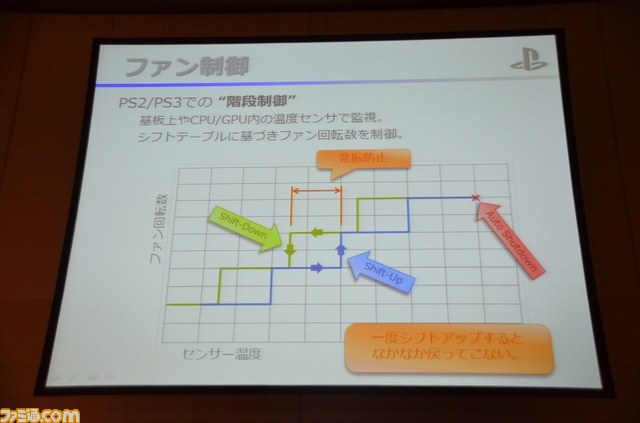
RIP-Felix
Senior Member
10:40
IDK why it didn't link the timstamp. Anyway, it was those slides I was referring to in this.
EDIT: The Heatsink and fans are optimized to reduce material cost. I have confirmed through fan testing and DIY fan blade design iteration that they already have the best fan blade design you could hop to achieve. All my designs were worse or marginally the same. The only way to eek more performance would be to use a more powerful fan, larger heatsink, improve TIM, contact area and bond-line thickness.
However all of this begs the question of why? Why go through all the trouble?
Last edited:

BigPaa
Forum Noob
Once I receive the "Franken-miracle" 65nm from @Computer Booter I'll have 3 consoles I can develop fan curves for.
- 90nm COK-001
- 65nm COK-001
- 40nm COK-001

RIP-Felix
Senior Member
Did you ever develop these curves?
I started on that and then asked myself why? For reliable 65nm and 40nm chips, they dont have an issue related to temp. Not an abnormal one. CPU curve if fine as is.
So that really only leaves the 90nm RSX curve that actually needs a different curve to keep it under 70C. I haven't returned to that project for awhile.

NightLess
Member
Found something interesting, I found a different fan configuration in the Sony official refurbished 40NM Frankenstein, the SYSCON chip is made in 2010, you can see it has P19 like Sherwood's SYSCON, but when I edited its P10, it changed to P16, does anyone know how to edit it?
Code:
[mullion]$
Press Ctrl+C to exit
>$ r 3300 200
r 3300 200
+0 +1 +2 +3 +4 +5 +6 +7 +8 +9 +A +B +C +D +E +F
-----------------------------------------------
33 40 45 48 4A 4D 5A 73 80 FF FF FF FF FF FF FF
FF FF FF FF 00 50 00 51 00 52 00 53 00 54 00 55
00 56 00 57 00 58 00 5B FF FF FF FF FF FF FF FF
FF FF FF FF FF FF FF FF FF FF FF FF 00 00 00 2D
00 3F 80 3F 00 40 80 40 00 41 00 44 80 44 00 45
FF FF FF FF FF FF FF FF FF FF FF FF FF FF FF FF
FF FF FF FF 33 FF 01 00 FF FF FF FF FF FF FF FF
FF FF FF FF FF FF FF FF FF FF FF FF FF FF FF FF
33 40 45 48 4A 4D 5A 73 80 FF FF FF FF FF FF FF
FF FF FF FF 00 53 00 54 00 55 00 56 00 57 00 58
00 59 00 5A 00 5B 00 5F FF FF FF FF FF FF FF FF
FF FF FF FF FF FF FF FF FF FF FF FF 00 00 00 28
00 3F 80 3F 00 40 80 40 00 41 00 4D 80 4D 00 4E
FF FF FF FF FF FF FF FF FF FF FF FF FF FF FF FF
FF FF FF FF 33 FF 01 00 FF FF FF FF FF FF FF FF
FF FF FF FF FF FF FF FF FF FF FF FF FF FF FF FF
33 40 45 48 4A 4D 5A 73 80 FF FF FF FF FF FF FF
FF FF FF FF 00 3E 00 3F 00 40 00 41 00 42 00 43
00 44 00 45 00 46 00 49 FF FF FF FF FF FF FF FF
FF FF FF FF FF FF FF FF FF FF FF FF 00 00 00 1E
00 23 80 23 00 24 80 24 00 25 00 38 80 3B 00 3C
FF FF FF FF FF FF FF FF FF FF FF FF FF FF FF FF
FF FF FF FF 33 FF 01 00 FF FF FF FF FF FF FF FF
FF FF FF FF FF FF FF FF FF FF FF FF FF FF FF FF
FF FF 00 4D 14 FF FF FF FF FF FF 8B 00 FF 00 FF
5A 00 5B 00 02 00 5E 00 5F 00 02 00 FF FF FF FF
FF FF 48 00 49 00 02 00 FF FF FF FF FF FF FF 8B
FF FF FF FF FF FF FF FF FF FF FF FF FF FF FF FF
FF FF FF FF FF FF FF FF FF FF FF FF FF FF FF FF
FF FF FF FF FF FF FF FF FF FF FF FF FF FF FF FF
FF FF FF FF FF FF FF FF FF FF FF FF FF FF FF FF
FF FF FF FF FF FF FF FF FF FF FF FF FF FF 94 60

[mullion]$
Press Ctrl+C to exit
>$ fantbl getini 0
fantbl getini 0
fancon No:00
P0: TempD:0.0(0x0000) - TempU:80.0(0x5000) duty:20%(0x33)
P1: TempD:45.0(0x2d00) - TempU:81.0(0x5100) duty:25%(0x40)
P2: TempD:63.0(0x3f00) - TempU:82.0(0x5200) duty:27%(0x45)
P3: TempD:63.50(0x3f80) - TempU:83.0(0x5300) duty:28%(0x48)
P4: TempD:64.0(0x4000) - TempU:84.0(0x5400) duty:29%(0x4a)
P5: TempD:64.50(0x4080) - TempU:85.0(0x5500) duty:30%(0x4d)
P6: TempD:65.0(0x4100) - TempU:86.0(0x5600) duty:35%(0x5a)
P7: TempD:68.0(0x4400) - TempU:87.0(0x5700) duty:45%(0x73)
P8: TempD:68.50(0x4480) - TempU:88.0(0x5800) duty:50%(0x80)
P9: TempD:69.0(0x4500) - TempU:91.0(0x5b00) duty:100%(0xff)
P10: TempD:255.75(0xffff) - TempU:255.75(0xffff) duty:100%(0xff)
P11: TempD:255.75(0xffff) - TempU:255.75(0xffff) duty:100%(0xff)
P12: TempD:255.75(0xffff) - TempU:255.75(0xffff) duty:100%(0xff)
P13: TempD:255.75(0xffff) - TempU:255.75(0xffff) duty:100%(0xff)
P14: TempD:255.75(0xffff) - TempU:255.75(0xffff) duty:100%(0xff)
P15: TempD:255.75(0xffff) - TempU:255.75(0xffff) duty:100%(0xff)
P16: TempD:255.75(0xffff) - TempU:255.75(0xffff) duty:100%(0xff)
P17: TempD:255.75(0xffff) - TempU:255.75(0xffff) duty:100%(0xff)
P18: TempD:255.75(0xffff) - TempU:255.75(0xffff) duty:100%(0xff)
P19: TempD:255.75(0xffff) - TempU:255.75(0xffff) duty:100%(0xff)
[mullion]$
Press Ctrl+C to exit
>$ fantbl getini 1
fantbl getini 1
fancon No:01
P0: TempD:0.0(0x0000) - TempU:83.0(0x5300) duty:20%(0x33)
P1: TempD:40.0(0x2800) - TempU:84.0(0x5400) duty:25%(0x40)
P2: TempD:63.0(0x3f00) - TempU:85.0(0x5500) duty:27%(0x45)
P3: TempD:63.50(0x3f80) - TempU:86.0(0x5600) duty:28%(0x48)
P4: TempD:64.0(0x4000) - TempU:87.0(0x5700) duty:29%(0x4a)
P5: TempD:64.50(0x4080) - TempU:88.0(0x5800) duty:30%(0x4d)
P6: TempD:65.0(0x4100) - TempU:89.0(0x5900) duty:35%(0x5a)
P7: TempD:77.0(0x4d00) - TempU:90.0(0x5a00) duty:45%(0x73)
P8: TempD:77.50(0x4d80) - TempU:91.0(0x5b00) duty:50%(0x80)
P9: TempD:78.0(0x4e00) - TempU:95.0(0x5f00) duty:100%(0xff)
P10: TempD:255.75(0xffff) - TempU:255.75(0xffff) duty:100%(0xff)
P11: TempD:255.75(0xffff) - TempU:255.75(0xffff) duty:100%(0xff)
P12: TempD:255.75(0xffff) - TempU:255.75(0xffff) duty:100%(0xff)
P13: TempD:255.75(0xffff) - TempU:255.75(0xffff) duty:100%(0xff)
P14: TempD:255.75(0xffff) - TempU:255.75(0xffff) duty:100%(0xff)
P15: TempD:255.75(0xffff) - TempU:255.75(0xffff) duty:100%(0xff)
P16: TempD:255.75(0xffff) - TempU:255.75(0xffff) duty:100%(0xff)
P17: TempD:255.75(0xffff) - TempU:255.75(0xffff) duty:100%(0xff)
P18: TempD:255.75(0xffff) - TempU:255.75(0xffff) duty:100%(0xff)
P19: TempD:255.75(0xffff) - TempU:255.75(0xffff) duty:100%(0xff)
[mullion]$
Press Ctrl+C to exit
>$ fantbl getini 3
fantbl getini 3
*** Invalid Argument ***
[mullion]$
Press Ctrl+C to exit
>$ tshutdown getini 0
tshutdown getini 0
TZone No:00
1st BE Primary  Temperature:91.0(0x5b00)
[mullion]$
Press Ctrl+C to exit
>$ tshutdown getini 1
tshutdown getini 1
TZone No:01
RSX Primary  Temperature:95.0(0x5f00)
[mullion]$
Press Ctrl+C to exit
>$ tshutdown getini 14
tshutdown getini 14
TZone No:14
SB  Temperature:73.0(0x4900)
NightLess
Member
I remembered Felix's SYSCON tutorial video, he said that mullion external mode 10 is 0a, I tried it and successfully changed it!I only changed the CELL part, because the RSX is 40NM, and I have never seen it run over 60°. Thanks again for all the information!
Code:
[mullion]$
Press Ctrl+C to exit
>$ fantbl getini 0
fantbl getini 0
fancon No:00
P0: TempD:0.0(0x0000) - TempU:60.0(0x3c00) duty:24%(0x3e)
P1: TempD:64.0(0x4000) - TempU:62.50(0x3e80) duty:25%(0x40)
P2: TempD:64.50(0x4080) - TempU:65.0(0x4100) duty:26%(0x43)
P3: TempD:65.0(0x4100) - TempU:66.0(0x4200) duty:27%(0x45)
P4: TempD:65.50(0x4180) - TempU:66.50(0x4280) duty:28%(0x48)
P5: TempD:66.0(0x4200) - TempU:67.0(0x4300) duty:29%(0x4a)
P6: TempD:66.50(0x4280) - TempU:68.0(0x4400) duty:30%(0x4d)
P7: TempD:67.0(0x4300) - TempU:68.50(0x4480) duty:32%(0x52)
P8: TempD:67.50(0x4380) - TempU:69.0(0x4500) duty:34%(0x57)
P9: TempD:68.0(0x4400) - TempU:69.50(0x4580) duty:35%(0x5a)
P10: TempD:68.50(0x4480) - TempU:70.0(0x4600) duty:36%(0x5c)
P11: TempD:69.0(0x4500) - TempU:70.50(0x4680) duty:37%(0x60)
P12: TempD:69.50(0x4580) - TempU:71.0(0x4700) duty:38%(0x63)
P13: TempD:70.0(0x4600) - TempU:71.50(0x4780) duty:40%(0x66)
P14: TempD:70.50(0x4680) - TempU:72.0(0x4800) duty:42%(0x6d)
P15: TempD:71.0(0x4700) - TempU:73.0(0x4900) duty:45%(0x73)
P16: TempD:71.50(0x4780) - TempU:74.0(0x4a00) duty:50%(0x80)
P17: TempD:72.0(0x4800) - TempU:75.0(0x4b00) duty:65%(0xa6)
P18: TempD:72.50(0x4880) - TempU:77.0(0x4d00) duty:80%(0xcc)
P19: TempD:73.0(0x4900) - TempU:79.0(0x4f00) duty:100%(0xff)Similar threads
-
 PS3 Kohada - A repair & tuning toolkit for the PS3 syscon
- Started by sagemono
- Replies: 2
-
-

-