
PS3 SYSCON Firmware key is now public (release by zecoxao) - What does it mean?

Developer @zecoxao has recently released something that the dev has been working on obtaining for 10 years now and that obstacle that has now been cleared is the SYSCON Firmware Key and zecoxao has now released it to the public. First off we must erase some misconceptions as this is not going to directly lead us to a CFW on nonCFW PS3's anytime soon. As the dev stated on twitter "needless and pointless to say that the confusion being created around these keys that they will be useful for cfw on ps3 3k and superslim is a very farfetched idea. unless we have access to the TSOP 78K0R models, we will not be able to obtain anything else" and then when @kozarovv provided a follow-up question about 3k models here the developer responded with "don't expect miracles, is all i'm saying ". Now the question (which was asked by @DeViL303) "So what can we do with this as of now, what is possible with just this key alone and current knowledge? Then @zecoxao provides an explanation seen in this post (and also seen below). So this is a great feat that has been made, but its still being investigated and something that will need to be explored in the weeks to come to fully understand what we can be uncovered,. .
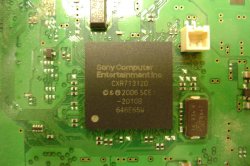
1200px-SYSCON_GEN1.JPG

  • i got the syscon firmware key, a dream i've been pursuing for the past 10 years. now that i have it i feel like i've acomplished my goal. the rest will follow naturally.
    - https://twitter.com/notzecoxao/status/1168954036541935616

    What can developer's do with this key?
    So what can we do with this as of now, what is possible with just this key alone and current knowledge? Custom fan speed profiles? Multiple boot sequences depending on flags or something, or does everything need more work?

    via @zecoxao : With this key the following has happened:


    14 syscon firmwares for the BGA models (CXR) were decrypted.
    from them, keys for PATCHES and FULL FW signing and encryption, as well as decryption and validation were found. we can now sign our own patches and fws for the following models:

    • TMU-510
    • COK-001
    • COK-002
    • SEM-001
    • DIA-001
    • DIA-002 or DEB-001 (same soft id)

    Additionally we found the initialization key for eid1 as well as the process of initializing it from factory
    We also found 7 extra keys (we still don't know what they do)
    Finally, we found out there is a secret keyslot function that generates keys for
    • SNVS
    • AUTH1/AUTH2
    • Regions of EEPROM
    • PATCH keys xoring (to generate the final keys)
    • Relationship with the other 7 Keys

    What still has to be done:
    • Hack the 78K0R chips (the TSOP ones found in later models)
    • Dump the firmware of those chips
    • Get the DYN-001 patch keys
    • Find an exploit on arm firmware that works in 78k0r firmware

    Edit: and yes, you can do all that fun kinky shit of fan boosting at max speeds, led disco panic attack, and star wars theme ON A DECR-1000! THIS is a devkit, so THIS is the ONLY device that supports FULL FUCKING FIRMWARES! DO NOT CONFUSE IT with a DECR-1400, that is a HALF devkit!


Release Source: twitter.com/notzecoxao
Discussion: psx-place.com

Thanks to @NathanHale for the news alert
 
Last edited:
don't forget i also shared nvs from a ps3 2000 syscon chip as well as a superslim syscon chip! you just need to do interleaving!
How was named that files ?, to be honest from the files you upload there are many that i cant figure what they are, the only "thermal config" datas i was able to collect from this thread are:

Retail PS3 models
COK-001 & COK-002 (csum0x7115).bin
SEM-001 (csum0x86D6).bin
DIA-001 & DIA-002 (csum0x985B).bin

Non-retail or rare PS3 models
cok-001 proto (csum0x0E17).bin
cok-001 refurb (csum0x3D55).bin
deb-001 tool (csum0xEF95).bin

...and the new addition to the collection VER-001 that doesnt uses a checksum
 
Last edited:
How was named that files ?, to be honest from the files you upload there are many that i cant figure what they are, the only "thermal config" datas i was able to collect from this thread are:

Retail PS3 models
COK-001 & COK-002 (csum0x7115).bin
SEM-001 (csum0x86D6).bin
DIA-001 & DIA-002 (csum0x985B).bin

Non-retail or rare PS3 models
cok-001 proto (csum0x0E17).bin
cok-001 refurb (csum0x3D55).bin
deb-001 tool (csum0xEF95).bin

...and the new addition to the collection VER-001 that doesnt uses a checksum

Uploaded.
AA SW-301
BB SW2-301
CC SW3-304
 

Attachments

Uploaded.
AA SW-301
BB SW2-301
CC SW3-304
Ohh, now i see them, pretty cool btw :)
The nvs_CC.bin was dumped from a MSX-001 motherboard ?, you just mentioned it was a superslim so im not sure

nvs_AA.bin <--- VER-001
nvs_BB.bin <--- DYN-001
nvs_CC.bin <--- MSX-001 ?

Im being picky about this because (by now) i want to keep a record of which motherboard is the "owner" of the thermal config data. Im not so sure if all retail motherboards of the same model are going to share the same thermal config (except if reburbished). If that rule is true them is going to be relativelly easy for us to organize them in the same way im doing
Otherway... if at some point we find 2 motherboards of the same model with different thermal config (but none of them was refurbished) we are going to have a small mess to organize them, lol
 
Last edited:
Rx/Tx are beside nor on 2500. Is this done with that script in this post? So still need to put that patch/mask on on auth? Which one?Same as eep set/get? Same as CRX/CRXF?
I may put pieces together for this puzzle.
Quite interested because I still believe that there is some errors on dump of AA, some uncompleted data, not with length on nvs, but inside bin.
Or it was edited not to show per unit info?
 
Last edited:
Rx/Tx are beside nor on 2500. Is this done with that script in this post? So still need to put that patch/mask on on auth? Which one?Same as eep set/get? Same as CRX/CRXF?
I may put pieces together for this puzzle.
Quite interested because I still believe that there is some errors on dump of AA, some uncompleted data, not with length on nvs, but inside bin.
Or it was edited not to show per unit info?
You need to use the script with a UART device (TTL232, something like CP2102 for example)
After you're authenticated, you can just call the commands on the wiki, page System Controller Firmware
Edit: Also, it needs to be syscon uart, and not southbridge uart.
 
Usage:
script <com port> < CXR, CXRF or SW>

After it's authenticated you type help to know a list of commands
edit: type auth to authenticate, exit to leave program
 
Ok right I seen now pdf. Right beside nor on 2500 are RxD0/TXD0 (syscon pin 81/80 quite near).
One question according this dumps OCD security ID should be on C4-CD? Second security id on 10C4-10CD?
There is nothing on C4-CD on nvs AA.
 
Ok right I seen now pdf. Right beside nor on 2500 are RxD0/TXD0 (syscon pin 81/80 quite near).
One question according this dumps OCD security ID should be on C4-CD? Second security id on 10C4-10CD?
There is nothing on C4-CD on nvs AA.
It's there, it says :Not:Used: (but you can't use the password anyways, because the 0xC3 byte doesn't let you debug and because security bit disables everything)
 
I thought may be something possible with time. Now hard part has been done. Would be nice to have blank parts for flash what we want. Thank you for your support and all info.
Edit
Earlier I was right about beside nor , but not very specific. Checked before those but haven't got python file to use. Will do test if I can stand wake.
3277333f4edd8aed2376f9dfec3f407b.jpg

Edit 2?
Now what I did wrong?
f9978ea5ad8ddf428d950b784bdfd077.jpg

Nah took it with auth after 3 attempts.
Well at least we have something
d809e40e7769b6f78251261fd88ed117.jpg
 
Last edited:
I thought may be something possible with time. Now hard part has been done. Would be nice to have blank parts for flash what we want. Thank you for your support and all info.
Edit
Earlier I was right about beside nor , but not very specific. Checked before those but haven't got python file to use. Will do test if I can stand wake.
3277333f4edd8aed2376f9dfec3f407b.jpg

Edit 2?
Now what I did wrong?
f9978ea5ad8ddf428d950b784bdfd077.jpg

Nah took it with auth after 3 attempts.
Well at least we have something
d809e40e7769b6f78251261fd88ed117.jpg
You can try to read eeprom.

EEP GET 0 40 (do this every 0x40 bytes until you get full eeprom, max size is 0x1400)
 
Here're some example Python 2 scripts which use the PS3UART class:

Dumping the CXR NVS:
Code:
if(len(sys.argv) < 3):
    print os.path.basename(__file__) + ' <serial port> <output file>'
    sys.exit(1)
 
ps3 = PS3UART(sys.argv[1], 'CXR')
print "Version: " + ps3.command("VER")[1][0]
print ps3.auth()
f = open(sys.argv[2], 'wb')
block_size = 0x40
print "Dumping NVS"
failed = []
for i in xrange(0x2C00, 0x7400, block_size): # 0x7400 for CXR713, 0x4400 for CXR714
    print "Reading 0x{:04X}".format(i)
    data = ps3.command("R8 {:08X} {:02X}".format(i, block_size))
    ret = data[0]
    if ret == 0:
        f.write((data[1][0]).decode('hex'))
    else:
        print "Failed: " + str(ret)
        failed += [i]
        f.write(("A"*block_size*2).decode('hex'))
     
f.close()
time.sleep(2)
print "\nRetrying failed offsets"
for i in failed:
    print "Reading 0x{:04X}".format(i)
    for j in xrange(0, block_size, block_size/4):
        while True:
            data = ps3.command("R8 {:08X} {:02X}".format(i+j, block_size/4))
            ret = data[0]
            if ret == 0:
                print data[1][0]
                break
            time.sleep(2)

Dumping the SW NVS (updated, also supports Python 3):
Code:
if(len(sys.argv) < 3):
    print(os.path.basename(__file__) + ' <serial port> <output file>')
    sys.exit(1)
  
ps3 = PS3UART(sys.argv[1], 'SW')
print('Version: ' + ps3.command('VER')[1][0])
print(ps3.auth())
f = open(sys.argv[2], 'wb')
block_size = 0x40
print('Dumping NVS')
for i in range(0x0, 0x1400, block_size):
    print('Reading 0x{:04X}'.format(i))
    data = ps3.command('EEP GET {:08X} {:02X}'.format(i, block_size))
    ret = data[0]
    temp = ''
    if ret == 0:
        for i in range(2, len(data[1])):
            temp += data[1][i][2:-2].replace(' ', '')
        f.write(bytearray.fromhex(temp))
    else:
        print('Failed: ' + str(ret))
      
f.close()

Installing a patch to the CXR:
Code:
if(len(sys.argv) < 3):
    print os.path.basename(__file__) + ' <serial port> <patch file>'
    sys.exit(1)
 
ps3 = PS3UART(sys.argv[1], 'CXR')
f = open(sys.argv[2], 'rb')
patch = f.read()
f.close()
print "Version: " + ps3.command("VER")[1][0]
print ps3.auth()
patch_area_1 = 0x2800
patch_area_2 = 0x4400 # 0x7400 for CXR713, 0x4400 for CXR714
block_size = 0x40
print "First region"
for i in xrange(0, 0x400, block_size):
    print hex(ps3.command("EEP SET " + hex(i+patch_area_1)[2:] + " " + hex(block_size)[2:] + " " + patch[i:i+block_size].encode('hex'))[0])
 
print "" 
print "Second region"
for i in xrange(0x400, 0x1000, block_size):
    print hex(ps3.command("EEP SET " + hex(i+patch_area_2-0x400)[2:] + " " + hex(block_size)[2:] + " " + patch[i:i+block_size].encode('hex'))[0])
 
Last edited:
@vyktormvmpay25 if you start making syscon dumps of few PS3 motherboards please dont delete them yet, eventually im going to ask you to send me some samples of the "thermal config" to complete this

I made images for all the PS3 fat motherboards, and the first PS3 slim motherboard DYN-001 (from CECH-20xx)
The next ones i would like to add to the collection are SUR-001 (from CECH-21xx) and JTP-001 JSD-001 (from CECH-25xx)
 
Last edited:
The only working dyn001 I have atm it has artefacts on rsx. Swapped and same situation. It was already installed on 4.86 rebug with webman modified fanspeed. Should I return to ofw for your table? I didn't had time for dumps been out for some work.
 
The only working dyn001 I have atm it has artefacts on rsx. Swapped and same situation. It was already installed on 4.86 rebug with webman modified fanspeed. Should I return to ofw for your table? I didn't had time for dumps been out for some work.
There is no need to return to OFW, you could dump syscon in all firmwares
We have a sample of the thermal config of the DYN-001... so dont worry... the only reason to review the thermal config of DYN-001 is to have a confirmation that your thermal config is identical to the one we have

Btw, this is the thermal config data for DYN-001.. if the data in your dump is identical there is no need to upload it
Code:
Offset(h) 00 01 02 03 04 05 06 07 08 09 0A 0B 0C 0D 0E 0F

00000000  33 35 00 00 00 39 36 00 2F 00 3B 37 00 31 00 3E
00000010  38 00 31 80 40 39 00 33 80 43 3A 00 34 00 45 3B
00000020  00 36 80 48 45 00 37 00 4A 46 00 3D 80 50 49 00
00000030  3E 00 55 4A 00 3E 80 5A 4B 00 3F 00 66 4C 00 3F
00000040  80 80 4D 00 40 00 B3 4E 00 41 00 FF 55 00 46 00
00000050  FF FF FF FF FF FF FF FF FF FF FF FF FF FF FF FF
00000060  FF FF FF FF 33 FF 01 00 FF FF FF FF FF FF FF FF
00000070  33 4E 00 00 00 39 4F 00 42 80 3B 50 00 43 00 3E
00000080  51 00 43 80 40 52 00 44 00 43 53 00 44 80 45 54
00000090  00 45 00 48 55 00 45 80 4A 56 00 46 00 50 57 00
000000A0  46 80 55 58 00 47 00 5A 59 00 47 80 66 5A 00 48
000000B0  00 80 5B 00 48 80 B3 5C 00 4A 00 FF 5F 00 52 00
000000C0  FF FF FF FF FF FF FF FF FF FF FF FF FF FF FF FF
000000D0  FF FF FF FF 33 FF 01 00 FF FF FF FF FF FF FF FF
000000E0  FF FF FF FF FF FF FF FF FF FF FF FF FF FF FF FF
000000F0  FF FF FF FF FF FF FF FF FF FF FF FF FF FF FF FF
00000100  FF FF FF FF FF FF FF FF FF FF FF FF FF FF FF FF
00000110  FF FF FF FF FF FF FF FF FF FF FF FF FF FF FF FF
00000120  FF FF FF FF FF FF FF FF FF FF FF FF FF FF FF FF
00000130  FF FF FF FF FF FF FF FF FF FF FF FF FF FF FF FF
00000140  FF FF FF FF 33 FF 01 00 00 FF FF FF FF FF FF FF
00000150  FF FF 00 00 4D 14 FF FF FF FF FF 84 88 84 88 FF
00000160  54 00 55 00 02 00 5E 00 5F 00 02 00 FF FF FF FF
00000170  FF FF FF FF FF FF FF FF FF FF FF FF FF FF FF FF
00000180  FF FF FF FF FF FF FF FF FF FF FF FF FF FF FF FF
00000190  FF FF FF FF FF FF FF FF FF FF FF FF FF FF FF FF
000001A0  FF FF FF FF FF FF FF FF FF FF FF FF FF FF FF FF
000001B0  FF FF FF FF FF FF FF FF FF FF FF FF FF FF FF FF
000001C0  FF FF FF FF FF FF FF FF FF FF FF FF FF FF FF FF
000001D0  FF FF FF FF FF FF FF FF FF FF FF FF FF FF FF FF
000001E0  FF FF FF FF FF FF FF FF FF FF FF FF FF FF FF FF
000001F0  FF FF FF FF FF FF FF FF FF FF FF FF FF FF FF FF

Are only 0x200 bytes. Im cropping it at that size because in the previous PS3 models with a CXR syscon the thermal config area was 0x200 (but in the SW* syscon series is not so clear his size)

If you made a dump of the whole syscon you can find this thermal config area seaching for:
FFFF004D14FFFFFFFFFF (CXR series)
FFFF00004D14FFFFFFFFFF (SW1 and SW2 series)
FFFF00004114FFFFFFFFFF (SW3 series)

*By now it seems this search patterns doesnt varies, it seems they should work in all PS3 models
 
Here're some example Python 2 scripts which use the PS3UART class:

Dumping the CXR NVS:
Code:
if(len(sys.argv) < 3):
    print os.path.basename(__file__) + ' <serial port> <output file>'
    sys.exit(1)
   
ps3 = PS3UART(sys.argv[1], 'CXR')
print "Version: " + ps3.command("VER")[1][0]
print ps3.auth()
f = open(sys.argv[2], 'wb')
block_size = 0x40
print "Dumping NVS"
failed = []
for i in xrange(0x2C00, 0x7400, block_size): # 0x7400 for CXR713, 0x4400 for CXR714
    print "Reading 0x{:04X}".format(i)
    data = ps3.command("R8 {:08X} {:02X}".format(i, block_size))
    ret = data[0]
    if ret == 0:
        f.write((data[1][0]).decode('hex'))
    else:
        print "Failed: " + str(ret)
        failed += [i]
        f.write(("A"*block_size*2).decode('hex'))
       
f.close()
time.sleep(2)
print "\nRetrying failed offsets"
for i in failed:
    print "Reading 0x{:04X}".format(i)
    for j in xrange(0, block_size, block_size/4):
        while True:
            data = ps3.command("R8 {:08X} {:02X}".format(i+j, block_size/4))
            ret = data[0]
            if ret == 0:
                print data[1][0]
                break
            time.sleep(2)

Dumping the SW NVS:
Code:
if(len(sys.argv) < 3):
    print os.path.basename(__file__) + ' <serial port> <output file>'
    sys.exit(1)
   
ps3 = PS3UART(sys.argv[1], 'SW')
print "Version: " + ps3.command("VER")[1][0]
print ps3.auth()
f = open(sys.argv[2], 'wb')
block_size = 0x40
print "Dumping NVS"
for i in xrange(0x0, 0x1400, block_size):
    print "Reading 0x{:04X}".format(i)
    data = ps3.command("EEP GET {:08X} {:02X}".format(i, block_size))
    ret = data[0]
    if ret == 0:
        f.write((data[1][0]).decode('hex'))
       
f.close()

Installing a patch to the CXR:
Code:
if(len(sys.argv) < 3):
    print os.path.basename(__file__) + ' <serial port> <patch file>'
    sys.exit(1)
   
ps3 = PS3UART(sys.argv[1], 'CXR')
f = open(sys.argv[2], 'rb')
patch = f.read()
f.close()
print "Version: " + ps3.command("VER")[1][0]
print ps3.auth()
patch_area_1 = 0x2800
patch_area_2 = 0x4400 # 0x7400 for CXR713, 0x4400 for CXR714
block_size = 0x40
print "First region"
for i in xrange(0, 0x400, block_size):
    print hex(ps3.command("EEP SET " + hex(i+patch_area_1)[2:] + " " + hex(block_size)[2:] + " " + patch[i:i+block_size].encode('hex'))[0])
   
print ""   
print "Second region"
for i in xrange(0x400, 0x1000, block_size):
    print hex(ps3.command("EEP SET " + hex(i+patch_area_2-0x400)[2:] + " " + hex(block_size)[2:] + " " + patch[i:i+block_size].encode('hex'))[0])
Dumping nvs with python 2.7.18 and script didn't work for me. Tried to add this script on the end of original released and somehow got counting address 40 by 40 then file was empty. Tried few hours. Windows 7x64 fresh install. Probably a complete py file with full script would be released?
Could I get some help with it please? Thank you for your efforts.
 
Last edited:
Dumping nvs with python 2.7.18 and script didn't work for me. Tried to add this script on the end of original released and somehow got counting address 40 by 40 then file was empty. Tried few hours. Windows 7x64 fresh install. Probably a complete py file with full script would be released?
Could I get some help with it please? Thank you for your efforts.
PS3UART is the name of the script, you must use it as Class from python in order to work
 

Featured content

Trending content

Latest posts

Back
Top


