PS4 Take NOR dump with CH341a programmer

On ps4 there're some resistor (I think?) that are linked to the module:
https://imgur.com/a/nxwMKlE
Should I check them before?
Also I'm testing the HDD on my Windows pc and it has 5 bad blocks (there're other 140gb to finish). Could be this maybe?

However it seems impossible to find a ps4 slim dead motherboard in my country.

EDIT 10/02/2020:
Tutorial here
 
Last edited:
So all the resistors fromtthe photo on the previous post are not shorted while this one on the left edge seems in open loop, so shorted. Could be this the problem? In a few hours I'll open the WiFi chip to check the internals
https://imgur.com/a/QaP44s6
 
It could be. There's no schematics for this mobo anywhere? Damn. Keep in mind that some resistors are too little (ohms), and they looks like they're in short, but that's should be normal. I can't tell if this is the case. Try picking up just a leg of that resistor, and try to update, if the problem is still present, just put it like it was. Take goo care while removing the shield, use a good amount of flux, and hot air at 3 and at 400ºC. It will take a while, and just use the heat gun without any adapter on the mouth.

For removing the entire module, apply heat from below the module, this to preheat the are, like rework stations do. After 3-5 mins, aplly from above until you see one side could be lifted. It will take a longer time, just be patient. Don't rush when removing it, you could damage the traces.
 
Hello guys. I have PS4 Slim with SAF-004 motherboard.

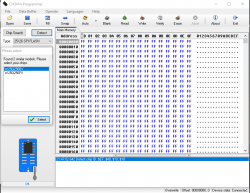
On Ch341a Programmer with 1.38 software but i have only W25Q257FV AND W25Q257JV.

My chip datasheet: Winbond 25Q256JVEQ

On ch341a 1.34 software i have 25Q256FV and 25Q256BV


My PS4 joypad working on safe mod but in xmb i cant move.
I have corrupted NOR.
But i try fix this now.
 

Attachments

  • 1.34 ch.PNG
    1.34 ch.PNG
    62.2 KB · Views: 197
Last edited:
Back
Top