
PS2 [Testers Needed] Open PS2 Loader with ZSO support (compressed ISO)

@Acid_Snake, How is it possible that some games work in ZSO but don't work in ISO? More details I wrote here.
It could be any number of things, but it is most likely this:

Some games do out of bounds reads on of the disc (meaning they ask to read data beyond where there is actual data).

On real discs this just results in the mechacon not doing anything, but for OPL they didn't have any check to see if the game was trying to read beyond the ISO file, so they actually did go beyond the ISO and read data (whatever data happens to be after the ISO, probably another ISO) and the game tries to interpret this data (when original it wouldn't since the result would be "there's no data") and this causes a crash.

For the ZSO reader I had actually implemented a check to prevent out of bounds reads, so even if OPL asks the ZSO reader to read beyond the boundaries of the ISO file, the ZSO reader will not do it.

The latest versions of OPL implement out of bound checks for ISO, which should fix these issues.
 
The latest versions of OPL implement out of bound checks for ISO, which should fix these issues.
I have checked these reports with new OPL versions and these issues are still not fixed.

By the way, I also have reports of ISO working and ZSO not working: 1, 2, 3, 4. OPL Beta 1.2.0 2022 doesn't fix these issues. Is it possible to fix them?
 
My infinite boredom has lead me to start mass testing games for the hell of it, updating a copy of the Sheet as I go.

Edit: All testing being done on latest beta release as of 7/29/23 on a SCPH-39001 all loaded on internal HDD.
 
Last edited:
My infinite boredom has lead me to start mass testing games for the hell of it, updating a copy of the Sheet as I go.

Edit: All testing being done on latest beta release as of 7/29/23 on a SCPH-39001 all loaded on internal HDD.

For HDD, I just want to give you some tips: Pad the converted ZSO so the sizes are divisible by 2048/0x800 bytes before you installing them (you can use hex editors for this like HxD)

The reason why is hdl_dump will truncate your ZSO if the size isn't divisible by 2048 and will round it to the nearest divisible size while installing it essentially corrupting your installation (Happened to me with Freestyle Metal X, game freezes during the later levels).
 
Can ZSO be installed on an internal hard drive (and how)? Or are they just copied to a created partition?

Use the latest HDL Batch Installer or PFS Batchkit Manager to install the ZSO compressed images. The ZSO and the ISO file must coexist before you install them. (For HDL Batch Installer, pick the ZSO file)
Also:
For HDD, I just want to give you some tips: Pad the converted ZSO so the sizes are divisible by 2048/0x800 bytes before you installing them (you can use hex editors for this like HxD)

The reason why is hdl_dump will truncate your ZSO if the size isn't divisible by 2048 and will round it to the nearest divisible size while installing it essentially corrupting your installation (Happened to me with Freestyle Metal X, game freezes during the later levels).

The problem stems from hdl_dump (HDL Batch Installer is basically a frontend to that along with few tools).
Basically hdl_dump will attempt to trim the installed ZSO file if the sizes isn't a multiple of 2048 bytes which results corrupted installations.
You have to pad the ZSO files before you installing it (Danixu tools can do that or use hex editor to pad it manually).
 
Last edited:
Thanks!
I converted a few games with OPL Manager and tried PFS Batchkit Manager. They are easy to install.
Is there a ZSO pack with working games like on XBOX OG (there several games out of 1000 are not compatible compressed, on PS2 maybe the opposite?).

Looking at the list there are about 60 USA games that work perfectly? The topic is from 2 years ago, could it be that they haven't all been tested yet?
 
Thanks!
I converted a few games with OPL Manager and tried PFS Batchkit Manager. They are easy to install.
Is there a ZSO pack with working games like on XBOX OG (there several games out of 1000 are not compatible compressed, on PS2 maybe the opposite?).

Looking at the list there are about 60 USA games that work perfectly? The topic is from 2 years ago, could it be that they haven't all been tested yet?

Could be that. Could be also due to corrupted installation (I already explained the reasons why. See what I quoted above).
 
The ones I tried work perfectly.

But I look in the compatibility list "007 - Everything or Nothing" I installed it - me too "Black screen after PS2 logo"

Can you give an example with Danixu tools of what to write in the CMD terminal to fix it. Because it says ERROR: there was an error processing the input file.
 
The ones I tried work perfectly.

But I look in the compatibility list "007 - Everything or Nothing" I installed it - me too "Black screen after PS2 logo"

Can you give an example with Danixu tools of what to write in the CMD terminal to fix it. Because it says ERROR: there was an error processing the input file.

You need to do it like this:

Code:
ziso -i (isofilename) -h

-h parameter must be specified so it would pad the ZSO file.
 
  • Like
Reactions: TnA
Hmmm, I tested another one (Dokapon Kingdom) it works again.
So there is a chance that all the games will work?
Now to ask how to convert 1800 games :D (now they are .7z.. if possible without unzipping them)
EDIT: Can .bin / .cue be converted?
 
Last edited:
Need help. bought a new usb & memory card followed Blaine locklair tutorial for FMCB ( everything is STILL black and white screen.) What do I do? I've been at it for weeks.- OPL opens no games on any of the modes (newest version and previous) ESR doesn't play burned games (black screen). Can someone point me in the right direction or tell me what I'm doing wrong because I'm literally going mad. I've been going at this almost a week!!
 
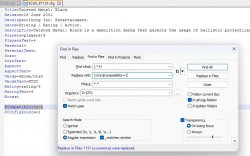
I will just copy paste my answer to the similar question I encountered on discord:
After OPL Manager scans the games for covers it automatically creates a .cfg file for each game. Then with Notepad++ I added the two lines in all files (for MODE 1).
 

Attachments

  • cfg.jpg
    cfg.jpg
    134.9 KB · Views: 103
Last edited:
Please update the description for Devil May Cry 1.

Every FMV in this game stutters, not just the intro.

You didn't specify what device are you using to run the game.
HDD? USB? SMB?
Also specify the cache size you're using on OPL settings for each devices.

And have you tried to using compatibility modes such as mode 1 or 2?
 

Similar threads

Back
Top