
You are using an out of date browser. It may not display this or other websites correctly.
You should upgrade or use an alternative browser.
You should upgrade or use an alternative browser.
PS2 The reset combination does not work with a wireless controller
- Thread starter m0rph
- Start date
Which game including Game-ID?
Which type of controller?
Which kind of setup are you using?
Softmod, Hardmod, Nomod?
How do you start the game (OPL I assume)?
Which version of OPL are you using?
Where are you starting the game from?
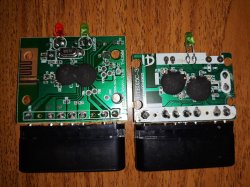
Usual Wireless controller for PS. Made in China.
USB and SMB
FMCB
OPL 1.0
From USB or SMB
ANY game for example SLES-52541, SLUS-20314, SCES-50928 etc. It`s not about game. It`s all about controller or may be because of it`s receiver.
The pad type shouldn't matter.
It is a common behavior with many games when playing from SMB or USB.
U wrong. It`s not about a game or USB/SMB. Because when i change the controller to old one, it solves the problem. So, the pad type matters.
Last edited by a moderator:
Then the controller probably doesn't support transmitting all buttons at once.
If it was so (like if you miss to press a button of the combination) simply nothing will happen (or just a normal game function depending on what input is detected).
But he said the screen goes (and stays) black. It's a partial IGR.
It happened to me with many games playing from SMB and i was using a wireless gamepad. Never thought it could be related to the pad, also because it doesn't happen with all games and I experienced this problem even using the DS2.
So perhaps OPL goes haywire if after the IGR the pad is a weird one?
Never thought it could be related to the pad
I have two wireless gamepads. Old one works with almost every game. New one doesn`t work in any game.
Also, i found a trick: plug receiver from old gamepad into slot 2. Old gamepad switched off. In this case, my new gamepad in slot 1 work fine))
So obviously it`s "console-receiver" related issue. I`ll try the latest OPL 1.1 later. But i don`t think it will help.
But, the SAME combination works fine in POPSTARTER.
With POPStarter you don't need to press R2 and L2 (just L1+R1+select+start).
Maybe the transmitter causes the pad-init to stall after an IGR from OPL.
So that makes OPL to loop/freeze when trying to initialize the pad?
If that's the case, something should be modified Imho.
I should be able to even unplug the pad after a IGR and it shouldn't matter for OPL.
Btw if it's so shouldn't it also happen at OPL first boot? Many times I booted OPL with the wireless pad yet to be initialized and no problems.
- He wrote BSOD after IGR... That's has nothing to do with OPL anymore (even when the IGR technically fails or IGR's code being part of OPL).
- No it would not, because on a first boot there would be no reason for the init to fail.
- His other receiver working with the new pad also seems to point to a problem with this specific hardware and possibly/probably in relation to how IGR is "hooked".
His other receiver working with the new pad
Not exactly. Actually, new pad is incompatible with old receiver. I tried to say that new pad works fine with his own receiver only when old receiver plugged into slot 2. Even if the old pad is turned off!
Meantime, tried the latest FMCB and OPL 1.1 version. Also, tried to disable the MODBO chip. The problem persists.
Similar threads
-

-
-
-
 PS2 OPL for Retro GEM with PS1 & PS2 Game ID Support
- Started by CosmicScale
- Replies: 2