PS3 (Tutorial) Bypass PSN Login for Netflix on PS3

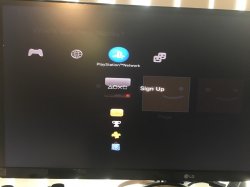
So earlier this week my child managed to log into Netflix on my PS3 without logging into PSN. Thanks to @Joonie the method to do this is now known. Before you go and get to happy so far only users of the latest NA Netflix app in the US have had success doing this as well. Here is a terrible video just to show it is working fine.

ps3_netflix.jpg

  • 92fc8ebb7630310f69d28c50470269f5.jpg
    Steps to use your Netflix Service
    • 1. Sign into PSN
    • 2. Sign into Neflix
    • 3. Sign out of PSN while still logged into Neftlix
    • 4. Exit Netflix
    • 5. Re-launch Netflix
    • 6. PSN bypassed
    • 7. Turn off the PS3
    • 8. Launch Netflix now without the need to use PSN (Note works even on different user profile)


Images and guide provided by Joonie I am just putting to together in a easy to read guide. I stumbled upon this but thought it was no longer needed and Sony was taking from the PS4 since if it can't find PSN you can still use video services. Joonie is the guy that deserves the credit for finding and writing up the details.

Edit: remember to delete any existing Netflix cache folder in /dev_hdd0/game before following the steps...
 
Last edited by a moderator:
@Ninja
Use psnpatch plugin to spoof at boot time.
What you need to do here is delete the Netflix cache folder, spoof your ids using the set you borrowed from your friend using psnpatch, in the Cobra Toolbox on plugin installation, set psnpatch to do id spoofing at boot time, log into the PSN & then login into Netflix. Log out of PSN while Netflix is running & from now on, Netflix will work without PSN & using your temporary ids.
The day you will change ids again you will need to redo the Netflix activation process again but it does not take long.

About permanent spoofing, it's actually semi permanent as it can be changed again at any time. You could change the ids in eid memory with idpset for a few days/weeks/months & restore the original ids later using the same method.

@RandQalan
Uninstalling is not enough to get rid of old login info, you must delete the Netflix cache folder manually as it does not get removed automatically. I don't even think that the app needs uninstalled actually, removing the cache folder is probably enough.
Note that it's required to log into PSN at least once to activate the Netflix app..
 
@RandQalan
Sure but in this case you'll have to start with the only nopsn version that still works ie EU 1.04. Gather the cache folder after logging into Netflix & use it with the updated official pkg.

And btw you should not need to copy the whole cache folder, the systemData.secure file is the only file containing the required information.

Currently you cannot use a systemData.secure file created with another idps/psid because the app will ask to reactivate but even with a systemData.secure file coming from another user's console or made with your own spoofed ids, the Netflix app has a huge flaw which still allows the app to log into that other user's Netflix account automatically, briefly showing you the associated Netflix menu screen with the Netflix user profiles, before eventually giving an error & asking the user to reactivate. When you choose to reactivate Netflix, the app just deletes the systemData.secure file from the cache directory & restarts.

This means that Netflix logs into its servers with whatever account information found in systemData.secure, even if the ids do not match.
Also different ps3 user profiles can apparently use the same systemData.secure file which appears to be another major vulnerability.

From what I I see here, given the major security flaws, I am hopeful that with a little bit of research, a new nopsn patch can probably be found for Netflix.
 
Last edited:

Featured content

Trending content

Latest posts

Back
Top