

JMD
Forum Noob
Howdy all!
I'd like to share a little guide on how to change the names of some webMAN entries in the XMB.
This was done on the latest webMAN MOD v1.47.31.
Preamble:
This tutorial will modify an existing installation of webMAN MOD. There is no need to access or modify the flash or PS3 xRegistry, this is all done via the dev_hdd0/game/UPDWEBMOD installation folder of webMAN.
It should now look something like this:
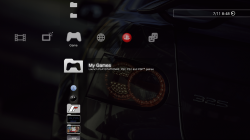
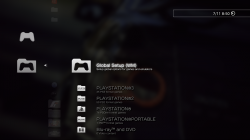
The purpose of this little change was so that my 8 year old daughter could navigate the XMB a bit easier. She understands My Games and can read it better than webMAN Games
I'd like to share a little guide on how to change the names of some webMAN entries in the XMB.
This was done on the latest webMAN MOD v1.47.31.
Preamble:
This tutorial will modify an existing installation of webMAN MOD. There is no need to access or modify the flash or PS3 xRegistry, this is all done via the dev_hdd0/game/UPDWEBMOD installation folder of webMAN.
- Backup your existing webMAN MOD installation folder located at dev_hdd0/game/UPDWEBMOD.
- Navigate to UPDWEBMOD\USRDIR\lang
- Open the language file of your PS3 system language, in my case, LANG_EN.TXT for English.
This file contains every English word displayed in webMAN MOD.
You must follow the existing format or you will break the file!
STR_FUNCTIONNAME [TEXT DISPLAYED ON XMB]
- Line 86, 87, 88, 90 & 91 contain the following:
Code:STR_MYGAMES [webMAN Games] STR_LOADGAMES [Load games with webMAN] STR_FIXING [Fixing] STR_WMSETUP [webMAN Setup] STR_WMSETUP2 [Setup webMAN options]
Which can be changed to something a bit more noob-friendly, such as;
Code:STR_MYGAMES [My Games] STR_LOADGAMES [Launch PLAYSTATION®3, PS2, PS1 and PSP™ games] STR_FIXING [Fixing] STR_WMSETUP [Global Setup] STR_WMSETUP2 [Setup global options for games and emulators]
- Save the file, and transfer it back to your PS3 and replace the file into
dev_hdd0/game/UPDWEBMOD/USRDIR/lang
- You're done!
It should now look something like this:
The purpose of this little change was so that my 8 year old daughter could navigate the XMB a bit easier. She understands My Games and can read it better than webMAN Games


