

gamerman 5000
Developer
Attention video Spanish-speaking players, the Spanish dubbing of Resident Evil Director's Cut had previously been released for the PSX and Sega Saturn console, today I bring you new news since the version of patch 2.0 for Resident Evil 2 for PSX and DreamCast has recently been published by the "Resident Evil Castellano" community.
https://www.youtube.com/@RESIDENTEVILCASTELLANO
Today I will teach you how to patch this great game so that you can enjoy it with Spanish dubbing and relive the experience of playing it now in your native language.
Warning: The translation team, neither this server nor "PSX Place" are responsible for any "damage" that may arise on consoles and physical game media due to poor implementation of these patches by the user, do so at your own risk.
For this tutorial I will focus on the version for the PSX console.
What we will need:
1.-A copy of the original game "Resident Evil 2" in BIN format applicable to the following versions:
LEON PAL SLES-00976
CLAIRE PAL SLES-10976
LEON NTSC SLUS-00748
CLAIRE NTSC SLUS-00756
Note: You can see more details in the "Readme" file that comes with the patch download.
Remember that you must have the original game for this task.
2.-The "Delta Patcher" program can be downloaded from the following link:
https://www.romhacking.net/utilities/704/
3.-Of course, download the translation patch from here:
https://tiovictor.romhackhispano.org/resident-evil-2-dreamcast/descargar/
Applying the Patch
4.- We open "Delta Patcher" and in the "Original File" section we select the BIN file of the game, while in the "XDelta Patch" section we select the patch corresponding to the version of the game in my case "NTSC Dual Shock".
Important: Make sure that the patch corresponds to the version of the game you have.
Note: If you used the same version as me, it is necessary to extract the tracks from the game since the patches must be applied to the "tracks 01" of their corresponding disc (Leon and Claire).
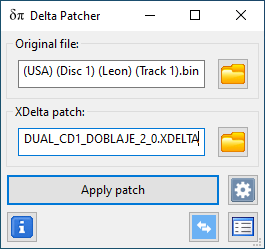
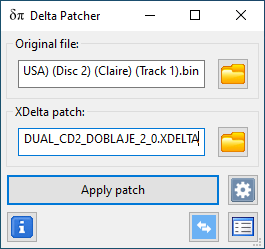
5.- Once the files have been selected, the next thing is to apply the patch. For this, we click on "Apply patch", at the end of the process a message will appear saying "Patch applied successfully".
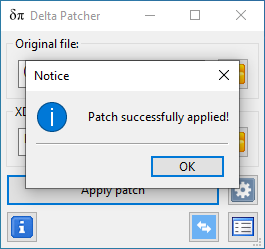
6.-We press "OK" and we already have our game with Spanish dubbing ready, we can now close "Delta Patcher".
Note: You will need to regenerate the two "Bin/Cue" images with the tracks included.
Follow the following tutorial if you don't know how to do it:
https://www.psx-place.com/threads/c...nd-convert-them-into-a-single-bin-file.40931/
Burn your discs with the patched image and enjoy it on the console, you can also use your favorite emulator.
Sample video:
https://www.youtube.com/@RESIDENTEVILCASTELLANO
Today I will teach you how to patch this great game so that you can enjoy it with Spanish dubbing and relive the experience of playing it now in your native language.
Warning: The translation team, neither this server nor "PSX Place" are responsible for any "damage" that may arise on consoles and physical game media due to poor implementation of these patches by the user, do so at your own risk.
For this tutorial I will focus on the version for the PSX console.
What we will need:
1.-A copy of the original game "Resident Evil 2" in BIN format applicable to the following versions:
LEON PAL SLES-00976
CLAIRE PAL SLES-10976
LEON NTSC SLUS-00748
CLAIRE NTSC SLUS-00756
Note: You can see more details in the "Readme" file that comes with the patch download.
Remember that you must have the original game for this task.
2.-The "Delta Patcher" program can be downloaded from the following link:
https://www.romhacking.net/utilities/704/
3.-Of course, download the translation patch from here:
https://tiovictor.romhackhispano.org/resident-evil-2-dreamcast/descargar/
Applying the Patch
4.- We open "Delta Patcher" and in the "Original File" section we select the BIN file of the game, while in the "XDelta Patch" section we select the patch corresponding to the version of the game in my case "NTSC Dual Shock".
Important: Make sure that the patch corresponds to the version of the game you have.
Note: If you used the same version as me, it is necessary to extract the tracks from the game since the patches must be applied to the "tracks 01" of their corresponding disc (Leon and Claire).
5.- Once the files have been selected, the next thing is to apply the patch. For this, we click on "Apply patch", at the end of the process a message will appear saying "Patch applied successfully".
6.-We press "OK" and we already have our game with Spanish dubbing ready, we can now close "Delta Patcher".
Note: You will need to regenerate the two "Bin/Cue" images with the tracks included.
Follow the following tutorial if you don't know how to do it:
https://www.psx-place.com/threads/c...nd-convert-them-into-a-single-bin-file.40931/
Burn your discs with the patched image and enjoy it on the console, you can also use your favorite emulator.
Sample video:

