dazzaXx
Member
Can you be a bit more specific?Is Kernel source code available?

Can you be a bit more specific?Is Kernel source code available?

Is Kernel source code available?
This is do-able with CEX, i have linked CEX patched Rebug firmware somewhere here in the comments. As for Habib CFW, i've never used it before as i believe Rebug is the best CFW out there and also the fact that i've never worked with any other firmware before. You use the Rebug Toolbox to boot into OtherOS and to install petitboot that is needed for Linux installation. Unless the Toolbox is usable/installable on other CFW's.
This is do-able with CEX.....CFW's.

Nah, I mean red-ribbon-powerpc64-ps3 kernel source, not glevand,s one.yes it's availabl: https://kernel.googlesource.com/pub/scm/linux/kernel/git/geoff/ps3-linux/
U can clone it with: git clone https://kernel.googlesource.com/pub/scm/linux/kernel/git/geoff/ps3-linux
Yes, it's using geoff upstream'ed patches, but kernel is different. Where is actual red-ribbon kernel source code?yes it's using geoff upstream'ed patches like added 3 days ago
U must try :P
REX is CEX with a few debugging functions, D-REX is DEX with full access to debugging and i think Lite editions have the least functions that standard REX/D-REX have. I am basing this off my current knowledge, i only deal with DEX lol so if im wrong someone please correct me :PIf someone is not busy I will appréciate answers to my questions please to see if it worth to install linux ( a mini how-to for cex ps3 and if we can go back to rebug if other cfw doesnt keep otheros after its installation (i hope i am clear )
Thanks
Edit: can someone explain me the différence between cfw Rex lite et Rex please
If you want Linux installed on your HDD, you'd need to either install the patched Rebug firmware that i have provided or patch your own firmware you use yourself, i think there are other ways to boot OtherOS without the need of Rebug's own Toolbox but i believe that causes more hassle. Even so if you do decide to install Linux on the Internal HDD, one of the steps requires you to format and wipe it completely so you'd need to make sure your stuff is backed up before attempting this.It is exactly my question about ability of other cfw to install toolbox after installation of rebug cex emer init/otheros/linux and have both cfw habib on gameos and linux in otheros.
I am sorry to ask u again but this rebug cfw emer init, if i understood we have to keep this mooded rebug cfw ? or we can replace it by the normal rebug AND Keep toolbox?
No idea if we can update with other cfw AND keep toolbox ?
What about performance of linux on ps3? Is it correct or not enough ram for live stream video?
Thank you for any help you can provide to have the answer of my worries before i test it.
(I am a noob lol and i dont want to brick my ps3 because it is an old one very rare in France : ps3 60gb backward for ps2 bought in USA - it will be very good to have gameos et otheros in this version)
Cheers
If you want Linux installed on your HDD, you'd need to either install the patched Rebug firmware that i have provided or patch your own firmware you use yourself, i think there are other ways to boot OtherOS without the need of Rebug's own Toolbox but i believe that causes more hassle. Even so if you do decide to install Linux on the Internal HDD, one of the steps requires you to format and wipe it completely so you'd need to make sure your stuff is backed up before attempting this.
Overall it is up to you, but i'd highly advise installing Rebug as it is the most reliable CFW out there for PS3's at the moment (I guess its more of personal preference...) and is the easiest to use in terms of OtherOS installation. But that's your choice to make, this tutorial has a high chance of success if you follow it exactly spot on. Also, i would never want anyone to brick their PS3 system but do be warned that it does involve modifying and resizing the /dev_flash. (Such as installing petitboot, LV1 patches, etc.)
The only one i know of is Red Ribbon Linux at this time. I've heard of FreeBSD being able to be installed on a PS3 but i haven't looked into that one much. All i read of FreeBSD was that it was a "Work-In-Progress" and there were very few forums discussing little info about it.Thank you very much and yes I decided to move to Rebug because it is the one that it still updated and shows clearly otheros in its changelog.
I have just another question about linux. Which one can be install with less hassle as you said and less ram usage?
Thank
The only one i know of is Red Ribbon Linux at this time. I've heard of FreeBSD being able to be installed on a PS3 but i haven't looked into that one much. All i read of FreeBSD was that it was a "Work-In-Progress" and there were very few forums discussing little info about it.


The PS3 (and PS4) firmwares are based on freeBSD, most of the low level research made by graf chokolo and glevand (the PS3 linux gurus) was made under freeBSDThe only one i know of is Red Ribbon Linux at this time. I've heard of FreeBSD being able to be installed on a PS3 but i haven't looked into that one much. All i read of FreeBSD was that it was a "Work-In-Progress" and there were very few forums discussing little info about it.
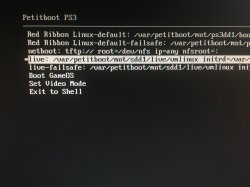
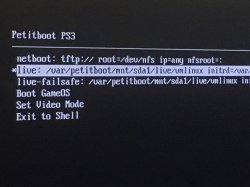
Hmm this is odd, i'll look into the issue.I followed the instructions until step 14. I chose the "live" option at the top of the petitboot menu, but then it says "system is going down now..." before my keyboard switches off and it returns to the petitboot menu.
I installed the CFW provided here, and have a CECH-2001A PS3 Slim with a brand new 1TB drive. Any help?