PS3 [Tutorial] (Read Warning) Installing Red Ribbon Linux on Rebug 4.81.2 - 4.84.2 D / REX

I was on petitboot and i went to "live" and it gives me an error saying "Failed: kexek /var/petitboot/mnt/sda1/live/vnlinuxDBG:pmenu_process_key:207: 258 (402)" i dont know what to do...

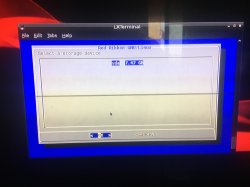
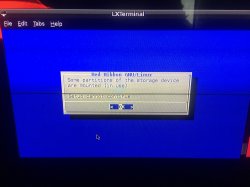
i restarted and tried again and it works but now im getting errors i the installer like when i do automatic partitioning it goes to a screen that says "stuff bla bla bla continue?" and i press yes and it goes back to the manual or automatic partitioning screen. i chose manual and it says the hdd has 0.00MB on it and the hard drive says on its cover "160GB storage" im severely confused with this os i work with other os's such as linux mint, ubuntu and steam os(currently using steam os). jeez linux is confusing.
 
Last edited:
Hey so when i input the command cd/tmp/petitboot/mnt/sda1/ on my dex slim i get the error "not found". I have tried running the process through from the beginning twice and have no luck. Please any help would be greatly appreciated really hope the post isnt dead.
Thanks in advance
 
DNwSt9g.jpg

Hi i just got to the point in step 12-13 where you have to find and run the .sh
But my ps3 tells me this and frezzes and have to cut the power to it in order to restart.
anyone know a fix or why this is happening
 
My question is what if you want to get rid of linux and go back to regular stock cfw? Just format the hard drive and reinstall 4.82.2 DEX?
 
My question is what if you want to get rid of linux and go back to regular stock cfw? Just format the hard drive and reinstall 4.82.2 DEX?
Yes Linux gets removed but from my experience, petitboot still remains installed which isn't that much of a problem
 
Nice guide. But i can't install it on my internal hdd. The installer says i have 263mb available that can be partitionized. Any one have the same problem? Have a PS3 Slim. Maybe that's the problem.
 
Nice guide. But i can't install it on my internal hdd. The installer says i have 263mb available that can be partitionized. Any one have the same problem? Have a PS3 Slim. Maybe that's the problem.
Have you reset the entire system? Linux can only be installed on the internal HDD on a fully reset console.
 
I have followed the guide twice. But now i am getting an OtherOS partition size of 0.00mb? What else did i do wrong.

For some reason. After a third try, i finally got more than a few gigs reserved for otheros! It's installing now, so i need to grab a cup of coffee :adoration:
 
HI,
i'm stuck on 14 keep saying fail to exec live i have a ps3 slim Rebug 4.81.2 D-REX 250 upgraded hdd to 2tb
 
Hey so when i input the command cd/tmp/petitboot/mnt/sda1/ on my dex slim i get the error "not found". I have tried running the process through from the beginning twice and have no luck. Please any help would be greatly appreciated really hope the post isnt dead.
Thanks in advance
cd /tmp/petitboot/mnt/sda1
 
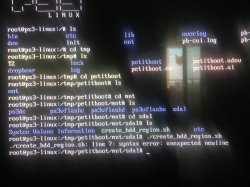
I have a problem, please look at the picture.
CECH -2101B 320GB
The "create_hdd_region. sh" is not provided in the tutorial, I found it through Google.
Please help me, thank you.
IMG_2317.JPG
IMG_2319.JPG
IMG_2320.JPG
 
DNwSt9g.jpg

Hi i just got to the point in step 12-13 where you have to find and run the .sh
But my ps3 tells me this and frezzes and have to cut the power to it in order to restart.
anyone know a fix or why this is happening
Hey man, I had this exact same error about crashing when requesting data at 228 along with consistent crashing when trying to request data at address 208 as well. I also tried to quickly locate and run the script, I couldn't cd into /tmp/petitboot/mnt/sdd1/ either as it couldn't find the directory, and I thought maybe that had something to do with it, and through some digging I went into each directory and ran ls in each one only to find that for some reason it was simply named sdd, not sdd or sda 1, and figured maybe that had something to do with it. I'll admit I'm very new to linux and have no idea what I was doing, so I'm sitting there scratching my head trying to figure out how to troubleshoot the crash and getting nowhere, when I had an idea. It would crash very quickly no matter what I did, sometimes not even getting into the bootloader, but I figured if I typed really fast and used tab completion to get the folder and then ran the script quickly before the crash maybe it would work. And sure enough, I ran it, and it did in fact crash right afterward, but I rebooted it and booted to the live USB and it actually worked and let me run through the install. Even now that it's installed it still crashes sometimes before I can take the 3 seconds it takes to boot into the distro from the bootloader, but if you keep trying and restarting and are quick you can get it to start, and once you're in you're in. Hope that helps.

TL;DR: Dunno why it's broken, but just type real fast and you should be all set.
 
Hey man, I had this exact same error about crashing when requesting data at 228 along with consistent crashing when trying to request data at address 208 as well. I also tried to quickly locate and run the script, I couldn't cd into /tmp/petitboot/mnt/sdd1/ either as it couldn't find the directory, and I thought maybe that had something to do with it, and through some digging I went into each directory and ran ls in each one only to find that for some reason it was simply named sdd, not sdd or sda 1, and figured maybe that had something to do with it. I'll admit I'm very new to linux and have no idea what I was doing, so I'm sitting there scratching my head trying to figure out how to troubleshoot the crash and getting nowhere, when I had an idea. It would crash very quickly no matter what I did, sometimes not even getting into the bootloader, but I figured if I typed really fast and used tab completion to get the folder and then ran the script quickly before the crash maybe it would work. And sure enough, I ran it, and it did in fact crash right afterward, but I rebooted it and booted to the live USB and it actually worked and let me run through the install. Even now that it's installed it still crashes sometimes before I can take the 3 seconds it takes to boot into the distro from the bootloader, but if you keep trying and restarting and are quick you can get it to start, and once you're in you're in. Hope that helps.

TL;DR: Dunno why it's broken, but just type real fast and you should be all set.
Restore PS3 System again,start all over again.
http://www.psx-place.com/threads/he...on-linux-on-ps3-slim-2101b.21540/#post-147589
 
Back
Top