
PS3 UNABLE TO UPDATE CFW

hey i have a few problems that i really need some help with if any one can help ill be very grateful
so i dont know what type of cfw i have and i dont know what system im running whether its cex or dex
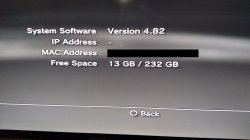
and i'm not quite sure what firmware im running because on the xmb system information it shows 4.82
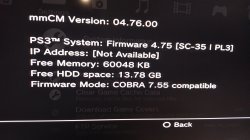
and on multiman it shows
mmCM Version: 04.76.00
PS3™ System: Firmware 4.75[SC-35 I PL3]
Firmware Mode: COBRA 7.55 compatible
and on the starting screen it states AB-CFW-4.55-1.00
with an edited logo
and i just wanna update to a new cfw but i cant
any kind of help is really appreciated
20200904_002755.jpg 20200904_002859.jpg Screenshot_20200904-003500_Video Player.jpg
sorry for the bad english
 
Last edited by a moderator:
hey i have a few problems that i really need some help with if any one can help ill be very grateful
so i dont know what type of cfw i have and i dont know what system im running whether its cex or dex
and i'm not quite sure what firmware im running because on the xmb system information it shows 4.82
and on multiman it shows
mmCM Version: 04.76.00
PS3™ System: Firmware 4.75[SC-35 I PL3]
Firmware Mode: COBRA 7.55 compatible
and on the starting screen it states AB-CFW-4.55-1.00
with an edited logo
and i just wanna update to a new cfw but i cant
any kind of help is really appreciated

View attachment 27664 View attachment 27665 View attachment 27666
sorry for the bad english

System Software is the firmware that you are on

mmCM version is nothing but the version of multiMAN that you are using

You are probably on REBUG 4.82.2 or possibly Ferrox

You need to have Rebug Toolbox or SEN Enabler to check if you are CEX/DEX... pick one to install, check it, then let me know.

If you're on DEX, then D-REX 4.82.2 can still go online, leaving no real reason to update unless you are upgrading to D-REX 4.84.2
 
Last edited:
System Software is the firmware that you are on

mmCM version is nothing but the version of multiMAN that you are using

You are probably on REBUG 4.82.2 or possibly Ferrox

You need to have Rebug Toolbox or SEN Enabler to check if you are CEX/DEX... pick one to install, check it, then let me know.

If you're on DEX, then D-REX 4.82.2 can still go online, leaving no real reason to update unless you are upgrading to D-REX 4.84.2
thanks for the reply
well i cant go online does that mean im on cex and if so how do i upgrade without getting data corrupted after agreeing to the terms and the update was copied
 
System Software is the firmware that you are on

mmCM version is nothing but the version of multiMAN that you are using

You are probably on REBUG 4.82.2 or possibly Ferrox

You need to have Rebug Toolbox or SEN Enabler to check if you are CEX/DEX... pick one to install, check it, then let me know.

If you're on DEX, then D-REX 4.82.2 can still go online, leaving no real reason to update unless you are upgrading to D-REX 4.84.2
i think im on ferrox because when i go to the package manager and try to install pkgs from my hdd ferrox mod installer.pkg appears
so how do i update ive tried ferrox 4.86 update and after i agree to the terms and proceed and when the ps3 reboot it just states data corrupted same with rebug 4.86.1 lite and rebug 4.82.2 rex and the d-rex states it before the terms so im assuming im on cex
again thank you
 
you are running a 4.82 cfw. either made from scratch or modded rebug/ferrox to say cystom name or logo.

multiman doesnt show the correct firmware version in newer firmware. latest multiman for cfw is here.
 
you are running a 4.82 cfw. either made from scratch or modded rebug/ferrox to say cystom name or logo.

multiman doesnt show the correct firmware version in newer firmware. latest multiman for cfw is here.
thanks for the reply
well i know that this cfw wasnt made from scratch because im from a 3d world country and there is one store that sells consoles and they barely understand what cfw is and most of them cant even install a game only the one who sold me this console the one whoes his name is the logo
and sorry for the writing english is not my mother lang
 
thanks for the reply
well i know that this cfw wasnt made from scratch because im from a 3d world country and there is one store that sells consoles and they barely understand what cfw is and most of them cant even install a game only the one who sold me this console the one whoes his name is the logo
and sorry for the writing english is not my mother lang

At least you have the ability to buy a CFW console from a store

In America, game stores know what CFW is & looks like, so you can't buy/sell them @ stores here, only order them from the internet.

Well, apart from possibly finding one at a pawn shop where they have no idea about CFW and can get away with selling things like that.

Seller should not be selling CFW consoles if they can barely help you themselves. Looks like a jury-rig made by some iranian scammers.
 
you are running a 4.82 cfw. either made from scratch or modded rebug/ferrox to say cystom name or logo.

multiman doesnt show the correct firmware version in newer firmware. latest multiman for cfw is here.
so how do i go online do i spoof it with sen enabler or what and i have read that alot of people get region restrict because of it
 
so how do i go online do i spoof it with sen enabler or what and i have read that alot of people get region restrict because of it

1. Download SEN Enabler and install on PS3 with Package Manager

2. Now open SEN Enabler and use it to "Enable PSN Access"

3. Use PSNPatch to spoof your IDPS, or if you use webMAN it has an auto-spoof function I think... I'm not good @ manual spoofing.

4. Use webMAN's Button combo: R2 + Triangle to delete history and CFW syscalls before you log on

5. Optionally, you could use PSNinja to delete history but it does not remove syscalls... Someone will say PSNinja is obsolete anyways.

So remember, always remove syscalls and don't go any lower than 4.82.2 or you will not be able to go online.
 
1. Download SEN Enabler and install on PS3 with Package Manager

2. Now open SEN Enabler and use it to "Enable PSN Access"

3. Use PSNPatch to spoof your IDPS, or if you use webMAN it has an auto-spoof function I think... I'm not good @ manual spoofing.

4. Use webMAN's Button combo: R2 + Triangle to delete history and CFW syscalls before you log on

5. Optionally, you could use PSNinja to delete history but it does not remove syscalls... Someone will say PSNinja is obsolete anyways.

So remember, always remove syscalls and don't go any lower than 4.82.2 or you will not be able to go online.
is 4.82 lower than 4.82.2
 
Someone will say PSNinja is obsolete anyways.
I'm not saying it is obsolete...but I have seen plenty of the knowledgable gurus here say it shouldn't be used anymore. The source code to some homebrew is not open so some things can not be updated if the developer leaves the scene. Over time sony fixed or changed some things that can break some homebrew. If the developer is gone and did not release the code, then the homebrew can never be fixed. I think this is the case with PSNinja.

@icouldreallyusesomehelp I recommend you update to rebug 4.86. then you dont have to spoof fw. just idps if you want too. and use psnpatch to block psn untill syscalls are disbled.
 
I'm not saying it is obsolete...but I have seen plenty of the knowledgable gurus here say it shouldn't be used anymore. The source code to some homebrew is not open so some things can not be updated if the developer leaves the scene. Over time sony fixed or changed some things that can break some homebrew. If the developer is gone and did not release the code, then the homebrew can never be fixed. I think this is the case with PSNinja.

@icouldreallyusesomehelp I recommend you update to rebug 4.86. then you dont have to spoof fw. just idps if you want too. and use psnpatch to block psn untill syscalls are disbled.
when i try to update and get to the part where the ps3 reboots it states data corrupted
 
is 4.82 lower than 4.82.2

No, 4.82.1 & 4.82.2 are still a part of the base FW 4.82, only difference between 4.82.1 & 4.82.2 is that 4.82.2 has updated payloads for DEX. If you're not that good with CFW yet, then you should listen to Coro & Sulfvr. Just install REBUG LITE 4.86.1 from Recovery mode.

Most mods are made for CEX nowadays, thanks to the HFW scene. CEX is built to run CEX mods only. DEX can be used to run both types of mods: CEX or DEX... but there are more risks when using DEX

REBUG LITE (4.85.1 & 4.86.1) are the last 2 CEX builds that were

D-REX 4.84.2 is the last DEX build that was released more than a year or 2 ago.
 
No, 4.82.1 & 4.82.2 are still a part of the base FW 4.82, only difference between 4.82.1 & 4.82.2 is that 4.82.2 has updated payloads for DEX. If you're not that good with CFW yet, then you should listen to Coro & Sulfvr. Just install REBUG 4.86 from Recovery mode.

Most mods are made for CEX nowadays, thanks to the HFW scene. CEX is built to run CEX mods only. DEX can be used to run both types of mods: CEX or DEX... but there are more risks when using DEX

REBUG LITE (4.85.1 & 4.86.1) are the last 2 CEX builds that were

D-REX 4.84.2 is the last DEX build that was released more than a year or 2 ago.

REBUG LITE 4.86.1 is the best recommendation.
yes i was just about to update to 4.86.1 but it stated that i need 9.99 or later
 

Similar threads

Back
Top