PS VITA / PS TV (UPDATE) HENkaku R9 v4 is now pushed with HENkaku Settings

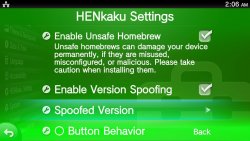
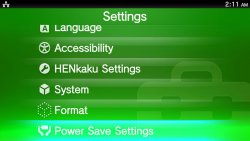
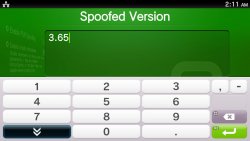
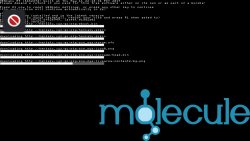
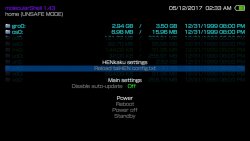
The new HENkaku Settings TheFl0w just recently previewed are now LIVE for ALL HENkaku users!!!! Screenshots taken from my PSTV just now!!! Notice the LAN connection and not the 3G Sim he had enabled. molecularShell is still v1.43 but no longer has the spoof options in the app. As you can see in the last pic (in the screenshots tab). I grab/ PSX-Place!!bed it 4 minutes after going LIVE!!! Go ME!!! That's right folks you seen it first here at where else

2017-05-12-020610.jpg

  • Release 9 v3 (May 14, 2017)
    HENkaku Settings moved to the top of settings category
    2017-05-14-005617-jpg.9152

    mole-jpg.9153


    Release 9 (May 11, 2017)
    • Fixed a bug in one of the patch that may crash SceShell
    • Disabled triggering of (nonworking) force reinstall in offline mode
    • Fixed slow file reading in molecularShell
    • Fixed crash in installing VPK (thanks d3m3vilurr)
    • Moved HENkaku settings to the official Settings application (thanks The_FloW)
    • Fixed problem of molecularShell corrupting VitaShell theme and settings (thanks The_FloW)

  • Live Area
    2017-05-12-020610.jpg 2017-05-12-021131.jpg 2017-05-12-021139.jpg
    HENkaku (setup)
    2017-05-12-022835.jpg 2017-05-12-022843.jpg 2017-05-12-022846.jpg 2017-05-12-022857.jpg

    molecularShell
    2017-05-12-023314.jpg


Last edited:
"Settings+" needs special module to patch it on the fly or it's somehow permanent modification? If it's only a patcher, can we get rid of MolecularShell?
 
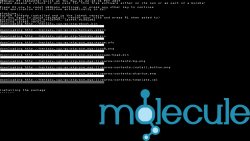
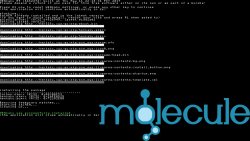
Seems Team molecule has pushed another update bringing HENkaku R9 to version 3, if using offline installer make sure to update. Only change I can see is HENkaku has moved to the top of the settings category. @STLcardsWS where I put this is that ok or should it be moved elsewhere? If so please do this for me where you see needed.

2017-05-14-005617.jpg

mole.jpg
 
Last edited:
Seems Team molecule has pushed another update bringing HENkaku R9 to version 3, if using offline installer make sure to update. Only change I can see is HENkaku has moved to the top of the settings category. @STLcardsWS where I put this is that ok or should it be moved elsewhere? If so please do this for me where you see needed.

there needs to be @atreyu187 help line. I brag about u a lot since u know so much about the Vita.
 
there needs to be @atreyu187 help line. I brag about u a lot since u know so much about the Vita.


Just a dork with too much time but please read the post that I just did they have finally fixed the issue with loading more then two native Vita plugins. I really think they should publish these changes
 
Last edited:
Just a dork with too much time but please read the post that I just did they have finally fixed the issue with loading more then two native Vita plugins. I really think they should publish these changes

well, I feel the same about the 3ds. luma has been updated to I think 7.05. I've updated my system for that, but I haven't updated ur system yet. a9lh isn't updated on the system either, but I do have the luma updater installed, so it's that easy. though, I do have a boot animation for u, so I need to rename the a9lh file.

anyway, I've taken a short break from the vita. I plan to update. I did update my vita (henkaku) a day or two ago, but I haven't my pstv. is it r3 or r4. and, I do update the online portion. reuse the app, install. that's my short tutorial on installing the latest online. I did that on my vita. hehe. :-P
 
well, I feel the same about the 3ds. luma has been updated to I think 7.05. I've updated my system for that, but I haven't updated ur system yet. a9lh isn't updated on the system either, but I do have the luma updater installed, so it's that easy. though, I do have a boot animation for u, so I need to rename the a9lh file.

anyway, I've taken a short break from the vita. I plan to update. I did update my vita (henkaku) a day or two ago, but I haven't my pstv. is it r3 or r4. and, I do update the online portion. reuse the app, install. that's my short tutorial on installing the latest online. I did that on my vita. hehe. :-p


R3 was pushed about midnight here then R4 about 45min later but both were done technically Sunday here but where Team Molecule is it was still Saturday night.
 
I need an email address to tell u my address if u still want my old 3ds. tell me in a pm. also, do u want me to update a9lh for u. it's still on v1, so the power goes out when the sd card isn't inserted.
 
I need an email address to tell u my address if u still want my old 3ds. tell me in a pm. also, do u want me to update a9lh for u. it's still on v1, so the power goes out when the sd card isn't inserted.


Will do an prefer it updated as it's going to my peanut for when she isn't here with me.
 
@atreyu187 , the charging issue where it doesn't charge unless the cable is angled a certain way should be easily fixable. I no longer have a collection of tools aside from a small set of screwdrivers. it works 100% besides though. I'll update it once money's received. I'll place the NAND backups on the 32GB card in the system. it still needs the updated luma and the homebrew channel as well. I never installed ntr which is used for hacks. it's basically the 3ds version of cobra I guess u could say as it edits in real time.
 
@atreyu187 , the charging issue where it doesn't charge unless the cable is angled a certain way should be easily fixable. I no longer have a collection of tools aside from a small set of screwdrivers. it works 100% besides though. I'll update it once money's received. I'll place the NAND backups on the 32GB card in the system. it still needs the updated luma and the homebrew channel as well. I never installed ntr which is used for hacks. it's basically the 3ds version of cobra I guess u could say as it edits in real time.


I have a 256gb microSD just sitting here waiting on it.
 
I have a 256gb microSD just sitting here waiting on it.

lol...I'm using a 128GB micro sd with my new 3ds. remember though - the larger the sd card the slower the operating system will run. Nintendo's suggestion is to use a 32GB or smaller card for stability, but screw that. I'm using a 256GB card with my wii u. I did have a 128GB card, but I needed more space for when loadiine was big. I just bought a cat5 crossover cable on ebay since my ethernet cable is transferring files slowly. it's going to take over a day to transfer 864GBs from my jtag 360 (the one that I use). :-P
 
I couldn't find the document about system performance: https://www.nintendo.co.uk/Support/...-use-/Which-SD-Card-should-I-use--719810.html

it's not that bad though, just ur scrolling through a lot of games may go more slowly. I think it may only occur when u have a lot of games in a folder or outside of a folder when u can scroll a lot. never tried a 256GB card on my new 3ds. remember to back that up. the NAND too. tickets r installed to the NAND, so they're the thing that causes games to appear on the home menu. and, the games r obviously installed to the sd card. if u forget to backup the NAND, u can use tik2shop (think that's what it's called) which will scan the sd card for games and install tickets accordingly. I've never had this problem though, since I'm a good, little boy. ;)
 
I have experienced loosing Hen twice since v9 update. Almost soiled myself after thinking I accidentally updated somehow. While moving files from external to internal and then trying to mount external as uxo I got an error message. Go back to check henkaku settings and they are gone. Go to system version says 3.65. No Henkaku. Had to reboot and reinstall Henkaku.
 
I have experienced loosing Hen twice since v9 update. Almost soiled myself after thinking I accidentally updated somehow. While moving files from external to internal and then trying to mount external as uxo I got an error message. Go back to check henkaku settings and they are gone. Go to system version says 3.65. No Henkaku. Had to reboot and reinstall Henkaku.
When you are mount uma0 as a ux0 you need to have all updated henkaku files also on that uma0. You should redo steps from this tutorial with overwriting files at prompt when copying from ux0 to uma0, and remember to not copy old game saves to newer one.

http://www.psx-place.com/threads/tut-how-to-use-usb-drive-as-a-ux0-memory-card-on-pstv.13186/
 
When you are mount uma0 as a ux0 you need to have all updated henkaku files also on that uma0. You should redo steps from this tutorial with overwriting files at prompt when copying from ux0 to uma0, and remember to not copy old game saves to newer one.

http://www.psx-place.com/threads/tut-how-to-use-usb-drive-as-a-ux0-memory-card-on-pstv.13186/
I've already copied everything over. It's not that. Most times it mounts no problem, but like I said I've experienced twice where for some reason I lost Henkaku while powered on. I think it's a bug.
 

Featured content

Trending content

Back
Top