PS3 [UPDATE2] multiMAN v 04.81.00 / .01 /.02 ( BASE / UPDATE / STEALTH for CEX & DEX) Updates by deank

(SEE UPDATE x2 v4.81.01 + 4.81.02 ) Original Article: 04.80.00: Developer @deank has brought his popular backup manager up to date with the release of multiMAN v04.81.00 . In this release the developer has added of course 4.81 CFW support for what appears only on CEX CFW at this time, but Stealth (aka StealthMAN) user will see an update supporting 4.81 CEX. This is a feature rich and popular backup manager that now has full 4.81 (CEX) Support . Additional releases for the PS3 firmware update of 4.81 can be seen here in our forums.


(4.81.01): deank has released the latest version that gives full DEX support to the backup manager. Update 2 (4.81.02) developer @deank has released a new update providing a fix for a reported issue that addressed a problem with nethost/netiso feature on DEX Custom Firmwares

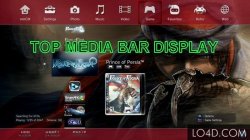
multiMAN_4.81_CFW_deank.jpg


  • Deank (1/8/2017) said:
    mM 04.81.02 was released when I removed the link for the test version and is available within mM as always (or from the web column) Also sacd-ripper.pkg is updated to support DEX 4.80

    This SACD Ripper is compiled with support from 3.55 up to 4.81. It doesn't require keys on usb stick and hopefully the extracted modules will work on all firmwares. Let me know if someone tests it.

    http://multiman.deanbg.com/multiman/feed/app/sacd-ripper.pkg

    Update x2 multiMAN v04.81.02

    • Fixed nethost/netiso issues on DEX CFW

    UPDATE - multiMAN v04.81.01
    • Added support for CFW 4.81 (DEX)

    NEW - multiMAN v04.81.00
    • Added support for CFW 4.81 (CEX)
    • Added update for Stealth version

    multiMAN v04.80.00

    * Added support for CFW 4.80
    * Added update for Stealth version

    multiMAN v04.78.02/04.78.03
    * Fixed naming of FLASH/LV1/LV2 exports for CFW 4.66/4.76/4.78
    * Fixed EBOOT.BIN/SPRX patching for CFW 4.66/4.76/4.78
    * Updated Showtime/Movian to latest Bleeding Edge (04.99.812) - http://movian.tv
    * Updated stealthMAN (multiMAN Stealth version) to 04.78.02

    multiMAN v04.78.01
    * Fixed crash when scanning for /net_host (ps3netsrv) games

    multiMAN v04.78.00
    * Added support for CFW 4.78
    * Updated Japanese translation by Kyan_dudl

    multiMAN v04.76.00
    * Added support for CFW 4.76
    * Fixed BD-Mirror for 4.75 DEX


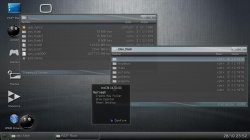
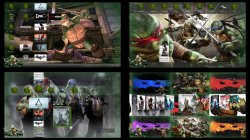
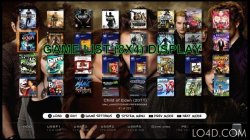
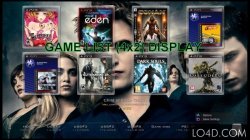
  • Various ScreenShots of multiMAN and its different views and modes.
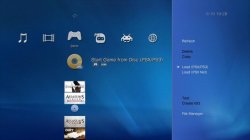
    MM3.jpg Screenshot_4.jpg PREVIEW.jpg multiman-backup-manager-2.jpg multiman-backup-manager-3.jpg multiman-backup-manager.jpg multiman-backup-manager-4.jpg multiman-backup-manager-5.jpg

(New Version) Download:


Last edited:
please, i have rebug 4.81.2 cobra 7.50
--when switch to mmCM on Multiman , games jb work but iso not , all fine
--when switch to Multiman on mmCM , games iso work but jb not ride mmCM, I suppose mmCM work with jb and iso games
I have restart ps3 for mmCM work with jb and iso games​
 
i was in rebug 4.75.3 multiman 4.76, the game enemy fron work fine rename (USERDIR/game2/_fastload
startup.pak --> TO ---> startup.pak.ORIG) with bd mirror and external)

but when i update to rebug 4.81.2 multiman 4.81.2 the game not work with This configuration (Damaged data ,Returning me xmb), i Delete data before running it game

It's a problem multiman or cfw, How to configure multiman for work in rebug 4.81.2
 
i was in rebug 4.75.3 multiman 4.76, the game enemy fron work fine rename (USERDIR/game2/_fastload
startup.pak --> TO ---> startup.pak.ORIG) with bd mirror and external)

but when i update to rebug 4.81.2 multiman 4.81.2 the game not work with This configuration (Damaged data ,Returning me xmb), i Delete data before running it game

It's a problem multiman or cfw, How to configure multiman for work in rebug 4.81.2
Can you please avoid double posting like this?
It does not matter where you post, we are all getting it the first time...
 
I just checked... ISO games load just fine (mm 4.80/4.81/4.81.02). There are no specific changes in mM for the last year or so, except for the netiso.
a question, i have multiman 4.81.2 ,How i use option (bd mirror+usb patch) , launched the game disk or apphome
 
a question, i have multiman 4.81.2 ,How i use option (bd mirror+usb patch) , launched the game disk or apphome
If you use a Cobra cfw none of those options are required to be used. In any case, don't use direct boot as it won't work with all games, don't use USB patch either. Bd mirror & internal/external can be used but are not necessary with Cobra.
Also most users should stick to using iso games, JB folders are obsolete & only the legacy from 3.55 days...

Without Cobra it is a different story...

App_home is actually a debug feature for developers that can be used to start games but most users should not need it.

As a general rule, you should always launch from the game disc icon. In some very specific cases like with noBD, only app_home can work but that should not concern you.
Anyway it makes no difference, if a game actually runs from app_home without giving you an error, you can safely use it.
 
Last edited:
If you use a Cobra cfw none of those options are required to be used. In any case, don't use direct boot as it won't work with all games, don't use USB patch either. Bd mirror & internal/external can be used but are not necessary with Cobra.
Also most users should stick to using iso games, JB folders are obsolete & only the legacy from 3.55 days...

Without Cobra it is a different story...

App_home is actually a debug feature for developers that can be used to start games but most users should not need it.

As a general rule, you should always launch from the game disc icon. In some very specific cases like with noBD, only app_home can work but that should not concern you.
Anyway it makes no difference, if a game actually runs from app_home without giving you an error, you can safely use it.

this information work in multiman 4.81.2
---(moving /PS3_GAME to the root of the USB HDD)----- how work it information

multiMAN 04.66.04 (20141123)

It is aimed to cover all configurations for better compatibility. This one will utilize the "USB Patch" option in "Settings" (used back in 3.41) and will affect the way BD-Mirror option is applied and when AIOMOD is used. The actual change is only with point 4) when both options are enabled.

COBRA firmwares (only affects games on external USB HDD):
1) [-] BD-Mirror | [-] USB Patch (Both options disabled) - mmCM will act the same as before (all versions up to 04.66.02)
2) [X] BD-Mirror | [-] USB Patch (Only BD-Mirror selected) - (no effect) Same as before
3) [-] BD-Mirror | [X] USB Patch (Only USB patch selected) - (no effect) Same as before
4) [X] BD-Mirror | [X] USB Patch (Both options enabled) - mM will use the old bd-mirror method (moving /PS3_GAME to the root of the USB HDD)


STANDARD firmwares:

1) [-] BD-Mirror | [-] USB Patch (Both options disabled) - multiMAN will act the same as before (all versions up to 04.66.02)
2) [X] BD-Mirror | [-] USB Patch (Only BD-Mirror selected) - Same as before (AIOMOD.BIN is used for USB games and libfs.sprx is used for internal HDD games)
3) [-] BD-Mirror | [X] USB Patch (Only USB patch selected) - (no effect) Same as before
4) [X] BD-Mirror | [X] USB Patch (Both options enabled) - AIOMOD.BIN is not used. mM will use the old bd-mirror method for USB games (moving /PS3_GAME to the root of the USB HDD) and libfs.sprx is used for internal HDD games)

This will make mM fully compatible with older and newer cobra/non-cobra firmwares, providing all possible options for all games/environments. By using option 4) on standard firmwares the user won't have to manually delete/rename AIOMOD.BIN, because it is needed by some games and other require the plain old bd-mirror method.

For example, to make the "Mordor" game work on Cobra from external USB HDD you will need option 4) enabled (both BD-Mirror and USB Patch options enabled for the game in settings).

After you update to 04.66.04 nothing should change for most of you. If you experience issues with some external USB HDD games - try options 2) and 4). When reporting problems, please make sure that you load multiMAN/mmCM after CLEAN REBOOT and do not use other apps/patches before launching the game. If you use any app that disables syscalls/psn patchers/etc - I cannot guarantee anything.
 
this information work in multiman 4.81.2
---(moving /PS3_GAME to the root of the USB HDD)----- how work it information

multiMAN 04.66.04 (20141123)

It is aimed to cover all configurations for better compatibility. This one will utilize the "USB Patch" option in "Settings" (used back in 3.41) and will affect the way BD-Mirror option is applied and when AIOMOD is used. The actual change is only with point 4) when both options are enabled.

COBRA firmwares (only affects games on external USB HDD):
1) [-] BD-Mirror | [-] USB Patch (Both options disabled) - mmCM will act the same as before (all versions up to 04.66.02)
2) [X] BD-Mirror | [-] USB Patch (Only BD-Mirror selected) - (no effect) Same as before
3) [-] BD-Mirror | [X] USB Patch (Only USB patch selected) - (no effect) Same as before
4) [X] BD-Mirror | [X] USB Patch (Both options enabled) - mM will use the old bd-mirror method (moving /PS3_GAME to the root of the USB HDD)


STANDARD firmwares:

1) [-] BD-Mirror | [-] USB Patch (Both options disabled) - multiMAN will act the same as before (all versions up to 04.66.02)
2) [X] BD-Mirror | [-] USB Patch (Only BD-Mirror selected) - Same as before (AIOMOD.BIN is used for USB games and libfs.sprx is used for internal HDD games)
3) [-] BD-Mirror | [X] USB Patch (Only USB patch selected) - (no effect) Same as before
4) [X] BD-Mirror | [X] USB Patch (Both options enabled) - AIOMOD.BIN is not used. mM will use the old bd-mirror method for USB games (moving /PS3_GAME to the root of the USB HDD) and libfs.sprx is used for internal HDD games)

This will make mM fully compatible with older and newer cobra/non-cobra firmwares, providing all possible options for all games/environments. By using option 4) on standard firmwares the user won't have to manually delete/rename AIOMOD.BIN, because it is needed by some games and other require the plain old bd-mirror method.

For example, to make the "Mordor" game work on Cobra from external USB HDD you will need option 4) enabled (both BD-Mirror and USB Patch options enabled for the game in settings).

After you update to 04.66.04 nothing should change for most of you. If you experience issues with some external USB HDD games - try options 2) and 4). When reporting problems, please make sure that you load multiMAN/mmCM after CLEAN REBOOT and do not use other apps/patches before launching the game. If you use any app that disables syscalls/psn patchers/etc - I cannot guarantee anything.
This was true for LOTR Mordor which was an exception. 99.9% of games don't need any of those options in Cobra mode. Nowadays this game works without USB patch or BD mirroring with mmCM. It's not an issue any longer.
What I am trying to explain is that those options only matter when Cobra is disabled & you use multiman.
When Cobra is enabled & you use mmCM, you don't need to use any of those options except maybe for a handful of very specific games...

Cobra fully replaces any need for BD mirroring, do you understand that? BD mirroring is the old way of mounting JB games but nowadays it's obsolete really.

Now if you try to use regular multiman (not mmCM) with Cobra enabled you are likely to experience some issues because Cobra & multiman might get confused... It's not recommended in any case.
 
Last edited:
this information work in multiman 4.81.2
---(moving /PS3_GAME to the root of the USB HDD)----- how work it information


For example, to make the "Mordor" game work on Cobra from external USB HDD you will need option 4) enabled (both BD-Mirror and USB Patch options enabled for the game in settings).

Hey, I have this game on my USB HDD, and this works without any workaround of yours.
 
I installed Multiman v.4.81.2, I wanted to know if you can launch the ROMS from "Retro" with Retroarch 1.3.6. ROMs appear in Retro but do not launch. While with Retroarch it works very well.
 
Deank :

Which version of Retroarch should I install to launch the Roms in Retro Multiman 04.81.02 ?
Do I have to install all the emulators separately ?
 
Back
Top