


jolek
Senior Member
VitaRPS5 (Vitaki Fork)
-
Enhanced PlayStation 5 Remote Play for PS Vita.
What's New in This Fork
This fork adds the following enhancements to ywnico's vitaki-fork:
- Latency & Performance Optimizations
- Thread priority tuning: Input thread at priority 96 (highest), audio/video at 64, with CPU affinity to prevent contention
- Faster input polling: Reduced from 5ms to 2ms (500Hz sampling) for 2.5× faster controller response
- Optimized network queue: Trimmed Takion reorder buffer from 128 to 64 packets to reduce buffering latency
- Estimated improvement: 20-40ms total latency reduction, input lag reduced from ~20-30ms to ~10ms
- See docs/LATENCY_QUICK_WINS.md for full details
- Controller Customization
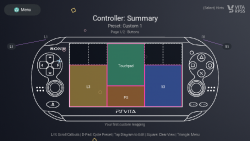
- 3 custom preset slots: Create and save your own button mappings (Custom 1, Custom 2, Custom 3)
- Immersive controller screen: Fullscreen PS Vita diagram with procedurally-rendered graphics
- Front/back view navigation: D-pad or touch to switch between front controls and rear touchpad
- Visual mapping: See all button assignments on an interactive controller diagram
- Settings integration: Controller tab in Settings page with L/R navigation
- VitaRPS5-Style UI Redesign
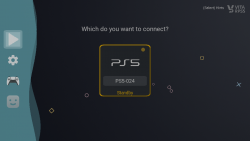
- Modern card-based console selection interface
- Professional PlayStation-themed color scheme
- Wave-animated navigation sidebar with collapsible menu (Triangle to open/close)
- Redesigned PIN entry screen with individual digit display
- Centralized focus manager for smooth D-pad navigation
- Tabbed settings page (Streaming, Controller) with visual polish
- Enhanced Console Wake Flow
- "Waking up console..." screen with animated progress
- 30-second timeout with visual countdown
- Automatic streaming start when console wakes up
- No need to press X twice
- Fixed Controller Input Issues
- Resolved race condition that prevented controller input during streaming
- Properly separated UI and input thread buffer access
- Controllers now work reliably during remote play
- Input stays responsive during packet-loss fallback recovery
- Improved Console Management
- Re-pairing now properly deletes registration data from storage
- Better console name and IP display formatting
- Circle button for cancel (PlayStation convention)
- Packet-Loss Fallback & Overlay
- When Ultra Low still drops frames, the client now pauses briefly, displays a reconnecting overlay, and restarts streaming at an even lower bitrate instead of crashing back to the menu
- Automatic retries keep discovery paused and resume seamlessly once the link stabilizes
- Controller input continues flowing during recovery to prevent input gaps
- Latency & Performance Optimizations
-
Instructions
Local connection
- Connect PS Vita and PS5 (or PS4) to the same local WiFi network.
- Log in to the same PSN account on both the PS5 and the Vita.
- Open Vitaki on PS Vita.
- Check settings (gear icon) to ensure your encoded PSN ID is there (if it's not automatically populated, or you accidentally deleted it, press START to re-detect it).
- The console should be automatically detected and appear as an icon.
- Select the console and Vitaki should ask for a registration code. On the PS5, navigate to Settings > System > Remote Play and select Pair Device. An 8-digit numeric code should appear; enter this into Vitaki and hit triangle to save.
- Select the console again in Vitaki. It should now connect (and in the future, will not ask for the device pairing code).
Disclaimer: This project is not endorsed or certified by Sony Interactive Entertainment LLC.
Source: https://github.com/mauricio-gg/vitaki-vitarps5.


