PS3 VSH Menu (REBUG) v0.2 + Custom Backgrounds

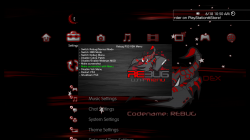
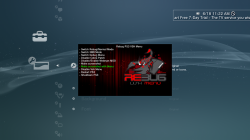
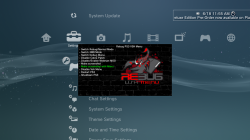
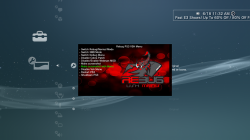
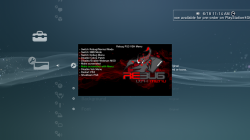
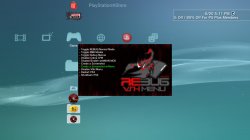
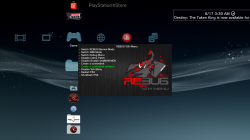
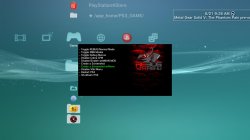
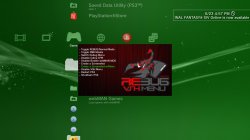
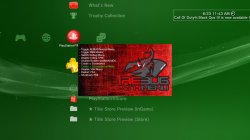
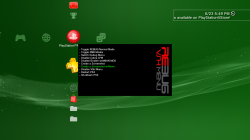
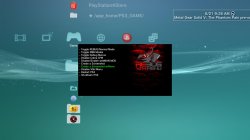
Orion is back with an update to the VSH Menu for REBUG with the release of v0.2. This VSH Menu is really handy for REBUG user's as you can easily perform various REBUG functions with ease from the XMB. No button combinations or going into REBUG Toolbox to perform these simple task. Now simply hit SELECT and this menu as you see pictured will appear on your XMB. The VSH Menu's have been progressing nicely since[break]s[/break] the initial POC from developer 3141card, Since that POC we have seen the SEN Enabler plugin (by Evilnat) adopt the a new VSH Menu and also Orion has started this VSH Menu for REBUG. . See all the details of the latest developments of this plugin below
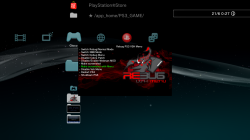

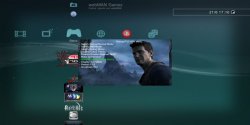
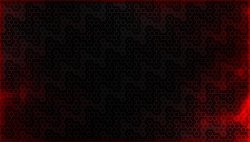
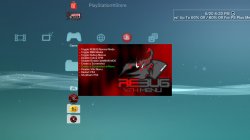
Also, bitsbubba and myself have created a number of Custom Backgrounds for Orion's VSH Menu that are super easy to install. See the small collection below with instructions on how to swap out these different looks for your XMB.


1434904007.png


Orion said:
Rebug PS3 Vsh menu v0.2 by Orion

Thanks to @3141card @Evilnat @STLcardsWS @bitsbubba and Team Rebug for this relase

Changelog Plugin

  • Code to remove patches cobra rewritten and is now fully functional (thanks to @bitsbubba for the tip).
  • Added code to detect patches Cobra (Coming from Gamesonic Manager)
  • Fixed code draw_png () (Thanks to developer @3141card for this fix)
  • New background for Vsh Menu (Thank @STLcardsWS to have made it)

Changelog Installer

  • Added code that goes to write to the file boot_plugins.txt, if there is, the string to start the Vsh menu.
  • Fixed code for Restart (thank @bitsbubba for the tip)
  • New icon for the installer (Thanks to @STLcardsWS to have made it)
Functions the VSH Menu (REBUG) can perform:

  • Switch Rebug/Normal Mode
  • Switch XMB Mode
  • Switch Debug Menu
  • Disable Cobra Patch
  • Disable/Enable webMAN MOD
  • Make Screenshot
  • Make Screenshot with Menu
  • Disable VSH Menu
  • Restart PS3
  • Shutdown PS3
Checkout these Other Custom Background Menus by @bitsbubba & @STLcardsWS
STLcardsWS said:
How to install these custom backgrounds:
  1. After Installing the REBUG VHS Menu
  2. By FTP or File Manager go to this location: /dev_hdd0/vsh_menu/
  3. Replace the current "background.png" with one of the ones from the included pack. (/dev_hdd0/vsh_menu/background.png)
  4. Enjoy!

Custom BackgroundXMB Preview
background2.png
Horizontal Black Wood (by STLcardsWS)
screenshot_2015_06_18_10_51_06.PNG
bg.png
Vertical Red Lines (by STLcardsWS)
screenshot_2015_06_18_11_22_20.PNG
backgr.png
Black Brick (by STLcardsWS)
screenshot.PNG
BG2.png
Red Bubbles (by STLcardsWS)
screenshot_2015_06_18_11_32_57.PNG
Background3.png
Red Fire (by STLcardsWS) (default bg in v0.2)
screenshot_2015_06_18_11_15_36.PNG
background2.png
Vertical Lines v2 (by bitsbubba)
screenshot_2015_06_20_17_11_43.jpg
Background3.png
Red/Black (by bitsbubba)
screenshot_2015_06_20_18_20_22.jpg
background.png
Vertical Black Wood (by bitsbubba)
screenshot_2015_06_17_03_30_59.png
Old Fashioned Rebug (normal).jpg
Old Fashion Rebug (by Berion)
background4.png
Rebug Stone (by bitsbubba)
screenshot_2015_06_21_09_26_32.jpg
background6.png
Another Vertical Red Lines (by bitsbubba)
screenshot_2015_06_23_16_57_41.jpg
background5.png
Red Chalk (by bitsbubba)
screenshot_2015_06_23_11_43_11.jpg
background7.png
Rebug Side (by bitsbubba)
screenshot_2015_06_23_17_50_16.png


UPDATE SEE NEW BACKGROUNDS ->->-> HERE

Downloads:

Source:
GameSonic.it / PSX-Place.com


View our newly created VSH Menu forum here at PSX-Place.com via this link
 
Last edited by a moderator:
those look fantastic! I think my favorite might be the red fire one. what I think might be interesting would be if the background were transparent aside from the rebug logo, then making the xmb wave look like it's on fire.
 
those look fantastic! I think my favorite might be the red fire one. what I think might be interesting would be if the background were transparent aside from the rebug logo, then making the xmb wave look like it's on fire.

That is the one Orion used for his plugin as the default one, but i want to improve it a bit yet (do not like the rebug bubbles from the original rebug logo). Will mess with to tomorrow i need to get up in about 4 and half hours . I have a bunch of backgrounds as i am sure bitsbubba does as well. I am sure we will have many of these made :) .. Will have to use that suggestion on one :)
 
That is the one Orion used for his plugin as the default one, but i want to improve it a bit yet (do not like the rebug bubbles from the original rebug logo). Will mess with to tomorrow i need to get up in about 4 and half hours . I have a bunch of backgrounds as i am sure bitsbubba does as well. I am sure we will have many of these made :) .. Will have to use that suggestion on one :)

there's so much potential with the ps3 at this point including the xmb modding. u can use the gradient tool in photoshop with the xmb particles making them whatever color u'd like and altering their depth or frequency.

alright, get some sleep bud. :)
 
[MENTION=6]bitsbubba[/MENTION] are there any conflicts with sen sprx
Or is it safe to have both whats recomended buddy
 
[MENTION=6]bitsbubba[/MENTION] are there any conflicts with sen sprx
Or is it safe to have both whats recomended buddy
I haven't seen any sign but then again [MENTION=21]3141card[/MENTION] has said as long as the don't use the same button (button combo) to open there shouldn't be any conflict
 
I made two skins (I didn't test it but they should work ;)).

Inspired by first layout design in Rebug official site from few years ago:
VSHMenu - Old Fashioned Rebug.7z
CRC32: CF74844E
MD5: CE5A866AA387731EA5126636122BEAB4

attachment.php
 

Attachments

  • Old Fashioned Rebug (normal).jpg
    Old Fashioned Rebug (normal).jpg
    34.9 KB · Views: 1,033
Last edited:
Hey guys and [MENTION=6]bitsbubba[/MENTION] i installed v2 on my 4.46 system and i clicked shutdown its rebbotes to press ps button screen then install firmware i tied twice same thing any ideas is it not compatible
 
Hey guys and [MENTION=6]bitsbubba[/MENTION] i installed v2 on my 4.46 system and i clicked shutdown its rebbotes to press ps button screen then install firmware i tied twice same thing any ideas is it not compatible

not sure why it would reboot you in pseudo-recovery mode [MENTION=17]Orion[/MENTION] can you shed some light on this, please? Is it compatible REBUG 4.46 (haven't had a chance to try the new version myself yet)?
 
there is a way to boot into the recovery menu with the vsh.self without having to do the power off/on thing. there was/is an app that does this back when people were converting from cex to dex. a lot of people were afraid that they'd mess up booting into the recovery menu the normal way and brick their system. I'm not sure if the app had existed before that or if it was made for that very reason.
 
[MENTION=7]atreyu187[/MENTION]

Yes, drugs are bad, mmmkay
if you are drunken you try to change already working stuff, mmmkay
no one likes a guy that change already working stuff, mmmkay
...

Good that [MENTION=6]bitsbubba[/MENTION] found this bug, in current stuff it was not to see.
(not clearing the buffer after flip, noob error :()

Here is a ugly test prx with a moving png part, show the alpha blending too.

ps3_vsh_menu_move_test

Copy icon0.png and test.png into /dev_usb000, my font.png is under /dev_hdd0.

In main view go to "3: Enter second menu view" and press start, hold R2 and use d-pad buttons for moving,
use L1 and R1 to change velocity.

Its only a test from today, nothing importend, but it show the alpha blending too.
 
Last edited:
[MENTION=7]atreyu187[/MENTION]

Yes, drugs are bad, mmmkay
if you are drunken you try to change already working stuff, mmmkay
no one likes a guy that change already working stuff, mmmkay
...

Good that [MENTION=6]bitsbubba[/MENTION] found this bug, in current stuff it was not to see.
(not clearing the buffer after flip, noob error :()

Here is a ugly test prx with a moving png part, show the alpha blending too.

ps3_vsh_menu_move_test

Copy icon0.png and test.png into /dev_usb000, my font.png is under /dev_hdd0.

In main view go to "3: Enter second menu view" and press start, hold R2 and use d-pad buttons for moving,
use L1 and R1 to change velocity.

Its only a test from today, nothing importend, but it show the alpha blending too.

Maybe bad but damn they can be ALOT of fun. Anyhow love the latest PNG bits and I'll try the moving one soon. Thanks for all the love this is getting from everyone. Also the only ReBug Cobra 4.46 I have is 7.03 so I can't run test on that I'm afraid but I can try it with the latest Cobra build that will be on 4.75.1 with my new 4.21.2 ReBug Cobra REX haxxxen just did for testing with the latest and greatest version of Cobra once my little tike goes to bed. Busy being pampered and playing 2p Final Fight on my PSTV while the little one is using her PSP slim. Love the fact my little one is so into Retro gaming. Never thought to do ad-hoc with a PSP and PSTV. It was her idea and worked marvelously. We were playing earlier in the Mexican food joint with her on her slim and me on my Go. She asked if we could finish at home on the PSP with the big TV. Gave it a go and now we are hooked. So many bad ass PSP ad-hoc games we can enjoy together now with a large screen. Gotta love it!!
 

Trending content

Back
Top