PS3 webMAN MOD 1.43.04 - An update by Aldostools & Matsumot0

New improvements and additions makes its way to the popular PS3 plugin we all known as webMAN MOD. The release of v1.43.04 was another update provided by both aldostools and also Matsumot0. and in this recent build there has been an added restart method (VSH Method) that puts the console into Standby but you must have Remote Play Enabled to use the feature. [break]ss[/break] Full details about this update can be seen below in the official changelog and also view the quote in the spoiler of Aldostools additional details about this update when he released a test build prior to the official release.

webMAN MOD.png
webMAN MOD 1.43.04
  • Code refactoring main.c has been split into 32 separate modules, grouped by category
  • Added the shutdown.ps3 option to webMAN.xml & webMAN_ES.xml
  • Combo L3+R1+O to restart using VSH method and added L3+R1+X to shutdown using VSH method
  • Updated Russian lang file again
  • Updated German lang file
  • Updated webMAN_XX.xml files
  • New icons has better definitions + some new

Your ps3 IP/shutdown.ps3 uses the syscall power off (like before).
Your ps3 IP/shutdown.ps3?vsh now uses the VSH method (performs a standby). Any parameter can be used (e.g. /shutdown.ps3?standby)

Your ps3 IP/restart.ps3 now uses VSH restart (instead of lpar restart).

Your ps3 IP/reboot.ps3?vsh does the same as restart.ps3
Your ps3 IP/reboot.ps3?quick performs lpar restart
Your ps3 IP/reboot.ps3?soft performs soft restart via syscall
Your ps3 IP/reboot.ps3 performs hard reboot via syscall

Notice: There is an important difference between VSH shutdown and syscall power off.

The syscall turns off the console completely. The VSH leaves the console in standby if Settings > Remote Play Settings > Remote Start is turned On.

If the option is Off, the console turns off completly.

A bit of background on the update & changes via Aldostools
Aldostools said:
I left the combos L3+R2+O (restart) and L3+R2+X (power off) using the current syscalls as before.

I changed the combo L3+R1+O to restart using VSH method and added L3+R1+X to shutdown using VSH method.

/shutdown.ps3 uses the syscall power off (like before).
/shutdown.ps3?vsh now uses the VSH method (performs a standby). Any parameter can be used (e.g. /shutdown.ps3?standby)

/restart.ps3 now uses VSH restart (instead of lpar restart).

/reboot.ps3?vsh does the same as restart.ps3
/reboot.ps3?quick performs lpar restart
/reboot.ps3?soft performs soft restart via syscall
/reboot.ps3 performs hard reboot via syscall

Notice: There is an important difference between VSH shutdown and syscall power off.
The syscall turns off the console completely. The VSH leaves the console in standby if Settings > Remote Play Settings > Remote Start (PS3) is turned On.
If the option is Off, the console turns off completly.

I also changed the restart method for togglers (cobra, rebug, ps2emu, etc.). Now they use VSH restart, instead of lpar restart.

SRC: http://aldostools.org/temp/test/webMAN_MOD_1.43.04.rar

BTW the main.c now is quite smaller (less than 3000 lines, vs. more than 15000 lines in earlier versions).
This is due the file has been split into 32 modules found in the "include" folder ;)
I hope that this change can make the code easier to maintain and analyze.

Credits to @Matsumot0 , mysis & 3141card for the vsh restart/shutdown functions.

Downloads:


Source(s):
PSX-Place.com --> (via aldostools) - (via Matsumot0) / github.com/Matsumot0
 
I've tested your report on my CECH-2501A and I couldn't reproduce your issue. The fan speed shows 29% (0x4C) after return from a PS2 game.

These are my current settings on webMAN MOD 1.43.04:
Code:
[x] Enable dynamic fan control	 [ ] Disable temperature warnings
(x) Auto at : 68 °C	         [x] Lowest : 30 % fan speed
( ) Manual : 64 % fan speed	PS2 Emulator : 37 % fan speed

Master [MENTION=89]aldostools[/MENTION], try with :
Code:
[x] load last-played game on startup

Thank you.
 
Master [MENTION=89]aldostools[/MENTION], try with :
Code:
[x] load last-played game on startup

Thank you.

I already had that option selected. I tested again and the values are showing normally in /cpursx.ps3 when the system returns to XMB from a PS2 game:
Code:
CPU: 59°C (MAX: 68°C)
RSX: 53°C
CPU: 138°F (MAX: 154°F)
RSX: 127°F
MEM: 1,988 KB
HDD: 8,739 MB free
FAN SPEED: 29% (0x4C)
 
@ Joonie

My issue was a little bit similar to the theme issue.
My PS3 freezes for 1 second at the start sequence.

Booting the retail VSH doesn't fix the issue, but with the webman's "Disable content scan on startup" option i could fix this.

Thx 4 dat


BTW. Is there a possibility in Cobra to delay loading plugins?

Greetz

I noticed that the Heavy Rain Dynamic Theme, also cause issue with VSH Menu 0.3 (PS3 freeze when you hold select to exit from menu) so i think the problem is not webMAN related.
The only one i know, is that i never had any kind of problem with older REBUG CFW versions.

UPDATE:
I tested other dynamic themes and all works just fine.
So, the problem is the theme.
END of the OT!
 
Last edited:
First thanks for all the updates to webman mod!

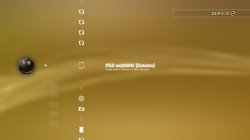
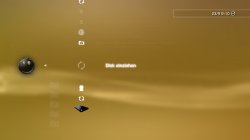
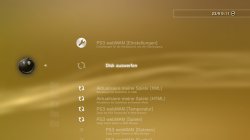
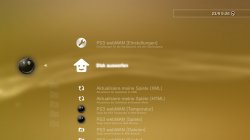
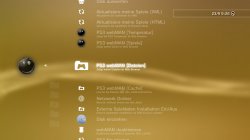
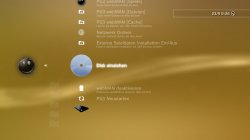
I have a small issue if I update from webman mod 1.43.02 (rebug edition) to webman mod 1.43.04 some icons are missing in webman settings... or they just load infinite?
everythings else works but this 4 icons just wont load...already tried to change from min+ to max and max+ but it dont change anything...
and tried to enable and disable integrated webman mod in rebug toolbox still same result...

screenshot_2015_09_23_09_10_22.jpg screenshot_2015_09_23_09_10_57.jpg screenshot_2015_09_23_09_11_08.jpg

if i downgrade webman Mod from 1.43.04 back to 1.43.02 all icon are here again... like on this screenshots

screenshot_2015_09_23_09_26_04.jpg screenshot_2015_09_23_09_26_21.jpg screenshot_2015_09_23_09_26_30.jpg

My CFW is Rebug Rex 4.75.3 (CEX mode + COBRA) like in my signature...
 
Last edited:
Last edited:
I already had that option selected. I tested again and the values are showing normally in /cpursx.ps3 when the system returns to XMB from a PS2 game:
Code:
CPU: 59°C (MAX: 68°C)
RSX: 53°C
CPU: 138°F (MAX: 154°F)
RSX: 127°F
MEM: 1,988 KB
HDD: 8,739 MB free
FAN SPEED: 29% (0x4C)

0% show in SELECT+START notification.
In webMAN Setup > PS3 webMAN [Temperature] normal.
Thank you.

View attachment 3950
 
0% show in SELECT+START notification.
In webMAN Setup > PS3 webMAN [Temperature] normal.
Thank you.

There is nothing that I can do... In my tests SELECT+START or /cpursx.ps3 always shows the correct fan speed after return from a PS2 game.

Maybe another dev could find the cause of your issue...
 
Sorry, but who can create some guide how to use webpad?
My brain already boil! :banghead:

Im want to control ps3 via PC keyboard its possible?
Thanks!
 
Sorry, but who can create some guide how to use webpad?
My brain already boil! :banghead:

Im want to control ps3 via PC keyboard its possible?
Thanks!

1. You must be using a build that has webPAD enabled... IIRC version 1.43.04 has enabled by default except the lite.
2. Go to PS3 Remote Controller
3. Click on the "Remote IP" and enter the IP address of your PS3

Use the mouse to click the button that you want to press. If you pass the mouse over the buttons, a tooltip will tell you the corresponding key on the keyboard.

In summary the keys are:
Arrows = DPAD, Shift+Arrows = LStick, Ctrl+Arrows = RStick
A/S/Z/X = :[]: :/\: :x: :o:, Enter=:x:, Esc=:o: (In a QWERTY keyboard the layout of the keys correspond to the same position of the buttons)
SPACE=:select:, SLASH=:start:
Q/W/D/C = :L1: :L2: :R2: :R1:
R = :L3:, T = :R3:, P = :PS Button:

g = Game Mode, b = Background, F2 = Remote IP, F5 = Refresh, F9 = Theme

Normal Mode = Buttons are auto released after 70ms
Game Mode = Buttons are released when the key is released on the keyboard

Toggle = open webMAN in an iframe. On android put the device in landscape.to view the controller.
 
Last edited:
1. You must be using a build that has webPAD enabled... IIRC version 1.43.04 has enabled by default except the lite.
WebMAN IIRC version 1.43.04?
Or what is that?

How and where I can enable webPAD?
May be I need install some prsx plugin under webman mod?
 
Last edited:
WebMAN IIRC version 1.43.04?
Or what is that?

How and where I can enable webPAD?
May be I need install some prsx plugin under webman mod?

IIRC: if i recall correctly

webMAN mod has the feature webpad always enabled. The only configuration needed is the ip of your console and it is remembered the next time that you visit the page.
 
[MENTION=89]aldostools[/MENTION]

as I update my Webman mod rebug without installing pkg?
 
I've install this version of webman, and the ps3 that i have (CECHP04 and CECH 2004b) have the same problem, webman only recognize the usb disk on usb000 and dont recognize the games on usb001, also, on my cechp04 (fat) the reboot option on webman, after refresh xml, dont work.
 

Featured content

Trending content

Back
Top