Webman mod issues

Mahmood

Member
Hi everyone.

I have some wiered issues with webman mod on my PS3 slim HEN, the Slaunch menu doesn't have any texts under the games, and all the menus inside are completely blank, and it might freeze the PS3 sometimes, tried to uninstall and install webman without success to fix this issue.
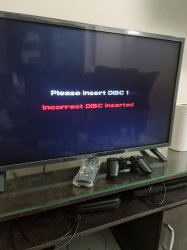
Another issue as well, when playing PS1 multi CD game when mounting the second CD through the phone, it gets mounted successfully, but the game doesn't read the disk, that doesn't happen with my PS3 rebug, any help ?
 
Hi everyone.

I have some wiered issues with webman mod on my PS3 slim HEN, the Slaunch menu doesn't have any texts under the games, and all the menus inside are completely blank, and it might freeze the PS3 sometimes, tried to uninstall and install webman without success to fix this issue.
Another issue as well, when playing PS1 multi CD game when mounting the second CD through the phone, it gets mounted successfully, but the game doesn't read the disk, that doesn't happen with my PS3 rebug, any help ?

For sLaunch Menu try changing the default font. Also try changing the system language to English (US).

Some non-Latin fonts cause blank text.

For the PS1, use /mount_ps3 from the smartphone. Notice that it has an underscore instead of a dot.

The web command /mount.ps3 only allows to mount a game from XMB, while /mount_ps3 allows to mount ISOs while running a game.
 
For sLaunch Menu try changing the default font. Also try changing the system language to English (US).

Some non-Latin fonts cause blank text.

For the PS1, use /mount_ps3 from the smartphone. Notice that it has an underscore instead of a dot.

The web command /mount.ps3 only allows to mount a game from XMB, while /mount_ps3 allows to mount ISOs while running a game.
lone time no see man btw can pm you as its inaccessible ,was going to ask if a standalone PS3MAPI plugin can be done just like openps3ftp (standalone ftp) to not have too much memory usage
 
lone time no see man btw can pm you as its inaccessible ,was going to ask if a standalone PS3MAPI plugin can be done just like openps3ftp (standalone ftp) to not have too much memory usage

Yes, it could be done.... The source code is available for anyone that want to do it.

I do not have plans to do it... it's a lot work to maintain multiple versions of the same plugin.
 
Yes, it could be done.... The source code is available for anyone that want to do it.

I do not have plans to do it... it's a lot work to maintain multiple versions of the same plugin.
Great , i've reinstall msys & mingw two days ago but it doesn't want to open in current work while i've commented the cd "$HOME" line
 
Great , i've reinstall msys & mingw two days ago but it doesn't want to open in current work while i've commented the cd "$HOME" line

I have msys & mingw installed, but I compile the project directly from Windows.
 
Thanks very much, always helpful, I got it working for Slaunch menu.

But for PS1 no success, I even tried with dot anf didn't work also.

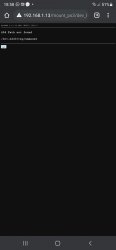
Thought I must first unmount the game manually, but when I try to eject it just gives me 404 error path not found
 
Thanks very much, always helpful, I got it working for Slaunch menu.

But for PS1 no success, I even tried with dot anf didn't work also.

Thought I must first unmount the game manually, but when I try to eject it just gives me 404 error path not found

Are you using the full edition?
If you're using lite edition you may receive errors trying to access feature that are implemented in that edition.

Some pictures of the process before and after the error would be helpful to identify the cause of the issue.
 
I'm using the full edition, so when trying to play Driver 2 for example I mount the first CD load the game which is on the second CD, then after given the screen to change the CD, I enter PS3 IP through the phone, then chossing games, pressing on the second CD, mounting it, the PS3 gives me notification that the game is mounted normally, but the game just doesn't load the CD, it stays on the same screen, tried that also with Syphon Filter 2, so I thought I should first unmount the game, so on my phone I press eject, it gives me the option to unmount the current game, but when pressing unmount it just gives me 404 error path not found.
This just happens with HEN, my other PS3 the second CD loads perfectly by just pressing on the image and just press on mount.
 

Attachments

  • 20210319_185838.jpg
    20210319_185838.jpg
    1.2 MB · Views: 73
  • Screenshot_20210319-185803_Chrome.jpg
    Screenshot_20210319-185803_Chrome.jpg
    96.2 KB · Views: 68
I'm using the full edition, so when trying to play Driver 2 for example I mount the first CD load the game which is on the second CD, then after given the screen to change the CD, I enter PS3 IP through the phone, then chossing games, pressing on the second CD, mounting it, the PS3 gives me notification that the game is mounted normally, but the game just doesn't load the CD, it stays on the same screen, tried that also with Syphon Filter 2, so I thought I should first unmount the game, so on my phone I press eject, it gives me the option to unmount the current game, but when pressing unmount it just gives me 404 error path not found.
This just happens with HEN, my other PS3 the second CD loads perfectly by just pressing on the image and just press on mount.

In the second picture it is not clear what web command you used.

If you entered the command manually, it could be problem. I just tried webMAN MOD 1.47.35 and it's working as it should.

Change the game just mount the new ISO (it will unmount automatically the previous disc before mount the new one).

1. Go to http://ip-address-of-PS3/
2. Select Games
3. Click the icon of the disc that you want to mount
4. You will receive this error message:
upload_2021-3-19_13-20-31.png


5. Click on the link at the bottom next to the "Error!" message.
upload_2021-3-19_13-20-55.png


NOTE: Some games need a physical disc ejected/inserted to detect the disc change.
 
In the second picture it is not clear what web command you used.

If you entered the command manually, it could be problem. I just tried webMAN MOD 1.47.35 and it's working as it should.

Change the game just mount the new ISO (it will unmount automatically the previous disc before mount the new one).

1. Go to http://ip-address-of-PS3/
2. Select Games
3. Click the icon of the disc that you want to mount
4. You will receive this error message:
View attachment 32237

5. Click on the link at the bottom next to the "Error!" message.
View attachment 32238

NOTE: Some games need a physical disc ejected/inserted to detect the disc change.

The game is mounted successfully, but the problem is that the game doesn't detect that the CD was changed, and that happens only with HEN console, the REBUG console is working fine for the same game.
I thought I should press eject on webman through mobile to unmount the game manually first but that didn't help since it gives me error, but through the normal way by select the gaming and mounting it, it gets mounted but not detected, which is wierd.
I'll try to capture the process via video
 
The game is mounted successfully, but the problem is that the game doesn't detect that the CD was changed, and that happens only with HEN console, the REBUG console is working fine for the same game.
I thought I should press eject on webman through mobile to unmount the game manually first but that didn't help since it gives me error, but through the normal way by select the gaming and mounting it, it gets mounted but not detected, which is wierd.
I'll try to capture the process via video

If it works on REBUG... then the issue is in HEN. webMAN MOD mounts the PSX games the same way in both payloads.

I suggest to contact the developers of that payload about this issue.
 
Just found a work around, if I mounted the game before given the screen to switch the disc it loads fine, which is great, thanks very much for your help and fast replys :)
 
No, I mean from Windows 10 executing a batch file from the project's folder.

The batch files and tools that I use are already included in the project's github.
i think you misunderstand me i am not talking about PS3MAPI project but i talk in general ,i've always used to compile cobra,webman,toolbox ...etc with msys shortcut but i need to do cd "the workind directory" as it open msys in home folder
 
i think you misunderstand me i am not talking about PS3MAPI project but i talk in general ,i've always used to compile cobra,webman,toolbox ...etc with msys shortcut but i need to do cd "the workind directory" as it open msys in home folder
you can try this reg, which will make "make" anywhere possible just by right click in any folder's background (msys installed to "C:\msys\1.0" and no need to comment any line in msys profile). you will get a new right click entry saying: "bash-"make"+Pause here..."
 

Attachments

I am not entirely sure I understand either but if what you wish to do is open the msys console in a specified folder rather than the default home directory, you may want to add a new entry in the windows context menu.

Try copying the code below then

1. tweak the msys.bat path as required for your setup as I don't recall it from memory, the one I used below might be wrong.
2. tweak the context menu entry text as you wish.
3. save the code as a .reg file & execute it.

Code:
Windows Registry Editor Version 5.00 [HKEY_CLASSES_ROOT\Directory\Background\shell\msys] @="Open MSYS Terminal Here" 
[HKEY_CLASSES_ROOT\Directory\Background\shell\msys\command] @="C:\\PSDK3v2\\msys\\1.0\\msys.bat"

And to remove the default switching to home folder as working directory, you may need to comment (with a '#' character) the cd "$HOME" line in /etc/profile
 
Appreciate thanks guys :love heart::love heart: i get to work with bguerville method as with haxxxen method it show error

upload_2021-3-19_21-51-38.png
 
Back
Top