PS3 webMAN MOD v 1.43.36 - NEW support to DL & Auto Install PKGs, + additional changes

Following deank's latest release of multiMAN Stealth the PS3 community has another popular project that seen an update as developer @aldostools is back with another update to webMAN MOD with the release of v1.43.36. This release contains an extensive list of changes ranging from various bug fixes and new functionality, there was alot of new features in this version of the plugin. Developer Aldo Vargas (aka aldostools) has added support for download & auto Installing of pkgs with a variety of options that surrounds this functionality Full list of changes can be seen in the changelog provided:

webMAN-MOD_1_43_36.jpg


    • Added support for download & auto install pkgs. Syntax: /install.pkg?url=<url-of-pkg>
    • Install PKG combo now auto-install all pkgs in hdd0/packages
    • /install.ps3 now deletes the pkg after installation
    • Use /install_ps3 to keep the pkg after installation
    • Added conditional install of pkg: /install.ps3<pkg_path>?
    • Added support for download .xm! as .xml
    • Pkgs are now downloaded to a temporary folder then moved
    • Limited delete pkg after install to hdd0 only
    • Added support to install local theme files (*.p3t)
    • Added online covers to lite edition
    • Added scan in ISO folder for covers named as <title_id>.JPG
    • Added list of last games to root of file manager
    • Icon sizer value now is retained after close the browser
    • Changed algorithm for covers scanning to: ISO folder > MM Covers > ICON0
      (instead of MM > ISO > ICON0)
    • Added support for sorting directories by date/size/name
    • Added support for wildcards in ftp directory listing
    • Fixed ftp navigation using the browsers
    • Changed PASV mode in ps3mapi to work in the same way as the ftp server
    • Added mount by name: /mount.ps3?<name>
    • Added support for filter file listing using: /path?<name>
    • Added /restart.ps3?min to reboot & show min fw version
    • Added swap buttons commands (the system is rebooted):
      /pad.ps3?cross=enter, /pad.ps3?circle=enter, /pad.ps3?cross=swap
    • Added ability to set default restart mode. e.g. /restart.ps3?quick$
    • Added link from /TROPDIR/NPWR* to trophy dir of current user
    • Added link from /LICDIR to home to savedata dir of current user
    • Removed selection of user account from /setup.ps3
    • /copy.ps3 now uses the home folder of the current user
    • Changed behavior of /copy.ps3 (for faster copy)
    • Now existing files with the same file size are not overwritten
    • /copy_ps3 overwrite the existing files (formerly /copy.ps3)
    • /copy.ps3 from hdd0 now copies to the first usb drive * previously the default usb drive was usb000
    • Added 'Copy & overwrite' option to fm.js (popup menu)
    • Removed support for droidMAN in lite edition
    • Removed polling of wm_request file (due performance impact)
      • Combos still use wm_request file, but it's processed directly
    • Removed buggy code added recently for psx audio processing
    • Added offline mode that disable network when games start
    • Added exception list /dev_hdd0/tmp/wm_online_ids.txt for auto-disable network
    • Now the fan speed is increased critically only if the temperature warning is enabled in /setup.ps3 and the temperature is > 85°C
    • Updated webMAN_IT.xml (thanks to smikk)
    • PARAM.SFO multi5 of updater & prepNTFS (thanks to smikk)
    • Re-added standalone plugin video_rec.sprx
    • Added disc icon with link to /bdvd to the bottom of all the pages
    • Changed link in 'size column' of /app_home to home of user in File Manager
    • Added keyboard shortcuts to /setup.ps3
    • Added combo l2_r2
    • Several code optimizations and bug fixes.


  • Plugin Installer
    Optional webMAN MOD Add-ons
    Source Code

    Official webMAN MOD website (offers useful links/features for webMAN MOD):


Download: webMAN_MOD_1.43.36_Updater.pkg

 
Last edited by a moderator:
Last edited:
Am getting a bit lost now...
With the last release, it seems that if the downloaded pkg already exists in the packages folder, it downloads it, rename it by adding " (1)" to its name but the installation doesn't start...
Is this correct?
 
Am getting a bit lost now...
With the last release, it seems that if the downloaded pkg already exists in the packages folder, it downloads it, rename it by adding " (1)" to its name but the installation doesn't start...
Is this correct?

For downloaded files, the /install.ps3 was ignoring the delete option. So /install.ps3?url= and /install_ps3?url= behaved the same. The delete option only worked for installation of local files using /install.ps3

Starting with the commit of today, the delete option is taken in count for both types of files (local and downloaded) using the /install.ps3 command. To keep the file use /download.ps3 or /install_ps3?url= (i.e. with an underscore, instead of a dot)
 
Last edited:
@aldostools
Hi!
I'm install latest wM 1.43.36 + ps3netserv for win bild 20161007. And have a some problems:
1. Games from PS3ISO not displayed in XMB, its displayed only via web-mode
2. Games from GAMEZ not displayed everywhere

What you think about create option to user-define new game-folders for separat games like GAMES/GAMEZ? And option to create menus for this folders in XMB > Game -> webMAN Games ? It's help to sort games
 
@aldostools
Hi!
I'm install latest wM 1.43.36 + ps3netserv for win bild 20161007. And have a some problems:
1. Games from PS3ISO not displayed in XMB, its displayed only via web-mode
2. Games from GAMEZ not displayed everywhere

What you think about create option to user-define new game-folders for separat games like GAMES/GAMEZ? And option to create menus for this folders in XMB > Game -> webMAN Games ? It's help to sort games

Please go to /setup.ps3, review all the values and *SAVE* the settings again (even if everything looks fine press SAVE button). Then restart.

I have tested with the latest build and the games in GAMEZ and PS3ISO are being listed on XMB and web.

Regarding to your suggestion could you explain it with an example (or a picture)?
One alternative to have new categories is using subfolders inside PS3ISO. The games will be listed with the folder name as a prefix.

e.g.
/dev_hdd0/PS3ISO/kidz/Game1.iso
/dev_hdd0/PS3ISO/kidz/Game2.iso


Are listed on XMB and web as:
  • Game3
  • kidz/Game1
  • kidz/Game2
  • My Game 4

The games 1 & 2 are grouped by folder name. It don't look as fancy as having XMB folders, but at least that help to organize your content in sub-categories and don't require extra code.
 
Please go to /setup.ps3, review all the values and *SAVE* the settings again (even if everything looks fine press SAVE button). Then restart.

I have tested with the latest build and the games in GAMEZ and PS3ISO are being listed on XMB and web.
Thx.
Not work anyway. Will try full remove/reinstall wM. Also I have a problem with mounting games and ps3netsrv.exe very often crashing during xml/html updating. After this test again
 
@ricardo If you notice... the buttons and the brackets near [Slider] and [PS3MAPI] have no text... that means that the settings is corrupted and it is not reading the labels correctly. My suggestion is: to delete /dev_hdd0/tmp/wmconfig.bin and save the settings again.

uaXlsN4.jpg


The technical reason of this corruption is due an important change in the way the settings are stored in 1.43.36:

In earlier builds the webMAN was using the compilation option __attribute__((packed)) to store the settings. As result, the NULL bytes are compressed to use less space. However, that option produce an object code that is larger than the space actually saved (1KB vs 4KB in object code).

So now the settings are stored unpacked, to save approximately 4KB in footprint memory, but it is required to be saved at least one time again.


If you want to show the covers, you should uncheck "Disable multiMAN covers" and select "MM COVERS" or "ONLINE COVERS".

MM COVERS will look up the covers locally and show a disc icon when not found.
ONLINE COVERS will look up the covers locally first and show the online version only when the icon is not found locally.[/Slider]
[Slider]
Thank you for your help Aldostool.
Thank you also for his explanation of the problem.
She helped to understand the problem better.
I am now using the webMAN perfectly.
I also want to thank the great help of bguerville,
You two are boys of golden.
The DeViL303 also ;)
[/slider]
 
Last edited:
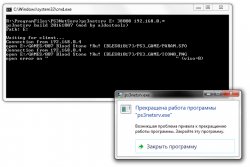
After reinstall webMAN crashing not finish. It's not happened at 1.43.32. I'm start ps3netsrv.exe then update xml/html via xmb/web on PS3 - > ps3netsrv.exe at PC is crash
Will try releases <= 1.43.35
ps3netsrv-crashing.jpg
 
After reinstall webMAN crashing not finish. It's not happened at 1.43.32. I'm start ps3netsrv.exe then update xml/html via xmb/web on PS3 - > ps3netsrv.exe at PC is crash
Will try releases <= 1.43.35
View attachment 6858

Thank you for your screenshot and the bug report. I have been trying to reproduce your error, but I don't get the crash.

To discard that it's a security issue, please try starting the session of CMD.exe as Administrator, then start ps3netsrv.
 
Back
Top