PS3 webMAN MOD v1.41.22: 4.70 CFW Support and more from Aldostools

Since the official firmware update of v4.70, community developer's like Aldo Vargas (aldostools) has been very busy updating various applications and this time around the developer has a new update for the very popular webMAN MOD plugin. In v1.41.22 support for 4.70 CFW was added, New Improvements to the new "Slider" mode on FireFox / MSIE. New improvements for PSXISO and a bit more can be found in the changelogs provided for this welcomed update from homebrew developer Aldostools:
[break]ss[/break]


Update: A couple of small updates where pushed by the developer with the release of v1.41.23 / .24

kZrunlM.png

NEW Changelog 1.41.24:

  • Fixed regression displaying text encoded in Big5

NEW
webMAN MOD 1.41.23

  • Fixed wrong offset for 'fix 8001003C error' on 4.70
  • Commented out unused declarations in common.h (NEW_POKE_SYSCALL_ADDR_* and HVSC_SYSCALL_ADDR_*)

NEW
Changelog 1.41.22:

  • Added offsets for fw 4.70
  • Improved html support of "slider" on FireFox / MSIE
  • Added support for custom background in slider.
    • Replace the transparent background.gif installed on
    • /dev_hdd0/xmlhost/game_plugin with any image
  • Updated rawiso with auto-detection of CD sector size for PSXISO 0559164
  • Added auto-detection of CD sector size for PSXISO (requires updated Cobra/Mamba).

Thanks to Joonie for his help testing the new CD sector size detection.

Changelog 1.41.21:
  • Fixed regression mounting PSXISO via ps3netsvr
  • Added cover animation to slider GUI
  • Fixed issue mounting incorrect game in slider GUI
  • Fixed issue when browser is resized in slider GUI

Changelog 1.41.20:
  • Added new "slider" webGUI (mobile friendly).
  • Improved display on mobile browsers.
  • Added icons to File Manager.

Previous Changes
Changelog 1.41.18:
  • Added optional Video subfolder to "Bluray™ and DVD" folder (Display RetroXMB videos, videos on USB devices and Data Disc icon)
  • /app_home now is unmapped on startup
  • Auto-enable /dev_blind. Disable it using the link in the column on file manager.
  • Added detection of sector size on ntfs (previously constant: 512) Based on raw_iso.sprx made by Estwald.
  • Added shortcuts to control fan speed from /cpursx.ps3

Changelog 1.41.17:
  • Added support for .ntfs[BDFILE] (fake ISO created by IRISMAN)
  • Added support to mount NTFS games using raw_iso.sprx (rawseciso by Estwald)

Changelog 1.41.16:
  • Added /videorec.ps3 to start/stop in-game video recording
  • Added [REC] link to record video from /cpursx.ps3
  • Added /loadprx.ps3 to load/unload prx dynamically on the specified slot (default: slot 6)
  • Added link to load .sprx file through File Manager

Changelog 1.41.15:
  • Fixed regression in auto-fix game (causing freeze when a ps3 iso was mounted)
  • Integrated Mysis video_rec plugin ported to C by 3141card
    • Use SELECT+R3 to load/unload video_rec.sprx
    • Use R3 in-game to record video to /dev_hdd0/VIDEO

Changelog 1.41.14:
  • Improved display of files containing latin characters (utf-8)

Changelog 1.41.12:
  • Fixed misc. regressions from build 1.41.09

Changelog 1.41.11:
  • Added commit from NvZ on PS3MAPI module:
  • 437 changes to the source code (From 1.41.05 to 1.41.11)

Download: webMAN MOD v1.41.22
Mirrors: Link

Source(s): brewology.com / psx-place.com

 
Great stuff as usual,

EDIT:
[MENTION=2]STLcardsWS[/MENTION] is now upto .23
Also [MENTION=89]aldostools[/MENTION] i installed the updater and the web side is ok it works on my iphone, but drop down menu glitchy words overlap each other, and my webman folder stays empty never ahows the sub folders ps1/2/3
Should i add the needed files manually
And im on rebug4.46.1/cobra.7.03
 
Last edited:
Great stuff as usual,

EDIT:
[MENTION=2]STLcardsWS[/MENTION] is now upto .23
Also [MENTION=89]aldostools[/MENTION] i installed the updater and the web side is ok it works on my iphone, but drop down menu glitchy words overlap each other, and my webman folder stays empty never ahows the sub folders ps1/2/3
Should i add the needed files manually
And im on rebug4.46.1/cobra.7.03

Unfortunately I don't have an iphone to test... maybe the browser that you used is not supported (the code in mobile.html uses a lot of javascript and CSS features that are not supported in all browsers).

Indeed I had to make customizations to make it look better on FireFox and MSIE... please try opening the slider on Chrome for iOS. Maybe it display better on your iphone.
 
If I install FERROX 4.70 I have to uninstall all other tools that spoof. I thought I had to uninstall webMAN, too? Or is it 100% compatible with FERROX 4.70?
 
[MENTION=89]aldostools[/MENTION] on my samsung galaxy s3 mini the new gui of webman not work
And if is possibile can you add to webman the auto fix for ISO?
 
[MENTION=89]aldostools[/MENTION] on my samsung galaxy s3 mini the new gui of webman not work
And if is possibile can you add to webman the auto fix for ISO?

Are you using Chrome for Android? On my LG Optimus G E976 works perfect (quad-core Snapdragon S4 Pro @ 1.5GHz, 4.7" 768x1280, 2GB RAM).

The auto fix for ISO is already implemented... you must have the auto-fix in "auto". If the PARAM.SFO in your ISO was modified with a lower version, then the fix is not performed and you have to fix it manually with Gamesonic.

Are you having issues fixing the ISOs?

EDIT:
I updated the menu to avoid the overlapping of text on certain screen models:
http://aldostools.org/ps3/PS3~dev_hdd0~xmlhost~game_plugin.zip

Install the zip with multiMAN or copy the extracted mobile.html to /dev_hdd0/xmlhost/game_plugin/
[MENTION=148]Sdw100[/MENTION] you can check with the "demo" site if this change solves the overlapping on your iPhone.
 
"-Updated rawiso with auto-detection of CD sector size for PSXISO 0559164
-Added auto-detection of CD sector size for PSXISO (requires updated Cobra/Mamba)."

Do this mean Webman plays any PSX ISO Sectorsizes (2048, 2352, 2336, 2448) like updated Irisman?
so I dont have to convert to the right Sector size like before if needed?

and what mean "(requires updated Cobra/Mamba)" will Cobra updated soon above 7.03? new Rebug CFW?
 
Last edited:
Are you using Chrome for Android? On my LG Optimus G E976 works perfect (quad-core Snapdragon S4 Pro @ 1.5GHz, 4.7" 768x1280, 2GB RAM).

The auto fix for ISO is already implemented... you must have the auto-fix in "auto". If the PARAM.SFO in your ISO was modified with a lower version, then the fix is not performed and you have to fix it manually with Gamesonic.

Are you having issues fixing the ISOs?

EDIT:
I updated the menu to avoid the overlapping of text on certain screen models:
http://aldostools.org/ps3/PS3~dev_hdd0~xmlhost~game_plugin.zip

Install the zip with multiMAN or copy the extracted mobile.html to /dev_hdd0/xmlhost/game_plugin/
[MENTION=148]Sdw100[/MENTION] you can check with the "demo" site if this change solves the overlapping on your iPhone.
Yes aldo in 4.46 rex cobra it dont fix any games in iso format,for example Dragon Ball Xenoverse

EDIT

Ok now my S3 Mini show very well the new gui of webman but thre is the problem of the ISO
 
Last edited:
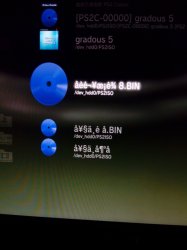
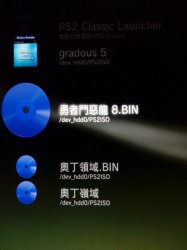
Hi, why now webman mod wont show chinese character ( file name )

IMG_20150227_014347.jpg


it have no issue on .07 version

IMG_20150227_014653.jpg
 
Last edited:
I just installed webMAN mod on a freshly jailbraked slim with Rogero 4.46 - cobra 7.00 installed.
Seems icons are not copied from the updater game folder to the tmp/wm_icons folder.
Tryed with 1.41.08, 1.41.16 and 1.41.23 updaters. Same issue. lang files are there.
Strange.
 
Yes aldo in 4.46 rex cobra it dont fix any games in iso format,for example Dragon Ball Xenoverse

EDIT

Ok now my S3 Mini show very well the new gui of webman but thre is the problem of the ISO

Did you try AUTO-FIX on FAT32 partition?, NTFS is not supported
 
Hi, why now webman mod wont show chinese character ( file name )

There was a regression that happened when I was fixing the display of files containing latin characters (utf-8) in 1.41.14.

This issue should be fixed in webMAN MOD 1.41.25
- Fixed regression displaying text encoded in Big5
- Fixed regression browsing /net files on the file manager

I just installed webMAN mod on a freshly jailbraked slim with Rogero 4.46 - cobra 7.00 installed.
Seems icons are not copied from the updater game folder to the tmp/wm_icons folder.
Tryed with 1.41.08, 1.41.16 and 1.41.23 updaters. Same issue. lang files are there.
Strange.

Thanks for the report. I'll check this issue a soon as I get a chance... meanwhile please verify the privileges of your folder /dev_hdd0/tmp/wm_icons/

store.brewology.com/ahomebrew.php?brewid=257

[MENTION=2]STLcardsWS[/MENTION] there another fix in .25 ;)
 
latest webman mod doesnt show games (blank) when select SLIDER OPTION ON WEBPAGE if you connect multiple drives with hub even you select usb000,001 so on (works only single driver to usb port). Otherwise webman xmb shows ever games and work fine.
Thanks and regards
 
Last edited:
latest webman mod doesnt show games (blank) when select SLIDER OPTION ON WEBPAGE if you connect multiple drives with hub even you select usb000,001 so on (works only single driver to usb port). Otherwise webman xmb shows ever games and work fine.
Thanks and regards

It depends on how the browser loads the pictures... Some browsers need to cache all the images first and it may take a while. Try refreshing the browser with F5 if the icons are not displayed.


BTW it's time for some innovation... this time the original idea comes from ermak86. He requested me the display of the time the console has been turned on using a combo.
I liked his idea and extended it to also display the Play time... So, if you're a parent worried about how much your kids waste on the PS3, this feature is for you :)

These features are available in webMAN MOD 1.41.26.
store.brewology.com/ahomebrew.php?brewid=257
 
It seems to be missing the payload on Custom Firmware 4.70 I can not use it with the last PRX Loader v1.09U and also the application PS3 Manager Launcher for nonCobra seems not to work
 
sure, I installed the latest version of the PRX Loader, and the FTP client in the directory "/ dev_hdd0 / game / PRXLOADER / USRDIR /" I entered the plugin no cobra
plugins.txt file I added the name of the plugin (dev_hdd0 / game / PRXLOADER / USRDIR / webftp_server.sprx), to load the load the plugin but what I'm going to mount the backup is not there
 
sure, I installed the latest version of the PRX Loader, and the FTP client in the directory "/ dev_hdd0 / game / PRXLOADER / USRDIR /" I entered the plugin no cobra
plugins.txt file I added the name of the plugin (dev_hdd0 / game / PRXLOADER / USRDIR / webftp_server.sprx), to load the load the plugin but what I'm going to mount the backup is not there

If you used PRX Loader 1.09U you have to use the noncobra edition to be able to load [strike]ISO[/strike] folder games... due Cobra / Mamba is not loaded.

To load ISO games you have to use PS3 Manager (although I think it doesn't has the payload for 4.70 with the updates from habib)...

The easiest way to get all your games working again (until Cobra for 4.70 is released) is to downgrade :dancestraw: 4.46 is my favorite :dcheese:
 
Hi Aldo,

Thanx for the wonderful work you have done during all those years on PS3.
This is great.

Having said that, i am facing a weird behavior on webman mod 1.41.25.
First off, mygames.xml doesnt generate well if ISOs are streamed through ps3netsrv AND webman Memory use is set to maximum.
If i turn webman memory usage to minimum and generate mygames.xml, now thngs work perfectly...
I'm on Rogero 4.46 Cobra V1.

Another weird thing, still about mygames.xml generation but also html generation:
I have some ps3netserved games that are entitled by their BLES code only, and not by the filename.
Even after a fresh webman install, first generation makes those games appear with this kind of name. I don't know why, as if the PARAM.SFO had been read although those games are ISO formated.

Third question:
Does disableing features minimize the use of memory? I mean, if i turn off FTP, pad shortcuts, fan control etc, do i get more free memory? My question is related to video recording, you might have guessed ^^
I'm looking for the least memory greedy configuration that would let me play ps3netsrv ISOs and record those.

Thx for your help!
Cheers
 

Featured content

Trending content

Back
Top