PS3 webMAN MOD v1.43.07 + NEW webMAN VSH Menu

Here is an exciting update to webMAN MOD with the release of version 1.43.07 by developers Aldostools & Matsumot0 . One of the big highlights in this update is the new inclusion of the webMAN VSH Menu. Recently you may of recalled the Unofficial version of littlebalup's VSH menu that aldostools released with a few changes and tweaks from the official build. Well the developer since decided to rename his unofficial version and include support for webMAN MOD and thus renamed the menu. [break]ss[/break]. Below you can see various information from the two developer's in the release quotes found below:


webMAN MOD Blue.png

v1.43.07 + webMAN (Mod) VSH Menu
Matsumot0 (via github) said:
There are some minor tweaks and fixes, but the major change is the integration with the VSH Menu.

VSH Menu for webMAN now can be installed optionally (Holding R1 when launching the Updater)

The source code for the VSH Menu project is included under the folder "vsh_menu".

webMAN MOD now supports http requests through a local file interface (/dev_hdd0/tmp/wm_request)
Example: "GET /mount.ps3/dev_hdd0/PS3ISO/MyGame.iso" (sans quotes)

Now it should be easier for devs to integrate their homebrews with webMAN MOD.

Special thanks to littlebalup, Mysis, 3141card and Orion for the VSH Menu.


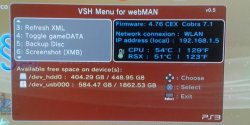
webMANVSH.jpg

aldostools (via PSX-Place.com) said:
I have renamed the plugin (littlebalup v0.4 Unofficial) to "VSH Menu for webMAN" and increased the version to 0.5. Although it says "for webMAN" it means "webMAN MOD" (I found that adding "MOD" to the title was too long)

This new menu requires to have webMAN MOD 1.43.07 installed.

Features of webMAN VSH Menu:

  • [*=1]Shows system info (CFW version, Cobra version, IP address, CPU/RSX temperatures)
    [*=1]Shows free space on hdd0, usb devices and dev_blind
    [*=1]Unmount current game
    [*=1]Eject disc / Insert disc
    [*=1]Mount /net0, /net1 or /net2
    [*=1]Change fan speed & mode
    [*=1]Shows System Info
    [*=1]Refresh XML (/dev_hdd0/xmlhost/game_plugin/mygames.xml)
    [*=1]Toggle gameDATA
    [*=1]Backup disc to HDD
    [*=1]XMB screen capture - (Note: Screenshots are saved to /dev_hdd0.)
    [*=1]Shutdown PS3
    [*=1] Reboot PS3 (soft* & hard methods). *lpar reboot


How to use webMAN (MOD) VSH Menu:


  • [*=1]Press :select: button for 3 seconds from XMB to open/close the Menu.
    [*=1]Use Up and Down D-pad to navigate the options and scroll.
    [*=1]Use Left and Right D-pad to change options and X button to select.

Changelog:

v0.5 (by Aldostools):
Renamed to VSH Menu for webMAN
Integrated with webMAN MOD 1.43.07
Serveral changes since 0.4 :)

v0.4 (by littlebalup):
Added "Eject Disc" and "Insert Disc" options (for physical disc, not disc images)
Scrolling menu with arrows.
Changed code of the the storage devices size info:
- Now displays size of the storage device in add of the available free space
- Now displays size in MB if less than 1GB (size and/or free space)
- Added free space and size detection for connected flashcards (/dev_sd, /dev_ms and /dev_cf)
- Added free space and size detection for /dev_blind (if mounted)
- Added icons for each device type (hdd, usb, flashcard, internal flash)
Added thermometer icon for temperatures:
- Icon is color blue if CPU and RSX below 50°C
- Icon is color green if hotter of CPU and RSX between 50°C and 65°C
- Icon is color orange if hotter of CPU and RSX between 65°C and 75°C
- Icon is color red if CPU or RSX over 75°C
Some font size slightly reduced.
Layout modifications (again...).

v0.3 (by littlebalup):
Added Firmware version info (spoofed if it is). Thanks @Zar.
New layout, background and icons.
(Only one english version for the moment...)

v0.2 (by littlebalup):
Fixed bug about IP adress not shown in some cases (thanks again to @3141card )
Added "Network connexion" type info (LAN or WLAN)

v0.1 (by littlebalup):
first beta release
Thanks to littlebalup, Mysis, 3141card, Orion and all the others that forgot to mention

UPDATE

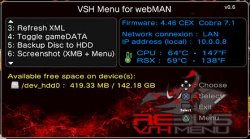
vsh_menu_rebug_theme.jpg
aldostools said:
Version 0.6 (of webMAN VSH Menu) now includes almost all the missing features from Rebug VSH menu (Credits to @Orion ). Also a new background for Rebug fans is included.
Download(s):
Mirror: link


Hi [MENTION=89]aldostools[/MENTION] and [MENTION=161]Matsumot0[/MENTION] Can you add plugins video recorder for XMB and GAME in VSH Menu ? like screenshot XMB ? Thanks
 
Hi [MENTION=89]aldostools[/MENTION] and [MENTION=161]Matsumot0[/MENTION] Can you add plugins video recorder for XMB and GAME in VSH Menu ? like screenshot XMB ? Thanks

In-game video recording is already implemented. XMB video recording is not possible yet ... you'll need to use a tablet or smartphone ;)
 
[MENTION=947]darekspy[/MENTION] Like aldostools said, it's unfortunately not yet possible for XMB recording, about record plugin into webMAN MOD is outdated, it's better to use the lasted version available on playstationhax.
BTW rec function will stay like this for long time, Mysis continue his project in closed source for some reason :(
 
Last edited:
Does the combo to unload Webman also unload the VSH Plugin?

No... for some reason that I don't know the VSH Plugin stops responding and looks like unloaded, but it stay loaded in memory when I try to unload it through the code.
However webMAN can unload it properly through /vshplugin.ps3mapi

[strike]I spent a good time trying to implement an "Unload VSH Menu" option, but I desisted of the idea.[/strike]

VSH Menu for webMAN v0.8 now includes the option "Unload VSH Menu".. requires webMAN MOD 1.43.09 installed.
 
[MENTION=118]kozarovv[/MENTION] I tried with a new config, min speed 30%, auto 70. I left the console on XMB for around 35 mins CPU 69/ RSX 68 and the fan speed went up to 39%
 
To access the menu in Rebug VHS mode webman has given me Red Screen error ( RSOD ) , being in Rebug 4.75.3 Cobra spoof with Rebug way to 4.76.
I tried to upgrade in safe mode and has not left me .
I tried to get in the safe mode and has not left me.
please someone help me ?
Thanks
 
I fixed an error in wm_vsh_menu
This error was pointed outlike fw version the spoofed version and not the real one
I solved the error with the same code used in rebug_vsh_menu

Thanks for the code. I included it in VSH Menu for webMAN 0.8 wth some changes.

Does the combo to unload Webman also unload the VSH Plugin?

I found a work around to unload the plugin. Please try version 0.8 (requires webMAN MOD 1.43.09) when [MENTION=161]Matsumot0[/MENTION] upload it to github

To access the menu in Rebug VHS mode webman has given me Red Screen error ( RSOD ) , being in Rebug 4.75.3 Cobra spoof with Rebug way to 4.76.
I tried to upgrade in safe mode and has not left me .
I tried to get in the safe mode and has not left me.
please someone help me ?
Thanks

If your console is a slim, try reformatting the HDD. Due your report I have added additional verifications to Orion's code and changed the first/default option to "Unload VSH Menu" in version 0.8

oh, I meant 60C.

Anything below 65ºC is ideal but it can be a bit noisy (depending of the room's temperature and ventilation).

I tried with a new config, min speed 30%, auto 70. I left the console on XMB for around 35 mins CPU 69/ RSX 68 and the fan speed went up to 39%

I use a max of 65ºC while I'm on XMB (99% of the time) and 68ºC playing games... btw my room is an oven ;)
 
Thanks for the code. I included it in VSH Menu for webMAN 0.8 wth some changes.


I found a work around to unload the plugin. Please try version 0.8 (requires webMAN MOD 1.43.09) when [MENTION=161]Matsumot0[/MENTION] upload it to github


If your console is a slim, try reformatting the HDD. Due your report I have added additional verifications to Orion's code and changed the first/default option to "Unload VSH Menu" in version 0.8


Anything below 65ºC is ideal but it can be a bit noisy (depending of the room's temperature and ventilation).


I use a max of 65ºC while I'm on XMB (99% of the time) and 68ºC playing games... btw my room is an oven ;)


the problem is that I tried to format the hard drive but will not let me take any action in safe mode.
Thanks
 
gotta love the early days of the ps3/360 when a console sounded like a jet engine yet still managed to fail.
 
aldo does webftp_server_lite.sprx work on rebug cfw? ive always used webftp_server_rebug_cobra_english.sprx
 
psydefx;24784]aldo does webftp_server_lite.sprx work on rebug cfw? ive always used webftp_server_rebug_cobra_english.sprx[/QUOTE]

webftp_server_lite.sprx works on any CFW with Cobra (Rebug or non-Rebug).

The Rebug editions are almost identical to the other Cobra editions, except that it includes 3 additional combos that rebug specific (REBUG Mode Switcher, Normal Mode Switcher, DEBUG Menu Switcher)
 
Try formatting the HDD on the PC or try using a spare HDD.

Thanks Aldo. at the end has left me access to formatting the HD once it has cooled. I think that the problem "Red Screen" (RSOD) was because the console overheat. I believe the problem was due to a failure into the VSH menu.
 
Last edited:
I found a work around to unload the plugin. Please try version 0.8 (requires webMAN MOD 1.43.09) when [MENTION=161]Matsumot0[/MENTION] upload it to github

Done, https://github.com/Matsumot0/webMAN-MOD/releases/tag/v1.43.09

Edit: [MENTION=89]aldostools[/MENTION] I've updated one more time build.bat into vsh menu folder to use properly cygwin path like webMAN MOD.
FYI you can delete all cygwin libs in your root directory like mine (I thought have removed each dll on my folder but i've found cygz.dll...lol)
 
Last edited:
webftp_server_lite.sprx works on any CFW with Cobra (Rebug or non-Rebug).

The Rebug editions are almost identical to the other Cobra editions, except that it includes 3 additional combos that rebug specific (REBUG Mode Switcher, Normal Mode Switcher, DEBUG Menu Switcher)

thanks for the info
 
Back
Top