PS3 webMAN MOD v1.43.07 + NEW webMAN VSH Menu

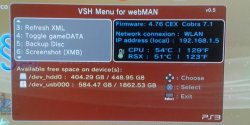
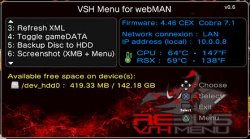
Here is an exciting update to webMAN MOD with the release of version 1.43.07 by developers Aldostools & Matsumot0 . One of the big highlights in this update is the new inclusion of the webMAN VSH Menu. Recently you may of recalled the Unofficial version of littlebalup's VSH menu that aldostools released with a few changes and tweaks from the official build. Well the developer since decided to rename his unofficial version and include support for webMAN MOD and thus renamed the menu. [break]ss[/break]. Below you can see various information from the two developer's in the release quotes found below:


webMAN MOD Blue.png

v1.43.07 + webMAN (Mod) VSH Menu
Matsumot0 (via github) said:
There are some minor tweaks and fixes, but the major change is the integration with the VSH Menu.

VSH Menu for webMAN now can be installed optionally (Holding R1 when launching the Updater)

The source code for the VSH Menu project is included under the folder "vsh_menu".

webMAN MOD now supports http requests through a local file interface (/dev_hdd0/tmp/wm_request)
Example: "GET /mount.ps3/dev_hdd0/PS3ISO/MyGame.iso" (sans quotes)

Now it should be easier for devs to integrate their homebrews with webMAN MOD.

Special thanks to littlebalup, Mysis, 3141card and Orion for the VSH Menu.


webMANVSH.jpg

aldostools (via PSX-Place.com) said:
I have renamed the plugin (littlebalup v0.4 Unofficial) to "VSH Menu for webMAN" and increased the version to 0.5. Although it says "for webMAN" it means "webMAN MOD" (I found that adding "MOD" to the title was too long)

This new menu requires to have webMAN MOD 1.43.07 installed.

Features of webMAN VSH Menu:

  • [*=1]Shows system info (CFW version, Cobra version, IP address, CPU/RSX temperatures)
    [*=1]Shows free space on hdd0, usb devices and dev_blind
    [*=1]Unmount current game
    [*=1]Eject disc / Insert disc
    [*=1]Mount /net0, /net1 or /net2
    [*=1]Change fan speed & mode
    [*=1]Shows System Info
    [*=1]Refresh XML (/dev_hdd0/xmlhost/game_plugin/mygames.xml)
    [*=1]Toggle gameDATA
    [*=1]Backup disc to HDD
    [*=1]XMB screen capture - (Note: Screenshots are saved to /dev_hdd0.)
    [*=1]Shutdown PS3
    [*=1] Reboot PS3 (soft* & hard methods). *lpar reboot


How to use webMAN (MOD) VSH Menu:


  • [*=1]Press :select: button for 3 seconds from XMB to open/close the Menu.
    [*=1]Use Up and Down D-pad to navigate the options and scroll.
    [*=1]Use Left and Right D-pad to change options and X button to select.

Changelog:

v0.5 (by Aldostools):
Renamed to VSH Menu for webMAN
Integrated with webMAN MOD 1.43.07
Serveral changes since 0.4 :)

v0.4 (by littlebalup):
Added "Eject Disc" and "Insert Disc" options (for physical disc, not disc images)
Scrolling menu with arrows.
Changed code of the the storage devices size info:
- Now displays size of the storage device in add of the available free space
- Now displays size in MB if less than 1GB (size and/or free space)
- Added free space and size detection for connected flashcards (/dev_sd, /dev_ms and /dev_cf)
- Added free space and size detection for /dev_blind (if mounted)
- Added icons for each device type (hdd, usb, flashcard, internal flash)
Added thermometer icon for temperatures:
- Icon is color blue if CPU and RSX below 50°C
- Icon is color green if hotter of CPU and RSX between 50°C and 65°C
- Icon is color orange if hotter of CPU and RSX between 65°C and 75°C
- Icon is color red if CPU or RSX over 75°C
Some font size slightly reduced.
Layout modifications (again...).

v0.3 (by littlebalup):
Added Firmware version info (spoofed if it is). Thanks @Zar.
New layout, background and icons.
(Only one english version for the moment...)

v0.2 (by littlebalup):
Fixed bug about IP adress not shown in some cases (thanks again to @3141card )
Added "Network connexion" type info (LAN or WLAN)

v0.1 (by littlebalup):
first beta release
Thanks to littlebalup, Mysis, 3141card, Orion and all the others that forgot to mention

UPDATE

vsh_menu_rebug_theme.jpg
aldostools said:
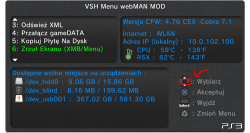
Version 0.6 (of webMAN VSH Menu) now includes almost all the missing features from Rebug VSH menu (Credits to @Orion ). Also a new background for Rebug fans is included.
Download(s):
Mirror: link


Ty tu gères mec :-)

Edit: [MENTION=89]aldostools[/MENTION] Just an idea from a friend, a simple upload button in file browser is useful for transfer files into dev_hdd0 and maybe dev_blind too without ftp client.
What do you think?
 
Last edited:
[MENTION=161]Matsumot0[/MENTION] I found a small bug in ''startup message ON/OFF ( graphic bug ) here it is only up and down no left and right when you choose options ( webMAN MOD 1.43.09 )
1.png
 
Last edited:
would it be possible to add 1:1 ps3 iso support? isos created through direct disc access and otheros
 
Just an idea from a friend, a simple upload button in file browser is useful for transfer files into dev_hdd0 and maybe dev_blind too without ftp client.
What do you think?

The web server only processes http GET method. Your idea would require the implementation of the http PUT method.

The parsing of the headers may be the harder part... IMO the idea is good, but I don't have plans to implement it. Unless you want to do it.
 
I use a max of 65ºC while I'm on XMB (99% of the time) and 68ºC playing games... btw my room is an oven ;)
So do you think the fan reaching 39% is OK for my Slim. I want a value around 35, so I am thinking in the possibility of change the thermal paste.

Now that I have your attention, do you know how can I always use the dark mode of PS3 theme. You know PS3 theme changes to a dark mode on nights. I asked [MENTION=29]Joonie[/MENTION] about this but he never replied. I would like an option in VSH Menu to toggle the dark mode.

Thank you,
Regards
 
Is good idea to change that paste, because is too high fan speed for temps like your. Totally something is wrong in cooling system.
 
Now that I have your attention, do you know how can I always use the dark mode of PS3 theme. You know PS3 theme changes to a dark mode on nights. I asked [MENTION=29]Joonie[/MENTION] about this but he never replied. I would like an option in VSH Menu to toggle the dark mode.
The day is divided in 4 periods:
-yoake
-day
-higure
-night
XMB uses different color and brightness values for them, stored in .MNU setting files inside .QRC files, is not documented fully and nobody tested it but i think the responsibles are the files ICONS.MNU inside icons.qrc, and HDR.MNU inside lines.qrc
Qt Resource Container (QRC) - PS3 Developer wiki
Icons.qrc - PS3 Developer wiki
Lines.qrc - PS3 Developer wiki

Maybe there is other wayaround to change this without needed to modify the .qrc files (incase there are other places in the firmware that overrides this .MNU settings and could be modifyed "on the fly") but doesnt looks probable
 
Is good idea to change that paste, because is too high fan speed for temps like your. Totally something is wrong in cooling system.
Thanks for the tips and advices.

The day is divided in 4 periods:
-yoake
-day
-higure
-night
XMB uses different color and brightness values for them, stored in .MNU setting files inside .QRC files, is not documented fully and nobody tested it but i think the responsibles are the files ICONS.MNU inside icons.qrc, and HDR.MNU inside lines.qrc
Qt Resource Container (QRC) - PS3 Developer wiki
Icons.qrc - PS3 Developer wiki
Lines.qrc - PS3 Developer wiki

Maybe there is other wayaround to change this without needed to modify the .qrc files (incase there are other places in the firmware that overrides this .MNU settings and could be modifyed "on the fly") but doesnt looks probable
Maybe faking the hour of the system. :confused:
 
Maybe faking the hour of the system. :confused:
Should work, keeping the time of the system stopped at an hour at night, permanentlly with the same date/time values, but is not a clean solution imo
Because all the files created or updated in the PS3 will store the fake timestamp... there are a lot afected from gamedata, savegame, trophies, or pkg installations, or transfered files from devices, ftp, etc... the amount of problems that could happen by using the same timestamp for everything is huge

Though... every process or app needs to ask for the date and time to the internal system timer... the system timer is common, but the processes that asks for times are not
And with this i mean... maybe is posible to hook the function responsible of the xmb color and brighness... and feed it with a static fake time
This way the system should continue working normally... but the color and brighness changes should not happen

I think the responsible is openGL, not sure though, and not sure if is posible to do what im saying... just brainstorming
 
I might be able to toy with the "dark mode" of the ps3 once I have my system hooked back up. I've been too busy with things as of late to devote much time to the system. plus, I'd rather test some things myself rather than relying on others to test 'em which I've had to do with some things recently. anyway, one option u might try is to alter the dds files with the gradient tool to faux darkness. remember: the images r upside down in the flash, so if it's dark on top, make sure it's dark on the bottom of the image. I learned that one when I created that dark side of the moon coldboot-wave hybrid. :)

edit: just thought it might be miiror-imaged. since that background consisted of a prism, it wasn't something I noticed. the icontex is that way. ...so it might be up is down, right is left if u want it to be perfect.

edit 2: oh, and if u just want a black background without gradient, u could try my wave here: http://www.psx-place.com/forum/ps3-news/gameboot-xmb-modify-collections-installer-bitsbubba-468.html
the wave color is different though. with the background, u can also make the wave rainbow-colored - blue background, red on the left side of the wave, yellow on the right side for all primary colors which is how I made this:

2ew31xd.jpg
 
Last edited:
In the webman where is the VshFpsCounter.yaml file located?
wanted to edit some FPS information.
Example: I wanted to leave the temperature only in Celsius.
 

Featured content

Trending content

Back
Top